Tag Archives: SQL Server

How to create a running total in SQL

Below is a simple example of how to create a running total in T-SQL using a self-join.

The total is created by summing the preceding values, the precedence of which is determined by, in this instance, the sale date field.

A date field, or another unique order field, is required for this technique to work otherwise all the values would be summed at once, based on grouping, and the summed value would be displayed for each relevant record.

CREATE TABLE #Product (
Product_ID INT
,Product VARCHAR(10)
)

CREATE TABLE #Sale (
    Product_ID INT
    ,SaleAmount MONEY
    ,SaleDate DATETIME
    )

INSERT INTO #Product
VALUES (
    1
    ,'Bike'
    )
    ,(
    2
    ,'Car'
    )
    ,(
    3
    ,'Truck'
    )


INSERT INTO #Sale
VALUES (
    1
    ,10
    ,'20150101 12:00:00.000'
    )
    ,(
    1
    ,10
    ,'20150102 13:00:00.000'
    )
    ,(
    2
    ,20
    ,'20150101 13:00:00.000'
    )
    ,(
    2
    ,30
    ,'20150101 14:00:00.000'
    )
    ,(
    3
    ,30
    ,'20150101 12:00:00.000'
    )

SELECT a.Product_ID
    ,p.Product
    ,a.SaleAmount
    ,SUM(b.SaleAmount) AS RunningTotal
    ,a.SaleDate
FROM #Sale AS a
INNER JOIN #Product AS p ON a.Product_ID = p.Product_ID   
LEFT JOIN #Sale AS b ON a.Product_ID = b.Product_ID
    AND b.SaleDate <= a.SaleDate
GROUP BY a.Product_ID
    ,p.Product
    ,a.SaleAmount
    ,a.SaleDate


DROP TABLE #Sale
DROP TABLE #Product
	
Image with the text 3000 years later in giant letters

How to provide a dynamic parameter drop-down of year options in SSRS

Say you’ve developed a report which returns data based on a inputted year parameter value, e.g. “give me all the sales in 2014”.

How do you provide the year options for the SSRS report?

Well there’s three ways that come to mind.

Select distinct from a date field, e.g. SELECT DISTINCT YEAR(SalesDate) FROM Sales

This would certainly provide you with all the available years but the database could have millions of sales. So it’s not too efficient.

You could manually populate years in the parameter settings in the SSRS report, kind of primitive but it would work.

But for me the robust and efficient way is the solution provided below.

The following SQL query dynamically populates an integer field in a temporary table with years. The query uses a base year variable, which can be set to as far back as when the required data fields and values existed in the database. A loop then provides the years up to and including the current year. This query can be used to generate a dataset for an SSRS report and then this dataset can then be used to provide parameter values for the report. The report will then always create a list of years between the base year and the current year. Meaning the years parameter will never need to be adjusted again.

(For a tutorial on how to turn a month name and year into dates for the first and last day of the month see this tutorial)

/*Create temp table populated with the years from a base year to the present year*/
IF OBJECT_ID('tempdb..#availableYear') IS NOT NULL
    DROP TABLE #availableYear

CREATE TABLE #availableYear ([Year] INT)

DECLARE @baseYear AS INT
DECLARE @i AS INT

/*Change the base year to the earliest year the database has the required data available*/
SET @baseYear = 2013
SET @i = 0

WHILE @i <= YEAR(GETDATE()) - @baseYear
BEGIN
    INSERT INTO #availableYear
    SELECT @baseYear + @i

    SET @i = @i + 1
END

SELECT * FROM #availableYear

Within the Stored Procedure that populates the report you can then do something like below to make sure the date range matches the year chosen.

DECLARE @yearChosen AS INT

SET @yearChosen = 2013

DECLARE @startDate date
DECLARE @endDate date

SET @startDate = CONVERT(CHAR(4), @yearChosen) + '0101'
SET @endDate = CONVERT(CHAR(4), @yearChosen) + '1231'

PRINT @startDate
PRINT @endDate    

--OR For example

YEAR(SaleDate) = @yearChosen

How to determine what stored procedures relate to what tables

Foreign keys are usually a good indicator of which tables connect to each other however you may be working in an environment that does not always follow best practices. As well as that you may not know what store procedures relate to what tables.
Sometimes databases need to move from one server to another or are depreciated. Before this can happened it is a very good idea to do a compressive assessment to see what interacts with what.
As once a thing gets moved everything that queries against it needs to point to it its new location.
A good starting point of this assessment would be to use the query below to determine what stored procedures reference the table specified in the WHERE clause.

  • NOTES: This query only pulls the tabled referenced in the database, it does not pull tables that are referenced from other databases.
  • Although the table maybe reference it may not actually be interacted with by the query, the table name may be comment in the code for example. However for the most part it is more likely the table has some action performed against it, be it a SELECT, INSERT, UPDATE etc.

The query works by using the sysobjects and syscomments tables.
Sysobjects: a system table that contains a row for each user-defined, schema-scoped object that is created within a database, including natively compiled scalar user-defined function.

Syscomments: a system table that contains entries for each view, rule, default, trigger, CHECK constraint, DEFAULT constraint, and stored procedure within the database. The text column contains the original SQL definition statements.

Or to dumb it down it joins, in our case, the stored procedures name to the query and scans this query for references to the specified table.

/*
CHANGE THE FOLLOWING:
SERVER NAME: ServerName
DATABASE NAME: DatabaseName 
TABLE NAME: TableName
 */


USE DatabaseName;
GO

SELECT DISTINCT so.name
FROM syscomments sc
INNER JOIN sysobjects so ON sc.id=so.id
WHERE sc.TEXT LIKE '%TableName%'

To expand on this logic to return every table referenced in every stored procedure in a database run the code below:

/*
CHANGE THE FOLLOWING:
SERVER NAME: ServerName
DATABASE NAME: DatabaseName 
 */
 
USE DatabaseName;
GO 

--DROP TEMP TABLES
IF OBJECT_ID('tempdb..#TablesAndSPs') IS NOT NULL
	DROP TABLE #TablesAndSPs

IF OBJECT_ID('tempdb..#Tables') IS NOT NULL
	DROP TABLE #Tables
	
--DECLARE VARIABLES
DECLARE @tableID AS INT
DECLARE @tableName AS VARCHAR(255)

--CREATE TEMP TABLE TO HOLD THE NAMES OF THE TABLES AND SPs
CREATE TABLE #TablesAndSPs (
	TABLE_ID INT
	,TABLE_NAME VARCHAR(255)
	,SP VARCHAR(255)
	)

--GET A LIST OF THE TABLES IN DATABASE
SELECT row_number() OVER (
		ORDER BY TABLE_NAME
		) AS TABLE_ID
	,TABLE_NAME
INTO #Tables
FROM INFORMATION_SCHEMA.TABLES

SET @tableID = 1

--LOOP AND POPULATE #TablesAndSPs
WHILE @tableID <= (
		SELECT MAX(TABLE_ID)
		FROM #Tables
		)
BEGIN
	SET @tableName = (
			SELECT TABLE_NAME
			FROM #Tables
			WHERE TABLE_ID = @tableID
			)

	INSERT INTO #TablesAndSPs
	SELECT DISTINCT @tableID
		,@tableName
		,so.NAME
	FROM syscomments sc
	INNER JOIN sysobjects so ON sc.id = so.id
	WHERE sc.TEXT LIKE '%' + @tableName + '%'

	SET @tableID = @tableID + 1
END

SELECT * FROM #TablesAndSPs

How to create Clustered and Nonclustered Indexes on a Temp Table

One of the best features of temp tables is that an index can be applied to them.

To clarify temp tables start with #, exist within the tempdb and are accessible within child batches (nested triggers, procedure, exec calls) of the query.

The execution plan can also determine the relevant statistics regarding their operation and suggest means of optimisation and will often suggest applying an index to the table.
Below is a simple example of applying both clustered and nonclustered indexes to the temporary table #Apostle created from a CTE (Common Table Expression).


IF OBJECT_ID('tempdb..#Apostle') IS NOT NULL
	DROP TABLE #Apostle;

WITH CTE
AS (
	SELECT 1 AS ID
		,'Simon Peter' AS NAME
	
	UNION
	
	SELECT 2
		,'James'
	
	UNION
	
	SELECT 3
		,'John'
	
	UNION
	
	SELECT 4
		,'Andrew'
	
	UNION
	
	SELECT 5
		,'Philip'
	
	UNION
	
	SELECT 6
		,'Thomas'
	
	UNION
	
	SELECT 7
		,'Bartholomew'
	
	UNION
	
	SELECT 8
		,'Matthew'
	
	UNION
	
	SELECT 9
		,'James'
	
	UNION
	
	SELECT 10
		,'Simon'
	
	UNION
	
	SELECT 11
		,'Thaddaeus'
	
	UNION
	
	SELECT 12
		,'Judas'
	)
SELECT *
INTO #Apostle
FROM CTE

-- CREATE INDEXES
CREATE CLUSTERED INDEX IDX_CLUSTERED_ID ON #Apostle (ID)

CREATE NONCLUSTERED INDEX IDX_NONCLUSTERED_ID ON #Apostle (ID)


Microsoft defines clustered and nonclustered indexes as the following:

Clustered

  • Clustered indexes sort and store the data rows in the table or view based on their key values. These are the columns included in the index definition. There can be only one clustered index per table, because the data rows themselves can be sorted in only one order.
  • The only time the data rows in a table are stored in sorted order is when the table contains a clustered index. When a table has a clustered index, the table is called a clustered table. If a table has no clustered index, its data rows are stored in an unordered structure called a heap.

Nonclustered

  • Nonclustered indexes have a structure separate from the data rows. A nonclustered index contains the nonclustered index key values and each key value entry has a pointer to the data row that contains the key value.
  • The pointer from an index row in a nonclustered index to a data row is called a row locator. The structure of the row locator depends on whether the data pages are stored in a heap or a clustered table. For a heap, a row locator is a pointer to the row. For a clustered table, the row locator is the clustered index key.
  • You can add nonkey columns to the leaf level of the nonclustered index to by-pass existing index key limits, 900 bytes and 16 key columns, and execute fully covered, indexed, queries.

Source

To learn more about indexes this is a good video on the topic.

How to remove NaN and Infinity from a SSRS table

Typically this occurs when a field uses an expression in a report table were the expression tries to divide a number by zero (Or the field can populate with #Error when there is a NULL involved). The best solution to resolve this problem is to create a custom function.

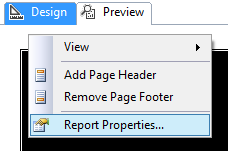
Right click on the background of your report (i.e. just below where it says Design) and go to Report Properties as shown:

picture showing user where to click in the reportThen you can left click on Code and add enter the custom code below in the window provided:

Public Function Divide(ByVal dividend As Double, ByVal divisor As Double) As Double
   If IsNothing(divisor) Or divisor = 0 Or IsNothing(dividend) Or dividend = 0 Then
      Return 0
   Else
      Return dividend / divisor
   End If
End Function

IsNothing() is used to avoid #Error and check whether the divisor or the dividend are 0 to avoid NaN and Infinity.

Now change the field expression from, for example:

SUM(Fields!A.Value)/SUM(Fields!B.Value)

To the expression below using the newly defined function Divide:

= Code.Divide(Sum(Fields!A.Value), Sum(Fields!B.Value))

Next you can update the fields textbox properties to make the number display as a percentage.

NOTE: Inserting a user defined function into a table will mean that that table will no longer be able to be copied and pasted as this throws an error. To copy and past the table you will need to look at the code of the report by right clicking on the report and choosing View Code. Search for “Code.Divide” and comment it out with an apostrophe ( ‘ ). You will now be able to copy the table.

How to export a table as an XML file using a SQL script

Below is a script that will allow you, as the title suggests, to export a table as an XML file.

By use of the find and replace function in your preferred text editor, or by way of the text editor in SSMS, input your values for the required fields, i.e. replace TableName with the name of the table you will be working off.

SERVER NAME: ServerName

DATABASE NAME: DatabaseName

SCHEMA NAME: SchemaName

TABLE NAME: TableName

SAVE LOCATION ADDRESS: AddressName

FILE NAME: FileName (Excluding .xml extension)

Then run the script below and the table will be exported as an XML file to the location and file name of your choosing.

/*
FIND AND REPLACE:

SERVER NAME: ServerName
DATABASE NAME: DatabaseName 
SCHEMA NAME: SchemaName
TABLE NAME: TableName
SAVE LOCATION ADDRESS: AddressName
FILE NAME: FileName
 */
-- Run on ServerName
USE DatabaseName;
GO

DECLARE @saveLocation AS VARCHAR(510)
DECLARE @nameOfFile AS VARCHAR(255)
DECLARE @instanceName AS VARCHAR(255)
DECLARE @cmd NVARCHAR(1020)

SET @saveLocation = 'AddressName'
SET @nameOfFile = 'FileName'
SET @saveLocation = @saveLocation + '\' + @nameOfFile + '.xml'
SET @instanceName = (
		SELECT @@servername
		)

-- Please note that the fully qualified table name is needed
SELECT @cmd = '
    bcp "SELECT * FROM [DatabaseName].[SchemaName].[TableName] row for xml auto, root(''rows''), elements" ' + 'queryout "' + @saveLocation + '" -S ' + @instanceName + ' -T -w -r -t';

EXEC xp_cmdshell @cmd;
GO


This script is enabled by two utilities xp_cmdshell and BCP.

For an explanation of each please view the associated links.

How to fix an SSRS Report that cannot find stored procedure fields or parameters while displaying the define query parameters window

When setting up your data sets in an SSRS report if you are using a complicated stored procedure, i.e. a SP which relies on dynamic SQL, temp tables or finishes with an IF statement, chances are the SSRS report will not be able to figure out what the SP returns. When this happens you will not be able to populate the data set with data.

This happens because the execution plan of the SSRS software isn’t smart enough and won’t be able to determine what fields the SP creates and therefore will not be able to create a means of storing the data on the report end.

Subsequently you’ll see the, often misleading, table below popup.


SSRS Pop up Define Query Parameters

The solution to stop this from happening is quite simple, but considering how expensive this software is it’s a solution that shouldn’t have to be employed.

The solution is to trick the SSRS software by simplifying the SP. Basically perform a select on the specific fields you need with no additional logic or create a table with the exact fields you need with corresponding data types and select from that.

Use this dumb SP to populate the dataset in the SSRS report.

In the “Choose a data source and create a query” window as below, click refresh fields.

SSRS window refresh fields
The software should now pick up the fields.
Change the SP back to the way it was before and do not refresh the fields again in the SSRS software and the fields should continue to populate as you need them.

How to map the table structure of all Databases in a SQL Server Instance

Below is a T-SQL script that will return the following fields for each table from each database located in a SQL Server Instance:

  • ServerName
  • DatabaseName
  • SchemaName
  • TableName
  • ColumnName
  • KeyType

The output is provided in a table format with these additional formatted lines of text which can be used as queries or as part of queries.

  • A Select table query
  • A Select column query
  • Each column bracketed
  • Each table and column bracketed

This query is especially useful from a reporting perspective for a DBA or SQL developer unfamiliar with the structure of the database they are querying. The table returned by the query can be exported to excel. Using excels filter option applied to the columns of the table makes finding and selecting specific tables and columns very easy.

This process can be repeated for every database server used by the business to generate a single mapped servers master excel file allowing the user to find any table or column available to the organization quickly.

Applying some colour coding like below adds to the ease of use.

Image of excel file with mapped database server structure

How to use:

Simply open SQL Server management studio and from object explorer right click on the server name and select new query. This will open a window set to the master database of the server. Copy and paste the SQL below into this SQL Server window and execute. When the query is finished you will have created the table above.

/*
SCRIPT UPDATED
20180316
*/

USE [master]
GO

/*DROP TEMP TABLES IF THEY EXIST*/
IF OBJECT_ID('tempdb..#DatabaseList') IS NOT NULL
	DROP TABLE #DatabaseList;

IF OBJECT_ID('tempdb..#TableStructure') IS NOT NULL
	DROP TABLE #TableStructure;

IF OBJECT_ID('tempdb..#ErrorTable') IS NOT NULL
	DROP TABLE #ErrorTable;

IF OBJECT_ID('tempdb..#MappedServer') IS NOT NULL
	DROP TABLE #MappedServer;

DECLARE @ServerName AS SYSNAME

SET @ServerName = @@SERVERNAME

CREATE TABLE #DatabaseList (
	Id INT NOT NULL IDENTITY(1, 1) PRIMARY KEY
	,ServerName SYSNAME
	,DbName SYSNAME
	);

CREATE TABLE [#TableStructure] (
	[DbName] SYSNAME
	,[SchemaName] SYSNAME
	,[TableName] SYSNAME
	,[ColumnName] SYSNAME
	,[KeyType] CHAR(7)
	) ON [PRIMARY];

/*THE ERROR TABLE WILL STORE THE DYNAMIC SQL THAT DID NOT WORK*/
CREATE TABLE [#ErrorTable] ([SqlCommand] VARCHAR(MAX)) ON [PRIMARY];

/*
A LIST OF DISTINCT DATABASE NAMES IS CREATED
THESE TWO COLUMNS ARE STORED IN THE #DatabaseList TEMP TABLE
THIS TABLE IS USED IN A FOR LOOP TO GET EACH DATABASE NAME
*/
INSERT INTO #DatabaseList (
	ServerName
	,DbName
	)
SELECT @ServerName
	,NAME AS DbName
FROM master.dbo.sysdatabases WITH (NOLOCK)
WHERE NAME <> 'tempdb'
ORDER BY NAME ASC

/*VARIABLES ARE DECLARED FOR USE IN THE FOLLOWING FOR LOOP*/
DECLARE @sqlCommand AS VARCHAR(MAX)
DECLARE @DbName AS SYSNAME
DECLARE @i AS INT
DECLARE @z AS INT

SET @i = 1
SET @z = (
		SELECT COUNT(*) + 1
		FROM #DatabaseList
		)

/*WHILE 1 IS LESS THAN THE NUMBER OF DATABASE NAMES IN #DatabaseList*/
WHILE @i < @z
BEGIN
	/*GET NEW DATABASE NAME*/
	SET @DbName = (
			SELECT [DbName]
			FROM #DatabaseList
			WHERE Id = @i
			)
	/*CREATE DYNAMIC SQL TO GET EACH TABLE NAME AND COLUMN NAME FROM EACH DATABASE*/
	SET @sqlCommand = 'USE [' + @DbName + '];' + '

INSERT INTO [#TableStructure]
SELECT DISTINCT' + '''' + @DbName + '''' + ' AS DbName
	,SCHEMA_NAME(SCHEMA_ID) AS SchemaName
	,T.NAME AS TableName	
	,C.NAME AS ColumnName
	,CASE 
		WHEN OBJECTPROPERTY(OBJECT_ID(iskcu.CONSTRAINT_NAME), ''IsPrimaryKey'') = 1 
			THEN ''Primary'' 
		WHEN OBJECTPROPERTY(OBJECT_ID(iskcu.CONSTRAINT_NAME), ''IsForeignKey'') = 1 
			THEN ''Foreign''
		ELSE NULL 
		END AS ''KeyType''
FROM SYS.TABLES AS t WITH (NOLOCK)
INNER JOIN SYS.COLUMNS C ON T.OBJECT_ID = C.OBJECT_ID
LEFT JOIN INFORMATION_SCHEMA.KEY_COLUMN_USAGE AS iskcu WITH (NOLOCK) 
ON SCHEMA_NAME(SCHEMA_ID) = iskcu.TABLE_SCHEMA 
	AND T.NAME = iskcu.TABLE_NAME
	AND C.NAME = iskcu.COLUMN_NAME
ORDER BY SchemaName ASC
	,TableName ASC
	,ColumnName ASC;
';

	/*ERROR HANDLING*/
	BEGIN TRY
		EXEC (@sqlCommand)
	END TRY

	BEGIN CATCH
		INSERT INTO #ErrorTable
		SELECT (@sqlCommand)
	END CATCH

	SET @i = @i + 1
END

/*
JOIN THE TEMP TABLES TOGETHER TO CREATE A MAPPED STRUCTURE OF THE SERVER
ADDITIONAL FIELDS ARE ADDED TO MAKE SELECTING TABLES AND FIELDS EASIER
*/
SELECT DISTINCT @@SERVERNAME AS ServerName
	,DL.DbName
	,TS.SchemaName
	,TS.TableName
	,TS.ColumnName
	,TS.[KeyType]
	,',' + QUOTENAME(TS.ColumnName) AS BracketedColumn
	,',' + QUOTENAME(TS.TableName) + '.' + QUOTENAME(TS.ColumnName) AS BracketedTableAndColumn
	,'SELECT * FROM ' + QUOTENAME(DL.DbName) + '.' + QUOTENAME(TS.SchemaName) + '.' + QUOTENAME(TS.TableName) + '--WHERE --GROUP BY --HAVING --ORDER BY' AS [SelectTable]
	,'SELECT ' + QUOTENAME(TS.TableName) + '.' + QUOTENAME(TS.ColumnName) + ' FROM ' + QUOTENAME(DL.DbName) + '.' + QUOTENAME(TS.SchemaName) + '.' + QUOTENAME(TS.TableName) + '--WHERE --GROUP BY --HAVING --ORDER BY' AS [SelectColumn]
INTO #MappedServer
FROM [#DatabaseList] AS DL
INNER JOIN [#TableStructure] AS TS ON DL.DbName = TS.DbName
ORDER BY DL.DbName ASC
	,TS.SchemaName ASC
	,TS.TableName ASC
	,TS.ColumnName ASC

/*
HOUSE KEEPING
*/
IF OBJECT_ID('tempdb..#DatabaseList') IS NOT NULL
	DROP TABLE #DatabaseList;

IF OBJECT_ID('tempdb..#TableStructure') IS NOT NULL
	DROP TABLE #TableStructure;

SELECT *
FROM #ErrorTable;

IF OBJECT_ID('tempdb..#ErrorTable') IS NOT NULL
	DROP TABLE #ErrorTable;

/*
THE DATA RETURNED CAN NOW BE EXPORTED TO EXCEL
USING A FILTERED SEARCH WILL NOW MAKE FINDING FIELDS A VERY EASY PROCESS
*/
SELECT ServerName
	,DbName
	,SchemaName
	,TableName
	,ColumnName
	,KeyType
	,BracketedColumn
	,BracketedTableAndColumn
	,SelectColumn
	,SelectTable
FROM #MappedServer
ORDER BY DbName ASC
	,SchemaName ASC
	,TableName ASC
	,ColumnName ASC;


 

Don’t drop that Stored Procedure, Alter it!

So when writing scripts to create tables you might often include some SQL like below to first assess whether or not the table exists before dropping it.

IF OBJECT_ID('Schema.TableName', 'U') IS NOT NULL
      DROP TABLE Schema.TableName
      GO


This might be because you are still testing data and want a table with a different structure to be created or to exist and be populated with different data while using the same table name. So it’s the right thing to do in that circumstance but you may be wrongly carrying that thinking forward into creating stored procedures and user defined functions.

By dropping an SP or UDF you are also breaking any securities or permissions associated with that SP or UDF meaning these permissions etc. will have to be created again.

But for SPs and UDFs you don’t actually need to drop the SP or UDF you just want to change it if it exists. In which case you use Alter rather than Create. However what if you are unaware as to whether the SP or UDF actually exists?

I propose creating dummy SP’s or UDF’s in their place which will simply be over written as demonstrated below.

-- ALTER STORED PROCEDURE
-- THIS DUMMY SP JUST SELECTS 1
IF OBJECT_ID('[Schema].[NameOfStoreProcedure]') IS NULL
	EXEC ('CREATE PROCEDURE [Schema].[NameOfStoreProcedure] AS SELECT 1')
GO

ALTER PROCEDURE [Schema].[NameOfStoreProcedure] @DateParameter DATE
	,@IntParameter INT
	,@CharParameter VARCHAR(30)
AS
BEGIN
	------------------------------------------------------
	------------------------------------------------------
	--INSERT STORED PROCEDURE LOGIC HERE
	--E.G.
	SELECT 1
	------------------------------------------------------
	------------------------------------------------------
	
END;
GO

-- ALTER FUNCTION
-- THIS DUMMY UDF SIMPLY SETS THE PARAMETER @INT TO 1
IF OBJECT_ID('[Schema].[NameOfFunction]') IS NULL
	EXEC ('
CREATE FUNCTION [Schema].[NameOfFunction] (@INT AS INT)
RETURNS INT
AS
BEGIN
	SELECT @INT = 1
	RETURN @INT
END
')
GO

ALTER FUNCTION [Schema].[NameOfFunction] (@INT AS INT)
RETURNS INT
AS
BEGIN
	SET @INT = @INT + 1
	RETURN @INT
END
GO

-- RUN FUNCTION TO SEE RESULT
SELECT [Schema].[NameOfFunction](10) AS ReturnedValue