Featured Image: A picture of a robot painting error over and over again

How to fix a Google Play Error -24


I had previously attempted to install an app but the device shut down mid installation. When I tried to install the app again at a later point in time the installation failed resulting in the Error -24 being shown on the play store.

So chances are you, as I did, are seeing an Error -24 message because remnants of a previous app installation remain.

Prerequisites to solving the problem:

To resolve this error install a file browser that will navigate to the system folders of the device, i.e. Root Browser. (Note: you’ll need root access to get to the necessary folder. You can view the following tutorial for an idea of what’s involved in rooting your device.)

Solution For An Error -24 :

STEP 1: In Root Browser tap the Data folder, then tap the Data folder again (One data folder is inside the other)

STEP 2: Find the remnant of the previous installation e.g. com.your.packagename and delete it. At this point you can try install the app again. If the installation fails repeat steps 1 & 2 and then move onto step 3.

Warning this next step is necessary but may have unwanted consequences as it involves wiping the cache of Google Play Services. The following paragraph is an over view of what google play services is and what it does. After reading the description you will be proceeding at your own risk.

Google Play services is used to update Google apps and apps from Google Play.
This component provides core functionality like authentication to your Google services, synchronized contacts, access to all the latest user privacy settings, and higher quality, lower-powered location based services.
Google Play services also enhances your app experience. It speeds up offline searches, provides more immersive maps, and improves gaming experiences.
Apps may not work if you uninstall Google Play services.

STEP 3: Go to Android Settings > Apps > swipe to All and scroll down to Google Play Services, tap on the app and then tap on clear cache button.

You should now be able to download and install that pesky app.

An icon symbolising data moving to different tables via ssis

How to use Temp tables in an SSIS package

If you have been using a query which utilizes temp tables but now you want that query to run as an SSIS package it’s going to need a bit of reworking.

Just adding the query as an Execute SQL Task in Visual Studio won’t work unfortunately if you are using, for example, SELECT * INTO to create the temp tables.

The First step to reworking the query will be to dedicate an Execute SQL Task to creating the temp tables your query uses, defining columns and data types etc. and then populating those tables with INSERT INTO rather than SELECT INTO.

For the following we will assume only one output temp table is required for the process which will be as follows:

  • A temp table to store data will be created.
  • A query will be used to populate this table.
  • This populated temp table will then become the source from which data will be pulled.

STEP 1.

In SSMS connect to what will be the source server and enter the statement to create the required temp table as a global temp table i.e. prefixing the table name with ##. Creating the table as a global temp table at this stage avoids errors when configuring the OLE DB Source in Visual Studio as it allows the table to be visible to the SSIS package.

STEP 2.

In Visual Studios drag a new Execute SQL Task into the control flow and name it, Create Temp Table.

Image showing Execute SQL Task Create Temp Table

Double click on the task to bring up the Execute SQL Task Editor window.

Image showing the Execute SQL Task Editor Window

Step through the process for creating a connection in the connection option and enter the following for the SQL statement option replacing yourTempTable with the name of your temp table.

IF OBJECT_ID('tempdb..##yourTempTable') IS NOT NULL
   DROP TABLE ##yourTempTable


Below this statement enter the same statement to create the global temp table as you used in SSMS.

STEP 3.

Next in the Create Temp Tables Properties, the window to the bottom right, for the section Execution under the option DelayValidation set the value to True. In STEP 1 the temp table is created and visible to Visual Studio, but when the SSIS package is run in the future the table won’t be there to be validated prior to the package running. Without setting this property to true the package would seek to confirm the existence of the temp table and would error when it determined the temp table does not exist stopping the package from running.

Image of Create Temp Table Task Properties showing DelayingValidation option set to True

STEP 4.

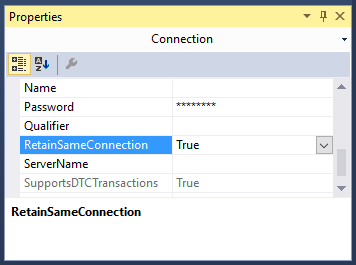
Next at the bottom of the design view window in Visual Studio the current source connection should be displayed. Left click on the source connection and the properties window should change focus to connection properties. Set the RetainSameConnection option to True, this allows the global temp table to remain visible to SSIS package during the package’s execution by maintaining the session.

Image showing the Connection Properties window with the RetainSameConnection option set to true

STEP 5.

Drag a Data Flow Task onto the Control Flow workspace and rename it Query and drag the precedence constraint between the Create Temp Table and Query.

Image showing OLE DB Source creation process

Double left click on the Query Task.

From Other Sources drag an OLE DB Source into the Data Flow workspace.

Double left click on the OLE DB Source and set the OLE DB Connection Manager to your source server and Data Access Mode to SQL Command.

Image of the OLE DB Source Editor Window

Enter your SQL Command in the box provided e.g.

SELECT * FROM ##yourTempTable


Hit OK on the OLE DB Source.

STEP 6.

Set up the destination as you would with any other typical SSIS package.

From Other Destinations drag an OLE DB Destination into the Data Flow workspace.

Then drag the precedence constraint between OLE DB Source to the OLE DB Destination.

Double left click on the OLE DB Destination and choose your destination and set “Table or View – fast load” from the data access mode dropdown. For the “Name of table or view option” enter your intended destination.

Hit OK on the OLE DB Destination.

Finally I would suggest adding another task that will drop the temp tables at the end of the package. For example, DROP TABLE ##yourTempTable.

Conclusion.

At this point you should now be able to run the package successfully and make your own adaptions to this process to fit your future needs.

How to play Quake 3 on your android TV stick using a PS3/4 controllerler.

The following is a tutorial on how to get this awesome FPS (which has aged beautifully and looks fantastic on a big Full HD Screen) onto your android TV stick (ATS), in my case a Tronsmart CX919, but this tutorial will also work for any android device.

Prerequisites:

Firstly in order to use a PS3/4 controller wirelessly your device will need to be rooted. If you do not have your device rooted please see this tutorial written for a CX919 device. (It will likely work for other devices too) Although you can use a keyboard and mouse if you’re old school or the touch controls on the screen if your device is mobile.

Secondly you will need the sixaxis controller app installed and setup on your device. If you do not have it installed please see this tutorial.

Steps to install Quake 3:

Running Quake 3 on an android device is achieved with the use of the Qiii4A app available on google play.

Step 1. Install this app.

QIII4A is a port of ioquake3 (which is a free software first person shooter engine based on Quake 3) to Android. So installing the app provides you with the engine for Quake 3 but not the game.

Therefore THIS APP DOES NOT CONTAIN OR DOWNLOAD ANY OF QUAKE 3 DATA FILES.

(IF YOU JUST WANT SOME FPS MULTIPLAYER ACTION: You have the option to install the game data for OpenArena also. OpenArena is a community-produced deathmatch FPS based on GPL idTech3 technology. There are many game types supported including Free For All, Capture The Flag, Domination, Overload, Harvester, and more.

Just press the button in the launcher app to download and install it.

Happy with just OpenArena?

Job done, you can stop reading now.

Enjoy!

You want more, keep reading.

Step 2. Get a copy of the Quake 3 baseq3 folder.

In order to install the Quake 3 game data you need the “baseq3” folder from the Quake 3 game which you can buy on steam http://store.steampowered.com/app/2200. In order to complete these steps it’s probably best to swap over to using a PC. You can download the game and pull the baseq3 folder from it.

(If you only have an android device at your disposal, you just need the baseq3 folder, oh I wonder where you could find that, wink wink nudge nudge.)

Step 3. Once you have the baseq3 folder.

Create a folder named qiii4a and paste baseq3 into it.

Step 4. Copy and paste the qiii4a folder to the folder specified in QIII4A launcher app

(example of correct path to “baseq3” folder: “/sdcard/qiii4a” directory in launcher). Note: you can also transfer the qiii4a folder to the external SD card of your android device and point the launch app to that location, example “/external_sd/qiii4a” However I would recommend that you have an external sd that is a class 10 micro sd card for the best performance.

Step 5. Launch the qiii4a app.

On  the controls screen check the following:

  • Smooth joystick
  • Hide onscreen buttons and enable mouse
  • Autodetect mouse
  • Mouse cursor position: Top left

On the graphics screen check the following:

  • 32 bit color
  • Screen resolution: Custom, then set the custom to whatever you have your ATS display set to. In my case it’s 1280 X 720
  • MSAA 16x

Step 6. Start the game and change the following settings

Use the right analogue stick to move the cross hair and R1 to select. (Or navigate with the keyboard)

Go to setup:

System > Graphics:

Basically you can just max out all the settings. Take a moment to appreciate how far technology has come that a little matchstick box sized computer that cost around 30 bucks can take all this classic has to throw at it.

Just be sure to set the video mode close to the custom display setting in the  Qiii4A app so aiming syncs up.

System > Controls:

You’ll have to play around with mouse speed until you find something you’re comfortable with. Chances are straight off the bat the controls won’t feel right.

Set smooth mouse on, free look on and map the right analogue stick button press as zoom view.

That’s pretty much it, you’re ready to go.

My advice is that you step through the single player game until you get your eye in and the controls set up comfortably. Once you’re settled you can move onto the multiplayer and play online. Stay away from excessive though, you’ll be eaten alive.

And now for my final thoughts.

In my opinion quake 3 is the best FPS experience on android. Even the latest Call of Duty games are based on the Quake engine in some shape or form so the value of the gameplay cannot be called into question.

In terms of visuals, no it’s not as pretty as Star Wars Battlefront but five minutes into a match and you’ll be too engrossed in taking revenge on the guy that just fragged you to really critique the less than epic visuals.

It’s a game all about blisteringly fast gameplay and android, with it’s still limited hardware, provides the perfect platform on which to appreciate an old classic again.

Android really needs a great FPS to make it a proper gaming platform, and what better FPS than the greatest FPS ever?


 

report cartoon

How to keep an SSRS Report on one page

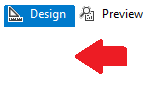
Using visual studio left click just under design to focus on the report.

Image showing where to click

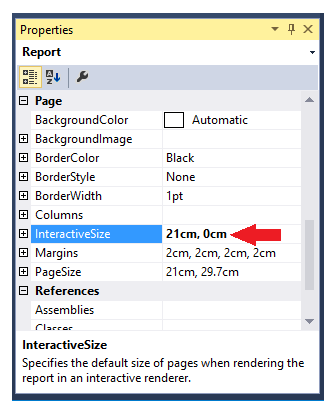
Now the report properties window should be visible in the bottom right of the screen.

Set the interactive height to 0 as shown below.

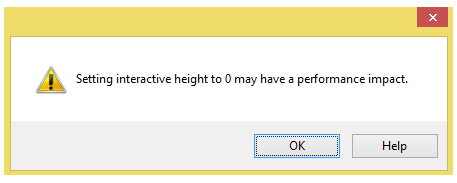
Properties windowYou will get the following warning sign below. Limiting the report to one page, by setting the interactive height to zero, means everything needs to be loaded all at once. This will create lag when a user loads the report and interacts with it.

warning message stating can cause performance issuesIf you are basically using SSRS as a means for end users to pull a data dump via excel, heed this warning. If you just have a few aggregated tables and you want them all on the same page you should be fine.

Image with the text 3000 years later in giant letters

How to provide a dynamic parameter drop-down of year options in SSRS

Say you’ve developed a report which returns data based on a inputted year parameter value, e.g. “give me all the sales in 2014”.

How do you provide the year options for the SSRS report?

Well there’s three ways that come to mind.

Select distinct from a date field, e.g. SELECT DISTINCT YEAR(SalesDate) FROM Sales

This would certainly provide you with all the available years but the database could have millions of sales. So it’s not too efficient.

You could manually populate years in the parameter settings in the SSRS report, kind of primitive but it would work.

But for me the robust and efficient way is the solution provided below.

The following SQL query dynamically populates an integer field in a temporary table with years. The query uses a base year variable, which can be set to as far back as when the required data fields and values existed in the database. A loop then provides the years up to and including the current year. This query can be used to generate a dataset for an SSRS report and then this dataset can then be used to provide parameter values for the report. The report will then always create a list of years between the base year and the current year. Meaning the years parameter will never need to be adjusted again.

(For a tutorial on how to turn a month name and year into dates for the first and last day of the month see this tutorial)

/*Create temp table populated with the years from a base year to the present year*/
IF OBJECT_ID('tempdb..#availableYear') IS NOT NULL
    DROP TABLE #availableYear

CREATE TABLE #availableYear ([Year] INT)

DECLARE @baseYear AS INT
DECLARE @i AS INT

/*Change the base year to the earliest year the database has the required data available*/
SET @baseYear = 2013
SET @i = 0

WHILE @i <= YEAR(GETDATE()) - @baseYear
BEGIN
    INSERT INTO #availableYear
    SELECT @baseYear + @i

    SET @i = @i + 1
END

SELECT * FROM #availableYear

Within the Stored Procedure that populates the report you can then do something like below to make sure the date range matches the year chosen.

DECLARE @yearChosen AS INT

SET @yearChosen = 2013

DECLARE @startDate date
DECLARE @endDate date

SET @startDate = CONVERT(CHAR(4), @yearChosen) + '0101'
SET @endDate = CONVERT(CHAR(4), @yearChosen) + '1231'

PRINT @startDate
PRINT @endDate    

--OR For example

YEAR(SaleDate) = @yearChosen

How to connect your android device to a Playstation 3 or 4 controller wirelessly

A list of directly compatible games is at the bottom of this post.

Prerequisites:

Firstly you will need your device rooted. Rooting the device just means you have administrative privileges on the device, but unlike windows it’s not as simple as just changing a setting. Please see this tutorial on checking if an android device is rooted and this tutorial if you need instruction on rooting your device.

Connecting your PS3/4 controller to your android device:

As with all things android you might have guessed you need an app to connect your device to your Playstation controller. In this case you need the sixaxis controller. Unfortunately the app isn’t free but it is cheap!

However before you go handing over your dosh the guys at dancing pixel studios (strange choice of names considering they don’t seem to make any games) were nice enough to create the sixaxis compatibility checker so you can try before you buy.

Step 1.

Install the compatibility checker from the play store here.

Step 2.

Once installed, open the app and click Start. If you get a connection failed your device is not supported.

Sorry dude.

If not, Yay!

Continue!

Step 3.

Connect your controller to your device with a mini usb cable.

Step 4.

Click pair. This will write your android’s Bluetooth address to the controller. (Don’t worry about the pad not working on the playstation anymore, they’re a terrible console anyway. JK, to reconnect your controller to your playstation just connect the controller via the usb cable and it will write the playstation address back onto the controller.)

Step 5.

Once paired click start on the app. The device is now listening for controllers. If the controller is not turned on press the power button in the center. Now when you press buttons on the controller you should see them appearing on screen.

Congratulations, your device is compatible you now have the honour of buying the app here.

Some setup advice:

When you first use the app you’ll be asked to tick the box recognising Sixaxis Controller as a Keyboard & Input Method. Do so. It asks because this is a security feature as such devices could be potential recording key strokes etc.

In general settings I always have the box Auto Start ticked, this means the app launches whenever the device is turned. For the idle timeout option I set the timeout for 300, which means if the controller is not interacted with for five minutes the app turns the controller off saving the battery. On the subject of battery you can use your device to charge the controller which is nice.

Not all games are compatible even more so if you’re using an Android box or stick:

Native compatible of a game means that it was programmed to accept inputs from controllers some great examples being BombSquad, Asphalt 8, Dead Trigger however, sadly, a lot of games do not support native compatibility.

This could be for a number of reasons, like the developer just never bothered to code compatibility into the app or the app might compete with a console version of the game and the developer doesn’t want to cannibalize the market. Man I wished Fifa had controller support. . .

However the sixaxis controller app comes with a great feature to map button presses. This is especially useful to the PUBG mobile fans out there.

How to do this though is another post in itself so I suggest you google around, there’s plenty of great tutorials out there and the gentle souls of the internet have even created touch profiles for games available to download saving you the trouble of doing the mapping yourself.

Sadly though mapping on many Android boxes and sticks don’t seem to work to well if at all. This is down to these devices often shipping without the necessary touch drivers because they don’t have screens. Which makes sense, why ship a device with touch drivers that doesn’t have a screen? For PUBG mobile players who want to use a controller of course!

The following is a list of games that you can play using the android sixaxis controller app.

Remapping of keys maybe necessary, the correct mapping is as follows.

  • Cross: A
  • Circle: B
  • Square: X
  • Triangle: Y

Games:

I’ll be adding to this list over time so if I’ve missed a game you’ve tested and know to work please comment below.

  1. Dead Trigger (free)
  2. Dead Trigger 2 (free)
  3. Evac
  4. Asphalt 8 (free)
  5. Dead Effect (free)
  6. Beach Buggy Blitz (free)
  7. Beach Buggy Racing (free)
  8. Dream League Soccer (free)
  9. BombSquad (free)
  10. Horizon Chase (free)
  11. PewPew (free)
  12. PewPew 2
  13. Skyriders (free)
  14. ShadowGun
  15. SoulCraft (free)
  16. Real Boxing (free)
  17. Skate Party 2 (free)
  18. GT Racing 2
  19. Manuganu 2 (free)
  20. Shooty Skies (free)
  21. Reckless Racing
  22. Rail Racing
  23. Jet Car Stunts 2
  24. Aces of the Luftwaffe (free)
  25. Tank Riders (free)
  26. Raging Thunder 2 (free)
  27. Annelids (free)
  28. Warlings: Armageddon (free)
  29. Table Top Racing (free)
  30. Sine Mora
  31. Pako – Car Chase Simulator (free)
  32. Sword Of Xolan (free)
  33. Nub’s Adventure (free)
  34. Super Dangerous Dungeons (free)
  35. Only One (free)
  36. Turbo Dismount (free)
  37. Particle Arcade Shooter
  38. Luminescence (free)
  39. Leo’s Fortune
  40. Does Not Commute
  41. Pac-Man (free)
  42. Redline Rush (free)
  43. Radiant (free)
  44. Zenonia
  45. Voxel Rush (free)
  46. Winter Fugitives *
  47. Hopeless *
  48. Tiny Thief *
  49. Smash Hit * (free)

Any other suggestions please feel free to add a comment below.

How do you tell if your Android device is rooted?

So here’s a quick and simple explanation of what a rooted device is.

By default the android OS blocks you and apps from doing the things that could potentially break (brick) the device or pose security concerns. But there are instances were an app legitimately needs access to some of the devices locked out functionality.

For example the sixaxis controller app lets you connect your device to a PS3/4 controller but requires root access to be able to manipulate the device’s bluetooth signal. This is a legitimate reason to require access to bluetooth but a more unscrupulous app might want access to transmit your phone’s data across a short range.

A rooted android device just means you have administrative privileges on the device, so you get to choose what you or an app can use/do, but unlike windows it’s not as simple as just changing a setting.

So how do you tell if an android device is rooted?

It’s simple, as with all things android you just use an app!

Install Root Checker from the play store and you’re good to go.

For a tutorial on how to root your device click here.

How to run multiple SQL scripts automatically in order.

If you’ve been working towards a new deployment to a live database chances are you have written several scripts (possibly dozens) that have been developed/tested against the the development server.

Now the time has come to put the update live. Which would require executing each script against the live database.

This task can be automated by using a very handy batch script to run against the directory the files are saved in.

Caveat: This process does not take into account error handling or rollbacks, it’s just a simple example people can build on.

In order for this to work the files must have been named in a manner that the necessary order of execution corresponds to ascii sort order, i.e. 001_CreateTable.sql, 002_PopulateTable etc. This is standard practice for sql file naming conventions.

Simply create a .BAT file with the following command:
(Swap servername and databaseName for your required server and database names, TIP: SELECT @@servername can provide you with the full server name.)

for %%G in (*.sql) do sqlcmd /S servername /d databaseName -E -i"%%G"
pause

Place this .BAT file in the directory from which you want the .SQL files to be executed, double click the .BAT file and the command will loop and execute every SQL script in the folder.

How to determine what stored procedures relate to what tables

Foreign keys are usually a good indicator of which tables connect to each other however you may be working in an environment that does not always follow best practices. As well as that you may not know what store procedures relate to what tables.
Sometimes databases need to move from one server to another or are depreciated. Before this can happened it is a very good idea to do a compressive assessment to see what interacts with what.
As once a thing gets moved everything that queries against it needs to point to it its new location.
A good starting point of this assessment would be to use the query below to determine what stored procedures reference the table specified in the WHERE clause.

  • NOTES: This query only pulls the tabled referenced in the database, it does not pull tables that are referenced from other databases.
  • Although the table maybe reference it may not actually be interacted with by the query, the table name may be comment in the code for example. However for the most part it is more likely the table has some action performed against it, be it a SELECT, INSERT, UPDATE etc.

The query works by using the sysobjects and syscomments tables.
Sysobjects: a system table that contains a row for each user-defined, schema-scoped object that is created within a database, including natively compiled scalar user-defined function.

Syscomments: a system table that contains entries for each view, rule, default, trigger, CHECK constraint, DEFAULT constraint, and stored procedure within the database. The text column contains the original SQL definition statements.

Or to dumb it down it joins, in our case, the stored procedures name to the query and scans this query for references to the specified table.

/*
CHANGE THE FOLLOWING:
SERVER NAME: ServerName
DATABASE NAME: DatabaseName 
TABLE NAME: TableName
 */


USE DatabaseName;
GO

SELECT DISTINCT so.name
FROM syscomments sc
INNER JOIN sysobjects so ON sc.id=so.id
WHERE sc.TEXT LIKE '%TableName%'

To expand on this logic to return every table referenced in every stored procedure in a database run the code below:

/*
CHANGE THE FOLLOWING:
SERVER NAME: ServerName
DATABASE NAME: DatabaseName 
 */
 
USE DatabaseName;
GO 

--DROP TEMP TABLES
IF OBJECT_ID('tempdb..#TablesAndSPs') IS NOT NULL
	DROP TABLE #TablesAndSPs

IF OBJECT_ID('tempdb..#Tables') IS NOT NULL
	DROP TABLE #Tables
	
--DECLARE VARIABLES
DECLARE @tableID AS INT
DECLARE @tableName AS VARCHAR(255)

--CREATE TEMP TABLE TO HOLD THE NAMES OF THE TABLES AND SPs
CREATE TABLE #TablesAndSPs (
	TABLE_ID INT
	,TABLE_NAME VARCHAR(255)
	,SP VARCHAR(255)
	)

--GET A LIST OF THE TABLES IN DATABASE
SELECT row_number() OVER (
		ORDER BY TABLE_NAME
		) AS TABLE_ID
	,TABLE_NAME
INTO #Tables
FROM INFORMATION_SCHEMA.TABLES

SET @tableID = 1

--LOOP AND POPULATE #TablesAndSPs
WHILE @tableID <= (
		SELECT MAX(TABLE_ID)
		FROM #Tables
		)
BEGIN
	SET @tableName = (
			SELECT TABLE_NAME
			FROM #Tables
			WHERE TABLE_ID = @tableID
			)

	INSERT INTO #TablesAndSPs
	SELECT DISTINCT @tableID
		,@tableName
		,so.NAME
	FROM syscomments sc
	INNER JOIN sysobjects so ON sc.id = so.id
	WHERE sc.TEXT LIKE '%' + @tableName + '%'

	SET @tableID = @tableID + 1
END

SELECT * FROM #TablesAndSPs

How to create Clustered and Nonclustered Indexes on a Temp Table

One of the best features of temp tables is that an index can be applied to them.

To clarify temp tables start with #, exist within the tempdb and are accessible within child batches (nested triggers, procedure, exec calls) of the query.

The execution plan can also determine the relevant statistics regarding their operation and suggest means of optimisation and will often suggest applying an index to the table.
Below is a simple example of applying both clustered and nonclustered indexes to the temporary table #Apostle created from a CTE (Common Table Expression).


IF OBJECT_ID('tempdb..#Apostle') IS NOT NULL
	DROP TABLE #Apostle;

WITH CTE
AS (
	SELECT 1 AS ID
		,'Simon Peter' AS NAME
	
	UNION
	
	SELECT 2
		,'James'
	
	UNION
	
	SELECT 3
		,'John'
	
	UNION
	
	SELECT 4
		,'Andrew'
	
	UNION
	
	SELECT 5
		,'Philip'
	
	UNION
	
	SELECT 6
		,'Thomas'
	
	UNION
	
	SELECT 7
		,'Bartholomew'
	
	UNION
	
	SELECT 8
		,'Matthew'
	
	UNION
	
	SELECT 9
		,'James'
	
	UNION
	
	SELECT 10
		,'Simon'
	
	UNION
	
	SELECT 11
		,'Thaddaeus'
	
	UNION
	
	SELECT 12
		,'Judas'
	)
SELECT *
INTO #Apostle
FROM CTE

-- CREATE INDEXES
CREATE CLUSTERED INDEX IDX_CLUSTERED_ID ON #Apostle (ID)

CREATE NONCLUSTERED INDEX IDX_NONCLUSTERED_ID ON #Apostle (ID)


Microsoft defines clustered and nonclustered indexes as the following:

Clustered

  • Clustered indexes sort and store the data rows in the table or view based on their key values. These are the columns included in the index definition. There can be only one clustered index per table, because the data rows themselves can be sorted in only one order.
  • The only time the data rows in a table are stored in sorted order is when the table contains a clustered index. When a table has a clustered index, the table is called a clustered table. If a table has no clustered index, its data rows are stored in an unordered structure called a heap.

Nonclustered

  • Nonclustered indexes have a structure separate from the data rows. A nonclustered index contains the nonclustered index key values and each key value entry has a pointer to the data row that contains the key value.
  • The pointer from an index row in a nonclustered index to a data row is called a row locator. The structure of the row locator depends on whether the data pages are stored in a heap or a clustered table. For a heap, a row locator is a pointer to the row. For a clustered table, the row locator is the clustered index key.
  • You can add nonkey columns to the leaf level of the nonclustered index to by-pass existing index key limits, 900 bytes and 16 key columns, and execute fully covered, indexed, queries.

Source

To learn more about indexes this is a good video on the topic.