How to determine the index fragmentation level on your SQL Server instance

Below is a script that will run against every table in every database on your Sql Server instance and output, among other things, the average index fragmentation percentage.

It can be a bit heavy when running against large databases with thousands of tables so I would recommend running it during downtime or outside office hours.

This script returns fragmentation stats by utilizing a DMV.

When Nulls are presented as parameters this DMV works at a server level and uses preset defaults.

[sys].[dm_db_index_physical_stats](NULL, NULL, NULL, NULL, NULL)

However it also accepts the parameter options below to limited the results returned.

[sys].[dm_db_index_physical_stats](Database_Id, Object_Id, Index_Id, partition_number, MODE)

MODE OPTIONS:

Mode specifies the scan level that is used to obtain statistics. Valid inputs are DEFAULT, NULL, LIMITED, SAMPLED, or DETAILED. The default (NULL) is LIMITED.

DEFAULT will have 12 columns full of data and then NULLS in the remainder.
SAMPLED will have 21 columns full of data.
LIMITED will have 12 columns of data and the NULLS in the remainder.
DETAILED will have 21 columns full of data.

Note: I’ve capture more fields in the temp table #Index than I use in the final select statement. This is because you might want to include additional index related fields i.e. check if the index is unique etc. If all you want is the index name in the final select statement you can tidy up the query as needed and exclude the unwanted additional fields.

SET NOCOUNT ON

IF OBJECT_ID('tempdb..#Schema') IS NOT NULL
	DROP TABLE #Schema

IF OBJECT_ID('tempdb..#Index') IS NOT NULL
	DROP TABLE #Index

DECLARE @Sql AS VARCHAR(MAX)
DECLARE @Database TABLE (
	DbId INT
	,DbName SYSNAME
	)
DECLARE @DbName AS SYSNAME
DECLARE @DbId AS INT

CREATE TABLE #Schema (
	DbId INT
	,DbName SYSNAME
	,Object_Id INT NULL
	,ObjectName SYSNAME NULL
	,TableFlag BIT
	,ViewFlag BIT
	,Schema_Id INT NULL
	,SchemaName SYSNAME NULL
	)

CREATE TABLE #Index (
	DbId INT
	,DbName SYSNAME
	,Object_Id INT NOT NULL
	,NAME SYSNAME NULL
	,index_id INT NOT NULL
	,type TINYINT NOT NULL
	,type_desc NVARCHAR(60) NULL
	,is_unique BIT NULL
	,data_space_id INT NULL
	,ignore_dup_key BIT NULL
	,is_primary_key BIT NULL
	,is_unique_constraint BIT NULL
	,fill_factor TINYINT NOT NULL
	,is_padded BIT NULL
	,is_disabled BIT NULL
	,is_hypothetical BIT NULL
	,allow_row_locks BIT NULL
	,allow_page_locks BIT NULL
	,has_filter BIT NULL
	,filter_definition NVARCHAR(max) NULL
	)

INSERT INTO @Database (
	DbId
	,DbName
	)
SELECT dbid
	,NAME
FROM master.dbo.sysdatabases
WHERE NAME <> 'tempdb'
ORDER BY NAME ASC

SET @DbId = 0

WHILE @DbId IS NOT NULL
BEGIN
	SET @DbId = (
			SELECT MIN(DbId)
			FROM @Database
			WHERE DbId > @DbId
			)
	SET @DbName = (
			SELECT DbName
			FROM @Database
			WHERE DbId = @DbId
			)
	SET @Sql = '
	INSERT INTO #Schema (
		DbId
		,DbName
		,Object_Id
		,ObjectName
		,TableFlag
		,ViewFlag
		,Schema_Id
		,SchemaName
		)
	SELECT ' + CONVERT(VARCHAR(128), @DbId) + ' AS DbId
		,' + '''' + @DbName + '''' + ' AS DbName
		,o.Object_Id
		,o.NAME AS ObjectName
		,CASE 
			WHEN o.type = ''IT''
				THEN 1
			WHEN o.type = ''S''
				THEN 1
			WHEN o.type = ''TT''
				THEN 1
			WHEN o.type = ''U''
				THEN 1
			ELSE NULL
			END AS TableFlag
		,CASE 
			WHEN o.type = ''V''
				THEN 1
			ELSE NULL
			END AS ViewFlag
		,s.Schema_Id
		,s.NAME AS SchemaName
	FROM ' + QUOTENAME(@DbName) + '.sys.objects AS o WITH (NOLOCK)
	INNER JOIN ' + QUOTENAME(@DbName) + '.sys.schemas AS s WITH (NOLOCK) ON o.schema_id = s.schema_id
	'

	EXEC (@Sql)

	SET @Sql = '
	INSERT INTO #Index (
	DbId
	,DbName
	,object_id
	,NAME
	,index_id
	,type
	,type_desc
	,is_unique
	,data_space_id
	,ignore_dup_key
	,is_primary_key
	,is_unique_constraint
	,fill_factor
	,is_padded
	,is_disabled
	,is_hypothetical
	,allow_row_locks
	,allow_page_locks
	,has_filter
	,filter_definition
	)
	SELECT ' + CONVERT(VARCHAR(128), @DbId) + ' AS DbId
		,' + '''' + @DbName + '''' + ' AS DbName
		,object_id
		,NAME
		,index_id
		,type
		,type_desc
		,is_unique
		,data_space_id
		,ignore_dup_key
		,is_primary_key
		,is_unique_constraint
		,fill_factor
		,is_padded
		,is_disabled
		,is_hypothetical
		,allow_row_locks
		,allow_page_locks
		,has_filter
		,filter_definition
	FROM ' + QUOTENAME(@DbName) + '.sys.indexes WITH (NOLOCK)
	'

	EXEC (@Sql)
END

SELECT ROW_NUMBER() OVER (
		ORDER BY s.DbName ASC
			,s.SchemaName ASC
			,s.ObjectName
		) AS Row
	,s.DbName
	,s.SchemaName AS SchemaName
	,s.Object_Id AS ObjectId
	,s.ObjectName
	,s.TableFlag
	,s.ViewFlag
	,i.Name AS IndexName
	,ddips.index_type_desc AS IndexType
	,ddips.page_count AS Pages
	,ddips.record_count AS Records
	,ddips.fragment_count AS Frags
	,ddips.avg_fragmentation_in_percent AS AvgFragPercent
FROM sys.dm_db_index_physical_stats(NULL, NULL, NULL, NULL, 'SAMPLED') AS ddips
INNER JOIN #Schema AS s ON ddips.database_id = s.DbId
INNER JOIN #Index AS i ON s.DbId = i.DbId
	AND s.Object_Id = i.Object_Id
	AND ddips.index_id = i.index_id
	AND ddips.object_id = s.Object_Id
WHERE (
		s.TableFlag = 1
		OR s.ViewFlag = 1
		)
ORDER BY s.DbName ASC
	,s.SchemaName ASC
	,s.ObjectName

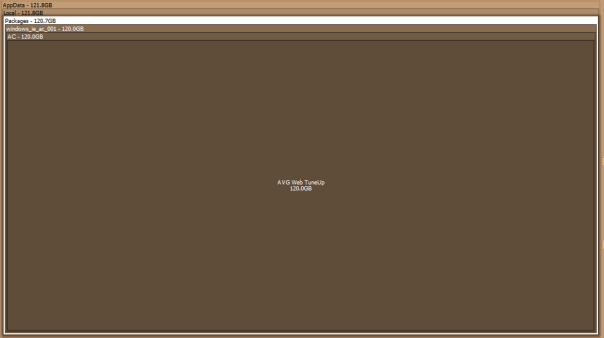
Space Sniffer image showing how much space AVG Web Tuneup using

AVG Web Tuneup you jerk!

So I finally got bothered enough to find out what the hell was eating up all the space on my C drive. I had just assumed it was something to do with the enforced Windows 10 upgrade but it turns out it was the AVG Web Tuneup application writing to the AppData directory. (Sorry for blaming you Windows 10)

For anyone else experiencing low disk space that is going unnoticed by disk cleanup utilities it might be worth checking this out. I used the fantastic utility Space Sniffer. This utility doesn’t require an install, it’s super light and super quick and will visually display all the files and folders on the drive you choose to scan. (Tip: run as administrator so it doesn’t throw warnings about directories it doesn’t have access to)

Space Sniffer image showing how much space AVG Web Tuneup using

To access the AppData folder on Windows 10 go to start and type %AppData%.

To rectify  this specific problem caused by AVG Web Tuneup utility first uninstall it. If this doesn’t get rid of the folder then access the AppData folder and navigate to AppData\Local\Packages\windows_ie_ac_001\AC\AVG Web TuneUp and delete that damn directory.

So long AVG Web Tuneup you jerk!

How to use SQL to remove non-numeric characters from a field

So I was working with phone numbers recently and the field was filthy. I mean there was absolutely no data entry validation whatsoever. Everything has been entered into this field from email addresses entered accidentally to phone numbers with little notes like (This is Steve’s number) to just random characters. There are millions of legitimate numbers in this field so in order to make the field workable the junk has to be taken out first.

A colleague of mine was kind enough to share this script with me for replacing characters. I’ve found it to be very beneficial as it is much more efficient than the solution I had been using of replacing all junk characters in a column row by row. This approach is set based replacing a single unwanted character from an entire column at a time.

CREATE TABLE #temp ([FreeText] VARCHAR(50) NOT NULL)

INSERT #temp
VALUES ('Hi There!!! 222  10 - 3476')

INSERT #temp
VALUES ('p@yahoo.com $%*


amp; 1234567 $%^&^')

DECLARE @DisallowedCharsASCIICodeMin TINYINT
,@DisallowedCharsASCIICodeMax TINYINT
,@ASCIICode TINYINT
,@Char CHAR(1)
,@ReplaceChar CHAR(1)
DECLARE @DisallowedChars TABLE (
[ASCIICode] TINYINT NOT NULL
,[Char] CHAR(1) NOT NULL
,[ReplaceChar] CHAR(1) NULL
,[Replaced] BIT NOT NULL DEFAULT 0
,PRIMARY KEY ([ASCIICode])
)

SELECT @DisallowedCharsASCIICodeMin = 32
,@DisallowedCharsASCIICodeMax = 126

SET @ASCIICode = @DisallowedCharsASCIICodeMin

WHILE @ASCIICode <= @DisallowedCharsASCIICodeMax
BEGIN
INSERT @DisallowedChars (
[ASCIICode]
,[Char]
)
VALUES (
@ASCIICode
,CHAR(@ASCIICode)
)

SET @ASCIICode = @ASCIICode + 1
END

DELETE @DisallowedChars
WHERE [Char] IN (
'0'
,'1'
,'2'
,'3'
,'4'
,'5'
,'6'
,'7'
,'8'
,'9'
)

WHILE EXISTS (
SELECT 1
FROM @DisallowedChars
WHERE [Replaced] = 0
)
BEGIN
SELECT TOP 1 @ASCIICode = [ASCIICode]
,@Char = [Char]
FROM @DisallowedChars
WHERE [Replaced] = 0

UPDATE #temp
SET [FreeText] = CASE
WHEN @ReplaceChar IS NULL
THEN REPLACE([FreeText], @Char, '')
ELSE REPLACE([FreeText], @Char, @ReplaceChar)
END
WHERE [FreeText] LIKE '%' + @Char + '%'

UPDATE @DisallowedChars
SET [Replaced] = 1
WHERE [ASCIICode] = @ASCIICode
END

SELECT *
FROM #temp

DROP TABLE #temp
GO


For my needs I’ve turned this logic into a stored procedure. I’ve also made a few changes. Firstly I’ve expanded the range of charters to exclude from unprintable characters to additional Unicode characters. I’ve also removed the option to add in a replace character as I only want non-numeric characters to be removed from the field. This allows me to also remove the case statement.

-- Drop stored procedure if it already exists
IF EXISTS (
		SELECT *
		FROM INFORMATION_SCHEMA.ROUTINES
		WHERE SPECIFIC_SCHEMA = N'dbo'
			AND SPECIFIC_NAME = N'GetNumeric'
		)
	DROP PROCEDURE dbo.GetNumeric
GO
-- Create Procedure
CREATE PROCEDURE dbo.GetNumeric @TableName VARCHAR(255)
	,@ColumnName VARCHAR(255)
AS
SET NOCOUNT ON

DECLARE @sql AS VARCHAR(500)

CREATE TABLE #temp (
	DirtyColumn VARCHAR(255) NOT NULL
	,CleanColumn VARCHAR(255) NOT NULL
	)

--SELECT @TableName
SET @sql = 'SELECT ' + @ColumnName + ' AS DirtyColumn
,' + @ColumnName + ' AS CleanColumn FROM ' + @TableName

INSERT INTO #temp (
	DirtyColumn
	,CleanColumn
	)
EXEC (@sql)

DECLARE @DisallowedCharsASCIICodeMin TINYINT
	,@DisallowedCharsASCIICodeMax TINYINT
	,@ASCIICode TINYINT
	,@Char CHAR(1)
	,@ReplaceChar CHAR(1)
DECLARE @DisallowedChars TABLE (
	[ASCIICode] TINYINT NOT NULL
	,[Char] CHAR(1) NOT NULL
	,[ReplaceChar] CHAR(1) NULL
	,[Replaced] BIT NOT NULL DEFAULT 0
	,PRIMARY KEY ([ASCIICode])
	)

SELECT @DisallowedCharsASCIICodeMin = 1
	,@DisallowedCharsASCIICodeMax = 254

SET @ASCIICode = @DisallowedCharsASCIICodeMin

WHILE @ASCIICode <= @DisallowedCharsASCIICodeMax
BEGIN
	INSERT @DisallowedChars (
		[ASCIICode]
		,[Char]
		)
	VALUES (
		@ASCIICode
		,CHAR(@ASCIICode)
		)

	SET @ASCIICode = @ASCIICode + 1
END

DELETE @DisallowedChars
WHERE [Char] IN (
		'0'
		,'1'
		,'2'
		,'3'
		,'4'
		,'5'
		,'6'
		,'7'
		,'8'
		,'9'
		)

WHILE EXISTS (
		SELECT 1
		FROM @DisallowedChars
		WHERE [Replaced] = 0
		)
BEGIN
	SELECT TOP 1 @ASCIICode = [ASCIICode]
		,@Char = [Char]
	FROM @DisallowedChars
	WHERE [Replaced] = 0

	UPDATE #temp
	SET [CleanColumn] = REPLACE([CleanColumn], @Char, '')
	WHERE [CleanColumn] LIKE '%' + @Char + '%'

	UPDATE @DisallowedChars
	SET [Replaced] = 1
	WHERE [ASCIICode] = @ASCIICode
END

SET @sql = 'UPDATE T1
SET T1.' + @ColumnName + ' = T2.CleanColumn
FROM ' + @TableName + ' AS T1
INNER JOIN #temp AS T2
ON T1.' + @ColumnName + ' = T2.DirtyColumn
WHERE T1.' + @ColumnName + '= T2.DirtyColumn;'

EXEC (@sql)

DROP TABLE #temp
GO


GO


After deploying the SP above to your test environment you can test it with the following script.

IF OBJECT_ID('dbo.DirtyPhoneNumbers', 'U') IS NOT NULL
	DROP TABLE dbo.DirtyPhoneNumbers;

CREATE TABLE DirtyPhoneNumbers (PhoneNumbers VARCHAR(255));
GO

INSERT INTO DirtyPhoneNumbers (PhoneNumbers)
VALUES ('afef2313newfnaksdfn')
	,('afef2313n!!!!!!!!!!&dfn')
	,('afef====+++22221sdfn')
	,('afef!"£$%^&&7575757sdfn')

SELECT *
FROM DirtyPhoneNumbers

EXEC dbo.GetNumeric 'DirtyPhoneNumbers'
	,'PhoneNumbers'

SELECT *
FROM DirtyPhoneNumbers

How to lookup SQL Server Jobs and get the job history with a query

Sometimes job history just won’t load in SQL Server Management Studio for one reason or another. One of the main reasons is that there are too many entries in the sysjobhistory table. The article here will help you resolve that problem. For a more immediate answer to the data you are looking for, like most things with SSMS, you can query the tables that contain this data directly.

For a permanent solution to bypassing SSMS I recommend using this stored procedure. If you just want a quick query see below.

If you want to get a job history for everything that has run over the last 7 days you can run the query below. Simply change the 7 to another number to go further back in time by days.

-- Variable Declarations 
DECLARE @PreviousDate DATETIME
DECLARE @Year VARCHAR(4)
DECLARE @Month VARCHAR(2)
DECLARE @MonthPre VARCHAR(2)
DECLARE @Day VARCHAR(2)
DECLARE @DayPre VARCHAR(2)
DECLARE @FinalDate INT


-- Initialize Variables 
SET @PreviousDate = DATEADD(dd, - 7, GETDATE()) -- Last 7 days  
SET @Year = DATEPART(yyyy, @PreviousDate)

SELECT @MonthPre = CONVERT(VARCHAR(2), DATEPART(mm, @PreviousDate))

SELECT @Month = RIGHT(CONVERT(VARCHAR, (@MonthPre + 1000000000)), 2)

SELECT @DayPre = CONVERT(VARCHAR(2), DATEPART(dd, @PreviousDate))

SELECT @Day = RIGHT(CONVERT(VARCHAR, (@DayPre + 1000000000)), 2)

SET @FinalDate = CAST(@Year + @Month + @Day AS INT)

-- Pull Job History 
SELECT j.[name]
	,s.step_name
	,h.step_id
	,MSDB.DBO.AGENT_DATETIME(h.run_date, h.run_time) AS run_time
	,STUFF(STUFF(STUFF(RIGHT(REPLICATE('0', 8) + CAST(h.run_duration AS VARCHAR(8)), 8), 3, 0, ':'), 6, 0, ':'), 9, 0, ':') 'run_duration (DD:HH:MM:SS)  '
	,h.run_status
	,h.sql_severity
	,h.message
	,h.SERVER
FROM msdb.dbo.sysjobhistory h
INNER JOIN msdb.dbo.sysjobs j ON h.job_id = j.job_id
INNER JOIN msdb.dbo.sysjobsteps s ON j.job_id = s.job_id
	AND h.step_id = s.step_id
WHERE h.run_date > @FinalDate
ORDER BY h.instance_id DESC


To get a job history for everything that has succeeded or failed over the last 7 days run the query below. Simply change the @RunStatus variable to either 0 (failed) or 1 (succeeded).

-- Variable Declarations 
DECLARE @RunStatus AS BIT
DECLARE @PreviousDate DATETIME
DECLARE @Year VARCHAR(4)
DECLARE @Month VARCHAR(2)
DECLARE @MonthPre VARCHAR(2)
DECLARE @Day VARCHAR(2)
DECLARE @DayPre VARCHAR(2)
DECLARE @FinalDate INT

/*Succeeded Jobs*/
--SET @RunStatus = 1
/*Failed Jobs*/
SET @RunStatus = 0

-- Initialize Variables 
SET @PreviousDate = DATEADD(dd, - 7, GETDATE()) -- Last 7 days  
SET @Year = DATEPART(yyyy, @PreviousDate)

SELECT @MonthPre = CONVERT(VARCHAR(2), DATEPART(mm, @PreviousDate))

SELECT @Month = RIGHT(CONVERT(VARCHAR, (@MonthPre + 1000000000)), 2)

SELECT @DayPre = CONVERT(VARCHAR(2), DATEPART(dd, @PreviousDate))

SELECT @Day = RIGHT(CONVERT(VARCHAR, (@DayPre + 1000000000)), 2)

SET @FinalDate = CAST(@Year + @Month + @Day AS INT)

-- Pull Job History 
SELECT j.[name]
	,s.step_name
	,h.step_id
	,MSDB.DBO.AGENT_DATETIME(h.run_date, h.run_time) AS run_time
	,STUFF(STUFF(STUFF(RIGHT(REPLICATE('0', 8) + CAST(h.run_duration AS VARCHAR(8)), 8), 3, 0, ':'), 6, 0, ':'), 9, 0, ':') 'run_duration (DD:HH:MM:SS)  '
	,h.run_status
	,h.sql_severity
	,h.message
	,h.SERVER
FROM msdb.dbo.sysjobhistory h
INNER JOIN msdb.dbo.sysjobs j ON h.job_id = j.job_id
INNER JOIN msdb.dbo.sysjobsteps s ON j.job_id = s.job_id
	AND h.step_id = s.step_id
WHERE h.run_status = @RunStatus
	AND h.run_date > @FinalDate
ORDER BY h.instance_id DESC


If you want to generate a list of all the:

  1. jobs and their owners
  2. SSIS packages and their owners

you can do so by running the queries below. (If you don’t already know the precise name or ID of a job)

--Jobs
select s.name,l.name
 from  msdb..sysjobs s 
 left join master.sys.syslogins l on s.owner_sid = l.sid

--Packages
select s.name,l.name 
from msdb..sysssispackages s 
 left join master.sys.syslogins l on s.ownersid = l.sid


Once you have retrieved either the name (command) or the ID of the job you are looking for you can plug that info into either one of the queries below also.

use msdb

select *
from dbo.sysjobsteps with (nolock)
where command like '%YourJobName%'

select *
from dbo.sysjobs sj with (nolock)
where sj.job_id = '1234-1234-1234-1234-1234'

How to turn a month name and year into a date field in SQL

When would I use this?

Say you have an SSRS report which provides users with the parameter options month and year and the report returns data for that month and year. You will likely need that month name (varchar) and year (int) to be converted into a date fields representing the first and last day of that month/year. Once you have those two dates they can then be used in the WHERE clause of your SQL query to return data within that range. The logic below will allow the conversion of month name and year into start and end dates described above. You can now take this logic and input it into a stored procedure or user defined function.

There will only ever be 12 months going forward but to create an ever updating parameter option for years please see this tutorial.

DECLARE @year AS INT
DECLARE @month AS VARCHAR(9)
DECLARE @monthNumber AS CHAR(2)
DECLARE @startDate AS DATE
DECLARE @endDate AS DATE;

SET @year = 2016
SET @month = 'February'

IF @year IS NOT NULL
BEGIN
	WITH monthPicker
	AS (
		SELECT CASE 
				WHEN @month = 'January'
					THEN '01'
				WHEN @month = 'February'
					THEN '02'
				WHEN @month = 'March'
					THEN '03'
				WHEN @month = 'April'
					THEN '04'
				WHEN @month = 'May'
					THEN '05'
				WHEN @month = 'June'
					THEN '06'
				WHEN @month = 'July'
					THEN '07'
				WHEN @month = 'August'
					THEN '08'
				WHEN @month = 'September'
					THEN '09'
				WHEN @month = 'October'
					THEN '10'
				WHEN @month = 'November'
					THEN '11'
				WHEN @month = 'December'
					THEN '12'
				ELSE NULL
				END AS monthPicked
		)
	SELECT @monthNumber = (
			SELECT monthPicked
			FROM monthPicker
			)

	SET @startDate = (
			SELECT CAST(CAST(@year AS VARCHAR(4)) + @monthNumber + '01' AS DATETIME)
			)
	SET @endDate = (
			SELECT DATEADD(s, - 1, DATEADD(MM, DATEDIFF(M, 0, @startDate) + 1, 0))
			)
END
ELSE
BEGIN
	SET @startDate = (
			SELECT DATEADD(m, DATEDIFF(m, 0, GETDATE()), 0)
			)
	SET @endDate = (DATEADD(MONTH, 1 + DATEDIFF(MONTH, 0, GETDATE()), - 1))
END

PRINT @startDate
PRINT @endDate

How to pass table valued parameters in SQL Server

With the introduction of SQL Server 2008 came the ability to define an entire table as a parameter, think of it like a table data type. This feature greatly eases the development process as constructing and parsing XML data strings is no longer necessary.

Table parameters are user defined parameters, i.e. you are creating a means of storing specific data that is passed by a stored procedure or function.

Limitations:

  • The READONLY clause must be used when passing in the table valued variable
  • Data in the table variable cannot be modified
  • The table variables cannot be used as OUTPUT parameters only input parameters.
  • When data is passed to the table variable the table variable must be passed to the stored procedure in the same batch. Table variables go out of scope as soon as the procedure or batch returns.

The following is a complete end to end example of how to create and pass data to table parameters:

IF OBJECT_ID('OrderHistory') > 0
	DROP TABLE OrderHistory;
GO

CREATE TABLE [dbo].[OrderHistory] (
	[OrderID] [int] IDENTITY(1, 1) NOT NULL PRIMARY KEY
	,[Product] [varchar](10) NULL
	,[OrderDate] [datetime] NULL
	,[SalePrice] [money] NULL
	)
GO

CREATE TYPE OrderHistoryTableType AS TABLE (
	[Product] [varchar](10) NULL
	,[OrderDate] [datetime] NULL
	,[SalePrice] [money] NULL
	)
GO

CREATE PROCEDURE usp_InsertOrder (@TableVariable OrderHistoryTableType READONLY)
AS
BEGIN
	INSERT INTO OrderHistory (
		Product
		,OrderDate
		,SalePrice
		)
	SELECT Product
		,OrderDate
		,SalePrice
	FROM @TableVariable
END
GO

DECLARE @DataTable AS OrderHistoryTableType

INSERT INTO @DataTable (
	Product
	,OrderDate
	,SalePrice
	)
VALUES (
	'Desktop'
	,GETUTCDATE()
	,599.00
	)

INSERT INTO @DataTable (
	Product
	,OrderDate
	,SalePrice
	)
VALUES (
	'Laptop'
	,GETUTCDATE()
	,299.00
	)

INSERT INTO @DataTable (
	Product
	,OrderDate
	,SalePrice
	)
VALUES (
	'Mouse'
	,GETUTCDATE()
	,9.00
	)

EXEC usp_InsertOrder @TableVariable = @DataTable

SELECT *
FROM OrderHistory


If you want to view other types of table type definitions in your system, or you’ve forgotten what you called a specific table parameter, you can execute the following query, which looks in the system catalog:

SELECT * FROM sys.table_types

How to spoof your android device and bypass Google’s unsupported restriction

Here’s a quick tutorial on how to spoof your android device.

Prerequisites to spoofing your device:

Install a file browser that can navigate to the system folders of the device, i.e. Root Browser. (Note: you’ll need root access to get to the necessary folder. You can view the following tutorial for an idea of what’s involved in rooting your device.)

Question: What do you mean by spoofing?

Answer: Spoofing means your device is tricking some app or service into thinking the device is a specific version, brand or model that it is not.

So for instance you’ve bought a Chinese OEM android device, say a CX-919 android TV stick, and you want an app or service to think that it is actually the latest Galaxy note.

Question: Why would you want to spoof your device?

Answer: Developers can limit what devices can play their apps on Google play. This can be because they want the app to run smoothly on the device so they limit the distribution to only devices which are powerful enough or have been tested. If your device is not a device that has been given permission to install the app you will get a message from google play stating this device is unsupported. This doesn’t necessarily mean your device can’t use the app, it’s just saying the man doesn’t want you to.

Other times developers, * cough Gameloft cough * actually put graphic restrictions within the game so only certain models from certain brands get access to the higher end graphics.

This is not due to the app testing your device and determining the performance capability of the device is too low and protecting from playing a game with awful lag because you set the graphics unrealistically high. It is because your device has a simple text file, called build.prop, which states what version, make and model your device is. Changing this file that identifies your device is usually sufficient to get past google play and internal app restrictions.

Steps to editing the build.prop file:

Step 1: Open root browser.

Step 2: Navigate to the system folder, enter it and scroll down to the build.prop file.

Step 3: Copy the file and paste to an external SD in case anything goes wrong (Or it’s not a bad idea to email yourself a copy if you do not have an external SD card mounted)

Step 4: Open the build.prop file with a text editor.

Once in build.prop you can edit the following things:

  • Edit Android Version by locating ro.build.version.release= and changing the current Build Version.
  • Edit your model # by locating ro.product.model= and changing your model #
  • Edit your product brand by locating ro.product.brand= and changing the value to the desired brand
  • Edit your manufacturer by locating ro.product.manufacturer= and changing the value to the desired manufacturer

Please Note that if you change the product brand, the name MUST be in ALL LOWERCASE LETTERS

In Most cases you can get away with just changing the model, brand and manufacturer to achieve your aims. With this being the case you might as well just change these identifiers to the latest Galaxy Note details. At the time of writing this is:

NOTE: GT-(i)9600 not L or 1

ro.product.model=GT-I9600

ro.product.brand=samsung

ro.product.manufacturer=samsung

Step 5: Once you are finished editing, Save the file

Step 6: Go into the Settings screen, select Applications, select Manage Applications, tap the All category, and select the Google Play app. Clear its cache and data.

Step 7: Reboot your device and once everything loads again, go to Settings> About Phone/Device and see the changes.

If this doesn’t get you past the unsupported restriction on google play it’s possible the game was developed specifically for Nvidia shield, just change the build.prop values accordingly.

SQL table of common file types and extensions used in business

Below is a list of the file types and their respective extensions commonly used in business. You can use the SQL script on this page to create a table for use in queries and stored procedures.

(The table below was created used No-Cruft Excel to HTML Table Converter)

FileType Extension
Microsoft Word 97 – 2003 Document doc
Microsoft Word 97 – 2003 Template dot
Word document docx
Word macro-enabled document docm
Word template dotx
Word macro-enabled template dotm
Word binary document introduced in Microsoft Office 2007 docb
Microsoft Excel 97-2003 Worksheet xls
Microsoft Excel 97-2003 Template xlt
Excel macro xlm
Excel workbook xlsx
Excel macro-enabled workbook xlsm
Excel template xltx
Excel macro-enabled template xltm
Excel binary worksheet xlsb
Excel add-in or macro xla
Excel add-in xlam
Excel XLL add-in xll
Excel workspace xlw
Legacy PowerPoint presentation ppt
Legacy PowerPoint template pot
Legacy PowerPoint slideshow pps
PowerPoint presentation pptx
PowerPoint macro-enabled presentation pptm
PowerPoint template potx
PowerPoint macro-enabled template potm
PowerPoint add-in ppam
PowerPoint slideshow ppsx
PowerPoint macro-enabled slideshow ppsm
PowerPoint slide sldx
PowerPoint macro-enabled slide sldm
The file extension for the Office Access 2007 file format ACCDB
The file extension for Office Access 2007 files that are in “execute only” mode ACCDE
The file extension for Access Database Templates. ACCDT
The file extension for the Office Access 2007 file format that enables you to open a database in runtime mode ACCDR
Microsoft Publisher file extension pub
Windows BitMap BMP
Data Interchange format DIF
Graphics Interchange Format GIF
Web page source text HTML
JPEG graphic JPG
JPEG graphic JPEG
Web page imagemap MAP
Acrobat -Portable document format PDF
Public Network graphic PNG
Adobe PhotoShop PSD
PaintShop Pro PSP
Rich Text Format RTF
Stuffit Compressed Archive SIT
UNIX TAR Compressed Archive TAR
TIFF graphic TIF
ASCII text (Mac text does not contain line feeds–use DOS Washer Utility to fix) TXT
Windows sound WAV
MS Works WKS
PC Zip Compressed Archive ZIP


USE [YourDatabase]
GO


SET ANSI_NULLS ON
GO
SET QUOTED_IDENTIFIER ON
GO
SET ANSI_PADDING ON
GO
CREATE TABLE [dbo].[IH_FileType](
	[IH_FileType_ID] [int] IDENTITY(1,1) NOT NULL,
	[FileType] [varchar](250) NULL,
	[Extension] [varchar](5) NULL,
	[OfficeFileType] [bit] NULL,
PRIMARY KEY CLUSTERED 
(
	[IH_FileType_ID] ASC
)WITH (PAD_INDEX  = OFF, STATISTICS_NORECOMPUTE  = OFF, IGNORE_DUP_KEY = OFF, ALLOW_ROW_LOCKS  = ON, ALLOW_PAGE_LOCKS  = ON) ON [PRIMARY]
) ON [PRIMARY]
GO
SET ANSI_PADDING OFF
GO
SET IDENTITY_INSERT [dbo].[IH_FileType] ON
INSERT [dbo].[IH_FileType] ([IH_FileType_ID], [FileType], [Extension], [OfficeFileType]) VALUES (1, N'Microsoft Word 97 - 2003 Document', N'doc', 1)
INSERT [dbo].[IH_FileType] ([IH_FileType_ID], [FileType], [Extension], [OfficeFileType]) VALUES (2, N'Microsoft Word 97 - 2003 Template', N'dot', 1)
INSERT [dbo].[IH_FileType] ([IH_FileType_ID], [FileType], [Extension], [OfficeFileType]) VALUES (3, N'Word document', N'docx', 1)
INSERT [dbo].[IH_FileType] ([IH_FileType_ID], [FileType], [Extension], [OfficeFileType]) VALUES (4, N'Word macro-enabled document', N'docm', 1)
INSERT [dbo].[IH_FileType] ([IH_FileType_ID], [FileType], [Extension], [OfficeFileType]) VALUES (5, N'Word template', N'dotx', 1)
INSERT [dbo].[IH_FileType] ([IH_FileType_ID], [FileType], [Extension], [OfficeFileType]) VALUES (6, N'Word macro-enabled template', N'dotm', 1)
INSERT [dbo].[IH_FileType] ([IH_FileType_ID], [FileType], [Extension], [OfficeFileType]) VALUES (7, N'Word binary document introduced in Microsoft Office 2007', N'docb', 1)
INSERT [dbo].[IH_FileType] ([IH_FileType_ID], [FileType], [Extension], [OfficeFileType]) VALUES (8, N'Microsoft Excel 97-2003 Worksheet', N'xls', 1)
INSERT [dbo].[IH_FileType] ([IH_FileType_ID], [FileType], [Extension], [OfficeFileType]) VALUES (9, N'Microsoft Excel 97-2003 Template', N'xlt', 1)
INSERT [dbo].[IH_FileType] ([IH_FileType_ID], [FileType], [Extension], [OfficeFileType]) VALUES (10, N'Excel macro', N'xlm', 1)
INSERT [dbo].[IH_FileType] ([IH_FileType_ID], [FileType], [Extension], [OfficeFileType]) VALUES (11, N'Excel workbook', N'xlsx', 1)
INSERT [dbo].[IH_FileType] ([IH_FileType_ID], [FileType], [Extension], [OfficeFileType]) VALUES (12, N'Excel macro-enabled workbook', N'xlsm', 1)
INSERT [dbo].[IH_FileType] ([IH_FileType_ID], [FileType], [Extension], [OfficeFileType]) VALUES (13, N'Excel template', N'xltx', 1)
INSERT [dbo].[IH_FileType] ([IH_FileType_ID], [FileType], [Extension], [OfficeFileType]) VALUES (14, N'Excel macro-enabled template', N'xltm', 1)
INSERT [dbo].[IH_FileType] ([IH_FileType_ID], [FileType], [Extension], [OfficeFileType]) VALUES (15, N'Excel binary worksheet', N'xlsb', 1)
INSERT [dbo].[IH_FileType] ([IH_FileType_ID], [FileType], [Extension], [OfficeFileType]) VALUES (16, N'Excel add-in or macro', N'xla', 1)
INSERT [dbo].[IH_FileType] ([IH_FileType_ID], [FileType], [Extension], [OfficeFileType]) VALUES (17, N'Excel add-in', N'xlam', 1)
INSERT [dbo].[IH_FileType] ([IH_FileType_ID], [FileType], [Extension], [OfficeFileType]) VALUES (18, N'Excel XLL add-in', N'xll', 1)
INSERT [dbo].[IH_FileType] ([IH_FileType_ID], [FileType], [Extension], [OfficeFileType]) VALUES (19, N'Excel workspace', N'xlw', 1)
INSERT [dbo].[IH_FileType] ([IH_FileType_ID], [FileType], [Extension], [OfficeFileType]) VALUES (20, N'Legacy PowerPoint presentation', N'ppt', 1)
INSERT [dbo].[IH_FileType] ([IH_FileType_ID], [FileType], [Extension], [OfficeFileType]) VALUES (21, N'Legacy PowerPoint template', N'pot', 1)
INSERT [dbo].[IH_FileType] ([IH_FileType_ID], [FileType], [Extension], [OfficeFileType]) VALUES (22, N'Legacy PowerPoint slideshow', N'pps', 1)
INSERT [dbo].[IH_FileType] ([IH_FileType_ID], [FileType], [Extension], [OfficeFileType]) VALUES (23, N'PowerPoint presentation', N'pptx', 1)
INSERT [dbo].[IH_FileType] ([IH_FileType_ID], [FileType], [Extension], [OfficeFileType]) VALUES (24, N'PowerPoint macro-enabled presentation', N'pptm', 1)
INSERT [dbo].[IH_FileType] ([IH_FileType_ID], [FileType], [Extension], [OfficeFileType]) VALUES (25, N'PowerPoint template', N'potx', 1)
INSERT [dbo].[IH_FileType] ([IH_FileType_ID], [FileType], [Extension], [OfficeFileType]) VALUES (26, N'PowerPoint macro-enabled template', N'potm', 1)
INSERT [dbo].[IH_FileType] ([IH_FileType_ID], [FileType], [Extension], [OfficeFileType]) VALUES (27, N'PowerPoint add-in', N'ppam', 1)
INSERT [dbo].[IH_FileType] ([IH_FileType_ID], [FileType], [Extension], [OfficeFileType]) VALUES (28, N'PowerPoint slideshow', N'ppsx', 1)
INSERT [dbo].[IH_FileType] ([IH_FileType_ID], [FileType], [Extension], [OfficeFileType]) VALUES (29, N'PowerPoint macro-enabled slideshow', N'ppsm', 1)
INSERT [dbo].[IH_FileType] ([IH_FileType_ID], [FileType], [Extension], [OfficeFileType]) VALUES (30, N'PowerPoint slide', N'sldx', 1)
INSERT [dbo].[IH_FileType] ([IH_FileType_ID], [FileType], [Extension], [OfficeFileType]) VALUES (31, N'PowerPoint macro-enabled slide', N'sldm', 1)
INSERT [dbo].[IH_FileType] ([IH_FileType_ID], [FileType], [Extension], [OfficeFileType]) VALUES (32, N'The file extension for the Office Access 2007 file format', N'accdb', 1)
INSERT [dbo].[IH_FileType] ([IH_FileType_ID], [FileType], [Extension], [OfficeFileType]) VALUES (33, N'The file extension for Office Access 2007 files that are in "execute only" mode', N'accde', 1)
INSERT [dbo].[IH_FileType] ([IH_FileType_ID], [FileType], [Extension], [OfficeFileType]) VALUES (34, N'The file extension for Access Database Templates.', N'accdt', 1)
INSERT [dbo].[IH_FileType] ([IH_FileType_ID], [FileType], [Extension], [OfficeFileType]) VALUES (35, N'The file extension for the Office Access 2007 file format that enables you to open a database in runtime mode', N'accdr', 1)
INSERT [dbo].[IH_FileType] ([IH_FileType_ID], [FileType], [Extension], [OfficeFileType]) VALUES (36, N'Microsoft Publisher file extension', N'pub', 1)
INSERT [dbo].[IH_FileType] ([IH_FileType_ID], [FileType], [Extension], [OfficeFileType]) VALUES (37, N'Windows BitMap', N'bmp', 0)
INSERT [dbo].[IH_FileType] ([IH_FileType_ID], [FileType], [Extension], [OfficeFileType]) VALUES (38, N'Data Interchange format', N'dif', 0)
INSERT [dbo].[IH_FileType] ([IH_FileType_ID], [FileType], [Extension], [OfficeFileType]) VALUES (39, N'Graphics Interchange Format', N'gif', 0)
INSERT [dbo].[IH_FileType] ([IH_FileType_ID], [FileType], [Extension], [OfficeFileType]) VALUES (40, N'Web page source text', N'html', 0)
INSERT [dbo].[IH_FileType] ([IH_FileType_ID], [FileType], [Extension], [OfficeFileType]) VALUES (41, N'JPEG graphic', N'jpg', 0)
INSERT [dbo].[IH_FileType] ([IH_FileType_ID], [FileType], [Extension], [OfficeFileType]) VALUES (42, N'JPEG graphic', N'jpeg', 0)
INSERT [dbo].[IH_FileType] ([IH_FileType_ID], [FileType], [Extension], [OfficeFileType]) VALUES (43, N'Web page imagemap', N'map', 0)
INSERT [dbo].[IH_FileType] ([IH_FileType_ID], [FileType], [Extension], [OfficeFileType]) VALUES (44, N'Acrobat -Portable document format', N'pdf', 0)
INSERT [dbo].[IH_FileType] ([IH_FileType_ID], [FileType], [Extension], [OfficeFileType]) VALUES (45, N'Public Network graphic', N'png', 0)
INSERT [dbo].[IH_FileType] ([IH_FileType_ID], [FileType], [Extension], [OfficeFileType]) VALUES (46, N'Adobe PhotoShop', N'psd', 0)
INSERT [dbo].[IH_FileType] ([IH_FileType_ID], [FileType], [Extension], [OfficeFileType]) VALUES (47, N'PaintShop Pro', N'psp', 0)
INSERT [dbo].[IH_FileType] ([IH_FileType_ID], [FileType], [Extension], [OfficeFileType]) VALUES (48, N'Rich Text Format', N'rtf', 0)
INSERT [dbo].[IH_FileType] ([IH_FileType_ID], [FileType], [Extension], [OfficeFileType]) VALUES (49, N'Stuffit Compressed Archive', N'sit', 0)
INSERT [dbo].[IH_FileType] ([IH_FileType_ID], [FileType], [Extension], [OfficeFileType]) VALUES (50, N'UNIX TAR Compressed Archive', N'tar', 0)
INSERT [dbo].[IH_FileType] ([IH_FileType_ID], [FileType], [Extension], [OfficeFileType]) VALUES (51, N'TIFF graphic', N'tif', 0)
INSERT [dbo].[IH_FileType] ([IH_FileType_ID], [FileType], [Extension], [OfficeFileType]) VALUES (52, N'ASCII text (Mac text does not contain line feeds--use DOS Washer Utility to fix)', N'txt', 0)
INSERT [dbo].[IH_FileType] ([IH_FileType_ID], [FileType], [Extension], [OfficeFileType]) VALUES (53, N'Windows sound', N'wav', 0)
INSERT [dbo].[IH_FileType] ([IH_FileType_ID], [FileType], [Extension], [OfficeFileType]) VALUES (54, N'MS Works', N'wks', 0)
INSERT [dbo].[IH_FileType] ([IH_FileType_ID], [FileType], [Extension], [OfficeFileType]) VALUES (55, N'PC Zip Compressed Archive', N'zip', 0)
SET IDENTITY_INSERT [dbo].[IH_FileType] OFF


SELECT *
FROM IH_FileType
Image of a small firefox facing off against a giant mechanical chrome monster

How to change the folder Android Firefox downloads to by default

NOTE: To set the download location to a folder on an external SD you will need to have a rooted device. See the following tutorial to get an idea of how to root your device.

STEPS:

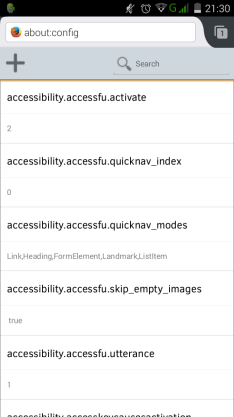
(1) Open firefox and type about:config into the address bar and tap Go. You will see a page displayed like below.

Image showing the about config page

You may want to bookmark this for easier future access.

(2) In the search bar, type down (for download) and wait for Firefox to filter the list.

(3) Scroll down to browser.download.folderList and tap it to display the editing controls. Change the value from 1 to 2 (from “default always” to “last used folder”).

(4) Tap the large “+” above the list to add a new setting.

(5) On the right side, you see “Boolean” tap that and change to “String”.

(6) Name the new setting as browser.download.dir

(7) Below the name of the setting enter the file path for the folder location you want to use. In my instance I had created the folder Download on the external SD. For example:

/mnt/external_sd/Download

(8) Once you have entered the file path tap return and then tap Create.

From this point on when you download something it should go to the folder you have specified.

How to create a running total in SQL

Below is a simple example of how to create a running total in T-SQL using a self-join.

The total is created by summing the preceding values, the precedence of which is determined by, in this instance, the sale date field.

A date field, or another unique order field, is required for this technique to work otherwise all the values would be summed at once, based on grouping, and the summed value would be displayed for each relevant record.

CREATE TABLE #Product (
Product_ID INT
,Product VARCHAR(10)
)

CREATE TABLE #Sale (
    Product_ID INT
    ,SaleAmount MONEY
    ,SaleDate DATETIME
    )

INSERT INTO #Product
VALUES (
    1
    ,'Bike'
    )
    ,(
    2
    ,'Car'
    )
    ,(
    3
    ,'Truck'
    )


INSERT INTO #Sale
VALUES (
    1
    ,10
    ,'20150101 12:00:00.000'
    )
    ,(
    1
    ,10
    ,'20150102 13:00:00.000'
    )
    ,(
    2
    ,20
    ,'20150101 13:00:00.000'
    )
    ,(
    2
    ,30
    ,'20150101 14:00:00.000'
    )
    ,(
    3
    ,30
    ,'20150101 12:00:00.000'
    )

SELECT a.Product_ID
    ,p.Product
    ,a.SaleAmount
    ,SUM(b.SaleAmount) AS RunningTotal
    ,a.SaleDate
FROM #Sale AS a
INNER JOIN #Product AS p ON a.Product_ID = p.Product_ID   
LEFT JOIN #Sale AS b ON a.Product_ID = b.Product_ID
    AND b.SaleDate <= a.SaleDate
GROUP BY a.Product_ID
    ,p.Product
    ,a.SaleAmount
    ,a.SaleDate


DROP TABLE #Sale
DROP TABLE #Product