Tag Archives: tutorial

How to save game scores in Corona SDK by writing to a file.

The scope of this tutorial will be to record and store the highest score achieved by a player in a game. This is done by:

  • Creating a file with a score of zero where the file does not exists.
  • When a player dies:
    • The previous score, i.e. value within the file, is assigned to a variable.
    • The player’s new score is assigned to a variable.
  • The two variables are compared.
  • If the previous score is higher nothing is changed.
  • If the previous score is lower the new score will be written to the file in its place.

Note:

No UI is provided as part of the tutorial as corona sdk often changes the manner in which objects are displayed, meaning the UI could break with future corona sdk versions. We will be working from the simulator output window alone.

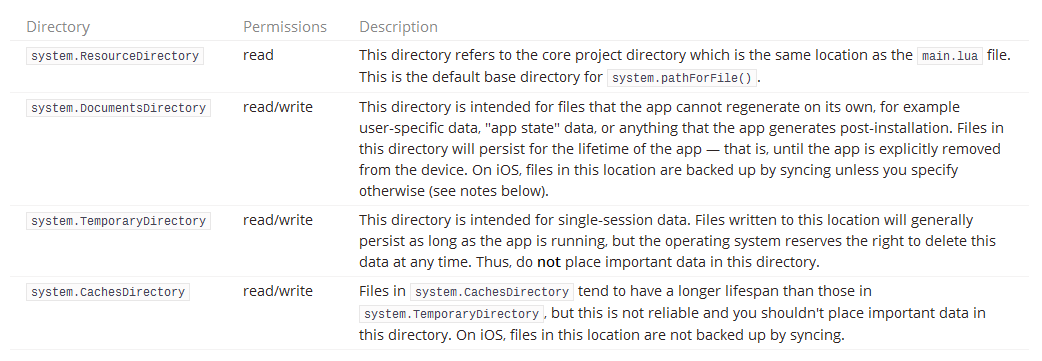
For security reasons, you are not allowed to write files in the system.ResourceDirectory (the directory where the application is stored). You must specify either system.DocumentsDirectory, system.TemporaryDirectory, or system.CachesDirectory in the system.pathForFile() function when opening the file for writing. Read move about this here.

Below is a table describing when and where each directory should be used.

systemDirectoriesTo use this tutorial create a folder containing a main.lua file.
Paste the code below into the file and save.
Open the file with Corona SDK and the score.txt file will be created and populated with a score of zero.

Play around with the Player Score variable:
newScore = 99

Enter a higher score and it will overwrite what currently exists in the file.

Enter a lower score and nothing will be changed.

-- main.lua

local path = system.pathForFile( "score.txt", system.DocumentsDirectory )

deleteFile = function()
 local result, reason = os.remove(path) 
	if result then
		print( "File removed" )
	else
		print( "File does not exist", reason )  --> score.txt: No such file or directory
	end
end

--[[ 
Uncomment below to remove file
--]]

--deleteFile()

-- Player Score

newScore = 99

-- io.open opens a file at path. returns nil if no file found
-- fh short for file handle
-- "r" is the read instruction
local fh, reason = io.open( path, "r" )

if fh then
    -- Read all contents of file into a variable oldScore
	-- This will be the previous score
	-- To read file content as number use "*number"
	-- To read file content as text use "*a"
	-- "\n" new line
    local oldScore = fh:read( "*number" )
    print( "Old contents of " .. path .. "\n" .. oldScore )
	
	if oldScore < newScore then
		-- re-opening the file in "w+" mode will erase all previous data stored in the file
		-- in the comments below is a table listing all the file mode types
		fh = io.open( path, "w+" )
		-- Set the score to the player's new score.
		fh:write( newScore )
		print( "New contents of " .. path .. "\n" .. newScore )
	end	
else
	-- Error logic
    print( "Reason open failed: " .. reason )  -- display failure message in terminal

    -- create file because it doesn't exist yet
    fh = io.open( path, "w" )

    if fh then
        print( "Created file" )
    else
        print( "Create file failed!" )
    end
	
	-- Set the score to zero.
    fh:write( 0 )

end

io.close( fh )

--[[
The various file modes are listed in the following table:

"r"	Read-only mode and is the default mode where an existing file is opened.
"w"	Write enabled mode that overwites existing file or creates a new file.
"a"	Append mode that opens an existing file or a creates a new file for appending.
"r+" Read and write mode for an existing file.
"w+" All existing data is removed if file exists or new file is created with read write permissions.
"a+" Append mode with read mode enabled that opens an existing file or creates a new file.

]]--

See the lua online book’s I/O library section for more information on working with files.

How to export a table as an XML file using a SQL script

Below is a script that will allow you, as the title suggests, to export a table as an XML file.

By use of the find and replace function in your preferred text editor, or by way of the text editor in SSMS, input your values for the required fields, i.e. replace TableName with the name of the table you will be working off.

SERVER NAME: ServerName

DATABASE NAME: DatabaseName

SCHEMA NAME: SchemaName

TABLE NAME: TableName

SAVE LOCATION ADDRESS: AddressName

FILE NAME: FileName (Excluding .xml extension)

Then run the script below and the table will be exported as an XML file to the location and file name of your choosing.

/*
FIND AND REPLACE:

SERVER NAME: ServerName
DATABASE NAME: DatabaseName 
SCHEMA NAME: SchemaName
TABLE NAME: TableName
SAVE LOCATION ADDRESS: AddressName
FILE NAME: FileName
 */
-- Run on ServerName
USE DatabaseName;
GO

DECLARE @saveLocation AS VARCHAR(510)
DECLARE @nameOfFile AS VARCHAR(255)
DECLARE @instanceName AS VARCHAR(255)
DECLARE @cmd NVARCHAR(1020)

SET @saveLocation = 'AddressName'
SET @nameOfFile = 'FileName'
SET @saveLocation = @saveLocation + '\' + @nameOfFile + '.xml'
SET @instanceName = (
		SELECT @@servername
		)

-- Please note that the fully qualified table name is needed
SELECT @cmd = '
    bcp "SELECT * FROM [DatabaseName].[SchemaName].[TableName] row for xml auto, root(''rows''), elements" ' + 'queryout "' + @saveLocation + '" -S ' + @instanceName + ' -T -w -r -t';

EXEC xp_cmdshell @cmd;
GO


This script is enabled by two utilities xp_cmdshell and BCP.

For an explanation of each please view the associated links.

How to enable and disable xp_cmdshell

xp_cmdshell is an extended stored procedure provided by Microsoft and stored in the master database. This procedure allows you to issue operating system commands directly to the Windows command shell via T-SQL code.

By default, the xp_cmdshell option is disabled on new installations. Along with other unwanted behavior malicious users can elevate their privileges with the use of xp_cmdshell. For this reason it is generally recommend to leave xp_cmdshell disabled. It can be enabled by using the Policy-Based Management or by running the sp_configure system stored procedure as shown in the following code example:

Use Master
GO

EXEC master.dbo.sp_configure 'show advanced options', 1
RECONFIGURE WITH OVERRIDE
GO

EXEC master.dbo.sp_configure 'xp_cmdshell', 1
RECONFIGURE WITH OVERRIDE
GO


To disable xp_cmdshell use the following code example. Note: The following example also sets show advanced options server configuration option to 0. It is best practice to leave this option in the default state of 0 to stop the enabling of features.

Use Master
GO

EXEC master.dbo.sp_configure 'xp_cmdshell', 0
RECONFIGURE WITH OVERRIDE
GO

EXEC master.dbo.sp_configure 'show advanced options', 0
RECONFIGURE WITH OVERRIDE
GO

How to populate a temp table with the days in a month

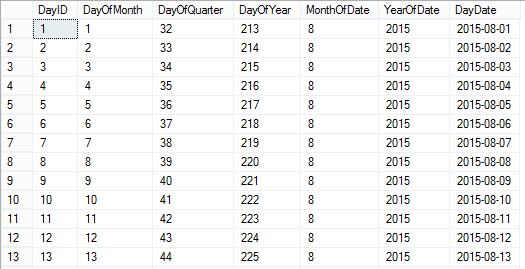
As described in the title this is a dynamic sql script that will populate a temp table with the day dates of the current month as outputted below:

calendarTableTo create a temporary calendar table for a greater period of time than just the current month:

Set @startDate to any historical date and @numberOfLoops to any number you like (365 being a year from the @startdate).

To make the table persistent:

Remove the # signs from the #calendarTable temp table referenced and rename the table accordingly.

You could also remove any columns you do not need.

IF OBJECT_ID('tempdb..#calendarTable') IS NOT NULL
	DROP TABLE #calendarTable;
	GO

CREATE TABLE #calendarTable (
	"DayID" INT
	,"DayOfMonth" INT
	,"DayOfQuarter" INT
	,"DayOfYear" INT
	,"MonthOfDate" INT
	,"YearOfDate" INT
	,"DayDate" DATE
	,PRIMARY KEY (DayID)
	)

DECLARE @startDate AS DATE
DECLARE @baseDate DATE
	,@offSet INT
	,@numberOfLoops INT

/*
To create a temporary calendar table:
Set @startDate to any historical date 
and @numberOfLoops to any number you like 
(365 being a year from the @startdate)

To make the table persistent remove the # signs 
from the #calendarTable temp table referenced 
*/
SET @startDate = GETUTCDATE() /*'20150101'*/
SET @baseDate = DATEADD(MONTH, DATEDIFF(MONTH, 0, @startDate), 0)
SET @offSet = 0
SET @numberOfLoops = DATEDIFF(DAY, @baseDate, DATEADD(MONTH, 1, @baseDate)) /*365*/

WHILE (@offSet < @numberOfLoops)
BEGIN
	INSERT INTO #calendarTable (
		"DayID"
		,"DayOfMonth"
		,"DayOfQuarter"
		,"DayOfYear"
		,"MonthOfDate"
		,"YearOfDate"
		,"DayDate"
		)
	SELECT (@offSet + 1)
		,DATEPART(DAY, DATEADD(DAY, @offSet, @baseDate))
		,DATEDIFF(D, DATEADD(QQ, DATEDIFF(QQ, 0, DATEADD(DAY, @offSet, @baseDate)), 0), DATEADD(DAY, @offSet, @baseDate)) + 1
		,DATEPART(DAYOFYEAR, DATEADD(DAY, @offSet, @baseDate))
		,DATEPART(MONTH, DATEADD(DAY, @offSet, @baseDate))
		,DATEPART(YEAR, DATEADD(DAY, @offSet, @baseDate))
		,DATEADD(DAY, @offSet, @baseDate)

	SET @offSet = @offSet + 1
END

SELECT *
FROM #calendarTable

How to fix an SSRS Report that cannot find stored procedure fields or parameters while displaying the define query parameters window

When setting up your data sets in an SSRS report if you are using a complicated stored procedure, i.e. a SP which relies on dynamic SQL, temp tables or finishes with an IF statement, chances are the SSRS report will not be able to figure out what the SP returns. When this happens you will not be able to populate the data set with data.

This happens because the execution plan of the SSRS software isn’t smart enough and won’t be able to determine what fields the SP creates and therefore will not be able to create a means of storing the data on the report end.

Subsequently you’ll see the, often misleading, table below popup.


SSRS Pop up Define Query Parameters

The solution to stop this from happening is quite simple, but considering how expensive this software is it’s a solution that shouldn’t have to be employed.

The solution is to trick the SSRS software by simplifying the SP. Basically perform a select on the specific fields you need with no additional logic or create a table with the exact fields you need with corresponding data types and select from that.

Use this dumb SP to populate the dataset in the SSRS report.

In the “Choose a data source and create a query” window as below, click refresh fields.

SSRS window refresh fields
The software should now pick up the fields.
Change the SP back to the way it was before and do not refresh the fields again in the SSRS software and the fields should continue to populate as you need them.

How to pass a multi-value parameter to a stored procedure from a SSRS Report

When you allow for multiple field values to be selected in a SSRS report there needs to be additional logic added to the back end to deal with this.

This is best explained with an example scenario.

I have a table called Ireland with two columns, ID_Column and County. You can use the script below to create and populate this table. Run the query below to follow the working example.

CREATE DATABASE [TEST_DB];

USE [TEST_DB];
GO

/****** Object:  Table [dbo].[Ireland]    Script Date: 07/15/2015 10:49:49 ******/
SET ANSI_NULLS ON
GO

SET QUOTED_IDENTIFIER ON
GO

SET ANSI_PADDING ON
GO

CREATE TABLE [dbo].[Ireland] (
	[ID_Column] [int] IDENTITY(1, 1) NOT NULL
	,[County] [varchar](9) NULL
	,PRIMARY KEY CLUSTERED ([ID_Column] ASC) WITH (
		PAD_INDEX = OFF
		,STATISTICS_NORECOMPUTE = OFF
		,IGNORE_DUP_KEY = OFF
		,ALLOW_ROW_LOCKS = ON
		,ALLOW_PAGE_LOCKS = ON
		) ON [PRIMARY]
	) ON [PRIMARY]
GO

SET ANSI_PADDING OFF
GO

SET IDENTITY_INSERT [dbo].[Ireland] ON

INSERT [dbo].[Ireland] ([ID_Column], [County]) VALUES (1, N'Antrim')
INSERT [dbo].[Ireland] ([ID_Column], [County]) VALUES (2, N'Armagh')
INSERT [dbo].[Ireland] ([ID_Column], [County]) VALUES (3, N'Carlow')
INSERT [dbo].[Ireland] ([ID_Column], [County]) VALUES (4, N'Cavan')
INSERT [dbo].[Ireland] ([ID_Column], [County]) VALUES (5, N'Clare')
INSERT [dbo].[Ireland] ([ID_Column], [County]) VALUES (6, N'Cork')
INSERT [dbo].[Ireland] ([ID_Column], [County]) VALUES (7, N'Derry')
INSERT [dbo].[Ireland] ([ID_Column], [County]) VALUES (8, N'Donegal')
INSERT [dbo].[Ireland] ([ID_Column], [County]) VALUES (9, N'Down')
INSERT [dbo].[Ireland] ([ID_Column], [County]) VALUES (10, N'Dublin')
INSERT [dbo].[Ireland] ([ID_Column], [County]) VALUES (11, N'Fermanagh')
INSERT [dbo].[Ireland] ([ID_Column], [County]) VALUES (12, N'Galway')
INSERT [dbo].[Ireland] ([ID_Column], [County]) VALUES (13, N'Kerry')
INSERT [dbo].[Ireland] ([ID_Column], [County]) VALUES (14, N'Kildare')
INSERT [dbo].[Ireland] ([ID_Column], [County]) VALUES (15, N'Kilkenny')
INSERT [dbo].[Ireland] ([ID_Column], [County]) VALUES (16, N'Laois')
INSERT [dbo].[Ireland] ([ID_Column], [County]) VALUES (17, N'Leitrim')
INSERT [dbo].[Ireland] ([ID_Column], [County]) VALUES (18, N'Limerick')
INSERT [dbo].[Ireland] ([ID_Column], [County]) VALUES (19, N'Longford')
INSERT [dbo].[Ireland] ([ID_Column], [County]) VALUES (20, N'Louth')
INSERT [dbo].[Ireland] ([ID_Column], [County]) VALUES (21, N'Mayo')
INSERT [dbo].[Ireland] ([ID_Column], [County]) VALUES (22, N'Meath')
INSERT [dbo].[Ireland] ([ID_Column], [County]) VALUES (23, N'Monaghan')
INSERT [dbo].[Ireland] ([ID_Column], [County]) VALUES (24, N'Offaly')
INSERT [dbo].[Ireland] ([ID_Column], [County]) VALUES (25, N'Roscommon')
INSERT [dbo].[Ireland] ([ID_Column], [County]) VALUES (26, N'Sligo')
INSERT [dbo].[Ireland] ([ID_Column], [County]) VALUES (27, N'Tipperary')
INSERT [dbo].[Ireland] ([ID_Column], [County]) VALUES (28, N'Tyrone')
INSERT [dbo].[Ireland] ([ID_Column], [County]) VALUES (29, N'Waterford')
INSERT [dbo].[Ireland] ([ID_Column], [County]) VALUES (30, N'Westmeath')
INSERT [dbo].[Ireland] ([ID_Column], [County]) VALUES (31, N'Wexford')
INSERT [dbo].[Ireland] ([ID_Column], [County]) VALUES (32, N'Wicklow')
SET IDENTITY_INSERT [dbo].[Ireland] OFF


If I wanted to allow a user to select every county from the Ireland table in an SSRS report I would create a stored procedure that simply executes the following query.

SELECT * FROM Ireland


However an SSRS report which allows users to choose counties in Ireland like below means that a WHERE clause needs to be introduced and be able to respond to the field values selected.
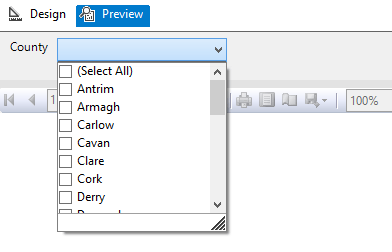
Image showing an SSRS report parameter options

But the issue is that the SSRS report will pass the multi-valued parameter as a string with the values separated by a comma.

So instead of receiving the required: ‘Antrim’, ‘Armagh’, ‘Carlow’, ‘Cavan’ etc. for use in the WHERE clause.

SQL Server is passed: ‘Antrim, Armagh, Carlow, Cavan’ etc. which cannot be used.

So the first additional logic and code to be added to the back end to deal with the multi-value parameter is a User Defined Function (UDF) which splits the parameter. The following function and quotations are taken from the 4guysfromrolla website.

Function Scope:

“There are generally two parameters to a split function: the list to split and the character(s) to split on, the delimiter. In the following function we begin by declaring our input variables – @List, the list to split, and @SplitOn, the delimiter(s) to split on. The return value of this UDF is a table with two fields: Id, an identity column, and Value, an nvarchar(100) column.”

Function Logic:

“The main body of the function simply loops through the string finding the first occurrence of the delimiter on each pass. Once the delimiter has been found, the string is broken into two pieces. The first piece is inserted into the result table while the second piece replaces the original list. The loop continues until no more occurrences of the delimiter are found. Lastly, the remainder of the list is added to the result table. Return the table and you have a split function.”

Run the query below to follow the working example.

USE [TEST_DB];
GO

CREATE FUNCTION [dbo].[Split] (
	@List NVARCHAR(2000)
	,@SplitOn NVARCHAR(5)
	)
RETURNS @RtnValue TABLE (
	Id INT identity(1, 1)
	,Value NVARCHAR(100)
	)
AS
BEGIN
	WHILE (Charindex(@SplitOn, @List) > 0)
	BEGIN
		INSERT INTO @RtnValue (value)
		SELECT Value = ltrim(rtrim(Substring(@List, 1, Charindex(@SplitOn, @List) - 1)))

		SET @List = Substring(@List, Charindex(@SplitOn, @List) + len(@SplitOn), len(@List))
	END

	INSERT INTO @RtnValue (Value)
	SELECT Value = ltrim(rtrim(@List))

	RETURN
END


(For a line by line break down of the function please see the webpage.)

Now that the split function exits within the database it is now possible to use a Stored Procedure to SELECT from the Ireland table pulling back specific counties by way of a WHERE clause.

Run the query below to follow the working example.

USE Test_DB;
GO

IF OBJECT_ID('[GetCounties]') IS NULL
	EXEC ('CREATE PROCEDURE dbo.[GetCounties] AS SELECT 1')
GO

ALTER PROCEDURE [dbo].[GetCounties] @County VARCHAR(MAX)
AS
	/*

NAME OF SP: GetCounties
Author:		Bloggins86
Date:		15/07/2015
Purpose:	Test multi-parameter select

*/
	------------------------------------------------------
	------------------------------------------------------
	--INSERT STORED PROCEDURE LOGIC HERE
	SELECT *
	FROM Ireland
	WHERE County IN (SELECT Value FROM dbo.Split(@County, ','))

	------------------------------------------------------
	------------------------------------------------------


Now that the populated table, split function and county select SP exists run the query below passing a string with multiple counties to return Dublin, Meath and Cork from the Ireland Table.

EXEC dbo.[GetCounties] 'Dublin, Meath, Cork'


You should now have returned the table with Dublin, Meath and Cork as separate row entries.

And that’s it, thanks for reading.

How to map the table structure of all Databases in a SQL Server Instance

Below is a T-SQL script that will return the following fields for each table from each database located in a SQL Server Instance:

  • ServerName
  • DatabaseName
  • SchemaName
  • TableName
  • ColumnName
  • KeyType

The output is provided in a table format with these additional formatted lines of text which can be used as queries or as part of queries.

  • A Select table query
  • A Select column query
  • Each column bracketed
  • Each table and column bracketed

This query is especially useful from a reporting perspective for a DBA or SQL developer unfamiliar with the structure of the database they are querying. The table returned by the query can be exported to excel. Using excels filter option applied to the columns of the table makes finding and selecting specific tables and columns very easy.

This process can be repeated for every database server used by the business to generate a single mapped servers master excel file allowing the user to find any table or column available to the organization quickly.

Applying some colour coding like below adds to the ease of use.

Image of excel file with mapped database server structure

How to use:

Simply open SQL Server management studio and from object explorer right click on the server name and select new query. This will open a window set to the master database of the server. Copy and paste the SQL below into this SQL Server window and execute. When the query is finished you will have created the table above.

/*
SCRIPT UPDATED
20180316
*/

USE [master]
GO

/*DROP TEMP TABLES IF THEY EXIST*/
IF OBJECT_ID('tempdb..#DatabaseList') IS NOT NULL
	DROP TABLE #DatabaseList;

IF OBJECT_ID('tempdb..#TableStructure') IS NOT NULL
	DROP TABLE #TableStructure;

IF OBJECT_ID('tempdb..#ErrorTable') IS NOT NULL
	DROP TABLE #ErrorTable;

IF OBJECT_ID('tempdb..#MappedServer') IS NOT NULL
	DROP TABLE #MappedServer;

DECLARE @ServerName AS SYSNAME

SET @ServerName = @@SERVERNAME

CREATE TABLE #DatabaseList (
	Id INT NOT NULL IDENTITY(1, 1) PRIMARY KEY
	,ServerName SYSNAME
	,DbName SYSNAME
	);

CREATE TABLE [#TableStructure] (
	[DbName] SYSNAME
	,[SchemaName] SYSNAME
	,[TableName] SYSNAME
	,[ColumnName] SYSNAME
	,[KeyType] CHAR(7)
	) ON [PRIMARY];

/*THE ERROR TABLE WILL STORE THE DYNAMIC SQL THAT DID NOT WORK*/
CREATE TABLE [#ErrorTable] ([SqlCommand] VARCHAR(MAX)) ON [PRIMARY];

/*
A LIST OF DISTINCT DATABASE NAMES IS CREATED
THESE TWO COLUMNS ARE STORED IN THE #DatabaseList TEMP TABLE
THIS TABLE IS USED IN A FOR LOOP TO GET EACH DATABASE NAME
*/
INSERT INTO #DatabaseList (
	ServerName
	,DbName
	)
SELECT @ServerName
	,NAME AS DbName
FROM master.dbo.sysdatabases WITH (NOLOCK)
WHERE NAME <> 'tempdb'
ORDER BY NAME ASC

/*VARIABLES ARE DECLARED FOR USE IN THE FOLLOWING FOR LOOP*/
DECLARE @sqlCommand AS VARCHAR(MAX)
DECLARE @DbName AS SYSNAME
DECLARE @i AS INT
DECLARE @z AS INT

SET @i = 1
SET @z = (
		SELECT COUNT(*) + 1
		FROM #DatabaseList
		)

/*WHILE 1 IS LESS THAN THE NUMBER OF DATABASE NAMES IN #DatabaseList*/
WHILE @i < @z
BEGIN
	/*GET NEW DATABASE NAME*/
	SET @DbName = (
			SELECT [DbName]
			FROM #DatabaseList
			WHERE Id = @i
			)
	/*CREATE DYNAMIC SQL TO GET EACH TABLE NAME AND COLUMN NAME FROM EACH DATABASE*/
	SET @sqlCommand = 'USE [' + @DbName + '];' + '

INSERT INTO [#TableStructure]
SELECT DISTINCT' + '''' + @DbName + '''' + ' AS DbName
	,SCHEMA_NAME(SCHEMA_ID) AS SchemaName
	,T.NAME AS TableName	
	,C.NAME AS ColumnName
	,CASE 
		WHEN OBJECTPROPERTY(OBJECT_ID(iskcu.CONSTRAINT_NAME), ''IsPrimaryKey'') = 1 
			THEN ''Primary'' 
		WHEN OBJECTPROPERTY(OBJECT_ID(iskcu.CONSTRAINT_NAME), ''IsForeignKey'') = 1 
			THEN ''Foreign''
		ELSE NULL 
		END AS ''KeyType''
FROM SYS.TABLES AS t WITH (NOLOCK)
INNER JOIN SYS.COLUMNS C ON T.OBJECT_ID = C.OBJECT_ID
LEFT JOIN INFORMATION_SCHEMA.KEY_COLUMN_USAGE AS iskcu WITH (NOLOCK) 
ON SCHEMA_NAME(SCHEMA_ID) = iskcu.TABLE_SCHEMA 
	AND T.NAME = iskcu.TABLE_NAME
	AND C.NAME = iskcu.COLUMN_NAME
ORDER BY SchemaName ASC
	,TableName ASC
	,ColumnName ASC;
';

	/*ERROR HANDLING*/
	BEGIN TRY
		EXEC (@sqlCommand)
	END TRY

	BEGIN CATCH
		INSERT INTO #ErrorTable
		SELECT (@sqlCommand)
	END CATCH

	SET @i = @i + 1
END

/*
JOIN THE TEMP TABLES TOGETHER TO CREATE A MAPPED STRUCTURE OF THE SERVER
ADDITIONAL FIELDS ARE ADDED TO MAKE SELECTING TABLES AND FIELDS EASIER
*/
SELECT DISTINCT @@SERVERNAME AS ServerName
	,DL.DbName
	,TS.SchemaName
	,TS.TableName
	,TS.ColumnName
	,TS.[KeyType]
	,',' + QUOTENAME(TS.ColumnName) AS BracketedColumn
	,',' + QUOTENAME(TS.TableName) + '.' + QUOTENAME(TS.ColumnName) AS BracketedTableAndColumn
	,'SELECT * FROM ' + QUOTENAME(DL.DbName) + '.' + QUOTENAME(TS.SchemaName) + '.' + QUOTENAME(TS.TableName) + '--WHERE --GROUP BY --HAVING --ORDER BY' AS [SelectTable]
	,'SELECT ' + QUOTENAME(TS.TableName) + '.' + QUOTENAME(TS.ColumnName) + ' FROM ' + QUOTENAME(DL.DbName) + '.' + QUOTENAME(TS.SchemaName) + '.' + QUOTENAME(TS.TableName) + '--WHERE --GROUP BY --HAVING --ORDER BY' AS [SelectColumn]
INTO #MappedServer
FROM [#DatabaseList] AS DL
INNER JOIN [#TableStructure] AS TS ON DL.DbName = TS.DbName
ORDER BY DL.DbName ASC
	,TS.SchemaName ASC
	,TS.TableName ASC
	,TS.ColumnName ASC

/*
HOUSE KEEPING
*/
IF OBJECT_ID('tempdb..#DatabaseList') IS NOT NULL
	DROP TABLE #DatabaseList;

IF OBJECT_ID('tempdb..#TableStructure') IS NOT NULL
	DROP TABLE #TableStructure;

SELECT *
FROM #ErrorTable;

IF OBJECT_ID('tempdb..#ErrorTable') IS NOT NULL
	DROP TABLE #ErrorTable;

/*
THE DATA RETURNED CAN NOW BE EXPORTED TO EXCEL
USING A FILTERED SEARCH WILL NOW MAKE FINDING FIELDS A VERY EASY PROCESS
*/
SELECT ServerName
	,DbName
	,SchemaName
	,TableName
	,ColumnName
	,KeyType
	,BracketedColumn
	,BracketedTableAndColumn
	,SelectColumn
	,SelectTable
FROM #MappedServer
ORDER BY DbName ASC
	,SchemaName ASC
	,TableName ASC
	,ColumnName ASC;


Don’t drop that Stored Procedure, Alter it!

So when writing scripts to create tables you might often include some SQL like below to first assess whether or not the table exists before dropping it.

IF OBJECT_ID('Schema.TableName', 'U') IS NOT NULL
      DROP TABLE Schema.TableName
      GO


This might be because you are still testing data and want a table with a different structure to be created or to exist and be populated with different data while using the same table name. So it’s the right thing to do in that circumstance but you may be wrongly carrying that thinking forward into creating stored procedures and user defined functions.

By dropping an SP or UDF you are also breaking any securities or permissions associated with that SP or UDF meaning these permissions etc. will have to be created again.

But for SPs and UDFs you don’t actually need to drop the SP or UDF you just want to change it if it exists. In which case you use Alter rather than Create. However what if you are unaware as to whether the SP or UDF actually exists?

I propose creating dummy SP’s or UDF’s in their place which will simply be over written as demonstrated below.

-- ALTER STORED PROCEDURE
-- THIS DUMMY SP JUST SELECTS 1
IF OBJECT_ID('[Schema].[NameOfStoreProcedure]') IS NULL
	EXEC ('CREATE PROCEDURE [Schema].[NameOfStoreProcedure] AS SELECT 1')
GO

ALTER PROCEDURE [Schema].[NameOfStoreProcedure] @DateParameter DATE
	,@IntParameter INT
	,@CharParameter VARCHAR(30)
AS
BEGIN
	------------------------------------------------------
	------------------------------------------------------
	--INSERT STORED PROCEDURE LOGIC HERE
	--E.G.
	SELECT 1
	------------------------------------------------------
	------------------------------------------------------
	
END;
GO

-- ALTER FUNCTION
-- THIS DUMMY UDF SIMPLY SETS THE PARAMETER @INT TO 1
IF OBJECT_ID('[Schema].[NameOfFunction]') IS NULL
	EXEC ('
CREATE FUNCTION [Schema].[NameOfFunction] (@INT AS INT)
RETURNS INT
AS
BEGIN
	SELECT @INT = 1
	RETURN @INT
END
')
GO

ALTER FUNCTION [Schema].[NameOfFunction] (@INT AS INT)
RETURNS INT
AS
BEGIN
	SET @INT = @INT + 1
	RETURN @INT
END
GO

-- RUN FUNCTION TO SEE RESULT
SELECT [Schema].[NameOfFunction](10) AS ReturnedValue


How to find columns from all Tables of a Database

If your job is to create reports using SQL chances are you have or will encounter this situation:

You’ve been asked to prepare a report, but the person who has asked for the report simply has a list of fields they want and they have no idea where those fields come from. They may have received previous reports in the past, so they know the fields exist, but they cannot provide any of the SQL queries used to create these reports as an example.

You, the developer, may not be familiar with that particular area of the business or associated data sources. Possibly because you typically prepared financial reports and this request has come from the operations or marketing departments.

So the first step is to locate these columns within the database.

The following query will return the Table Name, Schema Name and Column Name from the database.

In the example below all instances where the column name equals CustomerID, OrderID, OrderDate will be returned. Also Column names that contain the word Status or Promotion will also be return. Simply change or add additional columns names as needed. 

USE [YourDatabaseName];
GO

SELECT T.NAME AS TableName
	,SCHEMA_NAME(SCHEMA_ID) AS SchemaName
	,C.NAME AS ColumnName
FROM SYS.TABLES AS t
INNER JOIN SYS.COLUMNS C ON T.OBJECT_ID = C.OBJECT_ID
WHERE C.NAME = 'CustomerID'
	OR C.NAME = 'OrderID'
	OR C.NAME = 'OrderDate'
	OR C.NAME LIKE '%Status%'
	OR C.NAME LIKE '%Promotion%'
ORDER BY SchemaName
	,TableName;


That should help get you started in preparing the report.