Tag Archives: lesson

How to fix an SSRS Report that cannot find stored procedure fields or parameters while displaying the define query parameters window

When setting up your data sets in an SSRS report if you are using a complicated stored procedure, i.e. a SP which relies on dynamic SQL, temp tables or finishes with an IF statement, chances are the SSRS report will not be able to figure out what the SP returns. When this happens you will not be able to populate the data set with data.

This happens because the execution plan of the SSRS software isn’t smart enough and won’t be able to determine what fields the SP creates and therefore will not be able to create a means of storing the data on the report end.

Subsequently you’ll see the, often misleading, table below popup.


SSRS Pop up Define Query Parameters

The solution to stop this from happening is quite simple, but considering how expensive this software is it’s a solution that shouldn’t have to be employed.

The solution is to trick the SSRS software by simplifying the SP. Basically perform a select on the specific fields you need with no additional logic or create a table with the exact fields you need with corresponding data types and select from that.

Use this dumb SP to populate the dataset in the SSRS report.

In the “Choose a data source and create a query” window as below, click refresh fields.

SSRS window refresh fields
The software should now pick up the fields.
Change the SP back to the way it was before and do not refresh the fields again in the SSRS software and the fields should continue to populate as you need them.

How to pass a multi-value parameter to a stored procedure from a SSRS Report

When you allow for multiple field values to be selected in a SSRS report there needs to be additional logic added to the back end to deal with this.

This is best explained with an example scenario.

I have a table called Ireland with two columns, ID_Column and County. You can use the script below to create and populate this table. Run the query below to follow the working example.

CREATE DATABASE [TEST_DB];

USE [TEST_DB];
GO

/****** Object:  Table [dbo].[Ireland]    Script Date: 07/15/2015 10:49:49 ******/
SET ANSI_NULLS ON
GO

SET QUOTED_IDENTIFIER ON
GO

SET ANSI_PADDING ON
GO

CREATE TABLE [dbo].[Ireland] (
	[ID_Column] [int] IDENTITY(1, 1) NOT NULL
	,[County] [varchar](9) NULL
	,PRIMARY KEY CLUSTERED ([ID_Column] ASC) WITH (
		PAD_INDEX = OFF
		,STATISTICS_NORECOMPUTE = OFF
		,IGNORE_DUP_KEY = OFF
		,ALLOW_ROW_LOCKS = ON
		,ALLOW_PAGE_LOCKS = ON
		) ON [PRIMARY]
	) ON [PRIMARY]
GO

SET ANSI_PADDING OFF
GO

SET IDENTITY_INSERT [dbo].[Ireland] ON

INSERT [dbo].[Ireland] ([ID_Column], [County]) VALUES (1, N'Antrim')
INSERT [dbo].[Ireland] ([ID_Column], [County]) VALUES (2, N'Armagh')
INSERT [dbo].[Ireland] ([ID_Column], [County]) VALUES (3, N'Carlow')
INSERT [dbo].[Ireland] ([ID_Column], [County]) VALUES (4, N'Cavan')
INSERT [dbo].[Ireland] ([ID_Column], [County]) VALUES (5, N'Clare')
INSERT [dbo].[Ireland] ([ID_Column], [County]) VALUES (6, N'Cork')
INSERT [dbo].[Ireland] ([ID_Column], [County]) VALUES (7, N'Derry')
INSERT [dbo].[Ireland] ([ID_Column], [County]) VALUES (8, N'Donegal')
INSERT [dbo].[Ireland] ([ID_Column], [County]) VALUES (9, N'Down')
INSERT [dbo].[Ireland] ([ID_Column], [County]) VALUES (10, N'Dublin')
INSERT [dbo].[Ireland] ([ID_Column], [County]) VALUES (11, N'Fermanagh')
INSERT [dbo].[Ireland] ([ID_Column], [County]) VALUES (12, N'Galway')
INSERT [dbo].[Ireland] ([ID_Column], [County]) VALUES (13, N'Kerry')
INSERT [dbo].[Ireland] ([ID_Column], [County]) VALUES (14, N'Kildare')
INSERT [dbo].[Ireland] ([ID_Column], [County]) VALUES (15, N'Kilkenny')
INSERT [dbo].[Ireland] ([ID_Column], [County]) VALUES (16, N'Laois')
INSERT [dbo].[Ireland] ([ID_Column], [County]) VALUES (17, N'Leitrim')
INSERT [dbo].[Ireland] ([ID_Column], [County]) VALUES (18, N'Limerick')
INSERT [dbo].[Ireland] ([ID_Column], [County]) VALUES (19, N'Longford')
INSERT [dbo].[Ireland] ([ID_Column], [County]) VALUES (20, N'Louth')
INSERT [dbo].[Ireland] ([ID_Column], [County]) VALUES (21, N'Mayo')
INSERT [dbo].[Ireland] ([ID_Column], [County]) VALUES (22, N'Meath')
INSERT [dbo].[Ireland] ([ID_Column], [County]) VALUES (23, N'Monaghan')
INSERT [dbo].[Ireland] ([ID_Column], [County]) VALUES (24, N'Offaly')
INSERT [dbo].[Ireland] ([ID_Column], [County]) VALUES (25, N'Roscommon')
INSERT [dbo].[Ireland] ([ID_Column], [County]) VALUES (26, N'Sligo')
INSERT [dbo].[Ireland] ([ID_Column], [County]) VALUES (27, N'Tipperary')
INSERT [dbo].[Ireland] ([ID_Column], [County]) VALUES (28, N'Tyrone')
INSERT [dbo].[Ireland] ([ID_Column], [County]) VALUES (29, N'Waterford')
INSERT [dbo].[Ireland] ([ID_Column], [County]) VALUES (30, N'Westmeath')
INSERT [dbo].[Ireland] ([ID_Column], [County]) VALUES (31, N'Wexford')
INSERT [dbo].[Ireland] ([ID_Column], [County]) VALUES (32, N'Wicklow')
SET IDENTITY_INSERT [dbo].[Ireland] OFF


If I wanted to allow a user to select every county from the Ireland table in an SSRS report I would create a stored procedure that simply executes the following query.

SELECT * FROM Ireland


However an SSRS report which allows users to choose counties in Ireland like below means that a WHERE clause needs to be introduced and be able to respond to the field values selected.
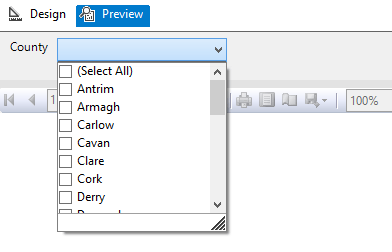
Image showing an SSRS report parameter options

But the issue is that the SSRS report will pass the multi-valued parameter as a string with the values separated by a comma.

So instead of receiving the required: ‘Antrim’, ‘Armagh’, ‘Carlow’, ‘Cavan’ etc. for use in the WHERE clause.

SQL Server is passed: ‘Antrim, Armagh, Carlow, Cavan’ etc. which cannot be used.

So the first additional logic and code to be added to the back end to deal with the multi-value parameter is a User Defined Function (UDF) which splits the parameter. The following function and quotations are taken from the 4guysfromrolla website.

Function Scope:

“There are generally two parameters to a split function: the list to split and the character(s) to split on, the delimiter. In the following function we begin by declaring our input variables – @List, the list to split, and @SplitOn, the delimiter(s) to split on. The return value of this UDF is a table with two fields: Id, an identity column, and Value, an nvarchar(100) column.”

Function Logic:

“The main body of the function simply loops through the string finding the first occurrence of the delimiter on each pass. Once the delimiter has been found, the string is broken into two pieces. The first piece is inserted into the result table while the second piece replaces the original list. The loop continues until no more occurrences of the delimiter are found. Lastly, the remainder of the list is added to the result table. Return the table and you have a split function.”

Run the query below to follow the working example.

USE [TEST_DB];
GO

CREATE FUNCTION [dbo].[Split] (
	@List NVARCHAR(2000)
	,@SplitOn NVARCHAR(5)
	)
RETURNS @RtnValue TABLE (
	Id INT identity(1, 1)
	,Value NVARCHAR(100)
	)
AS
BEGIN
	WHILE (Charindex(@SplitOn, @List) > 0)
	BEGIN
		INSERT INTO @RtnValue (value)
		SELECT Value = ltrim(rtrim(Substring(@List, 1, Charindex(@SplitOn, @List) - 1)))

		SET @List = Substring(@List, Charindex(@SplitOn, @List) + len(@SplitOn), len(@List))
	END

	INSERT INTO @RtnValue (Value)
	SELECT Value = ltrim(rtrim(@List))

	RETURN
END


(For a line by line break down of the function please see the webpage.)

Now that the split function exits within the database it is now possible to use a Stored Procedure to SELECT from the Ireland table pulling back specific counties by way of a WHERE clause.

Run the query below to follow the working example.

USE Test_DB;
GO

IF OBJECT_ID('[GetCounties]') IS NULL
	EXEC ('CREATE PROCEDURE dbo.[GetCounties] AS SELECT 1')
GO

ALTER PROCEDURE [dbo].[GetCounties] @County VARCHAR(MAX)
AS
	/*

NAME OF SP: GetCounties
Author:		Bloggins86
Date:		15/07/2015
Purpose:	Test multi-parameter select

*/
	------------------------------------------------------
	------------------------------------------------------
	--INSERT STORED PROCEDURE LOGIC HERE
	SELECT *
	FROM Ireland
	WHERE County IN (SELECT Value FROM dbo.Split(@County, ','))

	------------------------------------------------------
	------------------------------------------------------


Now that the populated table, split function and county select SP exists run the query below passing a string with multiple counties to return Dublin, Meath and Cork from the Ireland Table.

EXEC dbo.[GetCounties] 'Dublin, Meath, Cork'


You should now have returned the table with Dublin, Meath and Cork as separate row entries.

And that’s it, thanks for reading.

How to map the table structure of all Databases in a SQL Server Instance

Below is a T-SQL script that will return the following fields for each table from each database located in a SQL Server Instance:

  • ServerName
  • DatabaseName
  • SchemaName
  • TableName
  • ColumnName
  • KeyType

The output is provided in a table format with these additional formatted lines of text which can be used as queries or as part of queries.

  • A Select table query
  • A Select column query
  • Each column bracketed
  • Each table and column bracketed

This query is especially useful from a reporting perspective for a DBA or SQL developer unfamiliar with the structure of the database they are querying. The table returned by the query can be exported to excel. Using excels filter option applied to the columns of the table makes finding and selecting specific tables and columns very easy.

This process can be repeated for every database server used by the business to generate a single mapped servers master excel file allowing the user to find any table or column available to the organization quickly.

Applying some colour coding like below adds to the ease of use.

Image of excel file with mapped database server structure

How to use:

Simply open SQL Server management studio and from object explorer right click on the server name and select new query. This will open a window set to the master database of the server. Copy and paste the SQL below into this SQL Server window and execute. When the query is finished you will have created the table above.

/*
SCRIPT UPDATED
20180316
*/

USE [master]
GO

/*DROP TEMP TABLES IF THEY EXIST*/
IF OBJECT_ID('tempdb..#DatabaseList') IS NOT NULL
	DROP TABLE #DatabaseList;

IF OBJECT_ID('tempdb..#TableStructure') IS NOT NULL
	DROP TABLE #TableStructure;

IF OBJECT_ID('tempdb..#ErrorTable') IS NOT NULL
	DROP TABLE #ErrorTable;

IF OBJECT_ID('tempdb..#MappedServer') IS NOT NULL
	DROP TABLE #MappedServer;

DECLARE @ServerName AS SYSNAME

SET @ServerName = @@SERVERNAME

CREATE TABLE #DatabaseList (
	Id INT NOT NULL IDENTITY(1, 1) PRIMARY KEY
	,ServerName SYSNAME
	,DbName SYSNAME
	);

CREATE TABLE [#TableStructure] (
	[DbName] SYSNAME
	,[SchemaName] SYSNAME
	,[TableName] SYSNAME
	,[ColumnName] SYSNAME
	,[KeyType] CHAR(7)
	) ON [PRIMARY];

/*THE ERROR TABLE WILL STORE THE DYNAMIC SQL THAT DID NOT WORK*/
CREATE TABLE [#ErrorTable] ([SqlCommand] VARCHAR(MAX)) ON [PRIMARY];

/*
A LIST OF DISTINCT DATABASE NAMES IS CREATED
THESE TWO COLUMNS ARE STORED IN THE #DatabaseList TEMP TABLE
THIS TABLE IS USED IN A FOR LOOP TO GET EACH DATABASE NAME
*/
INSERT INTO #DatabaseList (
	ServerName
	,DbName
	)
SELECT @ServerName
	,NAME AS DbName
FROM master.dbo.sysdatabases WITH (NOLOCK)
WHERE NAME <> 'tempdb'
ORDER BY NAME ASC

/*VARIABLES ARE DECLARED FOR USE IN THE FOLLOWING FOR LOOP*/
DECLARE @sqlCommand AS VARCHAR(MAX)
DECLARE @DbName AS SYSNAME
DECLARE @i AS INT
DECLARE @z AS INT

SET @i = 1
SET @z = (
		SELECT COUNT(*) + 1
		FROM #DatabaseList
		)

/*WHILE 1 IS LESS THAN THE NUMBER OF DATABASE NAMES IN #DatabaseList*/
WHILE @i < @z
BEGIN
	/*GET NEW DATABASE NAME*/
	SET @DbName = (
			SELECT [DbName]
			FROM #DatabaseList
			WHERE Id = @i
			)
	/*CREATE DYNAMIC SQL TO GET EACH TABLE NAME AND COLUMN NAME FROM EACH DATABASE*/
	SET @sqlCommand = 'USE [' + @DbName + '];' + '

INSERT INTO [#TableStructure]
SELECT DISTINCT' + '''' + @DbName + '''' + ' AS DbName
	,SCHEMA_NAME(SCHEMA_ID) AS SchemaName
	,T.NAME AS TableName	
	,C.NAME AS ColumnName
	,CASE 
		WHEN OBJECTPROPERTY(OBJECT_ID(iskcu.CONSTRAINT_NAME), ''IsPrimaryKey'') = 1 
			THEN ''Primary'' 
		WHEN OBJECTPROPERTY(OBJECT_ID(iskcu.CONSTRAINT_NAME), ''IsForeignKey'') = 1 
			THEN ''Foreign''
		ELSE NULL 
		END AS ''KeyType''
FROM SYS.TABLES AS t WITH (NOLOCK)
INNER JOIN SYS.COLUMNS C ON T.OBJECT_ID = C.OBJECT_ID
LEFT JOIN INFORMATION_SCHEMA.KEY_COLUMN_USAGE AS iskcu WITH (NOLOCK) 
ON SCHEMA_NAME(SCHEMA_ID) = iskcu.TABLE_SCHEMA 
	AND T.NAME = iskcu.TABLE_NAME
	AND C.NAME = iskcu.COLUMN_NAME
ORDER BY SchemaName ASC
	,TableName ASC
	,ColumnName ASC;
';

	/*ERROR HANDLING*/
	BEGIN TRY
		EXEC (@sqlCommand)
	END TRY

	BEGIN CATCH
		INSERT INTO #ErrorTable
		SELECT (@sqlCommand)
	END CATCH

	SET @i = @i + 1
END

/*
JOIN THE TEMP TABLES TOGETHER TO CREATE A MAPPED STRUCTURE OF THE SERVER
ADDITIONAL FIELDS ARE ADDED TO MAKE SELECTING TABLES AND FIELDS EASIER
*/
SELECT DISTINCT @@SERVERNAME AS ServerName
	,DL.DbName
	,TS.SchemaName
	,TS.TableName
	,TS.ColumnName
	,TS.[KeyType]
	,',' + QUOTENAME(TS.ColumnName) AS BracketedColumn
	,',' + QUOTENAME(TS.TableName) + '.' + QUOTENAME(TS.ColumnName) AS BracketedTableAndColumn
	,'SELECT * FROM ' + QUOTENAME(DL.DbName) + '.' + QUOTENAME(TS.SchemaName) + '.' + QUOTENAME(TS.TableName) + '--WHERE --GROUP BY --HAVING --ORDER BY' AS [SelectTable]
	,'SELECT ' + QUOTENAME(TS.TableName) + '.' + QUOTENAME(TS.ColumnName) + ' FROM ' + QUOTENAME(DL.DbName) + '.' + QUOTENAME(TS.SchemaName) + '.' + QUOTENAME(TS.TableName) + '--WHERE --GROUP BY --HAVING --ORDER BY' AS [SelectColumn]
INTO #MappedServer
FROM [#DatabaseList] AS DL
INNER JOIN [#TableStructure] AS TS ON DL.DbName = TS.DbName
ORDER BY DL.DbName ASC
	,TS.SchemaName ASC
	,TS.TableName ASC
	,TS.ColumnName ASC

/*
HOUSE KEEPING
*/
IF OBJECT_ID('tempdb..#DatabaseList') IS NOT NULL
	DROP TABLE #DatabaseList;

IF OBJECT_ID('tempdb..#TableStructure') IS NOT NULL
	DROP TABLE #TableStructure;

SELECT *
FROM #ErrorTable;

IF OBJECT_ID('tempdb..#ErrorTable') IS NOT NULL
	DROP TABLE #ErrorTable;

/*
THE DATA RETURNED CAN NOW BE EXPORTED TO EXCEL
USING A FILTERED SEARCH WILL NOW MAKE FINDING FIELDS A VERY EASY PROCESS
*/
SELECT ServerName
	,DbName
	,SchemaName
	,TableName
	,ColumnName
	,KeyType
	,BracketedColumn
	,BracketedTableAndColumn
	,SelectColumn
	,SelectTable
FROM #MappedServer
ORDER BY DbName ASC
	,SchemaName ASC
	,TableName ASC
	,ColumnName ASC;


Don’t drop that Stored Procedure, Alter it!

So when writing scripts to create tables you might often include some SQL like below to first assess whether or not the table exists before dropping it.

IF OBJECT_ID('Schema.TableName', 'U') IS NOT NULL
      DROP TABLE Schema.TableName
      GO


This might be because you are still testing data and want a table with a different structure to be created or to exist and be populated with different data while using the same table name. So it’s the right thing to do in that circumstance but you may be wrongly carrying that thinking forward into creating stored procedures and user defined functions.

By dropping an SP or UDF you are also breaking any securities or permissions associated with that SP or UDF meaning these permissions etc. will have to be created again.

But for SPs and UDFs you don’t actually need to drop the SP or UDF you just want to change it if it exists. In which case you use Alter rather than Create. However what if you are unaware as to whether the SP or UDF actually exists?

I propose creating dummy SP’s or UDF’s in their place which will simply be over written as demonstrated below.

-- ALTER STORED PROCEDURE
-- THIS DUMMY SP JUST SELECTS 1
IF OBJECT_ID('[Schema].[NameOfStoreProcedure]') IS NULL
	EXEC ('CREATE PROCEDURE [Schema].[NameOfStoreProcedure] AS SELECT 1')
GO

ALTER PROCEDURE [Schema].[NameOfStoreProcedure] @DateParameter DATE
	,@IntParameter INT
	,@CharParameter VARCHAR(30)
AS
BEGIN
	------------------------------------------------------
	------------------------------------------------------
	--INSERT STORED PROCEDURE LOGIC HERE
	--E.G.
	SELECT 1
	------------------------------------------------------
	------------------------------------------------------
	
END;
GO

-- ALTER FUNCTION
-- THIS DUMMY UDF SIMPLY SETS THE PARAMETER @INT TO 1
IF OBJECT_ID('[Schema].[NameOfFunction]') IS NULL
	EXEC ('
CREATE FUNCTION [Schema].[NameOfFunction] (@INT AS INT)
RETURNS INT
AS
BEGIN
	SELECT @INT = 1
	RETURN @INT
END
')
GO

ALTER FUNCTION [Schema].[NameOfFunction] (@INT AS INT)
RETURNS INT
AS
BEGIN
	SET @INT = @INT + 1
	RETURN @INT
END
GO

-- RUN FUNCTION TO SEE RESULT
SELECT [Schema].[NameOfFunction](10) AS ReturnedValue


How to find columns from all Tables of a Database

If your job is to create reports using SQL chances are you have or will encounter this situation:

You’ve been asked to prepare a report, but the person who has asked for the report simply has a list of fields they want and they have no idea where those fields come from. They may have received previous reports in the past, so they know the fields exist, but they cannot provide any of the SQL queries used to create these reports as an example.

You, the developer, may not be familiar with that particular area of the business or associated data sources. Possibly because you typically prepared financial reports and this request has come from the operations or marketing departments.

So the first step is to locate these columns within the database.

The following query will return the Table Name, Schema Name and Column Name from the database.

In the example below all instances where the column name equals CustomerID, OrderID, OrderDate will be returned. Also Column names that contain the word Status or Promotion will also be return. Simply change or add additional columns names as needed. 

USE [YourDatabaseName];
GO

SELECT T.NAME AS TableName
	,SCHEMA_NAME(SCHEMA_ID) AS SchemaName
	,C.NAME AS ColumnName
FROM SYS.TABLES AS t
INNER JOIN SYS.COLUMNS C ON T.OBJECT_ID = C.OBJECT_ID
WHERE C.NAME = 'CustomerID'
	OR C.NAME = 'OrderID'
	OR C.NAME = 'OrderDate'
	OR C.NAME LIKE '%Status%'
	OR C.NAME LIKE '%Promotion%'
ORDER BY SchemaName
	,TableName;


That should help get you started in preparing the report.

How to dynamically pull all text file names from a folder into a SQL Server table

So here’s a quick out of the box solution for . . . you guessed it, dynamically pulling all text files from a folder into a SQL Server table. On it’s own this script isn’t very powerful but it can be paired with SQL queries to make some powerful functionality.

To use simply change the @path variable to the directory path you’re targeting and as it states in the comments . . .

-- NOTE: MAKE SURE THE BACKSLASH IS INCLUDED AT THE END OF THE STRING
-- *.txt IS REFERENCED IN THIS EXAMPLE BUT *.xls COULD ALSO BE USED

Sayōnara


— THIS QUERY USES CMD TO CAPTURE ALL THE FILES IN A FOLDER
— AND WRITE THE FILE NAMES TO A TABLE
— THE QUERY REQUIRES THAT xp_cmdShell BE ENABLED TO WORK
— THE FOLLOWING ENABLES xp_cmdShell:
— TO ALLOW ADVANCED OPTIONS TO BE CHANGED
EXEC sp_configure 'show advanced options'
,1
GO
— TO UPDATE THE CURRENTLY CONFIGURED VALUE FOR ADVANCED OPTIONS
RECONFIGURE
GO
— TO ENABLE THE FEATURE
EXEC sp_configure 'xp_cmdshell'
,1
GO
— TO UPDATE THE CURRENTLY CONFIGURED VALUE FOR THIS FEATURE
RECONFIGURE
GO
— THE FOLLOWING CREATES A TABLE AND POPULATES IT WITH THE FILES LOCATED IN THE SPECIFIED DIRECTORY
IF OBJECT_ID('ALLFILENAMES', 'U') IS NOT NULL
DROP TABLE ALLFILENAMES
CREATE TABLE ALLFILENAMES (
WHICHPATH VARCHAR(255)
,WHICHFILE VARCHAR(255)
)
DECLARE @filename VARCHAR(255)
,@path VARCHAR(255)
,@cmd VARCHAR(1000)
— GET THE LIST OF FILES TO PROCESS
— NOTES: MAKE SURE THE BACKSLASH IS INCLUDED AT THE END OF THE STRING
— *.txt IS REFERENCED IN THIS EXAMPLE BUT *.xls COULD ALSO BE USED
SET @path = 'C:\Users\Data\'
SET @cmd = 'dir ' + @path + '*.txt /b'
INSERT INTO ALLFILENAMES (WHICHFILE)
EXEC Master..xp_cmdShell @cmd
UPDATE ALLFILENAMES
SET WHICHPATH = @path
WHERE WHICHPATH IS NULL
SELECT *
FROM ALLFILENAMES

How to increase the performance of your Android TV Stick

So basically all android TV sticks (ATS’s), boxes and any other android device you connect to your TV has been somewhat hacked together to deliver a product the Android OS wasn’t explicitly designed for. (Not that it doesn’t do a great job)

The Android OS was designed for mobile devices but what constitutes a mobile device?

Well one can differentiate a mobile device as a mobile device by two distinguishing characteristics, one it has a built-in display and two it’ll be battery powered.

Android mini computers have neither.

As mentioned above ATS’s use a TV for the display and often ATS’s don’t have the drivers needed to recognised touch screen inputs. No touch screen inputs can have its drawbacks but the focus in this article is on the influence of not having a battery.

Android devices are constantly doing a juggling act between making the device run as fast and be as responsive as possible and not burning through the battery.

This balancing is primarily directed by the CPU governor. The Linux kernel has a number of CPU frequency governors, which can be looked on as rules that set the CPU frequency based on the selected governor and usage patterns. The frequency or clock rate is typically used as an indicator of the processor’s speed, i.e. how quickly it processes tasks. It is measured in the SI unit hertz. The higher the speed the better the performance and the worse the power consumption.

The best thing about the governors is that they have pre-sets, when the “performance” governor is active, the CPU frequency will be set to its maximum value, the “powersave” governor sets the CPU to its lowest frequency, the “ondemand” governor sets the CPU frequency depending on the current usage, etc.

But here’s the important part, because an ATS has no battery and it’s being power by the mains, there’s no need to set the governor to go easy on power consumption. So the governor should be set to performance at all times but by default (the device thinking it’s mobile) it’s probably not.

So how do you change the governor?

Well like everything else with android you use an app of course!

Note: You cannot change your CPU governor unless your phone is rooted and you have a ROM or app that lets you make a change. Also, different kernels (the intermediary software between your phone’s hardware and the operating system) offer different sets of governors.

There are several to choose from:

  • CPU tuner
  • No-frills CPU control
  • SetCPU
  • See here for more

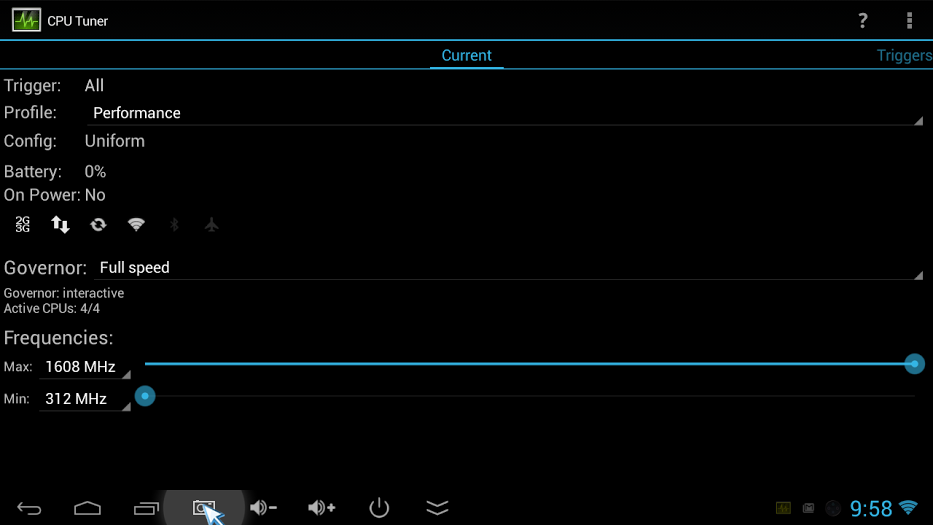
I use CPU tuner as pictured below.

cpuTuner

Simply install CPU Tuner and set profile to “Performance” and Governor to “Full Speed” and you should be getting a little extra juice from your device.

Slán

How to get the hour from a datetime string (T-SQL)

Often data is entered into the database as a string (varchar), when a more appropriate data type should have been applied.

Here’s a snippet of T-SQL for dealing with datetime data, stored as varchar, when what you really need is the hour. 

DECLARE @DateTime AS VARCHAR(25)

-- GET THE CURRENT DATETIME AND CONVERT INTO A STRING
SET @DateTime = (
		SELECT CONVERT(VARCHAR(25), GETDATE(), 120)
		)

--PRINT @DateTime
-- GET HOUR FROM DATETIME AS A STRING
SELECT DATEPART(HOUR, CONVERT(DATETIME, CONVERT(VARCHAR(13), @DateTime, 120) + ':00')) AS ConvertedHour


Why would data be stored as a varchar instead of using the appropriate data type in the first place?

The most common reason might be that XML files have been loaded without any data type conversions being applied, i.e. dates have been entered as strings along with everything else.

Why would you need this code?

Should you be confronted with data in this raw string form you would be unable to apply a clause regarding a specific hour. Ideally there should be some sort of staging table to convert the fields into the appropriate data types but if you simply wanted to apply some clauses to select specific data, which will be outputted to an excel file for example, that additional effort may be unnecessary.

How to copy only files from a folder and respective subfolders using a batch script

Ok so here’s a nifty little batch script that will loop through all the directories in a directory to gather all the subsequent files into a new directory. (Code at bottom of the page)

(For those of you that don’t know what a batch script is here’s a quick definition. A batch file is a text file that contains a sequence of commands for a computer operating system. It’s called a batch file because it batches (bundles or packages) into a single file a set of commands that would otherwise have to be presented to the system interactively from a keyboard one at a time.)

Here’s a diagram explaining how the batch script provided at the bottom of the page works. (Note that the folders aren’t copied just the files.)

diagram of process

So why would you use this?

Lets say you’re dealing with a system that has outputted thousands of folders into a single folder and each folder contains files.

You could be looking at millions of files to be gathered, a process that cannot be done manually.

Or a simpler use case might be you’ve downloaded thousands of movies and each was put into a separate folder. Now you just want the media files in one location.

How to use:

Open the program notepad.

Copy the code below and past it into notepad saving the file with the extension .bat

Place the batch file in the parent folder, i.e. the folder all the other folders are in.

Double click the batch file.

The batch file will create a folder one directory level above where the parent folder is located and copy all the files to this location.

An example of how to use the file is as follows:

If you had the parent folder “My Movies” on your desktop.

Pasting the batch file into this folder, and double clicking on it, would copy every movie into a folder called “Copied from My Movies” on your desktop.

And here’s the code,
Adiós.


@ECHO OFF
TITLE WAIT !
:: ASSIGN THE FILE PATH OF BATCH FILE TO A VARIABLE
SET "sourceDir=%CD%"
:: GET THE NAME OF THE FOLDER WHICH THE BATCH FILE IS IN
FOR %%a IN (.) DO SET currentFolder=%%~na
:: GO UP ONE DIRECTORY
CD ..
:: MAKE A DYNAMIC FOLDER NAME
::SET folderName=Copied From %currentFolder%
SET "folderName=Copied from %currentFolder%"
:: CREATE A FOLDER TO PUT THE COPIED FILES IN
:: IF FOLDER ALREADY EXISTS DELETE IT
IF EXIST "%folderName%" RMDIR "%folderName%" /S /Q
MKDIR "%folderName%"
:: ASSIGN DESTINATION FOLDER TO A VARIABLE
SET "destinationFolder=%CD%\%folderName%"
:: CREATE A LOG FILE IN DESTINATION FOLDER
SET "_report=%destinationFolder%\logxcopy.txt"
:: CREATE ERROR MESSAGE
IF NOT EXIST "%sourceDir%" (ECHO.Could not find %sourceDir% &GoTo:DONE)
:: OVERWRITE PREVIOUS LOG
>"%_report%" (
echo.%date% – %time%
echo.—————————————————
echo.
)
:: COPY FILES
FOR /F "Delims=" %%! IN ('DIR "%sourceDir%\" /b /s /a-d 2^>NUL') DO (
@ECHO.%%! &(
@XCOPY "%%!" "%destinationFolder%\" /i /y /h /f /c >>"%_report%",2>&1)
)
:DONE
TITLE,Done…….
ECHO.&PAUSE>NUL

view raw

batch copy file

hosted with ❤ by GitHub