Tag Archives: howto

How to identify and remove unused tables in SQL Server with T-Sql

In a perfect world an organisation should never get itself into the situation where tables need to be identified as functionally obsolete and removed in bulk. Schema changes should be stepped through the cycle of development, test, staging and live with developers cleaning as they go, but we don’t live in a perfect world as you may have noticed.

What do I mean by functionally obsolete? This means the tables are no longer being interacted with by user generated objects like stored procedures, functions or views. There may also be tables that could be classified as business redundant. That is they are being referenced by user generated objects frequently but they no longer have a use to the business, i.e. one job may have been replaced by another without the former being disabled or dropped. Business redundant objects are more difficult to determine and finding them may require input from multiple stakeholders.

A good approach for removing objects is to rename the objects first. This makes it easier to put the environment back the way it was if there are any problems encountered. After a set period of time if there is no impact on the overall environment script out the object then drop it. (Obviously do this in a test environment first if possible)

The script below is mostly a light weight SELECT statement that can be run on any environment. It does not execute any of the code it generates. It uses the sys.dm_db_index_usage_stats dynamic management view to determine when the tables were last interacted with. Interaction being defined as the following actions being applied against the object, update, seek, scan, lookup.

Caveat: Entries in this view reset to NULL after a Server reboot. Also the DMV has been known to be a bit unreliable with earlier versions of SQL Server with cases of the view being reset when a full index rebuild is carried out against a table. So don’t execute any code without first reviewing it.

Tables with NULL values for the fields below should be tables that have not been referenced at all or at least since the last time the server was rebooted.

LastUserUpdate
LastUserSeek
LastUserScan
LastUserLookup

Removing these objects is the low hanging fruit of cleaning up an environment. The script also provides stats on how many times these interactions happened and the size of the object. All these stats together should help you determine if an object is functionally redundant or business redundant and can be removed.

To aid further in the cleanup the script also creates the fields Action, Comments, Renamed, RenamedDate, RenameForDeletion, RestoreOriginalName, DropTable, DroppedDate.

The script output can then be copied and pasted into an Excel spread sheet and used to coordinate and track the cleanup progress.

SET NOCOUNT ON

DECLARE @Database TABLE ([DbName] [sysname])
DECLARE @DbName AS [sysname]
DECLARE @Sql AS [varchar] (max)

IF OBJECT_ID('tempdb..#TableStats', 'U') IS NOT NULL
	DROP TABLE #TableStats

IF OBJECT_ID('tempdb..#IndexStats', 'U') IS NOT NULL
	DROP TABLE #IndexStats

IF OBJECT_ID('tempdb..#TableUsageStats', 'U') IS NOT NULL
	DROP TABLE #TableUsageStats

IF OBJECT_ID('tempdb..#TableSizeStats', 'U') IS NOT NULL
	DROP TABLE #TableSizeStats

CREATE TABLE #TableStats (
	[DbName] [sysname]
	,[SchemaName] [sysname]
	,[ObjectId] [bigint]
	,[TableName] [sysname]
	,[ModifiedDate] [datetime]
	);

CREATE TABLE #IndexStats (
	[DbName] [sysname]
	,[ObjectId] [bigint]
	,[HasIndex] [bit]
	);

CREATE TABLE #TableSizeStats (
	[DbName] [varchar](255) NULL
	,[SchemaName] [varchar](255) NULL
	,[ObjectId] [bigint]
	,[TableName] [varchar](255) NULL
	,[RowCount] [bigint] NULL
	,[AvailableSpacePercentage] [numeric](6, 2) NULL
	,[UnusedSpaceGb] [numeric](10, 3) NULL
	,[UsedSpaceGb] [numeric](10, 3) NULL
	,[TotalSpaceGb] [numeric](10, 3) NULL
	,[UnusedSpaceMb] [numeric](13, 3) NULL
	,[UsedSpaceMb] [numeric](13, 3) NULL
	,[TotalSpaceMb] [numeric](13, 3) NULL
	,[UnusedSpaceKb] [bigint] NULL
	,[UsedSpaceKb] [bigint] NULL
	,[TotalSpaceKb] [bigint] NULL
	)

CREATE TABLE #TableUsageStats (
	[DbName] [sysname]
	,[ObjectId] [bigint]
	,[TableName] [nvarchar](128) NULL
	,[LastUserUpdate] [datetime] NULL
	,[LastUserSeek] [datetime] NULL
	,[LastUserScan] [datetime] NULL
	,[LastUserLookup] [datetime] NULL
	,[UserUpdateCount] [bigint] NOT NULL
	,[UserSeekCount] [bigint] NOT NULL
	,[UserScanCount] [bigint] NOT NULL
	,[UserLookupCount] [bigint] NOT NULL
	);

SET @DbName = '';

INSERT INTO @Database (DbName)
SELECT NAME
FROM sys.databases 
WHERE NAME NOT IN (
		'tempdb'
		,'master'
		,'mode'
		,'model'
		)
AND state_desc = 'ONLINE'
ORDER BY NAME ASC;

WHILE @DbName IS NOT NULL
BEGIN
	SET @DbName = (
			SELECT MIN(DbName)
			FROM @Database
			WHERE DbName > @DbName
			);
	SET @Sql = '
INSERT INTO #TableStats (
	DbName
	,schemaName
	,ObjectId
	,TableName
	,ModifiedDate
	)
SELECT DbName
	,SchemaName
	,ObjectId
	,TableName
	,ModifiedDate
FROM (
SELECT DISTINCT ' + '''' + @DbName + '''' + ' AS DbName
	,s.NAME AS SchemaName
	,t.object_id AS ObjectId
	,t.NAME AS TableName
	,t.modify_date AS ModifiedDate
FROM ' + QUOTENAME(@DbName) + '.sys.tables AS t
INNER JOIN ' + QUOTENAME(@DbName) + '.sys.schemas AS s ON t.schema_id = s.schema_id
LEFT JOIN ' + QUOTENAME(@DbName) + '.sys.extended_properties AS ep ON ep.major_id = t.[object_id] /*Exclude System Tables*/
WHERE t.NAME IS NOT NULL
	AND s.NAME IS NOT NULL
	AND (ep.[name] IS NULL OR ep.[name] <> ''microsoft_database_tools_support'')
	) AS rd
WHERE rd.SchemaName IS NOT NULL
ORDER BY DbName ASC
	,TableName ASC;
'

	EXEC (@Sql)

	SELECT @Sql = '
INSERT INTO #IndexStats (
	DbName
	,ObjectId
	,HasIndex
	)
SELECT ' + '''' + @DbName + '''' + ' AS DbName
	,OBJECT_ID AS ObjectId
	,IndexCheck AS HasIndex
FROM (
	SELECT DISTINCT OBJECT_ID
		,CASE 
			WHEN (
					[TYPE] > 0
					AND is_disabled = 0
					)
				THEN 1
			ELSE 0
			END AS IndexCheck
	FROM ' + QUOTENAME(@DbName) + '.sys.indexes
	) AS rd
WHERE rd.IndexCheck = 1
'

	EXEC (@Sql)

	SET @Sql = 
		'
INSERT INTO #TableSizeStats (
	[DbName]
	,[SchemaName]
	,[ObjectId]
	,[TableName]
	,[RowCount]
	,[AvailableSpacePercentage]
	,[UnusedSpaceGb]
	,[UsedSpaceGb]
	,[TotalSpaceGb]
	,[UnusedSpaceMb]
	,[UsedSpaceMb]
	,[TotalSpaceMb]
	,[UnusedSpaceKb]
	,[UsedSpaceKb]
	,[TotalSpaceKb]
	)
SELECT DISTINCT rd.[DbName]
	,rd.[SchemaName]
	,rd.[ObjectId]
	,rd.[TableName]
	,rd.[RowCount]
	,CASE 
		WHEN TotalSpaceKb > 0
			THEN ((UnusedSpaceKb / TotalSpaceKb) * 100)
		ELSE 0
		END AS AvailableSpacePercentage
	,CONVERT(NUMERIC(10, 3), (rd.[UnusedSpaceKb] / 1024.) / 1024.) AS UnusedSpaceGb
	,CONVERT(NUMERIC(10, 3), (rd.[UsedSpaceKb] / 1024.) / 1024.) AS UsedSpaceGb
	,CONVERT(NUMERIC(10, 3), (rd.[TotalSpaceKb] / 1024.) / 1024.) AS TotalSpaceGb
	,CONVERT(NUMERIC(13, 3), (rd.[UnusedSpaceKb] / 1024.)) AS UnusedSpaceMb
	,CONVERT(NUMERIC(13, 3), (rd.[UsedSpaceKb] / 1024.)) AS UsedSpaceMb
	,CONVERT(NUMERIC(13, 3), (rd.[TotalSpaceKb] / 1024.)) AS TotalSpaceMb
	,rd.[UnusedSpaceKb]
	,rd.[UsedSpaceKb]
	,rd.[TotalSpaceKb]
FROM (
	SELECT ' 
		+ '''' + @DbName + '''' + ' AS DbName
		,t.Object_id AS ObjectId
		,s.[name] AS [SchemaName]
		,t.[name] AS [TableName]
		,p.[rows] AS [RowCount]
		,SUM(a.[used_pages]) * 8 AS [UsedSpaceKb]
		,(SUM(a.[total_pages]) - SUM(a.[used_pages])) * 8 AS [UnusedSpaceKb]
		,SUM(a.[total_pages]) * 8 AS [TotalSpaceKb]
	FROM ' + QUOTENAME(@DbName) + '.sys.tables AS t
	INNER JOIN ' + QUOTENAME(@DbName) + '.sys.schemas AS s ON t.schema_id = s.schema_id
	INNER JOIN ' + QUOTENAME(@DbName) + '.sys.indexes AS i ON t.OBJECT_ID = i.object_id
	INNER JOIN ' + QUOTENAME(@DbName) + '.sys.partitions AS p ON i.object_id = p.OBJECT_ID
		AND i.[index_id] = p.[index_id]
	INNER JOIN ' + QUOTENAME(@DbName) + '.sys.allocation_units a ON p.[partition_id] = a.[container_id]
	WHERE t.[is_ms_shipped] = 0
		AND i.OBJECT_ID > 255
	GROUP BY s.[name]
		,t.[name]
		,t.[object_id]
		,p.[rows]
	) AS rd
ORDER BY DbName ASC
	,SchemaName ASC
	,TableName ASC;
'

	EXEC (@Sql)

	SET @Sql = '
INSERT INTO #TableUsageStats (
	[DbName]
	,[ObjectId]
	,[TableName]
	,[LastUserUpdate]
	,[LastUserSeek]
	,[LastUserScan]
	,[LastUserLookup]
	,[UserUpdateCount]
	,[UserSeekCount]
	,[UserScanCount]
	,[UserLookupCount]
	)
SELECT DbName
	,ObjectId
	,TableName
	,LastUserUpdate
	,LastUserSeek
	,LastUserScan
	,LastUserLookup
	,UserUpdateCount
	,UserSeekCount
	,UserScanCount
	,UserLookupCount
FROM (
	SELECT DISTINCT ROW_NUMBER() OVER (
			PARTITION BY ius.Object_Id ORDER BY last_user_update DESC
			) AS RN
		,' + '''' + @DbName + '''' + ' AS DbName
		,ius.OBJECT_ID AS ObjectId
		,o.NAME AS TableName
		,ius.last_user_update AS LastUserUpdate
		,ius.last_user_seek AS LastUserSeek
		,ius.last_user_scan AS LastUserScan
		,ius.last_user_lookup AS LastUserLookup
		,ius.user_updates AS UserUpdateCount
		,ius.user_seeks AS UserSeekCount
		,ius.user_scans AS UserScanCount
		,ius.user_lookups AS UserLookupCount
	FROM ' + QUOTENAME(@DbName) + 
		'.sys.dm_db_index_usage_stats AS ius
	INNER JOIN ' + QUOTENAME(@DbName) + '.sys.objects AS o ON ius.OBJECT_ID = o.OBJECT_ID
		AND o.NAME IS NOT NULL
	) AS rd
WHERE rd.RN = 1
ORDER BY rd.DbName ASC
	,rd.TableName ASC
	,rd.LastUserUpdate DESC
	,rd.LastUserSeek DESC
	,rd.LastUserScan DESC
	,rd.LastUserLookup DESC;
'

	EXEC (@Sql)
END;
GO

SELECT DISTINCT ROW_NUMBER() OVER (
		ORDER BY ts.[DbName] ASC
			,ts.[SchemaName] ASC
			,ts.[TableName] ASC
		) AS Row
	,ts.[DbName]
	,ts.[SchemaName]
	,ts.[TableName]
	,'' AS Action --Rename, keep etc.
	,'' AS Comments
	,'' AS Renamed --boolean flag
	,'' AS RenamedDate 
	,i.[HasIndex] --Tables without an index are heaps
	,tss.[TotalSpaceMb] AS TableSizeInMb
	,ts.[ModifiedDate]
	,tus.[LastUserUpdate]
	,tus.[LastUserSeek]
	,tus.[LastUserScan]
	,tus.[LastUserLookup]
	,tus.[UserUpdateCount]
	,tus.[UserSeekCount]
	,tus.[UserScanCount]
	,tus.[UserLookupCount]
	,tss.[AvailableSpacePercentage]
	,tss.[UnusedSpaceGb]
	,tss.[UsedSpaceGb]
	,tss.[TotalSpaceGb]
	,tss.[UnusedSpaceMb]
	,tss.[UsedSpaceMb]
	,tss.[TotalSpaceMb]
	,tss.[UnusedSpaceKb]
	,tss.[UsedSpaceKb]
	,tss.[TotalSpaceKb]
	,'USE ' + QUOTENAME(ts.[DbName]) + '; EXEC sp_rename ' + '''' + ts.[SchemaName] + '.' + ts.[TableName] + '''' + ', ' + '''' + '_DELETE_' + ts.[TableName] + '''' + ';' AS RenameForDeletion
	,'USE ' + QUOTENAME(ts.[DbName]) + '; EXEC sp_rename ' + '''' + ts.[SchemaName] + '.' + '_DELETE_' + ts.[TableName] + '''' + ', ' + '''' + ts.[TableName] + '''' + ';' AS RestoreOriginalName
	,'USE ' + QUOTENAME(ts.[DbName]) + '; DROP TABLE ' + QUOTENAME(ts.[SchemaName]) + '.' + '[' + '_DELETE_' + ts.[TableName] + ']' + ';' AS 'DropTable'
	,'' AS DroppedDate
FROM #TableStats AS ts
LEFT JOIN #TableSizeStats AS tss ON ts.ObjectId = tss.ObjectId
	AND tss.DbName = ts.DbName
LEFT JOIN #IndexStats AS i ON ts.ObjectId = i.ObjectId
	AND i.DbName = ts.DbName
LEFT JOIN #TableUsageStats AS tus ON ts.ObjectId = tus.ObjectId
	AND tus.DbName = ts.DbName
ORDER BY ts.[DbName] ASC
	,ts.[SchemaName] ASC
	,ts.[TableName] ASC

	-- REF: https://docs.microsoft.com/en-us/sql/relational-databases/system-dynamic-management-views/sys-dm-db-index-usage-stats-transact-sql

How to disable all enabled user job schedules in SQL Server with T-Sql

I’d really recommend not running the output of this script on a live environment! This is just a little something I whipped up to test on a development environment.

Running the below script will output the T-Sql required to disable all enabled job schedules on the SQL Server instance. Just copy the outputted text and paste into a new SSMS window and execute to disable the jobs.

SET NOCOUNT ON

DECLARE @Schedule TABLE (ScheduleId INT)
DECLARE @ScheduleId AS INT
DECLARE @Sql AS VARCHAR(MAX)

SET @ScheduleId = ''

INSERT INTO @Schedule (ScheduleId)
SELECT s.schedule_id
FROM msdb.dbo.sysschedules AS s
WHERE s.[enabled] = 1
	AND s.owner_sid <> 0x01
ORDER BY s.NAME ASC

WHILE @ScheduleId IS NOT NULL
BEGIN
	SET @ScheduleId = (
			SELECT MIN(ScheduleId)
			FROM @Schedule
			WHERE ScheduleId > @ScheduleId
			)
	SET @Sql = '
EXEC msdb.dbo.sp_update_schedule @schedule_id = ' + '''' + CONVERT(VARCHAR(5), @ScheduleId) + '''' + '
	,@enabled = 0; 
'

	PRINT @Sql
END

How to disable all enabled jobs in SQL Server with T-Sql where the job name contains specific keyword text

Running the below script will output the T-Sql required to disable all enabled jobs on the SQL Server instance where the job name contains a specific keyword. Just copy the outputted text and paste into a new SSMS window and execute to disable the jobs.

For example, if you change the text value ‘PLACEHOLDER’, for the variable @KeyWord, to ‘Backup’ then any job which has ‘Backup’ in its name will have T-Sql generated to disable it. You could change the PRINT to EXEC but I wouldn’t recommend it.

DECLARE @KeyWord AS VARCHAR(256)

SET @KeyWord = 'PLACEHOLDER'
SET NOCOUNT ON

DECLARE @Job TABLE (JobName SYSNAME)
DECLARE @JobName AS SYSNAME
DECLARE @Sql AS VARCHAR(MAX)

SET @JobName = ''

INSERT INTO @Job (JobName)
SELECT j.NAME
FROM msdb.dbo.sysjobs AS j
WHERE j.[enabled] = 1
	AND j.NAME LIKE '%' + @KeyWord + '%' 
ORDER BY j.NAME ASC

WHILE @JobName IS NOT NULL
BEGIN
	SET @JobName = (
			SELECT MIN(JobName)
			FROM @Job
			WHERE JobName > @JobName
			)
	SET @Sql = '
EXEC msdb.dbo.sp_update_job @job_name = ' + '''' + @JobName + '''' + '
	,@enabled = 0; 
'

	PRINT @Sql
END

How to run all enabled SQL Server Jobs with T-Sql

I’d really recommend not running the output of this script on a live environment! This is just a little something I whipped up to test changes on a development environment.

Running the script will output the T-Sql required to run all jobs on the SQL Server instance. Just copy the text and paste into a new SSMS window and execute. You could change the PRINT to EXEC but I wouldn’t recommend it.

SET NOCOUNT ON

DECLARE @Job TABLE (JobName SYSNAME)
DECLARE @JobName AS SYSNAME
DECLARE @Sql AS VARCHAR(MAX)

SET @JobName = ''

INSERT INTO @Job (JobName)
SELECT j.NAME
FROM msdb.dbo.sysjobs AS j
WHERE j.[enabled] = 1
ORDER BY j.NAME ASC

WHILE @JobName IS NOT NULL
BEGIN
	SET @JobName = (
			SELECT MIN(JobName)
			FROM @Job
			WHERE JobName > @JobName
			)
	SET @Sql = '
EXEC msdb.dbo.sp_start_job @job_name = ' + '''' + @JobName + '''' + '; 
'
	PRINT @Sql
END

How to delete all SQL Server Jobs that have no maintenance plan with T-Sql

I’d really recommend not running the output of this script on a live environment! This is just a little something I whipped up to clear out a development environment.

Running the script will output the T-Sql required to deleted all jobs on the SQL Server instance. Jobs for maintenance plans are not included as maintenance plans need to be deleted first. Just copy the text and paste into a new SSMS window and execute. You could change the PRINT to EXEC but I wouldn’t recommend it. 

SET NOCOUNT ON

DECLARE @Job TABLE (JobName SYSNAME)
DECLARE @JobName AS SYSNAME
DECLARE @Sql AS VARCHAR(MAX)

SET @JobName = ''

INSERT INTO @Job (JobName)
SELECT j.Name
FROM msdb.dbo.sysjobs AS j
LEFT JOIN msdb.dbo.sysmaintplan_subplans AS p ON j.job_id = p.job_id
WHERE p.subplan_id IS NULL
ORDER BY j.Name ASC

WHILE @JobName IS NOT NULL
BEGIN
	SET @JobName = (
			SELECT MIN(JobName)
			FROM @Job
			WHERE JobName > @JobName
			)
	SET @Sql = '
EXEC msdb.dbo.sp_delete_job @job_name = ' + '''' + @JobName + '''' + '; 
'
	PRINT @Sql
END

How to get MS SQL Server job history using a stored procedure

In a previous article (see article) I provided simple queries to return the server’s job history. It’s only natural that when you find yourself running the same script over and over again eventually you’ll get around to turning it into a stored procedure.

Well today was the day.

You can use the script below to create the Stored Procedure usp_GetJobHistory.

To deploy the SP to your instance you’ll need to replace the text PLACEHOLDER with the name of the database you’ll be deploying to. Ideally you should have a utility or administration database rather than deploying to Master.

The SP has 5 parameters.

Parameter Datatype Options Definition
@DaysToPull INT Any Number How many days of history you want
working back from today
@Status VARCHAR One of the following: All’, ‘Succeeded’, ‘Failed’,
‘Retried’, ‘Cancelled’, NULL
Will limited the rows returned
based on the status of the entry
@SortOrder VARCHAR ASC or DESC The occurrence order i.e. oldest to newest
@JobName VARCHAR Any Text Used in a LIKE operator to find jobs containing that text
@ReturnSql BIT 0, 1 or NULL Returns the SQL you can modify or
run to return the history

Example command:

Create the SQL code to return the job history for jobs containing the work backup that failed in the past day sorted by newest to oldest.

EXEC dbo.GetJobHistory @DaysToPull = 1
,@SortOrder = ‘DESC’
,@Status = ‘Failed’
,@JobName = ‘Backup’
,@ReturnSql = 1

Tip: you could use this to create a SSRS report that could be published daily to notify stakeholders of any job failures.

-- REPLACE PLACEHOLDER
USE [PLACEHOLDER];
GO

IF OBJECT_ID('[usp_GetJobHistory]') IS NULL
	EXEC ('CREATE PROCEDURE dbo.[usp_GetJobHistory] AS SELECT 1')
GO

ALTER PROCEDURE [dbo].[usp_GetJobHistory] @DaysToPull INT
	,@Status VARCHAR(9) = NULL
	,@SortOrder VARCHAR(4) = NULL
	,@JobName VARCHAR(256) = NULL
	,@ReturnSql BIT = NULL
AS
BEGIN
	-- =============================================
	-- Author:      Bloggins
	-- Create date: 20170420
	-- Description: <Query to retrieve job history bypassing SSMS inbuilt viewer>
	-- Website: https://techtidbytes.wordpress.com/
	-- =============================================
	SET NOCOUNT ON

	BEGIN TRY
		-- Variable Declarations 
		DECLARE @PreviousDate DATETIME
		DECLARE @Year VARCHAR(4)
		DECLARE @Month VARCHAR(2)
		DECLARE @MonthPre VARCHAR(2)
		DECLARE @Day VARCHAR(2)
		DECLARE @DayPre VARCHAR(2)
		DECLARE @FinalDate INT
		DECLARE @StatusClause AS VARCHAR(255)
		DECLARE @Sql AS VARCHAR(MAX)

		IF @SortOrder IS NULL
			OR (
				@SortOrder <> 'ASC'
				AND @SortOrder <> 'DESC'
				)
		BEGIN
			SET @SortOrder = 'ASC'
		END

		IF @Status = 'All'
			OR @Status IS NULL
			OR (
				@Status <> 'All'
				AND @Status <> 'Failed'
				AND @Status <> 'Succeeded'
				AND @Status <> 'Retried'
				AND @Status <> 'Cancelled'
				)
		BEGIN
			SET @StatusClause = '0, 1, 2, 3'
		END
		ELSE IF @Status = 'Failed'
		BEGIN
			SET @StatusClause = '0'
		END
		ELSE IF @Status = 'Succeeded'
		BEGIN
			SET @StatusClause = '1'
		END
		ELSE IF @Status = 'Retried'
		BEGIN
			SET @StatusClause = '2'
		END
		ELSE IF @Status = 'Cancelled'
		BEGIN
			SET @StatusClause = '3'
		END

		SET @PreviousDate = DATEADD(dd, - @DaysToPull, GETDATE())
		SET @Year = DATEPART(yyyy, @PreviousDate)

		SELECT @MonthPre = CONVERT(VARCHAR(2), DATEPART(mm, @PreviousDate))

		SELECT @Month = RIGHT(CONVERT(VARCHAR, (@MonthPre + 1000000000)), 2)

		SELECT @DayPre = CONVERT(VARCHAR(2), DATEPART(dd, @PreviousDate))

		SELECT @Day = RIGHT(CONVERT(VARCHAR, (@DayPre + 1000000000)), 2)

		SET @FinalDate = CAST(@Year + @Month + @Day AS INT)
		/*RunDuration FORMAT (DD:HH:MM:SS)*/
		SET @Sql = '
SELECT ROW_NUMBER() OVER(ORDER BY h.instance_id ' + @SortOrder + ' ) AS Row
	,h.Server AS ServerName
	,s.database_name AS DbName
	,j.name AS JobName
	,s.step_name AS StepName
	,h.step_id AS StepId
	,CASE 
		WHEN h.run_status = 0
			THEN ''Failed''
		WHEN h.run_status = 1
			THEN ''Succeeded''
		WHEN h.run_status = 2
			THEN ''Retried''
		WHEN h.run_status = 3
			THEN ''Cancelled''
		END AS RunStatus
	,MSDB.DBO.AGENT_DATETIME(h.run_date, h.run_time) AS RunTime
	,STUFF(STUFF(STUFF(RIGHT(REPLICATE(''0'', 8) + CAST(h.run_duration AS VARCHAR(8)), 8), 3, 0, '':''), 6, 0, '':''), 9, 0, '':'') AS RunDuration
	,h.sql_severity AS SqlSeverity
	,h.message AS MessageReturned
FROM msdb.dbo.sysjobhistory h
INNER JOIN msdb.dbo.sysjobs j ON h.job_id = j.job_id
INNER JOIN msdb.dbo.sysjobsteps s ON j.job_id = s.job_id
	AND h.step_id = s.step_id
WHERE h.run_status IN (' + @StatusClause + ')
	AND h.run_date > ' + CONVERT(VARCHAR(255), @FinalDate)

		IF @JobName IS NOT NULL
		BEGIN
			SET @Sql = @Sql + '
AND j.name LIKE ' + '''' + '%' + @JobName + '%' + '''' + ''
		END

		SET @Sql = @Sql + '
ORDER BY h.instance_id ' + @SortOrder

		IF @ReturnSql = 1
		BEGIN
			PRINT (@Sql)
		END
		ELSE
		BEGIN
			EXEC (@Sql)
		END
	END TRY

	BEGIN CATCH
		PRINT 'error!'

		DECLARE @error_number AS INTEGER
		DECLARE @error_message AS VARCHAR(400)

		SET @error_number = error_number()
		SET @error_message = left(error_message(), 400)

		PRINT 'error_message: ' + @error_message
	END CATCH
END

How to use a while loop to iterate through Databases

Say you have code you want executed against every database on a SQL Server instance, you could use SQL Server’s inbuilt sp_MSForEachDB. I’m not a big fan of it though because it is undocumented, so I’d always be concerned Microsoft might decide to kill it with any given patch or service pack update. (I know the likelihood of that is extremely low but I’m a risk adverse kinda guy)

I prefer to use the example below. It may not be the most efficient snippet of code available on the net but it’s good and simple and it’s not going anywhere unless I drop it.

(To execute code against every table in an instance see this post)

SET NOCOUNT ON;

DECLARE @Database TABLE (DbName SYSNAME);
DECLARE @DbName AS SYSNAME;

SET @DbName = '';

INSERT INTO @Database (DbName)
SELECT NAME
FROM sys.databases
WHERE NAME NOT IN (
		'tempdb'
		,'msdb'
		,'model'
		)
	AND state_desc = 'ONLINE'
ORDER BY NAME ASC;

WHILE @DbName IS NOT NULL
BEGIN
	SET @DbName = (
			SELECT MIN(DbName)
			FROM @Database
			WHERE DbName > @DbName
			);

	/*
	PUT CODE HERE
	EXAMPLE PRINT Database Name
	*/
	PRINT @DbName;
END

How to clear SQL Server backup and job history

SQL Server makes a record of each backup and restore it performs. This information is recorded across the following tables:

msdb.dbo.backupfile
msdb.dbo.backupfilegroup
msdb.dbo.backupmediafamily
msdb.dbo.backupmediaset
msdb.dbo.backupset
msdb.dbo.restorefile
msdb.dbo.restorefilegroup
msdb.dbo.restorehistory

There is no cleanup process that automatically clears these records down so as you can imagine over time it could grow to be substantial.

Before you upgrade a SQL Server instance if any of these tables exceeds 10,000 rows this can cause an upgrade to hang so it is recommended the older records be deleted.

To reduce rows in all of these tables, you can run the sp_delete_backuphistory stored procedure. This procedure deletes the entries in all of the backup and restore history tables for backup sets older than a specified date. An example is shown below:

EXEC msdb..sp_delete_backuphistory ‘20161201 12:00:00.000’

Similarly to remove records from msdb.dbo.sysjobhistory you can run the following example as shown below:

EXEC msdb..sp_purge_jobhistory @oldest_date = ‘20161201 12:00:00.000’

It is recommended you set up a job to clear these tables however how often you clear them requires some thought. For instance you may want to keep, or archive, the job history for performance comparisons over time or as a record of job failures.

Another example is I use a stored procedure that automatically generates TSQL to perform restores. This stored procedure uses the records in the backup history tables to generate the TSQL. Therefore I need to be careful I do not delete records that are within our backup file retention time period otherwise I would not be able to generate a restore script for those backup files using the stored procedure.

You might be reliant on these tables as well in some way so keep this in mind.

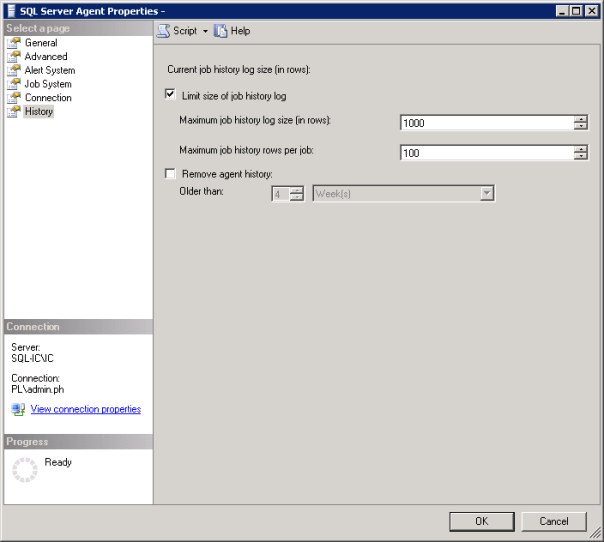
Picture showing SQL Server Agent Properties Window

How to setup how much Agent Job History is retained

I was asked to do a historic analysis of SQL Server jobs to determine their statistics, such as the number of runs, average run duration, successes/failures etc. As part of the daily checks I do on a server I’d only check the job runs for the past 24 hours. So I was surprised when I started the analysis and saw that averages for the same job across servers varied significantly.

When I looked at the msdb.dbo.sysjobhistory table of the server with the lowest averages I noted that there were only 999 rows and the history only went back a day or two.

So I had effectively no history on that server. When I looked at another the sysjobhistory table had almost 10 million entries, roughly 4 Gb of data! (The joys of taking over someone else’s environment)

This got me looking at the history settings for the SQL Agent. To open the SQL Server Agent Properties while in SQL Server Object Explorer right click on SQL Server Agent and then click on properties.

Picture showing SQL Server Agent Properties Window

For the first server the history settings were set to the default of 1000 lines for the log as a whole and 100 lines for the individual jobs. If you have a job that runs 4 steps that will use 5 lines, one line for the job and one line for each of the steps that are run. When I looked at the history settings on the second, server as you would expect, no settings had been applied.

Some sensible thresholds needed to be applied across the environment. I’m not going to dictate to you what your retention policy should be regarding job run history but I will say it can be as much as business decision as a server maintenance one so ask around if people need a record that something has run.

You may be in the position that you can be specific enough to enter row values but most organisations will have jobs that run weekly or monthly. In that case you may be better off using the “Older than” option and setting a retention period rather than using rows.

Always with logging, if you have the space, you’re better off having too much than having too little and missing data you need.  The size of each row in the sysjobhistory table is at most 4.5KB so keeping 10k rows is only around 45 Mb. If you don’t have 45 Mb to spare on your server then job history retention is the least of your worries. The worst thing that is likely to happen in storing more rows than you need is that it takes a bit longer to bring up the job history viewer. But here’s a link to some queries to help with that.

The moral of the story is just because it’s in the MSDB doesn’t mean Microsoft are taking care of it. Check your settings and make sure you’re retaining an appropriate amount of history now.