Tag Archives: How To

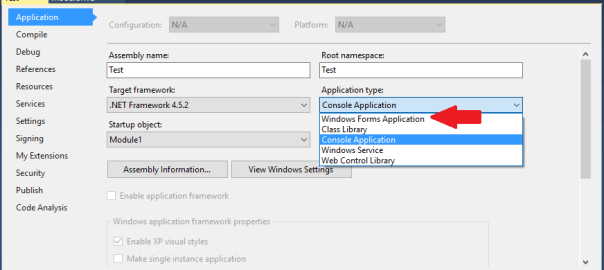
Picture showing the Application screen highlighting the Application type change from Console Application to Windows Forms Application

How to create a console application in Visual Studio that won’t open a command window when it runs

If you’ve written a small console application, say something that doesn’t require a UI e.g. a  batch script that you want to make into an exe, you’ve probably noticed that an unnecessary/unwanted command window pops up.

To stop the command window from opening you can simply make a change in the project properties by setting the Application Type from Console Application to Windows Forms Application.

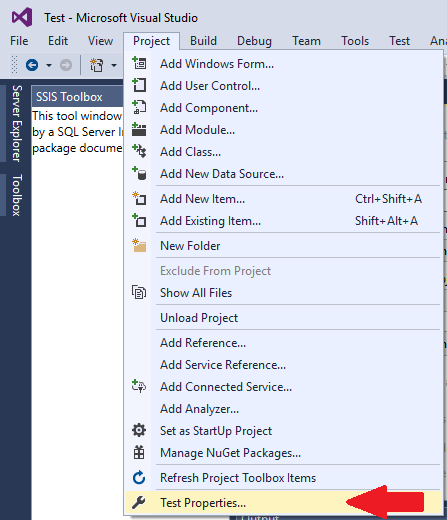
This can be done from within the project, click on Projects at the top of the screen and then click on Properties as show below.

Picture showing Project options highlighting Properties

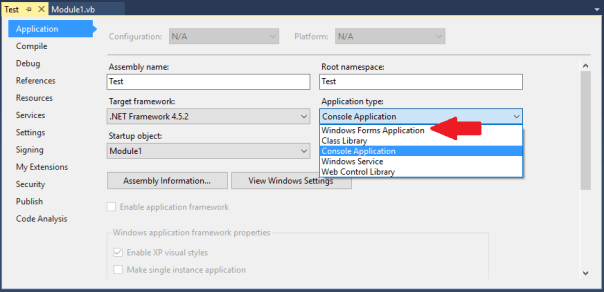
Then change the application type from Console Application to Windows Forms Application as shown below.

Picture showing the Application screen highlighting the Application type change from Console Application to Windows Forms Application

Icon of a folder or file with a clock on it

How to get the date of creation and size of current temporary objects from tempdb

The query below will return the temporary objects that currently exist in the tempdb of an instance.

It’s a good query if you’re experiencing issues with the tempdb and want to see what objects are taking up space or if temp tables are surviving longer than you might expect them to.

Recently I found that because queries were running directly from Tableau and the connection was being held open temp tables were not being removed. All the temp tables existing at the same time was taking up several GBs of space needlessly.

-- Get current temporary objects date of creation and size 
SELECT DISTINCT obj.name AS ObjectName
	,obj.type_desc AS ObjectType
	,obj.object_id AS ObjectId
	,obj.principal_id AS PrincipalId
	,obj.schema_id AS SchemaId
	,obj.parent_object_id AS ParentId
	,stat.row_count AS RowCountStat
	,stat.used_page_count * 8 AS UsedSizeKB
	,stat.reserved_page_count * 8 AS RevervedSizeKB
	,obj.create_date AS CreatedDate
	,obj.modify_date AS ModifiedDate
FROM tempdb.sys.partitions AS part WITH (NOLOCK)
INNER JOIN tempdb.sys.dm_db_partition_stats AS stat WITH (NOLOCK) ON part.partition_id = stat.partition_id
	AND part.partition_number = stat.partition_number
INNER JOIN tempdb.sys.tables AS tbl WITH (NOLOCK) ON stat.object_id = tbl.object_id
LEFT JOIN tempdb.sys.objects AS obj WITH (NOLOCK) ON tbl.name = obj.name
ORDER BY CreatedDate ASC;

How to identify databases with Guest user enabled

As best practice it is recommended to disable guest user in every user database, i.e. not master, msdb and tempdb, to improve the security of SQL Server. Guest user permits access to a database for any logins that are not mapped to a specific database user. The guest user cannot be dropped but it can be disabled by revoking the CONNECT permission.

Use the script below to identify which databases have guest user enabled. 

USE master;
GO

DECLARE @database_name SYSNAME
	,@sqlcmd NVARCHAR(4000)

DECLARE databases_cursor CURSOR
FOR
SELECT NAME
FROM sys.databases
WHERE STATE IN (0)
	AND database_id > 4
ORDER BY NAME

CREATE TABLE #guest_users_enabled (
	database_name SYSNAME
	,user_name SYSNAME
	,permission_name NVARCHAR(128)
	,state_desc NVARCHAR(6)
	)

OPEN databases_cursor;

FETCH NEXT
FROM databases_cursor
INTO @database_name;

WHILE @@FETCH_STATUS = 0
BEGIN
	SET @sqlcmd = N'use ' + @database_name + ';

        insert into #guest_users_enabled

        SELECT ''' + @database_name + ''' as database_name, name,

        permission_name, state_desc

        FROM sys.database_principals dpr

        INNER JOIN sys.database_permissions dpe

        ON dpr.principal_id = dpe.grantee_principal_id

        WHERE name = ''guest'' AND permission_name = ''CONNECT'''

	EXEC sp_executesql @sqlcmd

	FETCH NEXT
	FROM databases_cursor
	INTO @database_name;
END

SELECT database_name
	,user_name
	,permission_name
	,state_desc
FROM #guest_users_enabled
ORDER BY database_name ASC

DROP TABLE #guest_users_enabled

CLOSE databases_cursor;

DEALLOCATE databases_cursor;
GO
Use the script below, changing the placeholder database with the database identified in the script above, to revoke permission for the guest user to connect to that database.
USE [database name];

GO

REVOKE CONNECT FROM GUEST;

GO

How to resize TempDB in SQL Server

SQL Server Tempdb is used to store temporary objects. By default the initial size of the tempdb is too small for a production database engaged in any significant enterprise activities, therefore it should be sized accordingly on setup.

Failure to do so will have a negative performance impact when the database is first put into operation as it will need to grow to a more fitting size. Worse still, every time SQL Server is restarted the  tempdb will be recreated with its initial size. So SQL Server has to initiate autogrowth steps to grow the database file again and performance will be impacted negatively while it grows.

To compare the initial tempdb size to the current size run the script below.

USE master;
GO

SELECT mf.database_id
	,mf.NAME
	,mf.size * 8 / 1024 AS Initial_Size
	,df.size * 8 / 1024 AS Current_Size
FROM sys.master_files mf
/*adding info about current file size*/
INNER JOIN tempdb.sys.database_files df ON mf.NAME = df.NAME
/*filtering for tempdb only*/
WHERE mf.database_id = 2;
GO
You can set the tempdb initial size to the displayed current size if you think it will need to grow to this size again or take it as a simple guide and set the initial size less than its current size and allow it to grow as it needs.
To change the tempdb size run the script below replacing all the values in the placeholders with your specific values, use the example script further down as a guide. The files tempdev and templog are typically what the tempdb files are called in a default installation. (You can run the first script again to confirm success)

USE master;
GO

ALTER DATABASE TempDB MODIFY FILE (
	NAME = [logical file name of the tempdb data file]
	,SIZE = [value] MB
	);
GO

USE master;
GO

ALTER DATABASE TempDB MODIFY FILE (
	NAME = [tempdev]
	,SIZE = 4 MB
	);
GO


ALTER DATABASE TempDB MODIFY FILE (
	NAME = [templog]
	,SIZE = 3 MB
	);
GO

How to drop a user from a SQL Server database when you encounter the error message “The database principal owns a schema in the database, and cannot be dropped”

principalowner

So if you have encountered the error above “The database principal owns a schema in the database, and cannot be dropped” you will not be able to drop the user until ownership of the effected schema has been transferred to another user/role. In order to drop the user, you have to find the schema that is assigned first. You can do this by running the script below replacing myUser with the user name in question. 

SELECT name 
FROM  sys.schemas 
WHERE principal_id = USER_ID(myUser)
Then, use the schema found from the above query in place of the SchemaName below. This transfers ownership to dbo. You may need to alter authorization for multiple schema. Just run the statement for each returned schema replacing SchemaName. You can then drop your user.
ALTER AUTHORIZATION ON SCHEMA::SchemaName TO dbo;
 
GO

DROP USER myUser;
Five Database icons arranged in a star with the largest one in the center

How to identify all user objects in the SQL Server Master database

What is the SQL Server Master Database used for?

The master database is used by SQL Server to contain all of the system level information:

  • Logins
  • Linked servers
  • Endpoints
  • Configuration settings
  • Information about the other databases on this instance and the location of their files

If the master database is not present, SQL Server cannot start.

This is way you should always take regular backups of the master database.
as if SQL Server suffers a failure, those changes will be lost and you’ll be in a lot of trouble.

So the master database is needed for SQL Server to work. Logic and objects needed to enable your application should not be tangled up in there so you should always avoid creating objects in the master database. Use a user database instead.

In saying that everyone has made the mistake of not specifying the database they want to USE in a script and by default objects get written to the Master database. Or you might have inherited the responsibility for an application which did not conform to best practices and it uses objects created in Master.

To gain visibility of these objects just run the script below.

SELECT o.object_id AS ObjectId
	,o.NAME AS ObjectName
	,o.type_desc AS ObjectType
	,o.create_date AS CreateDate
	,o.modify_date AS ModifyDate
	,SUM(st.row_count) AS RowCnt
	,CAST(SUM(st.used_page_count) / 128.0 AS DECIMAL(36, 1)) AS DataSize_MB
FROM master.sys.objects o
LEFT JOIN master.sys.dm_db_partition_stats st ON st.object_id = o.object_id
	AND st.index_id < 2
GROUP BY o.object_id
	,o.NAME
	,o.type_desc
	,o.create_date
	,o.modify_date
	,o.is_ms_shipped
HAVING o.is_ms_shipped = 0
	AND o.NAME <> 'sp_ssis_startup'
	AND o.type_desc NOT LIKE '%CONSTRAINT%'
ORDER BY CAST(SUM(st.used_page_count) / 128.0 AS DECIMAL(36, 1)) DESC
	,RowCnt DESC

How to pass table valued parameters in SQL Server

With the introduction of SQL Server 2008 came the ability to define an entire table as a parameter, think of it like a table data type. This feature greatly eases the development process as constructing and parsing XML data strings is no longer necessary.

Table parameters are user defined parameters, i.e. you are creating a means of storing specific data that is passed by a stored procedure or function.

Limitations:

  • The READONLY clause must be used when passing in the table valued variable
  • Data in the table variable cannot be modified
  • The table variables cannot be used as OUTPUT parameters only input parameters.
  • When data is passed to the table variable the table variable must be passed to the stored procedure in the same batch. Table variables go out of scope as soon as the procedure or batch returns.

The following is a complete end to end example of how to create and pass data to table parameters:

IF OBJECT_ID('OrderHistory') > 0
	DROP TABLE OrderHistory;
GO

CREATE TABLE [dbo].[OrderHistory] (
	[OrderID] [int] IDENTITY(1, 1) NOT NULL PRIMARY KEY
	,[Product] [varchar](10) NULL
	,[OrderDate] [datetime] NULL
	,[SalePrice] [money] NULL
	)
GO

CREATE TYPE OrderHistoryTableType AS TABLE (
	[Product] [varchar](10) NULL
	,[OrderDate] [datetime] NULL
	,[SalePrice] [money] NULL
	)
GO

CREATE PROCEDURE usp_InsertOrder (@TableVariable OrderHistoryTableType READONLY)
AS
BEGIN
	INSERT INTO OrderHistory (
		Product
		,OrderDate
		,SalePrice
		)
	SELECT Product
		,OrderDate
		,SalePrice
	FROM @TableVariable
END
GO

DECLARE @DataTable AS OrderHistoryTableType

INSERT INTO @DataTable (
	Product
	,OrderDate
	,SalePrice
	)
VALUES (
	'Desktop'
	,GETUTCDATE()
	,599.00
	)

INSERT INTO @DataTable (
	Product
	,OrderDate
	,SalePrice
	)
VALUES (
	'Laptop'
	,GETUTCDATE()
	,299.00
	)

INSERT INTO @DataTable (
	Product
	,OrderDate
	,SalePrice
	)
VALUES (
	'Mouse'
	,GETUTCDATE()
	,9.00
	)

EXEC usp_InsertOrder @TableVariable = @DataTable

SELECT *
FROM OrderHistory


If you want to view other types of table type definitions in your system, or you’ve forgotten what you called a specific table parameter, you can execute the following query, which looks in the system catalog:

SELECT * FROM sys.table_types

How to create a running total in SQL

Below is a simple example of how to create a running total in T-SQL using a self-join.

The total is created by summing the preceding values, the precedence of which is determined by, in this instance, the sale date field.

A date field, or another unique order field, is required for this technique to work otherwise all the values would be summed at once, based on grouping, and the summed value would be displayed for each relevant record.

CREATE TABLE #Product (
Product_ID INT
,Product VARCHAR(10)
)

CREATE TABLE #Sale (
    Product_ID INT
    ,SaleAmount MONEY
    ,SaleDate DATETIME
    )

INSERT INTO #Product
VALUES (
    1
    ,'Bike'
    )
    ,(
    2
    ,'Car'
    )
    ,(
    3
    ,'Truck'
    )


INSERT INTO #Sale
VALUES (
    1
    ,10
    ,'20150101 12:00:00.000'
    )
    ,(
    1
    ,10
    ,'20150102 13:00:00.000'
    )
    ,(
    2
    ,20
    ,'20150101 13:00:00.000'
    )
    ,(
    2
    ,30
    ,'20150101 14:00:00.000'
    )
    ,(
    3
    ,30
    ,'20150101 12:00:00.000'
    )

SELECT a.Product_ID
    ,p.Product
    ,a.SaleAmount
    ,SUM(b.SaleAmount) AS RunningTotal
    ,a.SaleDate
FROM #Sale AS a
INNER JOIN #Product AS p ON a.Product_ID = p.Product_ID   
LEFT JOIN #Sale AS b ON a.Product_ID = b.Product_ID
    AND b.SaleDate <= a.SaleDate
GROUP BY a.Product_ID
    ,p.Product
    ,a.SaleAmount
    ,a.SaleDate


DROP TABLE #Sale
DROP TABLE #Product
	
report cartoon

How to keep an SSRS Report on one page

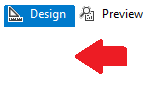
Using visual studio left click just under design to focus on the report.

Image showing where to click

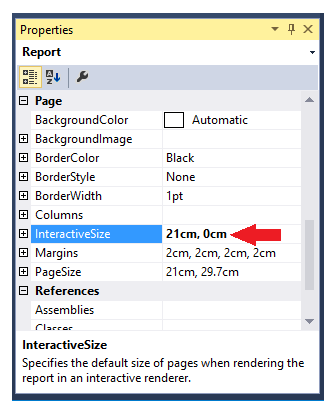
Now the report properties window should be visible in the bottom right of the screen.

Set the interactive height to 0 as shown below.

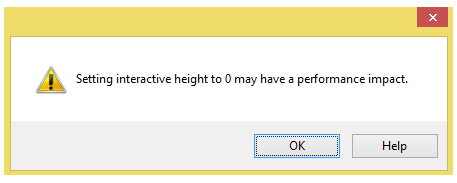
Properties windowYou will get the following warning sign below. Limiting the report to one page, by setting the interactive height to zero, means everything needs to be loaded all at once. This will create lag when a user loads the report and interacts with it.

warning message stating can cause performance issuesIf you are basically using SSRS as a means for end users to pull a data dump via excel, heed this warning. If you just have a few aggregated tables and you want them all on the same page you should be fine.

How to connect your android device to a Playstation 3 or 4 controller wirelessly

A list of directly compatible games is at the bottom of this post.

Prerequisites:

Firstly you will need your device rooted. Rooting the device just means you have administrative privileges on the device, but unlike windows it’s not as simple as just changing a setting. Please see this tutorial on checking if an android device is rooted and this tutorial if you need instruction on rooting your device.

Connecting your PS3/4 controller to your android device:

As with all things android you might have guessed you need an app to connect your device to your Playstation controller. In this case you need the sixaxis controller. Unfortunately the app isn’t free but it is cheap!

However before you go handing over your dosh the guys at dancing pixel studios (strange choice of names considering they don’t seem to make any games) were nice enough to create the sixaxis compatibility checker so you can try before you buy.

Step 1.

Install the compatibility checker from the play store here.

Step 2.

Once installed, open the app and click Start. If you get a connection failed your device is not supported.

Sorry dude.

If not, Yay!

Continue!

Step 3.

Connect your controller to your device with a mini usb cable.

Step 4.

Click pair. This will write your android’s Bluetooth address to the controller. (Don’t worry about the pad not working on the playstation anymore, they’re a terrible console anyway. JK, to reconnect your controller to your playstation just connect the controller via the usb cable and it will write the playstation address back onto the controller.)

Step 5.

Once paired click start on the app. The device is now listening for controllers. If the controller is not turned on press the power button in the center. Now when you press buttons on the controller you should see them appearing on screen.

Congratulations, your device is compatible you now have the honour of buying the app here.

Some setup advice:

When you first use the app you’ll be asked to tick the box recognising Sixaxis Controller as a Keyboard & Input Method. Do so. It asks because this is a security feature as such devices could be potential recording key strokes etc.

In general settings I always have the box Auto Start ticked, this means the app launches whenever the device is turned. For the idle timeout option I set the timeout for 300, which means if the controller is not interacted with for five minutes the app turns the controller off saving the battery. On the subject of battery you can use your device to charge the controller which is nice.

Not all games are compatible even more so if you’re using an Android box or stick:

Native compatible of a game means that it was programmed to accept inputs from controllers some great examples being BombSquad, Asphalt 8, Dead Trigger however, sadly, a lot of games do not support native compatibility.

This could be for a number of reasons, like the developer just never bothered to code compatibility into the app or the app might compete with a console version of the game and the developer doesn’t want to cannibalize the market. Man I wished Fifa had controller support. . .

However the sixaxis controller app comes with a great feature to map button presses. This is especially useful to the PUBG mobile fans out there.

How to do this though is another post in itself so I suggest you google around, there’s plenty of great tutorials out there and the gentle souls of the internet have even created touch profiles for games available to download saving you the trouble of doing the mapping yourself.

Sadly though mapping on many Android boxes and sticks don’t seem to work to well if at all. This is down to these devices often shipping without the necessary touch drivers because they don’t have screens. Which makes sense, why ship a device with touch drivers that doesn’t have a screen? For PUBG mobile players who want to use a controller of course!

The following is a list of games that you can play using the android sixaxis controller app.

Remapping of keys maybe necessary, the correct mapping is as follows.

  • Cross: A
  • Circle: B
  • Square: X
  • Triangle: Y

Games:

I’ll be adding to this list over time so if I’ve missed a game you’ve tested and know to work please comment below.

  1. Dead Trigger (free)
  2. Dead Trigger 2 (free)
  3. Evac
  4. Asphalt 8 (free)
  5. Dead Effect (free)
  6. Beach Buggy Blitz (free)
  7. Beach Buggy Racing (free)
  8. Dream League Soccer (free)
  9. BombSquad (free)
  10. Horizon Chase (free)
  11. PewPew (free)
  12. PewPew 2
  13. Skyriders (free)
  14. ShadowGun
  15. SoulCraft (free)
  16. Real Boxing (free)
  17. Skate Party 2 (free)
  18. GT Racing 2
  19. Manuganu 2 (free)
  20. Shooty Skies (free)
  21. Reckless Racing
  22. Rail Racing
  23. Jet Car Stunts 2
  24. Aces of the Luftwaffe (free)
  25. Tank Riders (free)
  26. Raging Thunder 2 (free)
  27. Annelids (free)
  28. Warlings: Armageddon (free)
  29. Table Top Racing (free)
  30. Sine Mora
  31. Pako – Car Chase Simulator (free)
  32. Sword Of Xolan (free)
  33. Nub’s Adventure (free)
  34. Super Dangerous Dungeons (free)
  35. Only One (free)
  36. Turbo Dismount (free)
  37. Particle Arcade Shooter
  38. Luminescence (free)
  39. Leo’s Fortune
  40. Does Not Commute
  41. Pac-Man (free)
  42. Redline Rush (free)
  43. Radiant (free)
  44. Zenonia
  45. Voxel Rush (free)
  46. Winter Fugitives *
  47. Hopeless *
  48. Tiny Thief *
  49. Smash Hit * (free)

Any other suggestions please feel free to add a comment below.