Category Archives: SQL Server

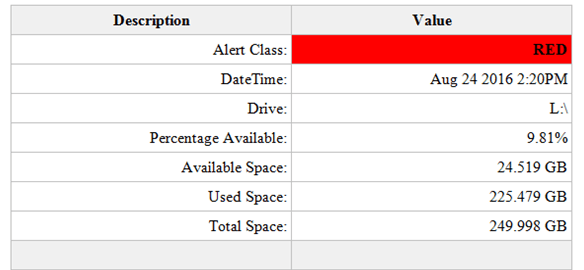
An example of the HTML table sent as part of the email

How to send an email notification when disk space is low from SQL Server

Firstly let me acknowledge a few points worth nothing:

  • Disk space monitoring should be performed by enterprise quality network monitoring software. (And yes these are often very expensive)
  • The availability of adequate amounts of disk space is the responsibility of the people in charge of the IT infrastructure. (Not the DBAs)
  • The process doing the monitoring should not be running on the machine it is monitoring. (If the monitored machine experiences a problem the monitor may not be able to notify anyone)

With all that being said you might be in the situation where you still need to know when SQL Server is running out of local disk space and the solution below provides you with a free means to achieve this. This is a dynamic solution which will be able to determine the disk space available of all the local drives visible to SQL Server.

Prerequisites:

  • You will need to have an exchange server set up with SQL Server already capable of sending emails.
  • I have set up a database called Admin to hold the below tables and SP. It is good practice to store this sort of thing in a purposely created database instead of using something like Master. You can use another database if you would prefer just change the references to Admin in the first and second script with a find and replace.

Setup:

There are 4 components to this process.

Tables:

DiskSpaceAlertThreshold, this table holds a red and a yellow value. These values relate to the percentage space available on the local drives. A good rule of thumb would be to ensure there is over 20% of space available. So disk space availability for the yellow alert is set to 20% and the red alert is set to 10%. (Yes I’ve borrowed the alert names from Star Trek)

StaffEmailList, this table contains the email address of the staff you want to be notified when disk space is running low. For this example Clark Kent of The Daily Planet is very interested in SQL server disk space. You can of course add additional staff email addresses to the table. To exclude a staff member from receiving an email, after they have been added to the table, set the active flag to zero.

Store Procedure:

LowDiskSpaceAlert, this store procedure contains all the logic to determine what percentage of disk space is available. It also creates the HTML table used in the email to display the alert results and calls for the email to be sent.

N.B. You will need to change the profile named in the stored procedure to match an email account profile available within your SQL Server. Simply change the value of @profileName before executing the script.

SET @profileName = 'SQL Report'

An example of the HTML table sent as part of the email:
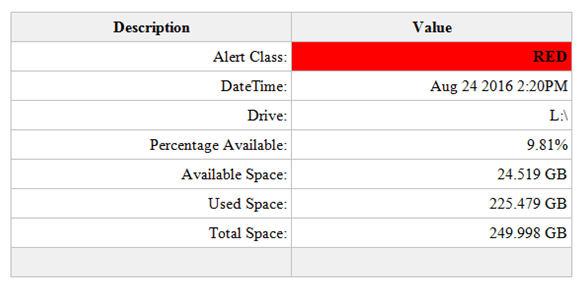
An example of the HTML table sent as part of the email

Job:

LowDiskSpaceAlert, this job simply runs the LowDiskSpaceAlert stored procedure every 10 minutes. You can change the schedule as you wish.

Create Tables and SP:

USE [Admin]
GO

/****** Object:  Table [dbo].[DiskSpaceAlertThreshold]    Script Date: 09/23/2016 18:46:29 ******/
SET ANSI_NULLS ON
GO

SET QUOTED_IDENTIFIER ON
GO

SET ANSI_PADDING ON
GO

CREATE TABLE [dbo].[DiskSpaceAlertThreshold] (
	[DiskSpaceAlertThresholdId] [int] IDENTITY(1, 1) NOT NULL
	,[AlertClass] [varchar](25) NULL
	,[ThresholdValue] [int] NULL
	,PRIMARY KEY CLUSTERED ([DiskSpaceAlertThresholdId] ASC) WITH (
		PAD_INDEX = OFF
		,STATISTICS_NORECOMPUTE = OFF
		,IGNORE_DUP_KEY = OFF
		,ALLOW_ROW_LOCKS = ON
		,ALLOW_PAGE_LOCKS = ON
		) ON [PRIMARY]
	) ON [PRIMARY]
GO

SET ANSI_PADDING OFF
GO

SET IDENTITY_INSERT [dbo].[DiskSpaceAlertThreshold] ON

INSERT [dbo].[DiskSpaceAlertThreshold] (
	[DiskSpaceAlertThresholdId]
	,[AlertClass]
	,[ThresholdValue]
	)
VALUES (
	1
	,N'Red'
	,10
	)

INSERT [dbo].[DiskSpaceAlertThreshold] (
	[DiskSpaceAlertThresholdId]
	,[AlertClass]
	,[ThresholdValue]
	)
VALUES (
	2
	,N'Yellow'
	,20
	)

SET IDENTITY_INSERT [dbo].[DiskSpaceAlertThreshold] OFF
/****** Object:  Table [dbo].[StaffEmailList]    Script Date: 09/23/2016 18:46:29 ******/
SET ANSI_NULLS ON
GO

SET QUOTED_IDENTIFIER ON
GO

SET ANSI_PADDING ON
GO

CREATE TABLE [dbo].[StaffEmailList] (
	[StaffEmailListId] [int] IDENTITY(1, 1) NOT NULL
	,[FirstName] [varchar](255) NULL
	,[LastName] [varchar](255) NULL
	,[EmailAddress] [varchar](255) NULL
	,[Active] [bit] NULL
	,PRIMARY KEY CLUSTERED ([StaffEmailListId] ASC) WITH (
		PAD_INDEX = OFF
		,STATISTICS_NORECOMPUTE = OFF
		,IGNORE_DUP_KEY = OFF
		,ALLOW_ROW_LOCKS = ON
		,ALLOW_PAGE_LOCKS = ON
		) ON [PRIMARY]
	) ON [PRIMARY]
GO

SET ANSI_PADDING OFF
GO

SET IDENTITY_INSERT [dbo].[StaffEmailList] ON

INSERT [dbo].[StaffEmailList] (
	[StaffEmailListId]
	,[FirstName]
	,[LastName]
	,[EmailAddress]
	,[Active]
	)
VALUES (
	1
	,N'Clark'
	,N'Kent'
	,N'cKent@thedailyplanet.com'
	,1
	)

SET IDENTITY_INSERT [dbo].[StaffEmailList] OFF
/****** Object:  StoredProcedure [dbo].[LowDiskSpaceAlert]    Script Date: 09/23/2016 18:46:33 ******/
SET ANSI_NULLS ON
GO

SET QUOTED_IDENTIFIER ON
GO

CREATE PROCEDURE [dbo].[LowDiskSpaceAlert]
AS
SET NOCOUNT ON

IF OBJECT_ID('tempdb..#DiskSpaceStats') IS NOT NULL
	DROP TABLE #DiskSpaceStats

IF OBJECT_ID('tempdb..#DriveAlert') IS NOT NULL
	DROP TABLE #DriveAlert

DECLARE @profileName AS VARCHAR(128)
DECLARE @thresholdRed AS INT
DECLARE @thresholdYellow AS INT
DECLARE @drive AS VARCHAR(5)
DECLARE @sql AS VARCHAR(MAX)
DECLARE @i AS INT
DECLARE @j AS INT

/*Change the name for your SQL Server email profile*/
SET @profileName = 'SQL Report'

CREATE TABLE #DriveAlert (
	AlertEntry VARCHAR(25)
	,AlertValue VARCHAR(25)
	)

SET @thresholdRed = (
		SELECT ThresholdValue
		FROM [Admin].[dbo].[DiskSpaceAlertThreshold]
		WHERE AlertClass = 'Red'
		)
SET @thresholdYellow = (
		SELECT ThresholdValue
		FROM [Admin].[dbo].[DiskSpaceAlertThreshold]
		WHERE AlertClass = 'Yellow'
		)

SELECT ROW_NUMBER() OVER (
		ORDER BY AvailableDriveSpacePercentage ASC
		) AS RowNo
	,ObservationDT
	,Drive
	,AvailableDriveSpacePercentage
	,AvailableDriveSpaceGB
	,UsedDriveSpaceGB
	,TotalDriveSpaceGB
INTO #DiskSpaceStats
FROM (
	SELECT DISTINCT GETDATE() AS ObservationDT
		,dovs.volume_mount_point AS Drive
		,CAST(((dovs.available_bytes / 1073741824.0) / (dovs.total_bytes / 1073741824.0)) * 100 AS NUMERIC(8, 2)) AS AvailableDriveSpacePercentage
		,CAST((dovs.available_bytes / 1073741824.0) AS NUMERIC(8, 3)) AvailableDriveSpaceGB
		,CAST(((dovs.total_bytes - dovs.available_bytes) / 1073741824.0) AS NUMERIC(8, 3)) AS UsedDriveSpaceGB
		,CAST((dovs.total_bytes / 1073741824.0) AS NUMERIC(8, 3)) TotalDriveSpaceGB
	FROM sys.master_files AS mf
	CROSS APPLY sys.dm_os_volume_stats(mf.database_id, mf.FILE_ID) AS dovs
	) AS r

SET @i = 1
SET @j = (
		SELECT MAX(RowNo)
		FROM #DiskSpaceStats
		)

WHILE @i <= @j
BEGIN
	SET @drive = (
			SELECT Drive
			FROM #DiskSpaceStats
			WHERE RowNo = @i
			)
	SET @sql = 'DECLARE @alert AS VARCHAR(6)
IF ' + CONVERT(VARCHAR(3), @thresholdYellow) + ' > (
		SELECT AvailableDriveSpacePercentage
		FROM #DiskSpaceStats
		WHERE Drive = ''' + @drive + '''
		)
BEGIN
SET @alert = ''YELLOW''
END
IF ' + CONVERT(VARCHAR(3), @thresholdRed) + ' > (
		SELECT AvailableDriveSpacePercentage
		FROM #DiskSpaceStats
		WHERE Drive = ''' + @drive + '''
		)
BEGIN
SET @alert = ''RED''
END
IF @alert IS NOT NULL
BEGIN
	SELECT AlertEntry
	,AlertValue
	FROM (
	SELECT ''Alert Class: '' AS AlertEntry
	,@alert AS AlertValue 
	UNION ALL
	SELECT ''DateTime: '' AS AlertEntry
	,CONVERT(VARCHAR(30), ObservationDT)  AS AlertValue
	FROM #DiskSpaceStats
	WHERE Drive = ''' + @drive + '''
	UNION ALL
	SELECT ''Drive: '' AS AlertEntry
	,Drive AS AlertValue
	FROM #DiskSpaceStats
	WHERE Drive = ''' + @drive + 
		'''
	UNION ALL
	SELECT ''Percentage Available: '' AS AlertEntry
	,CONVERT(VARCHAR(10), AvailableDriveSpacePercentage) + ''%'' AS AlertValue
	FROM #DiskSpaceStats
	WHERE Drive = ''' + @drive + '''
	UNION ALL
	SELECT ''Available Space: '' AS AlertEntry
	,CONVERT(VARCHAR(10), AvailableDriveSpaceGB) + '' GB'' AS AlertValue
	FROM #DiskSpaceStats
	WHERE Drive = ''' + @drive + '''
	UNION ALL
	SELECT ''Used Space: '' AS AlertEntry
	,CONVERT(VARCHAR(10), UsedDriveSpaceGB) + '' GB'' AS AlertValue
	FROM #DiskSpaceStats
	WHERE Drive = ''' + @drive + '''
	UNION ALL
	SELECT ''Total Space: '' AS AlertEntry
	,CONVERT(VARCHAR(10), TotalDriveSpaceGB) + '' GB'' AS AlertValue
	FROM #DiskSpaceStats
	WHERE Drive = ''' + @drive + '''
	UNION ALL 
	SELECT '' '' AS AlertEntry
	,'' '' AS AlertValue
	) AS alert
END
'

	INSERT INTO #DriveAlert
	EXEC (@sql)

	SET @i = @i + 1
END

IF EXISTS (
		SELECT *
		FROM #DriveAlert
		)
BEGIN
	DECLARE @emailList AS VARCHAR(MAX)
	DECLARE @subjectMsg AS VARCHAR(255)
	DECLARE @tableHTML NVARCHAR(MAX)

	SET @emailList = (
			SELECT STUFF((
						SELECT '; ' + EmailAddress
						FROM [Admin].[dbo].[StaffEmailList]
						WHERE Active = 1
						FOR XML PATH('')
						), 1, 1, '') AS EmailAddress
			)
	SET @subjectMsg = (
			SELECT @@SERVERNAME
			) + ' Low Disk Space Alert'
	SET @tableHTML = N'<style>
	.tableFormat {
		width:80%;
		border:1px solid #C0C0C0;
		border-collapse:collapse;
		padding:5px;
	}
	.tableFormat th {
		border:1px solid #C0C0C0;
		padding:5px;
		background:#F0F0F0;
	}
	.tableFormat td {
		border:1px solid #C0C0C0;
		text-align:right;
		padding:5px;
	}
</style>' + N'<H1></H1>' + N'<table class="tableFormat" align="center">' + N'<tr><th>Description</th><th>Value</th></tr>' + CAST((
				SELECT td = AlertEntry
					,''
					,td = AlertValue
					,''
				FROM #DriveAlert
				FOR XML PATH('tr')
					,TYPE
				) AS NVARCHAR(MAX)) + N'</table>';

	DROP TABLE #DiskSpaceStats

	SET @tableHTML = REPLACE(@tableHTML, '<td> </td>', '<td bgcolor="#F0F0F0"> </td>')
	SET @tableHTML = REPLACE(@tableHTML, '<td>RED</td>', '<td bgcolor="red"><b>RED</b></td>')
	SET @tableHTML = REPLACE(@tableHTML, '<td>YELLOW</td>', '<td bgcolor="yellow"><b>YELLOW</b></td>')

	EXEC msdb.dbo.sp_send_dbmail @profile_name = @profileName
		,@recipients = @emailList
		,@body = @tableHTML
		,@subject = @subjectMsg
		,@importance = 'High'
		,@body_format = 'HTML';
END
GO
Create Job:
USE [msdb]
GO

/****** Object:  Job [LowDiskSpaceAlert]    Script Date: 09/23/2016 19:03:39 ******/
BEGIN TRANSACTION

DECLARE @ReturnCode INT

SELECT @ReturnCode = 0

/****** Object:  JobCategory [[Uncategorized (Local)]]]    Script Date: 09/23/2016 19:03:39 ******/
IF NOT EXISTS (
		SELECT NAME
		FROM msdb.dbo.syscategories
		WHERE NAME = N'[Uncategorized (Local)]'
			AND category_class = 1
		)
BEGIN
	EXEC @ReturnCode = msdb.dbo.sp_add_category @class = N'JOB'
		,@type = N'LOCAL'
		,@name = N'[Uncategorized (Local)]'

	IF (
			@@ERROR <> 0
			OR @ReturnCode <> 0
			)
		GOTO QuitWithRollback
END

DECLARE @jobId BINARY (16)

EXEC @ReturnCode = msdb.dbo.sp_add_job @job_name = N'LowDiskSpaceAlert'
	,@enabled = 1
	,@notify_level_eventlog = 0
	,@notify_level_email = 0
	,@notify_level_netsend = 0
	,@notify_level_page = 0
	,@delete_level = 0
	,@description = N'No description available.'
	,@category_name = N'[Uncategorized (Local)]'
	,@owner_login_name = N'PL\admin.ph'
	,@job_id = @jobId OUTPUT

IF (
		@@ERROR <> 0
		OR @ReturnCode <> 0
		)
	GOTO QuitWithRollback

/****** Object:  Step [RunLowDiskSpaceAlertSP]    Script Date: 09/23/2016 19:03:40 ******/
EXEC @ReturnCode = msdb.dbo.sp_add_jobstep @job_id = @jobId
	,@step_name = N'RunLowDiskSpaceAlertSP'
	,@step_id = 1
	,@cmdexec_success_code = 0
	,@on_success_action = 1
	,@on_success_step_id = 0
	,@on_fail_action = 2
	,@on_fail_step_id = 0
	,@retry_attempts = 0
	,@retry_interval = 0
	,@os_run_priority = 0
	,@subsystem = N'TSQL'
	,@command = N'[dbo].[LowDiskSpaceAlert]'
	,@database_name = N'Admin'
	,@flags = 0

IF (
		@@ERROR <> 0
		OR @ReturnCode <> 0
		)
	GOTO QuitWithRollback

EXEC @ReturnCode = msdb.dbo.sp_update_job @job_id = @jobId
	,@start_step_id = 1

IF (
		@@ERROR <> 0
		OR @ReturnCode <> 0
		)
	GOTO QuitWithRollback

EXEC @ReturnCode = msdb.dbo.sp_add_jobschedule @job_id = @jobId
	,@name = N'LowDiskSpaceAlertSchedule'
	,@enabled = 1
	,@freq_type = 4
	,@freq_interval = 1
	,@freq_subday_type = 4
	,@freq_subday_interval = 10
	,@freq_relative_interval = 0
	,@freq_recurrence_factor = 0
	,@active_start_date = 20160824
	,@active_end_date = 99991231
	,@active_start_time = 0
	,@active_end_time = 235959
	,@schedule_uid = N'a8831f35-e7a6-4880-bc2d-4d48aff82ff6'

IF (
		@@ERROR <> 0
		OR @ReturnCode <> 0
		)
	GOTO QuitWithRollback

EXEC @ReturnCode = msdb.dbo.sp_add_jobserver @job_id = @jobId
	,@server_name = N'(local)'

IF (
		@@ERROR <> 0
		OR @ReturnCode <> 0
		)
	GOTO QuitWithRollback

COMMIT TRANSACTION

GOTO EndSave

QuitWithRollback:

IF (@@TRANCOUNT > 0)
	ROLLBACK TRANSACTION

EndSave:
GO


How to set SQL Server file autogrowth settings to recommended sizes across all databases on an instance

As part of a Microsoft RAP analysis you might encounter some of the following:

  • Databases identified with auto-growth set to percentage growth
  • Databases identified with auto-growth set to 1MB growth
  • Database files have been identified that have the next Auto Growth increment of 1GB or above
  • Databases have been identified with one or more Transaction Log files where expected next Auto Growth increment is 1GB or above

Brent Ozar suggests that the data file and log file autogrowth setting should be 256MB and 128MB respectively, and he makes a good argument here.

Broadly I agree with his position but I also acknowledge, as he does, that every database is different and has its own considerations. (Keep that in mind while reviewing the following script)

I’ve created the script below, which programmatically creates the SQL commands, to apply these recommended values to the autogrowth settings of each database on an instance.

The script gets every database name, and associated data file and log file names and using dynamic SQL writes a script to update autogrowth settings for each database.

You can then adjust the setting values manually for each database before executing.

Or if you’re really brave/crazy execute the dynamic script automatically by changing PRINT @sql to EXEC(@sql).

USE Master;
GO

SET NOCOUNT ON

DECLARE @database AS NVARCHAR(256)
	,@dataFileName AS NVARCHAR(256)
	,@logFileName AS NVARCHAR(256)
	,@sql AS VARCHAR(MAX)
	,@loop AS INT
	,@end AS INT

IF OBJECT_ID('tempdb..#DatabaseList') IS NOT NULL
	DROP TABLE #DatabaseList

CREATE TABLE #DatabaseList (
	[#DatabaseListId] INT IDENTITY(1, 1) PRIMARY KEY
	,[DatabaseName] [sysname] NOT NULL
	,[DataFileName] [sysname] NOT NULL
	,[LogFileName] [sysname] NOT NULL
	)

INSERT INTO #DatabaseList
SELECT d.DatabaseName
	,d.FileName AS DataFileName
	,l.FileName AS LogFileName
FROM (
	SELECT d.NAME AS DatabaseName
		,mf.NAME AS FileName
	FROM sys.master_files mf(NOLOCK)
	JOIN sys.databases d(NOLOCK) ON mf.database_id = d.database_id
	WHERE type_desc = 'ROWS'
	) AS d
LEFT JOIN (
	SELECT d.NAME AS DatabaseName
		,mf.NAME AS FileName
	FROM sys.master_files mf(NOLOCK)
	JOIN sys.databases d(NOLOCK) ON mf.database_id = d.database_id
	WHERE mf.type_desc = 'LOG'
	) AS l ON l.DatabaseName = d.DatabaseName

SET @end = (
		SELECT MAX(#DatabaseListId)
		FROM #DatabaseList
		)
SET @loop = 1

WHILE @loop <= @end
BEGIN
	SELECT @database = DatabaseName
		,@dataFileName = DataFileName
		,@logFileName = LogFileName
	FROM #DatabaseList
	WHERE #DatabaseListId = @loop

	--PRINT @database
	SET @sql = 'USE [' + @database + '];
		GO
		ALTER DATABASE [' + @database + '] MODIFY FILE (NAME=''' + @dataFileName + ''',MAXSIZE = UNLIMITED, FILEGROWTH = 256MB);
		ALTER DATABASE [' + @database + '] MODIFY FILE (NAME=''' + @logFileName + ''',MAXSIZE = UNLIMITED, FILEGROWTH = 128MB);
		GO'

	PRINT @sql

	SET @loop = @loop + 1
END
		/*
Change PRINT @sql to:
EXEC (@sql)
To Update the file sizes automatically
*/


As part of this process I’d also run the script below before and after you’ve made the changes to have a record for change management purposes.

SELECT GETDATE() AS DateOfObservation
	,d.NAME AS database_name
	,mf.NAME AS file_name
	,mf.type_desc AS file_type
	,mf.growth AS current_percent_growth
FROM sys.master_files mf(NOLOCK)
JOIN sys.databases d(NOLOCK) ON mf.database_id = d.database_id

How to determine the index fragmentation level on your SQL Server instance

Below is a script that will run against every table in every database on your Sql Server instance and output, among other things, the average index fragmentation percentage.

It can be a bit heavy when running against large databases with thousands of tables so I would recommend running it during downtime or outside office hours.

This script returns fragmentation stats by utilizing a DMV.

When Nulls are presented as parameters this DMV works at a server level and uses preset defaults.

[sys].[dm_db_index_physical_stats](NULL, NULL, NULL, NULL, NULL)

However it also accepts the parameter options below to limited the results returned.

[sys].[dm_db_index_physical_stats](Database_Id, Object_Id, Index_Id, partition_number, MODE)

MODE OPTIONS:

Mode specifies the scan level that is used to obtain statistics. Valid inputs are DEFAULT, NULL, LIMITED, SAMPLED, or DETAILED. The default (NULL) is LIMITED.

DEFAULT will have 12 columns full of data and then NULLS in the remainder.
SAMPLED will have 21 columns full of data.
LIMITED will have 12 columns of data and the NULLS in the remainder.
DETAILED will have 21 columns full of data.

Note: I’ve capture more fields in the temp table #Index than I use in the final select statement. This is because you might want to include additional index related fields i.e. check if the index is unique etc. If all you want is the index name in the final select statement you can tidy up the query as needed and exclude the unwanted additional fields.

SET NOCOUNT ON

IF OBJECT_ID('tempdb..#Schema') IS NOT NULL
	DROP TABLE #Schema

IF OBJECT_ID('tempdb..#Index') IS NOT NULL
	DROP TABLE #Index

DECLARE @Sql AS VARCHAR(MAX)
DECLARE @Database TABLE (
	DbId INT
	,DbName SYSNAME
	)
DECLARE @DbName AS SYSNAME
DECLARE @DbId AS INT

CREATE TABLE #Schema (
	DbId INT
	,DbName SYSNAME
	,Object_Id INT NULL
	,ObjectName SYSNAME NULL
	,TableFlag BIT
	,ViewFlag BIT
	,Schema_Id INT NULL
	,SchemaName SYSNAME NULL
	)

CREATE TABLE #Index (
	DbId INT
	,DbName SYSNAME
	,Object_Id INT NOT NULL
	,NAME SYSNAME NULL
	,index_id INT NOT NULL
	,type TINYINT NOT NULL
	,type_desc NVARCHAR(60) NULL
	,is_unique BIT NULL
	,data_space_id INT NULL
	,ignore_dup_key BIT NULL
	,is_primary_key BIT NULL
	,is_unique_constraint BIT NULL
	,fill_factor TINYINT NOT NULL
	,is_padded BIT NULL
	,is_disabled BIT NULL
	,is_hypothetical BIT NULL
	,allow_row_locks BIT NULL
	,allow_page_locks BIT NULL
	,has_filter BIT NULL
	,filter_definition NVARCHAR(max) NULL
	)

INSERT INTO @Database (
	DbId
	,DbName
	)
SELECT dbid
	,NAME
FROM master.dbo.sysdatabases
WHERE NAME <> 'tempdb'
ORDER BY NAME ASC

SET @DbId = 0

WHILE @DbId IS NOT NULL
BEGIN
	SET @DbId = (
			SELECT MIN(DbId)
			FROM @Database
			WHERE DbId > @DbId
			)
	SET @DbName = (
			SELECT DbName
			FROM @Database
			WHERE DbId = @DbId
			)
	SET @Sql = '
	INSERT INTO #Schema (
		DbId
		,DbName
		,Object_Id
		,ObjectName
		,TableFlag
		,ViewFlag
		,Schema_Id
		,SchemaName
		)
	SELECT ' + CONVERT(VARCHAR(128), @DbId) + ' AS DbId
		,' + '''' + @DbName + '''' + ' AS DbName
		,o.Object_Id
		,o.NAME AS ObjectName
		,CASE 
			WHEN o.type = ''IT''
				THEN 1
			WHEN o.type = ''S''
				THEN 1
			WHEN o.type = ''TT''
				THEN 1
			WHEN o.type = ''U''
				THEN 1
			ELSE NULL
			END AS TableFlag
		,CASE 
			WHEN o.type = ''V''
				THEN 1
			ELSE NULL
			END AS ViewFlag
		,s.Schema_Id
		,s.NAME AS SchemaName
	FROM ' + QUOTENAME(@DbName) + '.sys.objects AS o WITH (NOLOCK)
	INNER JOIN ' + QUOTENAME(@DbName) + '.sys.schemas AS s WITH (NOLOCK) ON o.schema_id = s.schema_id
	'

	EXEC (@Sql)

	SET @Sql = '
	INSERT INTO #Index (
	DbId
	,DbName
	,object_id
	,NAME
	,index_id
	,type
	,type_desc
	,is_unique
	,data_space_id
	,ignore_dup_key
	,is_primary_key
	,is_unique_constraint
	,fill_factor
	,is_padded
	,is_disabled
	,is_hypothetical
	,allow_row_locks
	,allow_page_locks
	,has_filter
	,filter_definition
	)
	SELECT ' + CONVERT(VARCHAR(128), @DbId) + ' AS DbId
		,' + '''' + @DbName + '''' + ' AS DbName
		,object_id
		,NAME
		,index_id
		,type
		,type_desc
		,is_unique
		,data_space_id
		,ignore_dup_key
		,is_primary_key
		,is_unique_constraint
		,fill_factor
		,is_padded
		,is_disabled
		,is_hypothetical
		,allow_row_locks
		,allow_page_locks
		,has_filter
		,filter_definition
	FROM ' + QUOTENAME(@DbName) + '.sys.indexes WITH (NOLOCK)
	'

	EXEC (@Sql)
END

SELECT ROW_NUMBER() OVER (
		ORDER BY s.DbName ASC
			,s.SchemaName ASC
			,s.ObjectName
		) AS Row
	,s.DbName
	,s.SchemaName AS SchemaName
	,s.Object_Id AS ObjectId
	,s.ObjectName
	,s.TableFlag
	,s.ViewFlag
	,i.Name AS IndexName
	,ddips.index_type_desc AS IndexType
	,ddips.page_count AS Pages
	,ddips.record_count AS Records
	,ddips.fragment_count AS Frags
	,ddips.avg_fragmentation_in_percent AS AvgFragPercent
FROM sys.dm_db_index_physical_stats(NULL, NULL, NULL, NULL, 'SAMPLED') AS ddips
INNER JOIN #Schema AS s ON ddips.database_id = s.DbId
INNER JOIN #Index AS i ON s.DbId = i.DbId
	AND s.Object_Id = i.Object_Id
	AND ddips.index_id = i.index_id
	AND ddips.object_id = s.Object_Id
WHERE (
		s.TableFlag = 1
		OR s.ViewFlag = 1
		)
ORDER BY s.DbName ASC
	,s.SchemaName ASC
	,s.ObjectName

How to use SQL to remove non-numeric characters from a field

So I was working with phone numbers recently and the field was filthy. I mean there was absolutely no data entry validation whatsoever. Everything has been entered into this field from email addresses entered accidentally to phone numbers with little notes like (This is Steve’s number) to just random characters. There are millions of legitimate numbers in this field so in order to make the field workable the junk has to be taken out first.

A colleague of mine was kind enough to share this script with me for replacing characters. I’ve found it to be very beneficial as it is much more efficient than the solution I had been using of replacing all junk characters in a column row by row. This approach is set based replacing a single unwanted character from an entire column at a time.

CREATE TABLE #temp ([FreeText] VARCHAR(50) NOT NULL)

INSERT #temp
VALUES ('Hi There!!! 222  10 - 3476')

INSERT #temp
VALUES ('p@yahoo.com $%*


amp; 1234567 $%^&^')

DECLARE @DisallowedCharsASCIICodeMin TINYINT
,@DisallowedCharsASCIICodeMax TINYINT
,@ASCIICode TINYINT
,@Char CHAR(1)
,@ReplaceChar CHAR(1)
DECLARE @DisallowedChars TABLE (
[ASCIICode] TINYINT NOT NULL
,[Char] CHAR(1) NOT NULL
,[ReplaceChar] CHAR(1) NULL
,[Replaced] BIT NOT NULL DEFAULT 0
,PRIMARY KEY ([ASCIICode])
)

SELECT @DisallowedCharsASCIICodeMin = 32
,@DisallowedCharsASCIICodeMax = 126

SET @ASCIICode = @DisallowedCharsASCIICodeMin

WHILE @ASCIICode <= @DisallowedCharsASCIICodeMax
BEGIN
INSERT @DisallowedChars (
[ASCIICode]
,[Char]
)
VALUES (
@ASCIICode
,CHAR(@ASCIICode)
)

SET @ASCIICode = @ASCIICode + 1
END

DELETE @DisallowedChars
WHERE [Char] IN (
'0'
,'1'
,'2'
,'3'
,'4'
,'5'
,'6'
,'7'
,'8'
,'9'
)

WHILE EXISTS (
SELECT 1
FROM @DisallowedChars
WHERE [Replaced] = 0
)
BEGIN
SELECT TOP 1 @ASCIICode = [ASCIICode]
,@Char = [Char]
FROM @DisallowedChars
WHERE [Replaced] = 0

UPDATE #temp
SET [FreeText] = CASE
WHEN @ReplaceChar IS NULL
THEN REPLACE([FreeText], @Char, '')
ELSE REPLACE([FreeText], @Char, @ReplaceChar)
END
WHERE [FreeText] LIKE '%' + @Char + '%'

UPDATE @DisallowedChars
SET [Replaced] = 1
WHERE [ASCIICode] = @ASCIICode
END

SELECT *
FROM #temp

DROP TABLE #temp
GO


For my needs I’ve turned this logic into a stored procedure. I’ve also made a few changes. Firstly I’ve expanded the range of charters to exclude from unprintable characters to additional Unicode characters. I’ve also removed the option to add in a replace character as I only want non-numeric characters to be removed from the field. This allows me to also remove the case statement.

-- Drop stored procedure if it already exists
IF EXISTS (
		SELECT *
		FROM INFORMATION_SCHEMA.ROUTINES
		WHERE SPECIFIC_SCHEMA = N'dbo'
			AND SPECIFIC_NAME = N'GetNumeric'
		)
	DROP PROCEDURE dbo.GetNumeric
GO
-- Create Procedure
CREATE PROCEDURE dbo.GetNumeric @TableName VARCHAR(255)
	,@ColumnName VARCHAR(255)
AS
SET NOCOUNT ON

DECLARE @sql AS VARCHAR(500)

CREATE TABLE #temp (
	DirtyColumn VARCHAR(255) NOT NULL
	,CleanColumn VARCHAR(255) NOT NULL
	)

--SELECT @TableName
SET @sql = 'SELECT ' + @ColumnName + ' AS DirtyColumn
,' + @ColumnName + ' AS CleanColumn FROM ' + @TableName

INSERT INTO #temp (
	DirtyColumn
	,CleanColumn
	)
EXEC (@sql)

DECLARE @DisallowedCharsASCIICodeMin TINYINT
	,@DisallowedCharsASCIICodeMax TINYINT
	,@ASCIICode TINYINT
	,@Char CHAR(1)
	,@ReplaceChar CHAR(1)
DECLARE @DisallowedChars TABLE (
	[ASCIICode] TINYINT NOT NULL
	,[Char] CHAR(1) NOT NULL
	,[ReplaceChar] CHAR(1) NULL
	,[Replaced] BIT NOT NULL DEFAULT 0
	,PRIMARY KEY ([ASCIICode])
	)

SELECT @DisallowedCharsASCIICodeMin = 1
	,@DisallowedCharsASCIICodeMax = 254

SET @ASCIICode = @DisallowedCharsASCIICodeMin

WHILE @ASCIICode <= @DisallowedCharsASCIICodeMax
BEGIN
	INSERT @DisallowedChars (
		[ASCIICode]
		,[Char]
		)
	VALUES (
		@ASCIICode
		,CHAR(@ASCIICode)
		)

	SET @ASCIICode = @ASCIICode + 1
END

DELETE @DisallowedChars
WHERE [Char] IN (
		'0'
		,'1'
		,'2'
		,'3'
		,'4'
		,'5'
		,'6'
		,'7'
		,'8'
		,'9'
		)

WHILE EXISTS (
		SELECT 1
		FROM @DisallowedChars
		WHERE [Replaced] = 0
		)
BEGIN
	SELECT TOP 1 @ASCIICode = [ASCIICode]
		,@Char = [Char]
	FROM @DisallowedChars
	WHERE [Replaced] = 0

	UPDATE #temp
	SET [CleanColumn] = REPLACE([CleanColumn], @Char, '')
	WHERE [CleanColumn] LIKE '%' + @Char + '%'

	UPDATE @DisallowedChars
	SET [Replaced] = 1
	WHERE [ASCIICode] = @ASCIICode
END

SET @sql = 'UPDATE T1
SET T1.' + @ColumnName + ' = T2.CleanColumn
FROM ' + @TableName + ' AS T1
INNER JOIN #temp AS T2
ON T1.' + @ColumnName + ' = T2.DirtyColumn
WHERE T1.' + @ColumnName + '= T2.DirtyColumn;'

EXEC (@sql)

DROP TABLE #temp
GO


GO


After deploying the SP above to your test environment you can test it with the following script.

IF OBJECT_ID('dbo.DirtyPhoneNumbers', 'U') IS NOT NULL
	DROP TABLE dbo.DirtyPhoneNumbers;

CREATE TABLE DirtyPhoneNumbers (PhoneNumbers VARCHAR(255));
GO

INSERT INTO DirtyPhoneNumbers (PhoneNumbers)
VALUES ('afef2313newfnaksdfn')
	,('afef2313n!!!!!!!!!!&dfn')
	,('afef====+++22221sdfn')
	,('afef!"£$%^&&7575757sdfn')

SELECT *
FROM DirtyPhoneNumbers

EXEC dbo.GetNumeric 'DirtyPhoneNumbers'
	,'PhoneNumbers'

SELECT *
FROM DirtyPhoneNumbers

How to lookup SQL Server Jobs and get the job history with a query

Sometimes job history just won’t load in SQL Server Management Studio for one reason or another. One of the main reasons is that there are too many entries in the sysjobhistory table. The article here will help you resolve that problem. For a more immediate answer to the data you are looking for, like most things with SSMS, you can query the tables that contain this data directly.

For a permanent solution to bypassing SSMS I recommend using this stored procedure. If you just want a quick query see below.

If you want to get a job history for everything that has run over the last 7 days you can run the query below. Simply change the 7 to another number to go further back in time by days.

-- Variable Declarations 
DECLARE @PreviousDate DATETIME
DECLARE @Year VARCHAR(4)
DECLARE @Month VARCHAR(2)
DECLARE @MonthPre VARCHAR(2)
DECLARE @Day VARCHAR(2)
DECLARE @DayPre VARCHAR(2)
DECLARE @FinalDate INT


-- Initialize Variables 
SET @PreviousDate = DATEADD(dd, - 7, GETDATE()) -- Last 7 days  
SET @Year = DATEPART(yyyy, @PreviousDate)

SELECT @MonthPre = CONVERT(VARCHAR(2), DATEPART(mm, @PreviousDate))

SELECT @Month = RIGHT(CONVERT(VARCHAR, (@MonthPre + 1000000000)), 2)

SELECT @DayPre = CONVERT(VARCHAR(2), DATEPART(dd, @PreviousDate))

SELECT @Day = RIGHT(CONVERT(VARCHAR, (@DayPre + 1000000000)), 2)

SET @FinalDate = CAST(@Year + @Month + @Day AS INT)

-- Pull Job History 
SELECT j.[name]
	,s.step_name
	,h.step_id
	,MSDB.DBO.AGENT_DATETIME(h.run_date, h.run_time) AS run_time
	,STUFF(STUFF(STUFF(RIGHT(REPLICATE('0', 8) + CAST(h.run_duration AS VARCHAR(8)), 8), 3, 0, ':'), 6, 0, ':'), 9, 0, ':') 'run_duration (DD:HH:MM:SS)  '
	,h.run_status
	,h.sql_severity
	,h.message
	,h.SERVER
FROM msdb.dbo.sysjobhistory h
INNER JOIN msdb.dbo.sysjobs j ON h.job_id = j.job_id
INNER JOIN msdb.dbo.sysjobsteps s ON j.job_id = s.job_id
	AND h.step_id = s.step_id
WHERE h.run_date > @FinalDate
ORDER BY h.instance_id DESC


To get a job history for everything that has succeeded or failed over the last 7 days run the query below. Simply change the @RunStatus variable to either 0 (failed) or 1 (succeeded).

-- Variable Declarations 
DECLARE @RunStatus AS BIT
DECLARE @PreviousDate DATETIME
DECLARE @Year VARCHAR(4)
DECLARE @Month VARCHAR(2)
DECLARE @MonthPre VARCHAR(2)
DECLARE @Day VARCHAR(2)
DECLARE @DayPre VARCHAR(2)
DECLARE @FinalDate INT

/*Succeeded Jobs*/
--SET @RunStatus = 1
/*Failed Jobs*/
SET @RunStatus = 0

-- Initialize Variables 
SET @PreviousDate = DATEADD(dd, - 7, GETDATE()) -- Last 7 days  
SET @Year = DATEPART(yyyy, @PreviousDate)

SELECT @MonthPre = CONVERT(VARCHAR(2), DATEPART(mm, @PreviousDate))

SELECT @Month = RIGHT(CONVERT(VARCHAR, (@MonthPre + 1000000000)), 2)

SELECT @DayPre = CONVERT(VARCHAR(2), DATEPART(dd, @PreviousDate))

SELECT @Day = RIGHT(CONVERT(VARCHAR, (@DayPre + 1000000000)), 2)

SET @FinalDate = CAST(@Year + @Month + @Day AS INT)

-- Pull Job History 
SELECT j.[name]
	,s.step_name
	,h.step_id
	,MSDB.DBO.AGENT_DATETIME(h.run_date, h.run_time) AS run_time
	,STUFF(STUFF(STUFF(RIGHT(REPLICATE('0', 8) + CAST(h.run_duration AS VARCHAR(8)), 8), 3, 0, ':'), 6, 0, ':'), 9, 0, ':') 'run_duration (DD:HH:MM:SS)  '
	,h.run_status
	,h.sql_severity
	,h.message
	,h.SERVER
FROM msdb.dbo.sysjobhistory h
INNER JOIN msdb.dbo.sysjobs j ON h.job_id = j.job_id
INNER JOIN msdb.dbo.sysjobsteps s ON j.job_id = s.job_id
	AND h.step_id = s.step_id
WHERE h.run_status = @RunStatus
	AND h.run_date > @FinalDate
ORDER BY h.instance_id DESC


If you want to generate a list of all the:

  1. jobs and their owners
  2. SSIS packages and their owners

you can do so by running the queries below. (If you don’t already know the precise name or ID of a job)

--Jobs
select s.name,l.name
 from  msdb..sysjobs s 
 left join master.sys.syslogins l on s.owner_sid = l.sid

--Packages
select s.name,l.name 
from msdb..sysssispackages s 
 left join master.sys.syslogins l on s.ownersid = l.sid


Once you have retrieved either the name (command) or the ID of the job you are looking for you can plug that info into either one of the queries below also.

use msdb

select *
from dbo.sysjobsteps with (nolock)
where command like '%YourJobName%'

select *
from dbo.sysjobs sj with (nolock)
where sj.job_id = '1234-1234-1234-1234-1234'

How to turn a month name and year into a date field in SQL

When would I use this?

Say you have an SSRS report which provides users with the parameter options month and year and the report returns data for that month and year. You will likely need that month name (varchar) and year (int) to be converted into a date fields representing the first and last day of that month/year. Once you have those two dates they can then be used in the WHERE clause of your SQL query to return data within that range. The logic below will allow the conversion of month name and year into start and end dates described above. You can now take this logic and input it into a stored procedure or user defined function.

There will only ever be 12 months going forward but to create an ever updating parameter option for years please see this tutorial.

DECLARE @year AS INT
DECLARE @month AS VARCHAR(9)
DECLARE @monthNumber AS CHAR(2)
DECLARE @startDate AS DATE
DECLARE @endDate AS DATE;

SET @year = 2016
SET @month = 'February'

IF @year IS NOT NULL
BEGIN
	WITH monthPicker
	AS (
		SELECT CASE 
				WHEN @month = 'January'
					THEN '01'
				WHEN @month = 'February'
					THEN '02'
				WHEN @month = 'March'
					THEN '03'
				WHEN @month = 'April'
					THEN '04'
				WHEN @month = 'May'
					THEN '05'
				WHEN @month = 'June'
					THEN '06'
				WHEN @month = 'July'
					THEN '07'
				WHEN @month = 'August'
					THEN '08'
				WHEN @month = 'September'
					THEN '09'
				WHEN @month = 'October'
					THEN '10'
				WHEN @month = 'November'
					THEN '11'
				WHEN @month = 'December'
					THEN '12'
				ELSE NULL
				END AS monthPicked
		)
	SELECT @monthNumber = (
			SELECT monthPicked
			FROM monthPicker
			)

	SET @startDate = (
			SELECT CAST(CAST(@year AS VARCHAR(4)) + @monthNumber + '01' AS DATETIME)
			)
	SET @endDate = (
			SELECT DATEADD(s, - 1, DATEADD(MM, DATEDIFF(M, 0, @startDate) + 1, 0))
			)
END
ELSE
BEGIN
	SET @startDate = (
			SELECT DATEADD(m, DATEDIFF(m, 0, GETDATE()), 0)
			)
	SET @endDate = (DATEADD(MONTH, 1 + DATEDIFF(MONTH, 0, GETDATE()), - 1))
END

PRINT @startDate
PRINT @endDate

How to pass table valued parameters in SQL Server

With the introduction of SQL Server 2008 came the ability to define an entire table as a parameter, think of it like a table data type. This feature greatly eases the development process as constructing and parsing XML data strings is no longer necessary.

Table parameters are user defined parameters, i.e. you are creating a means of storing specific data that is passed by a stored procedure or function.

Limitations:

  • The READONLY clause must be used when passing in the table valued variable
  • Data in the table variable cannot be modified
  • The table variables cannot be used as OUTPUT parameters only input parameters.
  • When data is passed to the table variable the table variable must be passed to the stored procedure in the same batch. Table variables go out of scope as soon as the procedure or batch returns.

The following is a complete end to end example of how to create and pass data to table parameters:

IF OBJECT_ID('OrderHistory') > 0
	DROP TABLE OrderHistory;
GO

CREATE TABLE [dbo].[OrderHistory] (
	[OrderID] [int] IDENTITY(1, 1) NOT NULL PRIMARY KEY
	,[Product] [varchar](10) NULL
	,[OrderDate] [datetime] NULL
	,[SalePrice] [money] NULL
	)
GO

CREATE TYPE OrderHistoryTableType AS TABLE (
	[Product] [varchar](10) NULL
	,[OrderDate] [datetime] NULL
	,[SalePrice] [money] NULL
	)
GO

CREATE PROCEDURE usp_InsertOrder (@TableVariable OrderHistoryTableType READONLY)
AS
BEGIN
	INSERT INTO OrderHistory (
		Product
		,OrderDate
		,SalePrice
		)
	SELECT Product
		,OrderDate
		,SalePrice
	FROM @TableVariable
END
GO

DECLARE @DataTable AS OrderHistoryTableType

INSERT INTO @DataTable (
	Product
	,OrderDate
	,SalePrice
	)
VALUES (
	'Desktop'
	,GETUTCDATE()
	,599.00
	)

INSERT INTO @DataTable (
	Product
	,OrderDate
	,SalePrice
	)
VALUES (
	'Laptop'
	,GETUTCDATE()
	,299.00
	)

INSERT INTO @DataTable (
	Product
	,OrderDate
	,SalePrice
	)
VALUES (
	'Mouse'
	,GETUTCDATE()
	,9.00
	)

EXEC usp_InsertOrder @TableVariable = @DataTable

SELECT *
FROM OrderHistory


If you want to view other types of table type definitions in your system, or you’ve forgotten what you called a specific table parameter, you can execute the following query, which looks in the system catalog:

SELECT * FROM sys.table_types
An icon symbolising data moving to different tables via ssis

How to use Temp tables in an SSIS package

If you have been using a query which utilizes temp tables but now you want that query to run as an SSIS package it’s going to need a bit of reworking.

Just adding the query as an Execute SQL Task in Visual Studio won’t work unfortunately if you are using, for example, SELECT * INTO to create the temp tables.

The First step to reworking the query will be to dedicate an Execute SQL Task to creating the temp tables your query uses, defining columns and data types etc. and then populating those tables with INSERT INTO rather than SELECT INTO.

For the following we will assume only one output temp table is required for the process which will be as follows:

  • A temp table to store data will be created.
  • A query will be used to populate this table.
  • This populated temp table will then become the source from which data will be pulled.

STEP 1.

In SSMS connect to what will be the source server and enter the statement to create the required temp table as a global temp table i.e. prefixing the table name with ##. Creating the table as a global temp table at this stage avoids errors when configuring the OLE DB Source in Visual Studio as it allows the table to be visible to the SSIS package.

STEP 2.

In Visual Studios drag a new Execute SQL Task into the control flow and name it, Create Temp Table.

Image showing Execute SQL Task Create Temp Table

Double click on the task to bring up the Execute SQL Task Editor window.

Image showing the Execute SQL Task Editor Window

Step through the process for creating a connection in the connection option and enter the following for the SQL statement option replacing yourTempTable with the name of your temp table.

IF OBJECT_ID('tempdb..##yourTempTable') IS NOT NULL
   DROP TABLE ##yourTempTable


Below this statement enter the same statement to create the global temp table as you used in SSMS.

STEP 3.

Next in the Create Temp Tables Properties, the window to the bottom right, for the section Execution under the option DelayValidation set the value to True. In STEP 1 the temp table is created and visible to Visual Studio, but when the SSIS package is run in the future the table won’t be there to be validated prior to the package running. Without setting this property to true the package would seek to confirm the existence of the temp table and would error when it determined the temp table does not exist stopping the package from running.

Image of Create Temp Table Task Properties showing DelayingValidation option set to True

STEP 4.

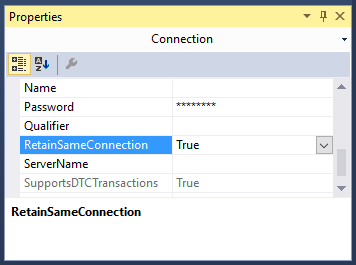
Next at the bottom of the design view window in Visual Studio the current source connection should be displayed. Left click on the source connection and the properties window should change focus to connection properties. Set the RetainSameConnection option to True, this allows the global temp table to remain visible to SSIS package during the package’s execution by maintaining the session.

Image showing the Connection Properties window with the RetainSameConnection option set to true

STEP 5.

Drag a Data Flow Task onto the Control Flow workspace and rename it Query and drag the precedence constraint between the Create Temp Table and Query.

Image showing OLE DB Source creation process

Double left click on the Query Task.

From Other Sources drag an OLE DB Source into the Data Flow workspace.

Double left click on the OLE DB Source and set the OLE DB Connection Manager to your source server and Data Access Mode to SQL Command.

Image of the OLE DB Source Editor Window

Enter your SQL Command in the box provided e.g.

SELECT * FROM ##yourTempTable


Hit OK on the OLE DB Source.

STEP 6.

Set up the destination as you would with any other typical SSIS package.

From Other Destinations drag an OLE DB Destination into the Data Flow workspace.

Then drag the precedence constraint between OLE DB Source to the OLE DB Destination.

Double left click on the OLE DB Destination and choose your destination and set “Table or View – fast load” from the data access mode dropdown. For the “Name of table or view option” enter your intended destination.

Hit OK on the OLE DB Destination.

Finally I would suggest adding another task that will drop the temp tables at the end of the package. For example, DROP TABLE ##yourTempTable.

Conclusion.

At this point you should now be able to run the package successfully and make your own adaptions to this process to fit your future needs.

report cartoon

How to keep an SSRS Report on one page

Using visual studio left click just under design to focus on the report.

Image showing where to click

Now the report properties window should be visible in the bottom right of the screen.

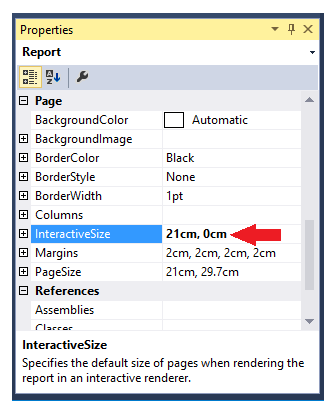
Set the interactive height to 0 as shown below.

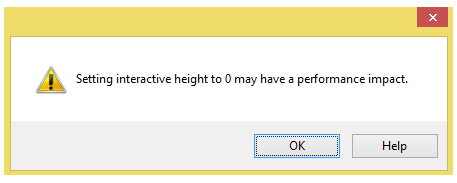
Properties windowYou will get the following warning sign below. Limiting the report to one page, by setting the interactive height to zero, means everything needs to be loaded all at once. This will create lag when a user loads the report and interacts with it.

warning message stating can cause performance issuesIf you are basically using SSRS as a means for end users to pull a data dump via excel, heed this warning. If you just have a few aggregated tables and you want them all on the same page you should be fine.

How to run multiple SQL scripts automatically in order.

If you’ve been working towards a new deployment to a live database chances are you have written several scripts (possibly dozens) that have been developed/tested against the the development server.

Now the time has come to put the update live. Which would require executing each script against the live database.

This task can be automated by using a very handy batch script to run against the directory the files are saved in.

Caveat: This process does not take into account error handling or rollbacks, it’s just a simple example people can build on.

In order for this to work the files must have been named in a manner that the necessary order of execution corresponds to ascii sort order, i.e. 001_CreateTable.sql, 002_PopulateTable etc. This is standard practice for sql file naming conventions.

Simply create a .BAT file with the following command:
(Swap servername and databaseName for your required server and database names, TIP: SELECT @@servername can provide you with the full server name.)

for %%G in (*.sql) do sqlcmd /S servername /d databaseName -E -i"%%G"
pause

Place this .BAT file in the directory from which you want the .SQL files to be executed, double click the .BAT file and the command will loop and execute every SQL script in the folder.