Category Archives: Development

How to archive tables that contain a keyword from one database to another using T-Sql

In the previous article I wrote about how to identify and remove unwanted tables. Link

In that tutorial I suggested prefixing the tables you want to remove with _DELETE_.

I also suggested you may want to archive the tables in some manner before you delete them. This could be because there is a chance someone might come looking for the data that was in a deleted table or something might break by removing the table and you might want to put it back asap.

If you have only a few tables you could script the tables out but if you have a lot of tables that becomes a little unmanageable. Also if the tables total in size to 10 Gb the script to recreate the tables will be a lot lot larger.

An alternative method is to create an Archive database, copy the tables across to this target database and then delete the tables in the source database. You can then backup and drop the Archive database saving the .bak file somewhere cheaper.

The script below will allow you to do just that. It prints the T-Sql to do the job, it doesn’t carry out the job, so it’s completely safe to execute and review.

To use the script below create a target database.

Use the target database name for the variable value @TargetDb

Use the source database name for the variable value @SourceDb

The @KeyWord variable is used to gather all the tables that contain the string of choice, in the example below _DELETE_.

The @RemoveKeyWord variable is a flag that will remove the keyword string from the target database table name, e.g. _DELETE_Sales will become Sales.

IF OBJECT_ID('tempdb..#Table') IS NOT NULL
	DROP TABLE #Table
GO

DECLARE @RemoveKeyWord BIT
DECLARE @Id AS INT
DECLARE @KeyWord AS VARCHAR(256)
DECLARE @SourceDb AS SYSNAME
DECLARE @TargetDb AS SYSNAME
DECLARE @TableName AS SYSNAME
DECLARE @SchemaName AS SYSNAME
DECLARE @Sql AS VARCHAR(MAX)

SET @RemoveKeyWord = 1
SET @KeyWord = '_DELETE_'
SET @TargetDb = 'Archive'
SET @SourceDb = 'Source'
SET NOCOUNT ON

CREATE TABLE #Table (
	Id_Table INT IDENTITY(1, 1)
	,SchemaName SYSNAME
	,TableName SYSNAME
	);

SET @Sql = '
INSERT INTO #Table (
	SchemaName
	,TableName
	)
SELECT s.NAME
	,so.NAME
FROM ' + QUOTENAME(@SourceDb) + '.sys.tables AS so
LEFT JOIN ' + QUOTENAME(@SourceDb) + '.sys.schemas AS s ON so.schema_id = s.schema_id
WHERE so.NAME LIKE ' + '''' + '%' + @KeyWord + '%' + '''' + '
ORDER BY s.NAME ASC'

EXEC (@Sql)

SET @SchemaName = ''

WHILE @SchemaName IS NOT NULL
BEGIN
	SET @SchemaName = (
			SELECT MIN(SchemaName)
			FROM #Table
			WHERE SchemaName > @SchemaName
				AND SchemaName <> 'dbo'
			)

	PRINT 'USE ' + QUOTENAME(@TargetDb) + ';
GO
	
IF NOT EXISTS (SELECT * FROM ' + QUOTENAME(@TargetDb) + '.sys.schemas WHERE name = ' + '''' + @SchemaName + '''' + ')
  BEGIN
    EXEC (' + '''' + 'CREATE SCHEMA ' + QUOTENAME(@SchemaName) + ';' + '''' + ');
  END;
  
'
END

SET @Id = 1

WHILE @Id IS NOT NULL
BEGIN
	SELECT @TableName = TableName
		,@SchemaName = SchemaName
	FROM #Table
	WHERE Id_Table = @Id

	IF @RemoveKeyWord = 1
	BEGIN
		PRINT '
SELECT *
INTO ' + QUOTENAME(@TargetDb) + '.' + QUOTENAME(@SchemaName) + '.' + QUOTENAME(REPLACE(@TableName, @KeyWord, '')) + ' 
FROM ' + QUOTENAME(@SourceDb) + '.' + QUOTENAME(@SchemaName) + '.' + QUOTENAME(@TableName)
	END
	ELSE
	BEGIN
		PRINT '
SELECT *
INTO ' + QUOTENAME(@TargetDb) + '.' + QUOTENAME(@SchemaName) + '.' + QUOTENAME(@TableName) + ' 
FROM ' + QUOTENAME(@SourceDb) + '.' + QUOTENAME(@SchemaName) + '.' + QUOTENAME(@TableName)
	END

	SET @Id = (
			SELECT MIN(Id_Table)
			FROM #Table
			WHERE Id_Table > @Id
			)
END

How to identify and remove unused tables in SQL Server with T-Sql

In a perfect world an organisation should never get itself into the situation where tables need to be identified as functionally obsolete and removed in bulk. Schema changes should be stepped through the cycle of development, test, staging and live with developers cleaning as they go, but we don’t live in a perfect world as you may have noticed.

What do I mean by functionally obsolete? This means the tables are no longer being interacted with by user generated objects like stored procedures, functions or views. There may also be tables that could be classified as business redundant. That is they are being referenced by user generated objects frequently but they no longer have a use to the business, i.e. one job may have been replaced by another without the former being disabled or dropped. Business redundant objects are more difficult to determine and finding them may require input from multiple stakeholders.

A good approach for removing objects is to rename the objects first. This makes it easier to put the environment back the way it was if there are any problems encountered. After a set period of time if there is no impact on the overall environment script out the object then drop it. (Obviously do this in a test environment first if possible)

The script below is mostly a light weight SELECT statement that can be run on any environment. It does not execute any of the code it generates. It uses the sys.dm_db_index_usage_stats dynamic management view to determine when the tables were last interacted with. Interaction being defined as the following actions being applied against the object, update, seek, scan, lookup.

Caveat: Entries in this view reset to NULL after a Server reboot. Also the DMV has been known to be a bit unreliable with earlier versions of SQL Server with cases of the view being reset when a full index rebuild is carried out against a table. So don’t execute any code without first reviewing it.

Tables with NULL values for the fields below should be tables that have not been referenced at all or at least since the last time the server was rebooted.

LastUserUpdate
LastUserSeek
LastUserScan
LastUserLookup

Removing these objects is the low hanging fruit of cleaning up an environment. The script also provides stats on how many times these interactions happened and the size of the object. All these stats together should help you determine if an object is functionally redundant or business redundant and can be removed.

To aid further in the cleanup the script also creates the fields Action, Comments, Renamed, RenamedDate, RenameForDeletion, RestoreOriginalName, DropTable, DroppedDate.

The script output can then be copied and pasted into an Excel spread sheet and used to coordinate and track the cleanup progress.

SET NOCOUNT ON

DECLARE @Database TABLE ([DbName] [sysname])
DECLARE @DbName AS [sysname]
DECLARE @Sql AS [varchar] (max)

IF OBJECT_ID('tempdb..#TableStats', 'U') IS NOT NULL
	DROP TABLE #TableStats

IF OBJECT_ID('tempdb..#IndexStats', 'U') IS NOT NULL
	DROP TABLE #IndexStats

IF OBJECT_ID('tempdb..#TableUsageStats', 'U') IS NOT NULL
	DROP TABLE #TableUsageStats

IF OBJECT_ID('tempdb..#TableSizeStats', 'U') IS NOT NULL
	DROP TABLE #TableSizeStats

CREATE TABLE #TableStats (
	[DbName] [sysname]
	,[SchemaName] [sysname]
	,[ObjectId] [bigint]
	,[TableName] [sysname]
	,[ModifiedDate] [datetime]
	);

CREATE TABLE #IndexStats (
	[DbName] [sysname]
	,[ObjectId] [bigint]
	,[HasIndex] [bit]
	);

CREATE TABLE #TableSizeStats (
	[DbName] [varchar](255) NULL
	,[SchemaName] [varchar](255) NULL
	,[ObjectId] [bigint]
	,[TableName] [varchar](255) NULL
	,[RowCount] [bigint] NULL
	,[AvailableSpacePercentage] [numeric](6, 2) NULL
	,[UnusedSpaceGb] [numeric](10, 3) NULL
	,[UsedSpaceGb] [numeric](10, 3) NULL
	,[TotalSpaceGb] [numeric](10, 3) NULL
	,[UnusedSpaceMb] [numeric](13, 3) NULL
	,[UsedSpaceMb] [numeric](13, 3) NULL
	,[TotalSpaceMb] [numeric](13, 3) NULL
	,[UnusedSpaceKb] [bigint] NULL
	,[UsedSpaceKb] [bigint] NULL
	,[TotalSpaceKb] [bigint] NULL
	)

CREATE TABLE #TableUsageStats (
	[DbName] [sysname]
	,[ObjectId] [bigint]
	,[TableName] [nvarchar](128) NULL
	,[LastUserUpdate] [datetime] NULL
	,[LastUserSeek] [datetime] NULL
	,[LastUserScan] [datetime] NULL
	,[LastUserLookup] [datetime] NULL
	,[UserUpdateCount] [bigint] NOT NULL
	,[UserSeekCount] [bigint] NOT NULL
	,[UserScanCount] [bigint] NOT NULL
	,[UserLookupCount] [bigint] NOT NULL
	);

SET @DbName = '';

INSERT INTO @Database (DbName)
SELECT NAME
FROM sys.databases 
WHERE NAME NOT IN (
		'tempdb'
		,'master'
		,'mode'
		,'model'
		)
AND state_desc = 'ONLINE'
ORDER BY NAME ASC;

WHILE @DbName IS NOT NULL
BEGIN
	SET @DbName = (
			SELECT MIN(DbName)
			FROM @Database
			WHERE DbName > @DbName
			);
	SET @Sql = '
INSERT INTO #TableStats (
	DbName
	,schemaName
	,ObjectId
	,TableName
	,ModifiedDate
	)
SELECT DbName
	,SchemaName
	,ObjectId
	,TableName
	,ModifiedDate
FROM (
SELECT DISTINCT ' + '''' + @DbName + '''' + ' AS DbName
	,s.NAME AS SchemaName
	,t.object_id AS ObjectId
	,t.NAME AS TableName
	,t.modify_date AS ModifiedDate
FROM ' + QUOTENAME(@DbName) + '.sys.tables AS t
INNER JOIN ' + QUOTENAME(@DbName) + '.sys.schemas AS s ON t.schema_id = s.schema_id
LEFT JOIN ' + QUOTENAME(@DbName) + '.sys.extended_properties AS ep ON ep.major_id = t.[object_id] /*Exclude System Tables*/
WHERE t.NAME IS NOT NULL
	AND s.NAME IS NOT NULL
	AND (ep.[name] IS NULL OR ep.[name] <> ''microsoft_database_tools_support'')
	) AS rd
WHERE rd.SchemaName IS NOT NULL
ORDER BY DbName ASC
	,TableName ASC;
'

	EXEC (@Sql)

	SELECT @Sql = '
INSERT INTO #IndexStats (
	DbName
	,ObjectId
	,HasIndex
	)
SELECT ' + '''' + @DbName + '''' + ' AS DbName
	,OBJECT_ID AS ObjectId
	,IndexCheck AS HasIndex
FROM (
	SELECT DISTINCT OBJECT_ID
		,CASE 
			WHEN (
					[TYPE] > 0
					AND is_disabled = 0
					)
				THEN 1
			ELSE 0
			END AS IndexCheck
	FROM ' + QUOTENAME(@DbName) + '.sys.indexes
	) AS rd
WHERE rd.IndexCheck = 1
'

	EXEC (@Sql)

	SET @Sql = 
		'
INSERT INTO #TableSizeStats (
	[DbName]
	,[SchemaName]
	,[ObjectId]
	,[TableName]
	,[RowCount]
	,[AvailableSpacePercentage]
	,[UnusedSpaceGb]
	,[UsedSpaceGb]
	,[TotalSpaceGb]
	,[UnusedSpaceMb]
	,[UsedSpaceMb]
	,[TotalSpaceMb]
	,[UnusedSpaceKb]
	,[UsedSpaceKb]
	,[TotalSpaceKb]
	)
SELECT DISTINCT rd.[DbName]
	,rd.[SchemaName]
	,rd.[ObjectId]
	,rd.[TableName]
	,rd.[RowCount]
	,CASE 
		WHEN TotalSpaceKb > 0
			THEN ((UnusedSpaceKb / TotalSpaceKb) * 100)
		ELSE 0
		END AS AvailableSpacePercentage
	,CONVERT(NUMERIC(10, 3), (rd.[UnusedSpaceKb] / 1024.) / 1024.) AS UnusedSpaceGb
	,CONVERT(NUMERIC(10, 3), (rd.[UsedSpaceKb] / 1024.) / 1024.) AS UsedSpaceGb
	,CONVERT(NUMERIC(10, 3), (rd.[TotalSpaceKb] / 1024.) / 1024.) AS TotalSpaceGb
	,CONVERT(NUMERIC(13, 3), (rd.[UnusedSpaceKb] / 1024.)) AS UnusedSpaceMb
	,CONVERT(NUMERIC(13, 3), (rd.[UsedSpaceKb] / 1024.)) AS UsedSpaceMb
	,CONVERT(NUMERIC(13, 3), (rd.[TotalSpaceKb] / 1024.)) AS TotalSpaceMb
	,rd.[UnusedSpaceKb]
	,rd.[UsedSpaceKb]
	,rd.[TotalSpaceKb]
FROM (
	SELECT ' 
		+ '''' + @DbName + '''' + ' AS DbName
		,t.Object_id AS ObjectId
		,s.[name] AS [SchemaName]
		,t.[name] AS [TableName]
		,p.[rows] AS [RowCount]
		,SUM(a.[used_pages]) * 8 AS [UsedSpaceKb]
		,(SUM(a.[total_pages]) - SUM(a.[used_pages])) * 8 AS [UnusedSpaceKb]
		,SUM(a.[total_pages]) * 8 AS [TotalSpaceKb]
	FROM ' + QUOTENAME(@DbName) + '.sys.tables AS t
	INNER JOIN ' + QUOTENAME(@DbName) + '.sys.schemas AS s ON t.schema_id = s.schema_id
	INNER JOIN ' + QUOTENAME(@DbName) + '.sys.indexes AS i ON t.OBJECT_ID = i.object_id
	INNER JOIN ' + QUOTENAME(@DbName) + '.sys.partitions AS p ON i.object_id = p.OBJECT_ID
		AND i.[index_id] = p.[index_id]
	INNER JOIN ' + QUOTENAME(@DbName) + '.sys.allocation_units a ON p.[partition_id] = a.[container_id]
	WHERE t.[is_ms_shipped] = 0
		AND i.OBJECT_ID > 255
	GROUP BY s.[name]
		,t.[name]
		,t.[object_id]
		,p.[rows]
	) AS rd
ORDER BY DbName ASC
	,SchemaName ASC
	,TableName ASC;
'

	EXEC (@Sql)

	SET @Sql = '
INSERT INTO #TableUsageStats (
	[DbName]
	,[ObjectId]
	,[TableName]
	,[LastUserUpdate]
	,[LastUserSeek]
	,[LastUserScan]
	,[LastUserLookup]
	,[UserUpdateCount]
	,[UserSeekCount]
	,[UserScanCount]
	,[UserLookupCount]
	)
SELECT DbName
	,ObjectId
	,TableName
	,LastUserUpdate
	,LastUserSeek
	,LastUserScan
	,LastUserLookup
	,UserUpdateCount
	,UserSeekCount
	,UserScanCount
	,UserLookupCount
FROM (
	SELECT DISTINCT ROW_NUMBER() OVER (
			PARTITION BY ius.Object_Id ORDER BY last_user_update DESC
			) AS RN
		,' + '''' + @DbName + '''' + ' AS DbName
		,ius.OBJECT_ID AS ObjectId
		,o.NAME AS TableName
		,ius.last_user_update AS LastUserUpdate
		,ius.last_user_seek AS LastUserSeek
		,ius.last_user_scan AS LastUserScan
		,ius.last_user_lookup AS LastUserLookup
		,ius.user_updates AS UserUpdateCount
		,ius.user_seeks AS UserSeekCount
		,ius.user_scans AS UserScanCount
		,ius.user_lookups AS UserLookupCount
	FROM ' + QUOTENAME(@DbName) + 
		'.sys.dm_db_index_usage_stats AS ius
	INNER JOIN ' + QUOTENAME(@DbName) + '.sys.objects AS o ON ius.OBJECT_ID = o.OBJECT_ID
		AND o.NAME IS NOT NULL
	) AS rd
WHERE rd.RN = 1
ORDER BY rd.DbName ASC
	,rd.TableName ASC
	,rd.LastUserUpdate DESC
	,rd.LastUserSeek DESC
	,rd.LastUserScan DESC
	,rd.LastUserLookup DESC;
'

	EXEC (@Sql)
END;
GO

SELECT DISTINCT ROW_NUMBER() OVER (
		ORDER BY ts.[DbName] ASC
			,ts.[SchemaName] ASC
			,ts.[TableName] ASC
		) AS Row
	,ts.[DbName]
	,ts.[SchemaName]
	,ts.[TableName]
	,'' AS Action --Rename, keep etc.
	,'' AS Comments
	,'' AS Renamed --boolean flag
	,'' AS RenamedDate 
	,i.[HasIndex] --Tables without an index are heaps
	,tss.[TotalSpaceMb] AS TableSizeInMb
	,ts.[ModifiedDate]
	,tus.[LastUserUpdate]
	,tus.[LastUserSeek]
	,tus.[LastUserScan]
	,tus.[LastUserLookup]
	,tus.[UserUpdateCount]
	,tus.[UserSeekCount]
	,tus.[UserScanCount]
	,tus.[UserLookupCount]
	,tss.[AvailableSpacePercentage]
	,tss.[UnusedSpaceGb]
	,tss.[UsedSpaceGb]
	,tss.[TotalSpaceGb]
	,tss.[UnusedSpaceMb]
	,tss.[UsedSpaceMb]
	,tss.[TotalSpaceMb]
	,tss.[UnusedSpaceKb]
	,tss.[UsedSpaceKb]
	,tss.[TotalSpaceKb]
	,'USE ' + QUOTENAME(ts.[DbName]) + '; EXEC sp_rename ' + '''' + ts.[SchemaName] + '.' + ts.[TableName] + '''' + ', ' + '''' + '_DELETE_' + ts.[TableName] + '''' + ';' AS RenameForDeletion
	,'USE ' + QUOTENAME(ts.[DbName]) + '; EXEC sp_rename ' + '''' + ts.[SchemaName] + '.' + '_DELETE_' + ts.[TableName] + '''' + ', ' + '''' + ts.[TableName] + '''' + ';' AS RestoreOriginalName
	,'USE ' + QUOTENAME(ts.[DbName]) + '; DROP TABLE ' + QUOTENAME(ts.[SchemaName]) + '.' + '[' + '_DELETE_' + ts.[TableName] + ']' + ';' AS 'DropTable'
	,'' AS DroppedDate
FROM #TableStats AS ts
LEFT JOIN #TableSizeStats AS tss ON ts.ObjectId = tss.ObjectId
	AND tss.DbName = ts.DbName
LEFT JOIN #IndexStats AS i ON ts.ObjectId = i.ObjectId
	AND i.DbName = ts.DbName
LEFT JOIN #TableUsageStats AS tus ON ts.ObjectId = tus.ObjectId
	AND tus.DbName = ts.DbName
ORDER BY ts.[DbName] ASC
	,ts.[SchemaName] ASC
	,ts.[TableName] ASC

	-- REF: https://docs.microsoft.com/en-us/sql/relational-databases/system-dynamic-management-views/sys-dm-db-index-usage-stats-transact-sql
How to disable all enabled jobs in SQL Server with T-Sql where the job name contains specific keyword text

Running the below script will output the T-Sql required to disable all enabled jobs on the SQL Server instance where the job name contains a specific keyword. Just copy the outputted text and paste into a new SSMS window and execute to disable the jobs.

For example, if you change the text value ‘PLACEHOLDER’, for the variable @KeyWord, to ‘Backup’ then any job which has ‘Backup’ in its name will have T-Sql generated to disable it. You could change the PRINT to EXEC but I wouldn’t recommend it.

DECLARE @KeyWord AS VARCHAR(256)

SET @KeyWord = 'PLACEHOLDER'
SET NOCOUNT ON

DECLARE @Job TABLE (JobName SYSNAME)
DECLARE @JobName AS SYSNAME
DECLARE @Sql AS VARCHAR(MAX)

SET @JobName = ''

INSERT INTO @Job (JobName)
SELECT j.NAME
FROM msdb.dbo.sysjobs AS j
WHERE j.[enabled] = 1
	AND j.NAME LIKE '%' + @KeyWord + '%' 
ORDER BY j.NAME ASC

WHILE @JobName IS NOT NULL
BEGIN
	SET @JobName = (
			SELECT MIN(JobName)
			FROM @Job
			WHERE JobName > @JobName
			)
	SET @Sql = '
EXEC msdb.dbo.sp_update_job @job_name = ' + '''' + @JobName + '''' + '
	,@enabled = 0; 
'

	PRINT @Sql
END

How to run all enabled SQL Server Jobs with T-Sql

I’d really recommend not running the output of this script on a live environment! This is just a little something I whipped up to test changes on a development environment.

Running the script will output the T-Sql required to run all jobs on the SQL Server instance. Just copy the text and paste into a new SSMS window and execute. You could change the PRINT to EXEC but I wouldn’t recommend it.

SET NOCOUNT ON

DECLARE @Job TABLE (JobName SYSNAME)
DECLARE @JobName AS SYSNAME
DECLARE @Sql AS VARCHAR(MAX)

SET @JobName = ''

INSERT INTO @Job (JobName)
SELECT j.NAME
FROM msdb.dbo.sysjobs AS j
WHERE j.[enabled] = 1
ORDER BY j.NAME ASC

WHILE @JobName IS NOT NULL
BEGIN
	SET @JobName = (
			SELECT MIN(JobName)
			FROM @Job
			WHERE JobName > @JobName
			)
	SET @Sql = '
EXEC msdb.dbo.sp_start_job @job_name = ' + '''' + @JobName + '''' + '; 
'
	PRINT @Sql
END

How to delete all SQL Server Jobs that have no maintenance plan with T-Sql

I’d really recommend not running the output of this script on a live environment! This is just a little something I whipped up to clear out a development environment.

Running the script will output the T-Sql required to deleted all jobs on the SQL Server instance. Jobs for maintenance plans are not included as maintenance plans need to be deleted first. Just copy the text and paste into a new SSMS window and execute. You could change the PRINT to EXEC but I wouldn’t recommend it. 

SET NOCOUNT ON

DECLARE @Job TABLE (JobName SYSNAME)
DECLARE @JobName AS SYSNAME
DECLARE @Sql AS VARCHAR(MAX)

SET @JobName = ''

INSERT INTO @Job (JobName)
SELECT j.Name
FROM msdb.dbo.sysjobs AS j
LEFT JOIN msdb.dbo.sysmaintplan_subplans AS p ON j.job_id = p.job_id
WHERE p.subplan_id IS NULL
ORDER BY j.Name ASC

WHILE @JobName IS NOT NULL
BEGIN
	SET @JobName = (
			SELECT MIN(JobName)
			FROM @Job
			WHERE JobName > @JobName
			)
	SET @Sql = '
EXEC msdb.dbo.sp_delete_job @job_name = ' + '''' + @JobName + '''' + '; 
'
	PRINT @Sql
END

How to get MS SQL Server job history using a stored procedure

In a previous article (see article) I provided simple queries to return the server’s job history. It’s only natural that when you find yourself running the same script over and over again eventually you’ll get around to turning it into a stored procedure.

Well today was the day.

You can use the script below to create the Stored Procedure usp_GetJobHistory.

To deploy the SP to your instance you’ll need to replace the text PLACEHOLDER with the name of the database you’ll be deploying to. Ideally you should have a utility or administration database rather than deploying to Master.

The SP has 5 parameters.

Parameter Datatype Options Definition
@DaysToPull INT Any Number How many days of history you want
working back from today
@Status VARCHAR One of the following: All’, ‘Succeeded’, ‘Failed’,
‘Retried’, ‘Cancelled’, NULL
Will limited the rows returned
based on the status of the entry
@SortOrder VARCHAR ASC or DESC The occurrence order i.e. oldest to newest
@JobName VARCHAR Any Text Used in a LIKE operator to find jobs containing that text
@ReturnSql BIT 0, 1 or NULL Returns the SQL you can modify or
run to return the history

Example command:

Create the SQL code to return the job history for jobs containing the work backup that failed in the past day sorted by newest to oldest.

EXEC dbo.GetJobHistory @DaysToPull = 1
,@SortOrder = ‘DESC’
,@Status = ‘Failed’
,@JobName = ‘Backup’
,@ReturnSql = 1

Tip: you could use this to create a SSRS report that could be published daily to notify stakeholders of any job failures.

-- REPLACE PLACEHOLDER
USE [PLACEHOLDER];
GO

IF OBJECT_ID('[usp_GetJobHistory]') IS NULL
	EXEC ('CREATE PROCEDURE dbo.[usp_GetJobHistory] AS SELECT 1')
GO

ALTER PROCEDURE [dbo].[usp_GetJobHistory] @DaysToPull INT
	,@Status VARCHAR(9) = NULL
	,@SortOrder VARCHAR(4) = NULL
	,@JobName VARCHAR(256) = NULL
	,@ReturnSql BIT = NULL
AS
BEGIN
	-- =============================================
	-- Author:      Bloggins
	-- Create date: 20170420
	-- Description: <Query to retrieve job history bypassing SSMS inbuilt viewer>
	-- Website: https://techtidbytes.wordpress.com/
	-- =============================================
	SET NOCOUNT ON

	BEGIN TRY
		-- Variable Declarations 
		DECLARE @PreviousDate DATETIME
		DECLARE @Year VARCHAR(4)
		DECLARE @Month VARCHAR(2)
		DECLARE @MonthPre VARCHAR(2)
		DECLARE @Day VARCHAR(2)
		DECLARE @DayPre VARCHAR(2)
		DECLARE @FinalDate INT
		DECLARE @StatusClause AS VARCHAR(255)
		DECLARE @Sql AS VARCHAR(MAX)

		IF @SortOrder IS NULL
			OR (
				@SortOrder <> 'ASC'
				AND @SortOrder <> 'DESC'
				)
		BEGIN
			SET @SortOrder = 'ASC'
		END

		IF @Status = 'All'
			OR @Status IS NULL
			OR (
				@Status <> 'All'
				AND @Status <> 'Failed'
				AND @Status <> 'Succeeded'
				AND @Status <> 'Retried'
				AND @Status <> 'Cancelled'
				)
		BEGIN
			SET @StatusClause = '0, 1, 2, 3'
		END
		ELSE IF @Status = 'Failed'
		BEGIN
			SET @StatusClause = '0'
		END
		ELSE IF @Status = 'Succeeded'
		BEGIN
			SET @StatusClause = '1'
		END
		ELSE IF @Status = 'Retried'
		BEGIN
			SET @StatusClause = '2'
		END
		ELSE IF @Status = 'Cancelled'
		BEGIN
			SET @StatusClause = '3'
		END

		SET @PreviousDate = DATEADD(dd, - @DaysToPull, GETDATE())
		SET @Year = DATEPART(yyyy, @PreviousDate)

		SELECT @MonthPre = CONVERT(VARCHAR(2), DATEPART(mm, @PreviousDate))

		SELECT @Month = RIGHT(CONVERT(VARCHAR, (@MonthPre + 1000000000)), 2)

		SELECT @DayPre = CONVERT(VARCHAR(2), DATEPART(dd, @PreviousDate))

		SELECT @Day = RIGHT(CONVERT(VARCHAR, (@DayPre + 1000000000)), 2)

		SET @FinalDate = CAST(@Year + @Month + @Day AS INT)
		/*RunDuration FORMAT (DD:HH:MM:SS)*/
		SET @Sql = '
SELECT ROW_NUMBER() OVER(ORDER BY h.instance_id ' + @SortOrder + ' ) AS Row
	,h.Server AS ServerName
	,s.database_name AS DbName
	,j.name AS JobName
	,s.step_name AS StepName
	,h.step_id AS StepId
	,CASE 
		WHEN h.run_status = 0
			THEN ''Failed''
		WHEN h.run_status = 1
			THEN ''Succeeded''
		WHEN h.run_status = 2
			THEN ''Retried''
		WHEN h.run_status = 3
			THEN ''Cancelled''
		END AS RunStatus
	,MSDB.DBO.AGENT_DATETIME(h.run_date, h.run_time) AS RunTime
	,STUFF(STUFF(STUFF(RIGHT(REPLICATE(''0'', 8) + CAST(h.run_duration AS VARCHAR(8)), 8), 3, 0, '':''), 6, 0, '':''), 9, 0, '':'') AS RunDuration
	,h.sql_severity AS SqlSeverity
	,h.message AS MessageReturned
FROM msdb.dbo.sysjobhistory h
INNER JOIN msdb.dbo.sysjobs j ON h.job_id = j.job_id
INNER JOIN msdb.dbo.sysjobsteps s ON j.job_id = s.job_id
	AND h.step_id = s.step_id
WHERE h.run_status IN (' + @StatusClause + ')
	AND h.run_date > ' + CONVERT(VARCHAR(255), @FinalDate)

		IF @JobName IS NOT NULL
		BEGIN
			SET @Sql = @Sql + '
AND j.name LIKE ' + '''' + '%' + @JobName + '%' + '''' + ''
		END

		SET @Sql = @Sql + '
ORDER BY h.instance_id ' + @SortOrder

		IF @ReturnSql = 1
		BEGIN
			PRINT (@Sql)
		END
		ELSE
		BEGIN
			EXEC (@Sql)
		END
	END TRY

	BEGIN CATCH
		PRINT 'error!'

		DECLARE @error_number AS INTEGER
		DECLARE @error_message AS VARCHAR(400)

		SET @error_number = error_number()
		SET @error_message = left(error_message(), 400)

		PRINT 'error_message: ' + @error_message
	END CATCH
END

How to use a while loop to iterate through Databases

Say you have code you want executed against every database on a SQL Server instance, you could use SQL Server’s inbuilt sp_MSForEachDB. I’m not a big fan of it though because it is undocumented, so I’d always be concerned Microsoft might decide to kill it with any given patch or service pack update. (I know the likelihood of that is extremely low but I’m a risk adverse kinda guy)

I prefer to use the example below. It may not be the most efficient snippet of code available on the net but it’s good and simple and it’s not going anywhere unless I drop it.

(To execute code against every table in an instance see this post)

SET NOCOUNT ON;

DECLARE @Database TABLE (DbName SYSNAME);
DECLARE @DbName AS SYSNAME;

SET @DbName = '';

INSERT INTO @Database (DbName)
SELECT NAME
FROM sys.databases
WHERE NAME NOT IN (
		'tempdb'
		,'msdb'
		,'model'
		)
	AND state_desc = 'ONLINE'
ORDER BY NAME ASC;

WHILE @DbName IS NOT NULL
BEGIN
	SET @DbName = (
			SELECT MIN(DbName)
			FROM @Database
			WHERE DbName > @DbName
			);

	/*
	PUT CODE HERE
	EXAMPLE PRINT Database Name
	*/
	PRINT @DbName;
END
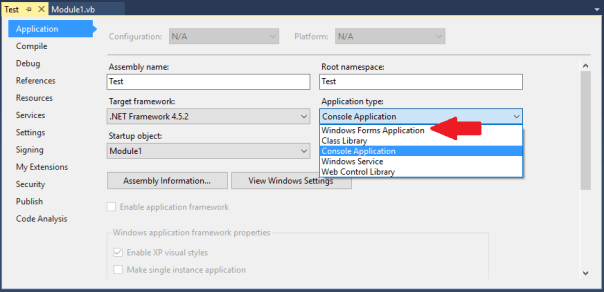
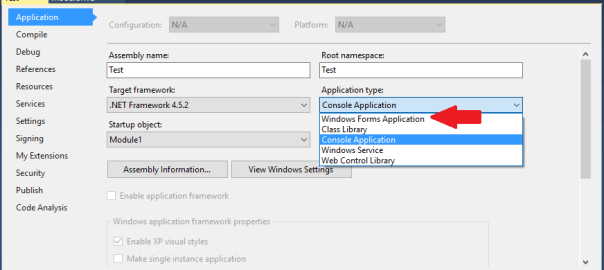
Picture showing the Application screen highlighting the Application type change from Console Application to Windows Forms Application

How to create a console application in Visual Studio that won’t open a command window when it runs

If you’ve written a small console application, say something that doesn’t require a UI e.g. a  batch script that you want to make into an exe, you’ve probably noticed that an unnecessary/unwanted command window pops up.

To stop the command window from opening you can simply make a change in the project properties by setting the Application Type from Console Application to Windows Forms Application.

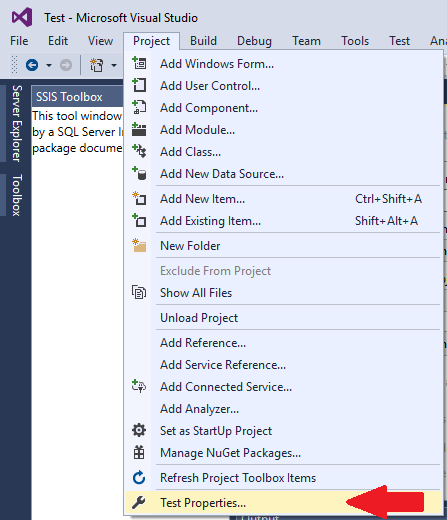
This can be done from within the project, click on Projects at the top of the screen and then click on Properties as show below.

Picture showing Project options highlighting Properties

Then change the application type from Console Application to Windows Forms Application as shown below.

Picture showing the Application screen highlighting the Application type change from Console Application to Windows Forms Application

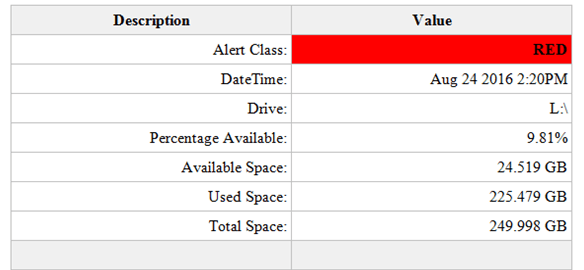
An example of the HTML table sent as part of the email

How to send an email notification when disk space is low from SQL Server

Firstly let me acknowledge a few points worth nothing:

  • Disk space monitoring should be performed by enterprise quality network monitoring software. (And yes these are often very expensive)
  • The availability of adequate amounts of disk space is the responsibility of the people in charge of the IT infrastructure. (Not the DBAs)
  • The process doing the monitoring should not be running on the machine it is monitoring. (If the monitored machine experiences a problem the monitor may not be able to notify anyone)

With all that being said you might be in the situation where you still need to know when SQL Server is running out of local disk space and the solution below provides you with a free means to achieve this. This is a dynamic solution which will be able to determine the disk space available of all the local drives visible to SQL Server.

Prerequisites:

  • You will need to have an exchange server set up with SQL Server already capable of sending emails.
  • I have set up a database called Admin to hold the below tables and SP. It is good practice to store this sort of thing in a purposely created database instead of using something like Master. You can use another database if you would prefer just change the references to Admin in the first and second script with a find and replace.

Setup:

There are 4 components to this process.

Tables:

DiskSpaceAlertThreshold, this table holds a red and a yellow value. These values relate to the percentage space available on the local drives. A good rule of thumb would be to ensure there is over 20% of space available. So disk space availability for the yellow alert is set to 20% and the red alert is set to 10%. (Yes I’ve borrowed the alert names from Star Trek)

StaffEmailList, this table contains the email address of the staff you want to be notified when disk space is running low. For this example Clark Kent of The Daily Planet is very interested in SQL server disk space. You can of course add additional staff email addresses to the table. To exclude a staff member from receiving an email, after they have been added to the table, set the active flag to zero.

Store Procedure:

LowDiskSpaceAlert, this store procedure contains all the logic to determine what percentage of disk space is available. It also creates the HTML table used in the email to display the alert results and calls for the email to be sent.

N.B. You will need to change the profile named in the stored procedure to match an email account profile available within your SQL Server. Simply change the value of @profileName before executing the script.

SET @profileName = 'SQL Report'

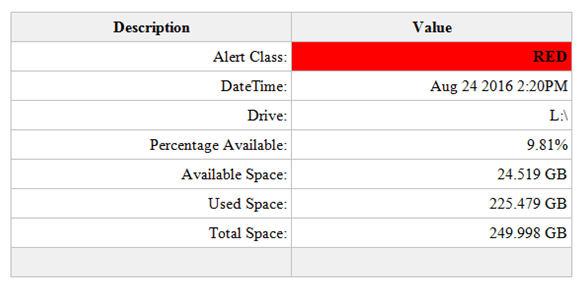
An example of the HTML table sent as part of the email:

An example of the HTML table sent as part of the email

Job:

LowDiskSpaceAlert, this job simply runs the LowDiskSpaceAlert stored procedure every 10 minutes. You can change the schedule as you wish.

Create Tables and SP:

USE [Admin]
GO

/****** Object:  Table [dbo].[DiskSpaceAlertThreshold]    Script Date: 09/23/2016 18:46:29 ******/
SET ANSI_NULLS ON
GO

SET QUOTED_IDENTIFIER ON
GO

SET ANSI_PADDING ON
GO

CREATE TABLE [dbo].[DiskSpaceAlertThreshold] (
	[DiskSpaceAlertThresholdId] [int] IDENTITY(1, 1) NOT NULL
	,[AlertClass] [varchar](25) NULL
	,[ThresholdValue] [int] NULL
	,PRIMARY KEY CLUSTERED ([DiskSpaceAlertThresholdId] ASC) WITH (
		PAD_INDEX = OFF
		,STATISTICS_NORECOMPUTE = OFF
		,IGNORE_DUP_KEY = OFF
		,ALLOW_ROW_LOCKS = ON
		,ALLOW_PAGE_LOCKS = ON
		) ON [PRIMARY]
	) ON [PRIMARY]
GO

SET ANSI_PADDING OFF
GO

SET IDENTITY_INSERT [dbo].[DiskSpaceAlertThreshold] ON

INSERT [dbo].[DiskSpaceAlertThreshold] (
	[DiskSpaceAlertThresholdId]
	,[AlertClass]
	,[ThresholdValue]
	)
VALUES (
	1
	,N'Red'
	,10
	)

INSERT [dbo].[DiskSpaceAlertThreshold] (
	[DiskSpaceAlertThresholdId]
	,[AlertClass]
	,[ThresholdValue]
	)
VALUES (
	2
	,N'Yellow'
	,20
	)

SET IDENTITY_INSERT [dbo].[DiskSpaceAlertThreshold] OFF
/****** Object:  Table [dbo].[StaffEmailList]    Script Date: 09/23/2016 18:46:29 ******/
SET ANSI_NULLS ON
GO

SET QUOTED_IDENTIFIER ON
GO

SET ANSI_PADDING ON
GO

CREATE TABLE [dbo].[StaffEmailList] (
	[StaffEmailListId] [int] IDENTITY(1, 1) NOT NULL
	,[FirstName] [varchar](255) NULL
	,[LastName] [varchar](255) NULL
	,[EmailAddress] [varchar](255) NULL
	,[Active] [bit] NULL
	,PRIMARY KEY CLUSTERED ([StaffEmailListId] ASC) WITH (
		PAD_INDEX = OFF
		,STATISTICS_NORECOMPUTE = OFF
		,IGNORE_DUP_KEY = OFF
		,ALLOW_ROW_LOCKS = ON
		,ALLOW_PAGE_LOCKS = ON
		) ON [PRIMARY]
	) ON [PRIMARY]
GO

SET ANSI_PADDING OFF
GO

SET IDENTITY_INSERT [dbo].[StaffEmailList] ON

INSERT [dbo].[StaffEmailList] (
	[StaffEmailListId]
	,[FirstName]
	,[LastName]
	,[EmailAddress]
	,[Active]
	)
VALUES (
	1
	,N'Clark'
	,N'Kent'
	,N'cKent@thedailyplanet.com'
	,1
	)

SET IDENTITY_INSERT [dbo].[StaffEmailList] OFF
/****** Object:  StoredProcedure [dbo].[LowDiskSpaceAlert]    Script Date: 09/23/2016 18:46:33 ******/
SET ANSI_NULLS ON
GO

SET QUOTED_IDENTIFIER ON
GO

CREATE PROCEDURE [dbo].[LowDiskSpaceAlert]
AS
SET NOCOUNT ON

IF OBJECT_ID('tempdb..#DiskSpaceStats') IS NOT NULL
	DROP TABLE #DiskSpaceStats

IF OBJECT_ID('tempdb..#DriveAlert') IS NOT NULL
	DROP TABLE #DriveAlert

DECLARE @profileName AS VARCHAR(128)
DECLARE @thresholdRed AS INT
DECLARE @thresholdYellow AS INT
DECLARE @drive AS VARCHAR(5)
DECLARE @sql AS VARCHAR(MAX)
DECLARE @i AS INT
DECLARE @j AS INT

/*Change the name for your SQL Server email profile*/
SET @profileName = 'SQL Report'

CREATE TABLE #DriveAlert (
	AlertEntry VARCHAR(25)
	,AlertValue VARCHAR(25)
	)

SET @thresholdRed = (
		SELECT ThresholdValue
		FROM [Admin].[dbo].[DiskSpaceAlertThreshold]
		WHERE AlertClass = 'Red'
		)
SET @thresholdYellow = (
		SELECT ThresholdValue
		FROM [Admin].[dbo].[DiskSpaceAlertThreshold]
		WHERE AlertClass = 'Yellow'
		)

SELECT ROW_NUMBER() OVER (
		ORDER BY AvailableDriveSpacePercentage ASC
		) AS RowNo
	,ObservationDT
	,Drive
	,AvailableDriveSpacePercentage
	,AvailableDriveSpaceGB
	,UsedDriveSpaceGB
	,TotalDriveSpaceGB
INTO #DiskSpaceStats
FROM (
	SELECT DISTINCT GETDATE() AS ObservationDT
		,dovs.volume_mount_point AS Drive
		,CAST(((dovs.available_bytes / 1073741824.0) / (dovs.total_bytes / 1073741824.0)) * 100 AS NUMERIC(8, 2)) AS AvailableDriveSpacePercentage
		,CAST((dovs.available_bytes / 1073741824.0) AS NUMERIC(8, 3)) AvailableDriveSpaceGB
		,CAST(((dovs.total_bytes - dovs.available_bytes) / 1073741824.0) AS NUMERIC(8, 3)) AS UsedDriveSpaceGB
		,CAST((dovs.total_bytes / 1073741824.0) AS NUMERIC(8, 3)) TotalDriveSpaceGB
	FROM sys.master_files AS mf
	CROSS APPLY sys.dm_os_volume_stats(mf.database_id, mf.FILE_ID) AS dovs
	) AS r

SET @i = 1
SET @j = (
		SELECT MAX(RowNo)
		FROM #DiskSpaceStats
		)

WHILE @i <= @j
BEGIN
	SET @drive = (
			SELECT Drive
			FROM #DiskSpaceStats
			WHERE RowNo = @i
			)
	SET @sql = 'DECLARE @alert AS VARCHAR(6)
IF ' + CONVERT(VARCHAR(3), @thresholdYellow) + ' > (
		SELECT AvailableDriveSpacePercentage
		FROM #DiskSpaceStats
		WHERE Drive = ''' + @drive + '''
		)
BEGIN
SET @alert = ''YELLOW''
END
IF ' + CONVERT(VARCHAR(3), @thresholdRed) + ' > (
		SELECT AvailableDriveSpacePercentage
		FROM #DiskSpaceStats
		WHERE Drive = ''' + @drive + '''
		)
BEGIN
SET @alert = ''RED''
END
IF @alert IS NOT NULL
BEGIN
	SELECT AlertEntry
	,AlertValue
	FROM (
	SELECT ''Alert Class: '' AS AlertEntry
	,@alert AS AlertValue 
	UNION ALL
	SELECT ''DateTime: '' AS AlertEntry
	,CONVERT(VARCHAR(30), ObservationDT)  AS AlertValue
	FROM #DiskSpaceStats
	WHERE Drive = ''' + @drive + '''
	UNION ALL
	SELECT ''Drive: '' AS AlertEntry
	,Drive AS AlertValue
	FROM #DiskSpaceStats
	WHERE Drive = ''' + @drive + 
		'''
	UNION ALL
	SELECT ''Percentage Available: '' AS AlertEntry
	,CONVERT(VARCHAR(10), AvailableDriveSpacePercentage) + ''%'' AS AlertValue
	FROM #DiskSpaceStats
	WHERE Drive = ''' + @drive + '''
	UNION ALL
	SELECT ''Available Space: '' AS AlertEntry
	,CONVERT(VARCHAR(10), AvailableDriveSpaceGB) + '' GB'' AS AlertValue
	FROM #DiskSpaceStats
	WHERE Drive = ''' + @drive + '''
	UNION ALL
	SELECT ''Used Space: '' AS AlertEntry
	,CONVERT(VARCHAR(10), UsedDriveSpaceGB) + '' GB'' AS AlertValue
	FROM #DiskSpaceStats
	WHERE Drive = ''' + @drive + '''
	UNION ALL
	SELECT ''Total Space: '' AS AlertEntry
	,CONVERT(VARCHAR(10), TotalDriveSpaceGB) + '' GB'' AS AlertValue
	FROM #DiskSpaceStats
	WHERE Drive = ''' + @drive + '''
	UNION ALL 
	SELECT '' '' AS AlertEntry
	,'' '' AS AlertValue
	) AS alert
END
'

	INSERT INTO #DriveAlert
	EXEC (@sql)

	SET @i = @i + 1
END

IF EXISTS (
		SELECT *
		FROM #DriveAlert
		)
BEGIN
	DECLARE @emailList AS VARCHAR(MAX)
	DECLARE @subjectMsg AS VARCHAR(255)
	DECLARE @tableHTML NVARCHAR(MAX)

	SET @emailList = (
			SELECT STUFF((
						SELECT '; ' + EmailAddress
						FROM [Admin].[dbo].[StaffEmailList]
						WHERE Active = 1
						FOR XML PATH('')
						), 1, 1, '') AS EmailAddress
			)
	SET @subjectMsg = (
			SELECT @@SERVERNAME
			) + ' Low Disk Space Alert'
	SET @tableHTML = N'<style>
	.tableFormat {
		width:80%;
		border:1px solid #C0C0C0;
		border-collapse:collapse;
		padding:5px;
	}
	.tableFormat th {
		border:1px solid #C0C0C0;
		padding:5px;
		background:#F0F0F0;
	}
	.tableFormat td {
		border:1px solid #C0C0C0;
		text-align:right;
		padding:5px;
	}
</style>' + N'<H1></H1>' + N'<table class="tableFormat" align="center">' + N'<tr><th>Description</th><th>Value</th></tr>' + CAST((
				SELECT td = AlertEntry
					,''
					,td = AlertValue
					,''
				FROM #DriveAlert
				FOR XML PATH('tr')
					,TYPE
				) AS NVARCHAR(MAX)) + N'</table>';

	DROP TABLE #DiskSpaceStats

	SET @tableHTML = REPLACE(@tableHTML, '<td> </td>', '<td bgcolor="#F0F0F0"> </td>')
	SET @tableHTML = REPLACE(@tableHTML, '<td>RED</td>', '<td bgcolor="red"><b>RED</b></td>')
	SET @tableHTML = REPLACE(@tableHTML, '<td>YELLOW</td>', '<td bgcolor="yellow"><b>YELLOW</b></td>')

	EXEC msdb.dbo.sp_send_dbmail @profile_name = @profileName
		,@recipients = @emailList
		,@body = @tableHTML
		,@subject = @subjectMsg
		,@importance = 'High'
		,@body_format = 'HTML';
END
GO
Create Job:
USE [msdb]
GO

/****** Object:  Job [LowDiskSpaceAlert]    Script Date: 09/23/2016 19:03:39 ******/
BEGIN TRANSACTION

DECLARE @ReturnCode INT

SELECT @ReturnCode = 0

/****** Object:  JobCategory [[Uncategorized (Local)]]]    Script Date: 09/23/2016 19:03:39 ******/
IF NOT EXISTS (
		SELECT NAME
		FROM msdb.dbo.syscategories
		WHERE NAME = N'[Uncategorized (Local)]'
			AND category_class = 1
		)
BEGIN
	EXEC @ReturnCode = msdb.dbo.sp_add_category @class = N'JOB'
		,@type = N'LOCAL'
		,@name = N'[Uncategorized (Local)]'

	IF (
			@@ERROR <> 0
			OR @ReturnCode <> 0
			)
		GOTO QuitWithRollback
END

DECLARE @jobId BINARY (16)

EXEC @ReturnCode = msdb.dbo.sp_add_job @job_name = N'LowDiskSpaceAlert'
	,@enabled = 1
	,@notify_level_eventlog = 0
	,@notify_level_email = 0
	,@notify_level_netsend = 0
	,@notify_level_page = 0
	,@delete_level = 0
	,@description = N'No description available.'
	,@category_name = N'[Uncategorized (Local)]'
	,@owner_login_name = N'PL\admin.ph'
	,@job_id = @jobId OUTPUT

IF (
		@@ERROR <> 0
		OR @ReturnCode <> 0
		)
	GOTO QuitWithRollback

/****** Object:  Step [RunLowDiskSpaceAlertSP]    Script Date: 09/23/2016 19:03:40 ******/
EXEC @ReturnCode = msdb.dbo.sp_add_jobstep @job_id = @jobId
	,@step_name = N'RunLowDiskSpaceAlertSP'
	,@step_id = 1
	,@cmdexec_success_code = 0
	,@on_success_action = 1
	,@on_success_step_id = 0
	,@on_fail_action = 2
	,@on_fail_step_id = 0
	,@retry_attempts = 0
	,@retry_interval = 0
	,@os_run_priority = 0
	,@subsystem = N'TSQL'
	,@command = N'[dbo].[LowDiskSpaceAlert]'
	,@database_name = N'Admin'
	,@flags = 0

IF (
		@@ERROR <> 0
		OR @ReturnCode <> 0
		)
	GOTO QuitWithRollback

EXEC @ReturnCode = msdb.dbo.sp_update_job @job_id = @jobId
	,@start_step_id = 1

IF (
		@@ERROR <> 0
		OR @ReturnCode <> 0
		)
	GOTO QuitWithRollback

EXEC @ReturnCode = msdb.dbo.sp_add_jobschedule @job_id = @jobId
	,@name = N'LowDiskSpaceAlertSchedule'
	,@enabled = 1
	,@freq_type = 4
	,@freq_interval = 1
	,@freq_subday_type = 4
	,@freq_subday_interval = 10
	,@freq_relative_interval = 0
	,@freq_recurrence_factor = 0
	,@active_start_date = 20160824
	,@active_end_date = 99991231
	,@active_start_time = 0
	,@active_end_time = 235959
	,@schedule_uid = N'a8831f35-e7a6-4880-bc2d-4d48aff82ff6'

IF (
		@@ERROR <> 0
		OR @ReturnCode <> 0
		)
	GOTO QuitWithRollback

EXEC @ReturnCode = msdb.dbo.sp_add_jobserver @job_id = @jobId
	,@server_name = N'(local)'

IF (
		@@ERROR <> 0
		OR @ReturnCode <> 0
		)
	GOTO QuitWithRollback

COMMIT TRANSACTION

GOTO EndSave

QuitWithRollback:

IF (@@TRANCOUNT > 0)
	ROLLBACK TRANSACTION

EndSave:
GO
An icon symbolising data moving to different tables via ssis

How to use Temp tables in an SSIS package

If you have been using a query which utilizes temp tables but now you want that query to run as an SSIS package it’s going to need a bit of reworking.

Just adding the query as an Execute SQL Task in Visual Studio won’t work unfortunately if you are using, for example, SELECT * INTO to create the temp tables.

The First step to reworking the query will be to dedicate an Execute SQL Task to creating the temp tables your query uses, defining columns and data types etc. and then populating those tables with INSERT INTO rather than SELECT INTO.

For the following we will assume only one output temp table is required for the process which will be as follows:

  • A temp table to store data will be created.
  • A query will be used to populate this table.
  • This populated temp table will then become the source from which data will be pulled.

STEP 1.

In SSMS connect to what will be the source server and enter the statement to create the required temp table as a global temp table i.e. prefixing the table name with ##. Creating the table as a global temp table at this stage avoids errors when configuring the OLE DB Source in Visual Studio as it allows the table to be visible to the SSIS package.

STEP 2.

In Visual Studios drag a new Execute SQL Task into the control flow and name it, Create Temp Table.

Image showing Execute SQL Task Create Temp Table

Double click on the task to bring up the Execute SQL Task Editor window.

Image showing the Execute SQL Task Editor Window

Step through the process for creating a connection in the connection option and enter the following for the SQL statement option replacing yourTempTable with the name of your temp table.

IF OBJECT_ID('tempdb..##yourTempTable') IS NOT NULL
   DROP TABLE ##yourTempTable


Below this statement enter the same statement to create the global temp table as you used in SSMS.

STEP 3.

Next in the Create Temp Tables Properties, the window to the bottom right, for the section Execution under the option DelayValidation set the value to True. In STEP 1 the temp table is created and visible to Visual Studio, but when the SSIS package is run in the future the table won’t be there to be validated prior to the package running. Without setting this property to true the package would seek to confirm the existence of the temp table and would error when it determined the temp table does not exist stopping the package from running.

Image of Create Temp Table Task Properties showing DelayingValidation option set to True

STEP 4.

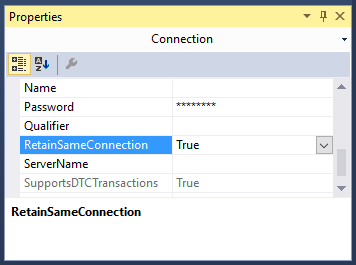
Next at the bottom of the design view window in Visual Studio the current source connection should be displayed. Left click on the source connection and the properties window should change focus to connection properties. Set the RetainSameConnection option to True, this allows the global temp table to remain visible to SSIS package during the package’s execution by maintaining the session.

Image showing the Connection Properties window with the RetainSameConnection option set to true

STEP 5.

Drag a Data Flow Task onto the Control Flow workspace and rename it Query and drag the precedence constraint between the Create Temp Table and Query.

Image showing OLE DB Source creation process

Double left click on the Query Task.

From Other Sources drag an OLE DB Source into the Data Flow workspace.

Double left click on the OLE DB Source and set the OLE DB Connection Manager to your source server and Data Access Mode to SQL Command.

Image of the OLE DB Source Editor Window

Enter your SQL Command in the box provided e.g.

SELECT * FROM ##yourTempTable


Hit OK on the OLE DB Source.

STEP 6.

Set up the destination as you would with any other typical SSIS package.

From Other Destinations drag an OLE DB Destination into the Data Flow workspace.

Then drag the precedence constraint between OLE DB Source to the OLE DB Destination.

Double left click on the OLE DB Destination and choose your destination and set “Table or View – fast load” from the data access mode dropdown. For the “Name of table or view option” enter your intended destination.

Hit OK on the OLE DB Destination.

Finally I would suggest adding another task that will drop the temp tables at the end of the package. For example, DROP TABLE ##yourTempTable.

Conclusion.

At this point you should now be able to run the package successfully and make your own adaptions to this process to fit your future needs.