Tag Archives: uncategorised

How to enable and disable xp_cmdshell

xp_cmdshell is an extended stored procedure provided by Microsoft and stored in the master database. This procedure allows you to issue operating system commands directly to the Windows command shell via T-SQL code.

By default, the xp_cmdshell option is disabled on new installations. Along with other unwanted behavior malicious users can elevate their privileges with the use of xp_cmdshell. For this reason it is generally recommend to leave xp_cmdshell disabled. It can be enabled by using the Policy-Based Management or by running the sp_configure system stored procedure as shown in the following code example:

Use Master
GO

EXEC master.dbo.sp_configure 'show advanced options', 1
RECONFIGURE WITH OVERRIDE
GO

EXEC master.dbo.sp_configure 'xp_cmdshell', 1
RECONFIGURE WITH OVERRIDE
GO


To disable xp_cmdshell use the following code example. Note: The following example also sets show advanced options server configuration option to 0. It is best practice to leave this option in the default state of 0 to stop the enabling of features.

Use Master
GO

EXEC master.dbo.sp_configure 'xp_cmdshell', 0
RECONFIGURE WITH OVERRIDE
GO

EXEC master.dbo.sp_configure 'show advanced options', 0
RECONFIGURE WITH OVERRIDE
GO

How to populate a temp table with the days in a month

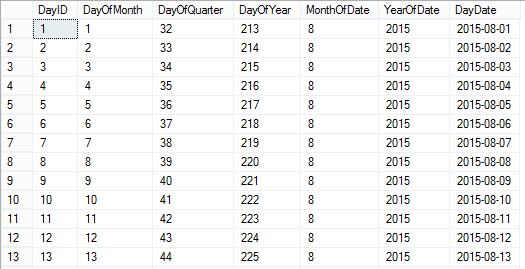
As described in the title this is a dynamic sql script that will populate a temp table with the day dates of the current month as outputted below:

calendarTableTo create a temporary calendar table for a greater period of time than just the current month:

Set @startDate to any historical date and @numberOfLoops to any number you like (365 being a year from the @startdate).

To make the table persistent:

Remove the # signs from the #calendarTable temp table referenced and rename the table accordingly.

You could also remove any columns you do not need.

IF OBJECT_ID('tempdb..#calendarTable') IS NOT NULL
	DROP TABLE #calendarTable;
	GO

CREATE TABLE #calendarTable (
	"DayID" INT
	,"DayOfMonth" INT
	,"DayOfQuarter" INT
	,"DayOfYear" INT
	,"MonthOfDate" INT
	,"YearOfDate" INT
	,"DayDate" DATE
	,PRIMARY KEY (DayID)
	)

DECLARE @startDate AS DATE
DECLARE @baseDate DATE
	,@offSet INT
	,@numberOfLoops INT

/*
To create a temporary calendar table:
Set @startDate to any historical date 
and @numberOfLoops to any number you like 
(365 being a year from the @startdate)

To make the table persistent remove the # signs 
from the #calendarTable temp table referenced 
*/
SET @startDate = GETUTCDATE() /*'20150101'*/
SET @baseDate = DATEADD(MONTH, DATEDIFF(MONTH, 0, @startDate), 0)
SET @offSet = 0
SET @numberOfLoops = DATEDIFF(DAY, @baseDate, DATEADD(MONTH, 1, @baseDate)) /*365*/

WHILE (@offSet < @numberOfLoops)
BEGIN
	INSERT INTO #calendarTable (
		"DayID"
		,"DayOfMonth"
		,"DayOfQuarter"
		,"DayOfYear"
		,"MonthOfDate"
		,"YearOfDate"
		,"DayDate"
		)
	SELECT (@offSet + 1)
		,DATEPART(DAY, DATEADD(DAY, @offSet, @baseDate))
		,DATEDIFF(D, DATEADD(QQ, DATEDIFF(QQ, 0, DATEADD(DAY, @offSet, @baseDate)), 0), DATEADD(DAY, @offSet, @baseDate)) + 1
		,DATEPART(DAYOFYEAR, DATEADD(DAY, @offSet, @baseDate))
		,DATEPART(MONTH, DATEADD(DAY, @offSet, @baseDate))
		,DATEPART(YEAR, DATEADD(DAY, @offSet, @baseDate))
		,DATEADD(DAY, @offSet, @baseDate)

	SET @offSet = @offSet + 1
END

SELECT *
FROM #calendarTable

How to pass a multi-value parameter to a stored procedure from a SSRS Report

When you allow for multiple field values to be selected in a SSRS report there needs to be additional logic added to the back end to deal with this.

This is best explained with an example scenario.

I have a table called Ireland with two columns, ID_Column and County. You can use the script below to create and populate this table. Run the query below to follow the working example.

CREATE DATABASE [TEST_DB];

USE [TEST_DB];
GO

/****** Object:  Table [dbo].[Ireland]    Script Date: 07/15/2015 10:49:49 ******/
SET ANSI_NULLS ON
GO

SET QUOTED_IDENTIFIER ON
GO

SET ANSI_PADDING ON
GO

CREATE TABLE [dbo].[Ireland] (
	[ID_Column] [int] IDENTITY(1, 1) NOT NULL
	,[County] [varchar](9) NULL
	,PRIMARY KEY CLUSTERED ([ID_Column] ASC) WITH (
		PAD_INDEX = OFF
		,STATISTICS_NORECOMPUTE = OFF
		,IGNORE_DUP_KEY = OFF
		,ALLOW_ROW_LOCKS = ON
		,ALLOW_PAGE_LOCKS = ON
		) ON [PRIMARY]
	) ON [PRIMARY]
GO

SET ANSI_PADDING OFF
GO

SET IDENTITY_INSERT [dbo].[Ireland] ON

INSERT [dbo].[Ireland] ([ID_Column], [County]) VALUES (1, N'Antrim')
INSERT [dbo].[Ireland] ([ID_Column], [County]) VALUES (2, N'Armagh')
INSERT [dbo].[Ireland] ([ID_Column], [County]) VALUES (3, N'Carlow')
INSERT [dbo].[Ireland] ([ID_Column], [County]) VALUES (4, N'Cavan')
INSERT [dbo].[Ireland] ([ID_Column], [County]) VALUES (5, N'Clare')
INSERT [dbo].[Ireland] ([ID_Column], [County]) VALUES (6, N'Cork')
INSERT [dbo].[Ireland] ([ID_Column], [County]) VALUES (7, N'Derry')
INSERT [dbo].[Ireland] ([ID_Column], [County]) VALUES (8, N'Donegal')
INSERT [dbo].[Ireland] ([ID_Column], [County]) VALUES (9, N'Down')
INSERT [dbo].[Ireland] ([ID_Column], [County]) VALUES (10, N'Dublin')
INSERT [dbo].[Ireland] ([ID_Column], [County]) VALUES (11, N'Fermanagh')
INSERT [dbo].[Ireland] ([ID_Column], [County]) VALUES (12, N'Galway')
INSERT [dbo].[Ireland] ([ID_Column], [County]) VALUES (13, N'Kerry')
INSERT [dbo].[Ireland] ([ID_Column], [County]) VALUES (14, N'Kildare')
INSERT [dbo].[Ireland] ([ID_Column], [County]) VALUES (15, N'Kilkenny')
INSERT [dbo].[Ireland] ([ID_Column], [County]) VALUES (16, N'Laois')
INSERT [dbo].[Ireland] ([ID_Column], [County]) VALUES (17, N'Leitrim')
INSERT [dbo].[Ireland] ([ID_Column], [County]) VALUES (18, N'Limerick')
INSERT [dbo].[Ireland] ([ID_Column], [County]) VALUES (19, N'Longford')
INSERT [dbo].[Ireland] ([ID_Column], [County]) VALUES (20, N'Louth')
INSERT [dbo].[Ireland] ([ID_Column], [County]) VALUES (21, N'Mayo')
INSERT [dbo].[Ireland] ([ID_Column], [County]) VALUES (22, N'Meath')
INSERT [dbo].[Ireland] ([ID_Column], [County]) VALUES (23, N'Monaghan')
INSERT [dbo].[Ireland] ([ID_Column], [County]) VALUES (24, N'Offaly')
INSERT [dbo].[Ireland] ([ID_Column], [County]) VALUES (25, N'Roscommon')
INSERT [dbo].[Ireland] ([ID_Column], [County]) VALUES (26, N'Sligo')
INSERT [dbo].[Ireland] ([ID_Column], [County]) VALUES (27, N'Tipperary')
INSERT [dbo].[Ireland] ([ID_Column], [County]) VALUES (28, N'Tyrone')
INSERT [dbo].[Ireland] ([ID_Column], [County]) VALUES (29, N'Waterford')
INSERT [dbo].[Ireland] ([ID_Column], [County]) VALUES (30, N'Westmeath')
INSERT [dbo].[Ireland] ([ID_Column], [County]) VALUES (31, N'Wexford')
INSERT [dbo].[Ireland] ([ID_Column], [County]) VALUES (32, N'Wicklow')
SET IDENTITY_INSERT [dbo].[Ireland] OFF


If I wanted to allow a user to select every county from the Ireland table in an SSRS report I would create a stored procedure that simply executes the following query.

SELECT * FROM Ireland


However an SSRS report which allows users to choose counties in Ireland like below means that a WHERE clause needs to be introduced and be able to respond to the field values selected.
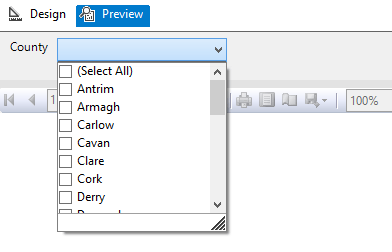
Image showing an SSRS report parameter options

But the issue is that the SSRS report will pass the multi-valued parameter as a string with the values separated by a comma.

So instead of receiving the required: ‘Antrim’, ‘Armagh’, ‘Carlow’, ‘Cavan’ etc. for use in the WHERE clause.

SQL Server is passed: ‘Antrim, Armagh, Carlow, Cavan’ etc. which cannot be used.

So the first additional logic and code to be added to the back end to deal with the multi-value parameter is a User Defined Function (UDF) which splits the parameter. The following function and quotations are taken from the 4guysfromrolla website.

Function Scope:

“There are generally two parameters to a split function: the list to split and the character(s) to split on, the delimiter. In the following function we begin by declaring our input variables – @List, the list to split, and @SplitOn, the delimiter(s) to split on. The return value of this UDF is a table with two fields: Id, an identity column, and Value, an nvarchar(100) column.”

Function Logic:

“The main body of the function simply loops through the string finding the first occurrence of the delimiter on each pass. Once the delimiter has been found, the string is broken into two pieces. The first piece is inserted into the result table while the second piece replaces the original list. The loop continues until no more occurrences of the delimiter are found. Lastly, the remainder of the list is added to the result table. Return the table and you have a split function.”

Run the query below to follow the working example.

USE [TEST_DB];
GO

CREATE FUNCTION [dbo].[Split] (
	@List NVARCHAR(2000)
	,@SplitOn NVARCHAR(5)
	)
RETURNS @RtnValue TABLE (
	Id INT identity(1, 1)
	,Value NVARCHAR(100)
	)
AS
BEGIN
	WHILE (Charindex(@SplitOn, @List) > 0)
	BEGIN
		INSERT INTO @RtnValue (value)
		SELECT Value = ltrim(rtrim(Substring(@List, 1, Charindex(@SplitOn, @List) - 1)))

		SET @List = Substring(@List, Charindex(@SplitOn, @List) + len(@SplitOn), len(@List))
	END

	INSERT INTO @RtnValue (Value)
	SELECT Value = ltrim(rtrim(@List))

	RETURN
END


(For a line by line break down of the function please see the webpage.)

Now that the split function exits within the database it is now possible to use a Stored Procedure to SELECT from the Ireland table pulling back specific counties by way of a WHERE clause.

Run the query below to follow the working example.

USE Test_DB;
GO

IF OBJECT_ID('[GetCounties]') IS NULL
	EXEC ('CREATE PROCEDURE dbo.[GetCounties] AS SELECT 1')
GO

ALTER PROCEDURE [dbo].[GetCounties] @County VARCHAR(MAX)
AS
	/*

NAME OF SP: GetCounties
Author:		Bloggins86
Date:		15/07/2015
Purpose:	Test multi-parameter select

*/
	------------------------------------------------------
	------------------------------------------------------
	--INSERT STORED PROCEDURE LOGIC HERE
	SELECT *
	FROM Ireland
	WHERE County IN (SELECT Value FROM dbo.Split(@County, ','))

	------------------------------------------------------
	------------------------------------------------------


Now that the populated table, split function and county select SP exists run the query below passing a string with multiple counties to return Dublin, Meath and Cork from the Ireland Table.

EXEC dbo.[GetCounties] 'Dublin, Meath, Cork'


You should now have returned the table with Dublin, Meath and Cork as separate row entries.

And that’s it, thanks for reading.
Combine and then split tsql insert statement files into batches of one thousand.

Recently I was given the task of executing hundreds of prepared sql files some containing multi-row insert statements numbering in the tens of thousands.

So I encountered two problems with this:

  • MSSQL Multi-row insert statements  actually have some limits i.e. a maximum of 1000 rows can be inserted.
  • I didn’t know which files had more or less than a thousand insert statements.

Luckily all the new rows were going into the same table and I knew that each file had the same flat/unformatted tsql structure.

This meant I could write a batch script to combine the files and then split the tsql insert statements into batches of 1000.

The batch script below is a little long winded so here are the main sections.

  • Combine Files
  • Remove unwanted lines of text  i.e. blank lines or insert statement sections.
  • Ensure every parentheses is followed by a comma
  • Inject the “insert into table” statement and GO every 1000 lines.
  • Remove double quotes

This was a somewhat specific case but hopefully you’ll be able to pick the batch script below apart for yourself and get some use out of it. But if there’s one little snippet of code I’d like to draw your attention to it is this little gem.

TYPE *.sql > CombinedScript.sql


Type that into a text file and save it as combine.bat, place the file in the folder with all your sql scripts and the OS will combine them all for you as CombinedScript.sql.

Here’s the rest of the script followed by some sample data showing the shape and structure of the original sql files.

(I’d like to thank the hilite.me website for creating this awesome online utility for creating HTML highlighted code that can just be dropped into a blog, as shown below. No more gist for me!)

@ECHO OFF

::VARIABLES
SET FileToUse="CombinedScript.sql"
SET FileToDelete="Query.sql"
SET FirstLine="Insert into [LoadProfiles] (Profile,Type,ProfileDate,ProfileValue,Active,Created,CreatedBy) Values"
SET BatchSplit="GO "
SET TextLineToAdd=%BatchSplit%%FirstLine%
::SET "TextLineToAdd=%TextLineToAdd:"=%"
::Combine SQL FILES

ECHO Combining Files . . . 
ECHO Please Wait
ECHO.
TYPE *.sql > %FileToUse%
ECHO Files Combined
ECHO.

ECHO Removing unwanted lines of text . . . 
ECHO Please Wait
ECHO.
::REF 1
::REMOVE THE LINES WITH INSERT AND VALUES FROM FILE
findstr /v "Insert Values" %FileToUse% > Temp.sql
::REF 2
::REMOVE BLANK ROWS FROM Temp.sql
findstr /v /r /c:"^$" /c:"^\ *$" Temp.sql >> CleanedFile.sql
::DELETE Temp.sql
IF EXIST Temp.sql del /F Temp.sql
ECHO Lines Removed
ECHO.


::REF 3
::REPLACE ) WITH ), TO ENSURE EVERY PARENTHESES IS FOLLOWED BY A COMMA
ECHO Adding Comma to each Parentheses missing a Comma . . .
ECHO Please Wait
ECHO.
    setlocal enableextensions disabledelayedexpansion

    set "search=)"
    set "replace=),"

    set "textFile=CleanedFile.sql"

    for /f "delims=" %%i in ('type "%textFile%" ^& break ^> "%textFile%" ') do (
        set "line=%%i"
        setlocal enabledelayedexpansion
        set "line=!line:%search%=%replace%!"
        >>PreparedFile.sql echo(!line!
        endlocal
    )
::DELETE CleanedFile.sql
IF EXIST CleanedFile.sql del /F CleanedFile.sql
::REF 3
::REPLACE ),, WITH ), TO ENSURE EVERY PARENTHESES IS FOLLOWED BY ONLY ONE COMMA
	    setlocal enableextensions disabledelayedexpansion

    set "search=),,"
    set "replace=),"

    set "textFile=PreparedFile.sql"

    for /f "delims=" %%i in ('type "%textFile%" ^& break ^> "%textFile%" ') do (
        set "line=%%i"
        setlocal enabledelayedexpansion
        set "line=!line:%search%=%replace%!"
        >>CleanedFile.sql echo(!line!
        endlocal
    )
ECHO Commas Added
ECHO.

ECHO Creating Query file . . .
ECHO Please Wait
ECHO.
::DELETE PreparedFile.sql
IF EXIST PreparedFile.sql del /F PreparedFile.sql
 
::Try to delete the file only if it exists
IF EXIST %FileToDelete% del /F %FileToDelete%
 
::REM If the file wasn't deleted for some reason, stop and error
IF EXIST %FileToDelete% exit 1

TYPE NUL > %FileToDelete% 

::REF 4
SETLOCAL
SET count=0
SET injectevery=1000
FOR /f "delims=" %%Z IN ('type CleanedFile.sql^|findstr /n "^"') DO (
SET /a count+=1
SET line=%%Z
SETLOCAL ENABLEDELAYEDEXPANSION
ECHO(!line:*:=! >> Query.sql
IF !count!==%injectevery% ECHO.%TextLineToAdd% >> Query.sql
ENDLOCAL
SET /a count=count %% %injectevery% 
) 

::REF 3
::REPLACE " WITH NOTHING 
ECHO Adding Comma to each Parentheses missing a Comma . . .
ECHO Please Wait
ECHO.
    setlocal enableextensions disabledelayedexpansion

    set "search=""
    set "replace= "

    set "textFile=Query.sql"

    for /f "delims=" %%i in ('type "%textFile%" ^& break ^> "%textFile%" ') do (
        set "line=%%i"
        setlocal enabledelayedexpansion
        set "line=!line:%search%=%replace%!"
        >>Script.sql echo(!line!
        endlocal
    )
::DELETE CleanedFile.sql
IF EXIST CleanedFile.sql del /F CleanedFile.sql

PAUSE

::REF 1: http://stackoverflow.com/questions/418916/delete-certain-lines-in-a-txt-file-via-a-batch-file
::CREDIT GOES TO: http://stackoverflow.com/users/14138/rick

::REF 2: http://www.computing.net/answers/programming/delete-blank-line-from-a-txt-file-using-batch/25575.html
::CREDIT GOES TO: http://www.computing.net/userinfo/150780

::REF 3: http://stackoverflow.com/questions/23075953/batch-script-to-find-and-replace-a-string-in-text-file-without-creating-an-extra
::CREDIT GOES TO: http://stackoverflow.com/users/2861476/mc-nd

::REF 4: FOR INSERT NEW TEXT LINE: http://stackoverflow.com/questions/15859128/looking-for-batch-file-to-insert-new-lines-into-text-file
::CREDIT GOES TO: http://stackoverflow.com/users/2128947/magoo

/*CHANGE DATABASE_NAME*/

USE [DATABASE_NAME]
GO

/****** Object:  Table [dbo].[LoadProfiles]    Script Date: 06/12/2015 15:34:43 ******/
SET ANSI_NULLS ON
GO

SET QUOTED_IDENTIFIER ON
GO

SET ANSI_PADDING ON
GO

CREATE TABLE [dbo].[LoadProfiles](
	[ProfileID] [int] IDENTITY(1,1) NOT NULL,
	[Profile] [int] NULL,
	[Type] [varchar](8) NULL,
	[ProfileDate] [date] NULL,
	[ProfileValue] [decimal](12, 10) NULL,
	[Active] [bit] NULL,
	[Created] [datetime] NULL,
	[CreatedBy] [int] NULL,
PRIMARY KEY CLUSTERED 
(
	[LoadProfileID] ASC
)WITH (PAD_INDEX  = OFF, STATISTICS_NORECOMPUTE  = OFF, IGNORE_DUP_KEY = OFF, ALLOW_ROW_LOCKS  = ON, ALLOW_PAGE_LOCKS  = ON) ON [PRIMARY]
) ON [PRIMARY]

GO

SET ANSI_PADDING OFF
GO

 
Insert into [dbo].[LoadProfiles] (Profile,Type,ProfileDate,ProfileValue,Active,Created,CreatedBy)
 Values
(1,'24H','2012/01/01',0.003348,1,getutcdate(),333),
(1,'24H','2012/01/02',0.003392,1,getutcdate(),333),
(1,'24H','2012/01/03',0.003278,1,getutcdate(),333),
(1,'24H','2012/01/04',0.003252,1,getutcdate(),333),
(1,'24H','2012/01/05',0.003203,1,getutcdate(),333)

How to map the table structure of all Databases in a SQL Server Instance

Below is a T-SQL script that will return the following fields for each table from each database located in a SQL Server Instance:

  • ServerName
  • DatabaseName
  • SchemaName
  • TableName
  • ColumnName
  • KeyType

The output is provided in a table format with these additional formatted lines of text which can be used as queries or as part of queries.

  • A Select table query
  • A Select column query
  • Each column bracketed
  • Each table and column bracketed

This query is especially useful from a reporting perspective for a DBA or SQL developer unfamiliar with the structure of the database they are querying. The table returned by the query can be exported to excel. Using excels filter option applied to the columns of the table makes finding and selecting specific tables and columns very easy.

This process can be repeated for every database server used by the business to generate a single mapped servers master excel file allowing the user to find any table or column available to the organization quickly.

Applying some colour coding like below adds to the ease of use.

Image of excel file with mapped database server structure

How to use:

Simply open SQL Server management studio and from object explorer right click on the server name and select new query. This will open a window set to the master database of the server. Copy and paste the SQL below into this SQL Server window and execute. When the query is finished you will have created the table above.

/*
SCRIPT UPDATED
20180316
*/

USE [master]
GO

/*DROP TEMP TABLES IF THEY EXIST*/
IF OBJECT_ID('tempdb..#DatabaseList') IS NOT NULL
	DROP TABLE #DatabaseList;

IF OBJECT_ID('tempdb..#TableStructure') IS NOT NULL
	DROP TABLE #TableStructure;

IF OBJECT_ID('tempdb..#ErrorTable') IS NOT NULL
	DROP TABLE #ErrorTable;

IF OBJECT_ID('tempdb..#MappedServer') IS NOT NULL
	DROP TABLE #MappedServer;

DECLARE @ServerName AS SYSNAME

SET @ServerName = @@SERVERNAME

CREATE TABLE #DatabaseList (
	Id INT NOT NULL IDENTITY(1, 1) PRIMARY KEY
	,ServerName SYSNAME
	,DbName SYSNAME
	);

CREATE TABLE [#TableStructure] (
	[DbName] SYSNAME
	,[SchemaName] SYSNAME
	,[TableName] SYSNAME
	,[ColumnName] SYSNAME
	,[KeyType] CHAR(7)
	) ON [PRIMARY];

/*THE ERROR TABLE WILL STORE THE DYNAMIC SQL THAT DID NOT WORK*/
CREATE TABLE [#ErrorTable] ([SqlCommand] VARCHAR(MAX)) ON [PRIMARY];

/*
A LIST OF DISTINCT DATABASE NAMES IS CREATED
THESE TWO COLUMNS ARE STORED IN THE #DatabaseList TEMP TABLE
THIS TABLE IS USED IN A FOR LOOP TO GET EACH DATABASE NAME
*/
INSERT INTO #DatabaseList (
	ServerName
	,DbName
	)
SELECT @ServerName
	,NAME AS DbName
FROM master.dbo.sysdatabases WITH (NOLOCK)
WHERE NAME <> 'tempdb'
ORDER BY NAME ASC

/*VARIABLES ARE DECLARED FOR USE IN THE FOLLOWING FOR LOOP*/
DECLARE @sqlCommand AS VARCHAR(MAX)
DECLARE @DbName AS SYSNAME
DECLARE @i AS INT
DECLARE @z AS INT

SET @i = 1
SET @z = (
		SELECT COUNT(*) + 1
		FROM #DatabaseList
		)

/*WHILE 1 IS LESS THAN THE NUMBER OF DATABASE NAMES IN #DatabaseList*/
WHILE @i < @z
BEGIN
	/*GET NEW DATABASE NAME*/
	SET @DbName = (
			SELECT [DbName]
			FROM #DatabaseList
			WHERE Id = @i
			)
	/*CREATE DYNAMIC SQL TO GET EACH TABLE NAME AND COLUMN NAME FROM EACH DATABASE*/
	SET @sqlCommand = 'USE [' + @DbName + '];' + '

INSERT INTO [#TableStructure]
SELECT DISTINCT' + '''' + @DbName + '''' + ' AS DbName
	,SCHEMA_NAME(SCHEMA_ID) AS SchemaName
	,T.NAME AS TableName	
	,C.NAME AS ColumnName
	,CASE 
		WHEN OBJECTPROPERTY(OBJECT_ID(iskcu.CONSTRAINT_NAME), ''IsPrimaryKey'') = 1 
			THEN ''Primary'' 
		WHEN OBJECTPROPERTY(OBJECT_ID(iskcu.CONSTRAINT_NAME), ''IsForeignKey'') = 1 
			THEN ''Foreign''
		ELSE NULL 
		END AS ''KeyType''
FROM SYS.TABLES AS t WITH (NOLOCK)
INNER JOIN SYS.COLUMNS C ON T.OBJECT_ID = C.OBJECT_ID
LEFT JOIN INFORMATION_SCHEMA.KEY_COLUMN_USAGE AS iskcu WITH (NOLOCK) 
ON SCHEMA_NAME(SCHEMA_ID) = iskcu.TABLE_SCHEMA 
	AND T.NAME = iskcu.TABLE_NAME
	AND C.NAME = iskcu.COLUMN_NAME
ORDER BY SchemaName ASC
	,TableName ASC
	,ColumnName ASC;
';

	/*ERROR HANDLING*/
	BEGIN TRY
		EXEC (@sqlCommand)
	END TRY

	BEGIN CATCH
		INSERT INTO #ErrorTable
		SELECT (@sqlCommand)
	END CATCH

	SET @i = @i + 1
END

/*
JOIN THE TEMP TABLES TOGETHER TO CREATE A MAPPED STRUCTURE OF THE SERVER
ADDITIONAL FIELDS ARE ADDED TO MAKE SELECTING TABLES AND FIELDS EASIER
*/
SELECT DISTINCT @@SERVERNAME AS ServerName
	,DL.DbName
	,TS.SchemaName
	,TS.TableName
	,TS.ColumnName
	,TS.[KeyType]
	,',' + QUOTENAME(TS.ColumnName) AS BracketedColumn
	,',' + QUOTENAME(TS.TableName) + '.' + QUOTENAME(TS.ColumnName) AS BracketedTableAndColumn
	,'SELECT * FROM ' + QUOTENAME(DL.DbName) + '.' + QUOTENAME(TS.SchemaName) + '.' + QUOTENAME(TS.TableName) + '--WHERE --GROUP BY --HAVING --ORDER BY' AS [SelectTable]
	,'SELECT ' + QUOTENAME(TS.TableName) + '.' + QUOTENAME(TS.ColumnName) + ' FROM ' + QUOTENAME(DL.DbName) + '.' + QUOTENAME(TS.SchemaName) + '.' + QUOTENAME(TS.TableName) + '--WHERE --GROUP BY --HAVING --ORDER BY' AS [SelectColumn]
INTO #MappedServer
FROM [#DatabaseList] AS DL
INNER JOIN [#TableStructure] AS TS ON DL.DbName = TS.DbName
ORDER BY DL.DbName ASC
	,TS.SchemaName ASC
	,TS.TableName ASC
	,TS.ColumnName ASC

/*
HOUSE KEEPING
*/
IF OBJECT_ID('tempdb..#DatabaseList') IS NOT NULL
	DROP TABLE #DatabaseList;

IF OBJECT_ID('tempdb..#TableStructure') IS NOT NULL
	DROP TABLE #TableStructure;

SELECT *
FROM #ErrorTable;

IF OBJECT_ID('tempdb..#ErrorTable') IS NOT NULL
	DROP TABLE #ErrorTable;

/*
THE DATA RETURNED CAN NOW BE EXPORTED TO EXCEL
USING A FILTERED SEARCH WILL NOW MAKE FINDING FIELDS A VERY EASY PROCESS
*/
SELECT ServerName
	,DbName
	,SchemaName
	,TableName
	,ColumnName
	,KeyType
	,BracketedColumn
	,BracketedTableAndColumn
	,SelectColumn
	,SelectTable
FROM #MappedServer
ORDER BY DbName ASC
	,SchemaName ASC
	,TableName ASC
	,ColumnName ASC;


Universal Error Logging for Stored Procedures in SQL Server

Probably the best way to log whether your stored procedure ran correctly or threw an error during its run is to create another stored procedure to capture the events of the run.

This example although basic captures the primary data you would want to keep a record of regarding a procedures run.

  • The name of the stored procedure
  • The start time of the stored procedure
  • The time the stored procedure finished/errored
  • A user comment/error message
  • An assigned Log ID

Below is a pre-baked example requiring just a change to the DatabaseName, and if you wish SP_Name, text fields, as instructed in the comments of the SQL below, to test run the script.

This will create a SP_Log table and the stored procedure InsertRunIntoSpLog which can be reused over and over again when making stored procedures for other jobs to log the success/failure of these jobs.

Step 3 is an example stored procedure, which can be renamed as something other than SP_Name, which simply displays the date time.  Once created whenever the following is executed, EXEC dbo.SP_Name, the current date time will be returned and a record of the procedures run will be added to a row in the SP_Log table.

Although as stated above this is a basic example it is a very powerful foundation which can be built upon for very comprehensive event and transaction logging.


— CHANGE [DatabaseName] TO THE NAME OF THE DB REQUIRED
— CHANGE SP_NAME TO THE NAME OF THE SP REQUIRED
—————————————————
— STEP 1
— CREATE TABLE TO STORE ERRORS
—————————————————
USE [DatabaseName]
GO
— DROP LOG TABLE IF ALREADY EXISTS
IF OBJECT_ID('dbo.SP_Log', 'U') IS NOT NULL
DROP TABLE dbo.SP_Log
GO
SET ANSI_NULLS ON
GO
SET QUOTED_IDENTIFIER ON
GO
SET ANSI_PADDING ON
GO
— CREATE LOG TABLE
CREATE TABLE [dbo].[SP_Log] (
[LogID] [int] IDENTITY(1, 1) NOT FOR REPLICATION NOT NULL
,[NameOfSp] [nvarchar](100) NOT NULL
,[StepCode] [varchar](1) NOT NULL
,[RunDate] [datetime] NOT NULL
,[Comment] [nvarchar](200) NULL
,PRIMARY KEY CLUSTERED ([LogID] ASC) WITH (
PAD_INDEX = OFF
,STATISTICS_NORECOMPUTE = OFF
,IGNORE_DUP_KEY = OFF
,ALLOW_ROW_LOCKS = ON
,ALLOW_PAGE_LOCKS = ON
) ON [PRIMARY]
) ON [PRIMARY]
GO
SET ANSI_PADDING OFF
GO
—————————————————
— STEP 2
— CREATE STORED PROCEDURE TO WRITE ERRORS TO ERROR TABLE
—————————————————
USE [DatabaseName]
GO
IF OBJECT_ID('dbo.InsertRunIntoSpLog', 'p') IS NOT NULL
DROP PROCEDURE [dbo].[InsertRunIntoSpLog]
GO
SET ANSI_NULLS ON
GO
SET QUOTED_IDENTIFIER ON
GO
— CREATE STORED PROCEDURE
CREATE PROCEDURE [dbo].[InsertRunIntoSpLog] @SpVariableName NVARCHAR(100)
,@StepCode VARCHAR(1)
,@Comment NVARCHAR(400)
AS
BEGIN
INSERT INTO SP_Log (
NameOfSp
,StepCode
,RunDate
,Comment
)
VALUES (
@SpVariableName
,@StepCode
,getutcdate()
,@Comment
)
END
GO
—————————————————
— STEP 3
— STORED PROCEDURE RUN / ERROR CATCH EXAMPLE
—————————————————
IF OBJECT_ID('dbo.SP_Name', 'p') IS NOT NULL
DROP PROCEDURE [dbo].[SP_Name]
GO
CREATE PROCEDURE [dbo].[SP_Name]
AS
BEGIN
BEGIN TRY
— INSERT SP RUN LOG FOR SP START
EXEC InsertRunIntoSpLog 'SP_NAME' — SP_NAME
,'S' — S, F OR E (START, FINNISH OR ERROR)
,'' — USER COMMENT
— QUERY HERE
— FOR EXAMPLE
SELECT GETDATE() AS CurrentDateTime
— INSERT SP RUN LOG FOR SP END
EXEC InsertRunIntoSpLog 'SP_NAME'
,'F'
,''
END TRY
BEGIN CATCH
PRINT 'error!'
— INSERT SP RUN LOG FOR SP ERROR
DECLARE @error_number AS INTEGER
DECLARE @error_message AS VARCHAR(400)
SET @error_number = error_number()
SET @error_message = left(error_message(), 400)
PRINT 'error_message: ' + @error_message
EXEC InsertRunIntoSpLog 'SP_NAME'
,'E'
,@error_message
END CATCH
END

How to dynamically pull all text file names from a folder into a SQL Server table

So here’s a quick out of the box solution for . . . you guessed it, dynamically pulling all text files from a folder into a SQL Server table. On it’s own this script isn’t very powerful but it can be paired with SQL queries to make some powerful functionality.

To use simply change the @path variable to the directory path you’re targeting and as it states in the comments . . .

-- NOTE: MAKE SURE THE BACKSLASH IS INCLUDED AT THE END OF THE STRING
-- *.txt IS REFERENCED IN THIS EXAMPLE BUT *.xls COULD ALSO BE USED

Sayōnara


— THIS QUERY USES CMD TO CAPTURE ALL THE FILES IN A FOLDER
— AND WRITE THE FILE NAMES TO A TABLE
— THE QUERY REQUIRES THAT xp_cmdShell BE ENABLED TO WORK
— THE FOLLOWING ENABLES xp_cmdShell:
— TO ALLOW ADVANCED OPTIONS TO BE CHANGED
EXEC sp_configure 'show advanced options'
,1
GO
— TO UPDATE THE CURRENTLY CONFIGURED VALUE FOR ADVANCED OPTIONS
RECONFIGURE
GO
— TO ENABLE THE FEATURE
EXEC sp_configure 'xp_cmdshell'
,1
GO
— TO UPDATE THE CURRENTLY CONFIGURED VALUE FOR THIS FEATURE
RECONFIGURE
GO
— THE FOLLOWING CREATES A TABLE AND POPULATES IT WITH THE FILES LOCATED IN THE SPECIFIED DIRECTORY
IF OBJECT_ID('ALLFILENAMES', 'U') IS NOT NULL
DROP TABLE ALLFILENAMES
CREATE TABLE ALLFILENAMES (
WHICHPATH VARCHAR(255)
,WHICHFILE VARCHAR(255)
)
DECLARE @filename VARCHAR(255)
,@path VARCHAR(255)
,@cmd VARCHAR(1000)
— GET THE LIST OF FILES TO PROCESS
— NOTES: MAKE SURE THE BACKSLASH IS INCLUDED AT THE END OF THE STRING
— *.txt IS REFERENCED IN THIS EXAMPLE BUT *.xls COULD ALSO BE USED
SET @path = 'C:\Users\Data\'
SET @cmd = 'dir ' + @path + '*.txt /b'
INSERT INTO ALLFILENAMES (WHICHFILE)
EXEC Master..xp_cmdShell @cmd
UPDATE ALLFILENAMES
SET WHICHPATH = @path
WHERE WHICHPATH IS NULL
SELECT *
FROM ALLFILENAMES

How to get the hour from a datetime string (T-SQL)

Often data is entered into the database as a string (varchar), when a more appropriate data type should have been applied.

Here’s a snippet of T-SQL for dealing with datetime data, stored as varchar, when what you really need is the hour. 

DECLARE @DateTime AS VARCHAR(25)

-- GET THE CURRENT DATETIME AND CONVERT INTO A STRING
SET @DateTime = (
		SELECT CONVERT(VARCHAR(25), GETDATE(), 120)
		)

--PRINT @DateTime
-- GET HOUR FROM DATETIME AS A STRING
SELECT DATEPART(HOUR, CONVERT(DATETIME, CONVERT(VARCHAR(13), @DateTime, 120) + ':00')) AS ConvertedHour


Why would data be stored as a varchar instead of using the appropriate data type in the first place?

The most common reason might be that XML files have been loaded without any data type conversions being applied, i.e. dates have been entered as strings along with everything else.

Why would you need this code?

Should you be confronted with data in this raw string form you would be unable to apply a clause regarding a specific hour. Ideally there should be some sort of staging table to convert the fields into the appropriate data types but if you simply wanted to apply some clauses to select specific data, which will be outputted to an excel file for example, that additional effort may be unnecessary.
