Category Archives: SQL Server

How to determine what stored procedures relate to what tables

Foreign keys are usually a good indicator of which tables connect to each other however you may be working in an environment that does not always follow best practices. As well as that you may not know what store procedures relate to what tables.
Sometimes databases need to move from one server to another or are depreciated. Before this can happened it is a very good idea to do a compressive assessment to see what interacts with what.
As once a thing gets moved everything that queries against it needs to point to it its new location.
A good starting point of this assessment would be to use the query below to determine what stored procedures reference the table specified in the WHERE clause.

  • NOTES: This query only pulls the tabled referenced in the database, it does not pull tables that are referenced from other databases.
  • Although the table maybe reference it may not actually be interacted with by the query, the table name may be comment in the code for example. However for the most part it is more likely the table has some action performed against it, be it a SELECT, INSERT, UPDATE etc.

The query works by using the sysobjects and syscomments tables.
Sysobjects: a system table that contains a row for each user-defined, schema-scoped object that is created within a database, including natively compiled scalar user-defined function.

Syscomments: a system table that contains entries for each view, rule, default, trigger, CHECK constraint, DEFAULT constraint, and stored procedure within the database. The text column contains the original SQL definition statements.

Or to dumb it down it joins, in our case, the stored procedures name to the query and scans this query for references to the specified table.

/*
CHANGE THE FOLLOWING:
SERVER NAME: ServerName
DATABASE NAME: DatabaseName 
TABLE NAME: TableName
 */


USE DatabaseName;
GO

SELECT DISTINCT so.name
FROM syscomments sc
INNER JOIN sysobjects so ON sc.id=so.id
WHERE sc.TEXT LIKE '%TableName%'

To expand on this logic to return every table referenced in every stored procedure in a database run the code below:

/*
CHANGE THE FOLLOWING:
SERVER NAME: ServerName
DATABASE NAME: DatabaseName 
 */
 
USE DatabaseName;
GO 

--DROP TEMP TABLES
IF OBJECT_ID('tempdb..#TablesAndSPs') IS NOT NULL
	DROP TABLE #TablesAndSPs

IF OBJECT_ID('tempdb..#Tables') IS NOT NULL
	DROP TABLE #Tables
	
--DECLARE VARIABLES
DECLARE @tableID AS INT
DECLARE @tableName AS VARCHAR(255)

--CREATE TEMP TABLE TO HOLD THE NAMES OF THE TABLES AND SPs
CREATE TABLE #TablesAndSPs (
	TABLE_ID INT
	,TABLE_NAME VARCHAR(255)
	,SP VARCHAR(255)
	)

--GET A LIST OF THE TABLES IN DATABASE
SELECT row_number() OVER (
		ORDER BY TABLE_NAME
		) AS TABLE_ID
	,TABLE_NAME
INTO #Tables
FROM INFORMATION_SCHEMA.TABLES

SET @tableID = 1

--LOOP AND POPULATE #TablesAndSPs
WHILE @tableID <= (
		SELECT MAX(TABLE_ID)
		FROM #Tables
		)
BEGIN
	SET @tableName = (
			SELECT TABLE_NAME
			FROM #Tables
			WHERE TABLE_ID = @tableID
			)

	INSERT INTO #TablesAndSPs
	SELECT DISTINCT @tableID
		,@tableName
		,so.NAME
	FROM syscomments sc
	INNER JOIN sysobjects so ON sc.id = so.id
	WHERE sc.TEXT LIKE '%' + @tableName + '%'

	SET @tableID = @tableID + 1
END

SELECT * FROM #TablesAndSPs

How to create Clustered and Nonclustered Indexes on a Temp Table

One of the best features of temp tables is that an index can be applied to them.

To clarify temp tables start with #, exist within the tempdb and are accessible within child batches (nested triggers, procedure, exec calls) of the query.

The execution plan can also determine the relevant statistics regarding their operation and suggest means of optimisation and will often suggest applying an index to the table.
Below is a simple example of applying both clustered and nonclustered indexes to the temporary table #Apostle created from a CTE (Common Table Expression).


IF OBJECT_ID('tempdb..#Apostle') IS NOT NULL
	DROP TABLE #Apostle;

WITH CTE
AS (
	SELECT 1 AS ID
		,'Simon Peter' AS NAME
	
	UNION
	
	SELECT 2
		,'James'
	
	UNION
	
	SELECT 3
		,'John'
	
	UNION
	
	SELECT 4
		,'Andrew'
	
	UNION
	
	SELECT 5
		,'Philip'
	
	UNION
	
	SELECT 6
		,'Thomas'
	
	UNION
	
	SELECT 7
		,'Bartholomew'
	
	UNION
	
	SELECT 8
		,'Matthew'
	
	UNION
	
	SELECT 9
		,'James'
	
	UNION
	
	SELECT 10
		,'Simon'
	
	UNION
	
	SELECT 11
		,'Thaddaeus'
	
	UNION
	
	SELECT 12
		,'Judas'
	)
SELECT *
INTO #Apostle
FROM CTE

-- CREATE INDEXES
CREATE CLUSTERED INDEX IDX_CLUSTERED_ID ON #Apostle (ID)

CREATE NONCLUSTERED INDEX IDX_NONCLUSTERED_ID ON #Apostle (ID)


Microsoft defines clustered and nonclustered indexes as the following:

Clustered

  • Clustered indexes sort and store the data rows in the table or view based on their key values. These are the columns included in the index definition. There can be only one clustered index per table, because the data rows themselves can be sorted in only one order.
  • The only time the data rows in a table are stored in sorted order is when the table contains a clustered index. When a table has a clustered index, the table is called a clustered table. If a table has no clustered index, its data rows are stored in an unordered structure called a heap.

Nonclustered

  • Nonclustered indexes have a structure separate from the data rows. A nonclustered index contains the nonclustered index key values and each key value entry has a pointer to the data row that contains the key value.
  • The pointer from an index row in a nonclustered index to a data row is called a row locator. The structure of the row locator depends on whether the data pages are stored in a heap or a clustered table. For a heap, a row locator is a pointer to the row. For a clustered table, the row locator is the clustered index key.
  • You can add nonkey columns to the leaf level of the nonclustered index to by-pass existing index key limits, 900 bytes and 16 key columns, and execute fully covered, indexed, queries.

Source

To learn more about indexes this is a good video on the topic.

How to write text to a file with SQL Server

The following is a tutorial on creating a stored procedure that will allow you to create a file in any directory and insert text into this newly created file.

In order for this to work you will need to authorise the running of system stored procedures with Object Linking and Embedding functionality (See OLE).

Authorisation is needed as the stored procedure we will create rely on the system SPs sp_OACreate and sp_OAMethod.

sp_OACreate: Creates an instance of an OLE object.

sp_OAMethod: Calls a method of an OLE object.

NOTE: By default, SQL Server blocks access to OLE Automation stored procedures by turning the components off as part of the security configuration for the server.

Run the script below to grant authorisation.

--AUTHORIZE SYSTEM STORED PROCEDURES
sp_configure 'show advanced options'
	,1;
GO

RECONFIGURE;
GO

sp_configure 'Ole Automation Procedures'
	,1;
GO

RECONFIGURE;
GO

--AUTHORIZED

 
Next we will create the stored procedure WriteToFile. Substitute the DatabaseName with the database you will be using.

--CREATE STORED PROCEDURE
/*
CHANGE:
DATABASE NAME: DatabaseName 
 */
USE "DatabaseName";
GO

SET ANSI_NULLS ON
GO

SET QUOTED_IDENTIFIER ON
GO

IF OBJECT_ID('[dbo].[WriteToFile]', 'P') IS NOT NULL
	DROP PROCEDURE [WriteToFile];
GO

CREATE PROCEDURE [dbo].[WriteToFile] @File VARCHAR(255)
	,@Text VARCHAR(MAX)
	WITH EXECUTE AS CALLER
AS
BEGIN
	DECLARE @OLE INT
	DECLARE @FileID INT

	EXECUTE sp_OACreate 'Scripting.FileSystemObject'
		,@OLE OUT

	EXECUTE sp_OAMethod @OLE
		,'OpenTextFile'
		,@FileID OUT
		,@File
		,8
		,1

	EXECUTE sp_OAMethod @FileID
		,'WriteLine'
		,NULL
		,@Text

	EXECUTE sp_OADestroy @FileID

	EXECUTE sp_OADestroy @OLE
END;

 
Below is an example using the WriteToFile stored procedure.

--WRITE TO FILE EXAMPLE
/*
CHANGE:
DATABASE NAME: DatabaseName 
 */
USE "DatabaseName";
GO

DECLARE @Path VARCHAR(255)
DECLARE @Txt VARCHAR(MAX)

--NOTE: THE LOG FILE WILL BE CREATED IF IT DOES NOT ALREADY EXIST
SET @PATH = 'C:\temp\WriteToFileExampleLog.txt'
SET @Txt = 'Hello World'

EXEC [DatabaseName].[dbo].[WriteToFile] @Path
	,@Txt;


Using the same stored procedure here’s an example writing a table to the file using concatenation and a loop. This process works by taking the table row by row and writing the concatenated value to the file. There are easier ways to achieve this however, i.e. utilising the export functionality built into SSMS and saving this as a package to be run as a job.

--STORED PROCEDURE CREATED
--WRITE TABLE TO FILE EXAMPLE
DECLARE @Path VARCHAR(255)
DECLARE @Txt VARCHAR(MAX)
DECLARE @loopId AS INT
DECLARE @maxId AS INT
DECLARE @TempCustomer TABLE (
	ID_column INT IDENTITY PRIMARY KEY
	,FirstName NVARCHAR(100)
	);

--NOTE: THE LOG FILE WILL BE CREATED IF IT DOES NOT ALREADY EXIST
SET @PATH = 'C:\temp\WriteToFileExampleLog.txt'

INSERT INTO @tempCustomer (FirstName)
VALUES ('Paul')
	,('Jim')
	,('John')

SET @loopId = 1
SET @maxId = (
		SELECT MAX(ID_column)
		FROM @TempCustomer
		)

WHILE @loopId <= @maxId
BEGIN
	SELECT @Txt = CONVERT(VARCHAR(10), ID_column) + ', ' + FirstName
	FROM @TempCustomer
	WHERE ID_column = @loopId

	PRINT @Txt

	EXEC [TEST_DB].[dbo].[WriteToFile] @Path
		,@Txt;

	SET @loopId = @loopId + 1
END


How to remove NaN and Infinity from a SSRS table

Typically this occurs when a field uses an expression in a report table were the expression tries to divide a number by zero (Or the field can populate with #Error when there is a NULL involved). The best solution to resolve this problem is to create a custom function.

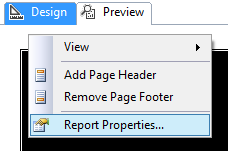
Right click on the background of your report (i.e. just below where it says Design) and go to Report Properties as shown:

picture showing user where to click in the reportThen you can left click on Code and add enter the custom code below in the window provided:

Public Function Divide(ByVal dividend As Double, ByVal divisor As Double) As Double
   If IsNothing(divisor) Or divisor = 0 Or IsNothing(dividend) Or dividend = 0 Then
      Return 0
   Else
      Return dividend / divisor
   End If
End Function

IsNothing() is used to avoid #Error and check whether the divisor or the dividend are 0 to avoid NaN and Infinity.

Now change the field expression from, for example:

SUM(Fields!A.Value)/SUM(Fields!B.Value)

To the expression below using the newly defined function Divide:

= Code.Divide(Sum(Fields!A.Value), Sum(Fields!B.Value))

Next you can update the fields textbox properties to make the number display as a percentage.

NOTE: Inserting a user defined function into a table will mean that that table will no longer be able to be copied and pasted as this throws an error. To copy and past the table you will need to look at the code of the report by right clicking on the report and choosing View Code. Search for “Code.Divide” and comment it out with an apostrophe ( ‘ ). You will now be able to copy the table.

How to export a table as an XML file using a SQL script

Below is a script that will allow you, as the title suggests, to export a table as an XML file.

By use of the find and replace function in your preferred text editor, or by way of the text editor in SSMS, input your values for the required fields, i.e. replace TableName with the name of the table you will be working off.

SERVER NAME: ServerName

DATABASE NAME: DatabaseName

SCHEMA NAME: SchemaName

TABLE NAME: TableName

SAVE LOCATION ADDRESS: AddressName

FILE NAME: FileName (Excluding .xml extension)

Then run the script below and the table will be exported as an XML file to the location and file name of your choosing.

/*
FIND AND REPLACE:

SERVER NAME: ServerName
DATABASE NAME: DatabaseName 
SCHEMA NAME: SchemaName
TABLE NAME: TableName
SAVE LOCATION ADDRESS: AddressName
FILE NAME: FileName
 */
-- Run on ServerName
USE DatabaseName;
GO

DECLARE @saveLocation AS VARCHAR(510)
DECLARE @nameOfFile AS VARCHAR(255)
DECLARE @instanceName AS VARCHAR(255)
DECLARE @cmd NVARCHAR(1020)

SET @saveLocation = 'AddressName'
SET @nameOfFile = 'FileName'
SET @saveLocation = @saveLocation + '\' + @nameOfFile + '.xml'
SET @instanceName = (
		SELECT @@servername
		)

-- Please note that the fully qualified table name is needed
SELECT @cmd = '
    bcp "SELECT * FROM [DatabaseName].[SchemaName].[TableName] row for xml auto, root(''rows''), elements" ' + 'queryout "' + @saveLocation + '" -S ' + @instanceName + ' -T -w -r -t';

EXEC xp_cmdshell @cmd;
GO


This script is enabled by two utilities xp_cmdshell and BCP.

For an explanation of each please view the associated links.

What is BCP?

BCP (bulk copy program) is a utility that installs with SQL Server and can assist with large data transfers.

“The bcp utility bulk copies data between an instance of Microsoft SQL Server and a data file in a user-specified format. The bcp utility can be used to import large numbers of new rows into SQL Server tables or to export data out of tables into data files. Except when used with the queryout option, the utility requires no knowledge of Transact-SQL. To import data into a table, you must either use a format file created for that table or understand the structure of the table and the types of data that are valid for its columns.” – Microsoft

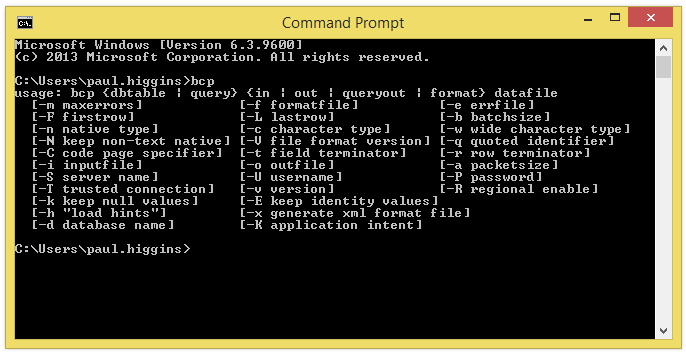
To see the parameter options from the command line on a machine with SQL Server installed, type “bcp” and press Enter.

bcp in c.m.d. windowFor further information please see the LINK.

How to enable and disable xp_cmdshell

xp_cmdshell is an extended stored procedure provided by Microsoft and stored in the master database. This procedure allows you to issue operating system commands directly to the Windows command shell via T-SQL code.

By default, the xp_cmdshell option is disabled on new installations. Along with other unwanted behavior malicious users can elevate their privileges with the use of xp_cmdshell. For this reason it is generally recommend to leave xp_cmdshell disabled. It can be enabled by using the Policy-Based Management or by running the sp_configure system stored procedure as shown in the following code example:

Use Master
GO

EXEC master.dbo.sp_configure 'show advanced options', 1
RECONFIGURE WITH OVERRIDE
GO

EXEC master.dbo.sp_configure 'xp_cmdshell', 1
RECONFIGURE WITH OVERRIDE
GO


To disable xp_cmdshell use the following code example. Note: The following example also sets show advanced options server configuration option to 0. It is best practice to leave this option in the default state of 0 to stop the enabling of features.

Use Master
GO

EXEC master.dbo.sp_configure 'xp_cmdshell', 0
RECONFIGURE WITH OVERRIDE
GO

EXEC master.dbo.sp_configure 'show advanced options', 0
RECONFIGURE WITH OVERRIDE
GO

How to populate a temp table with the days in a month

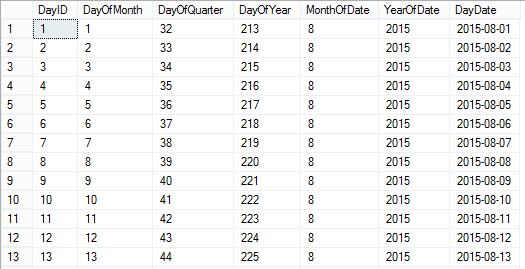
As described in the title this is a dynamic sql script that will populate a temp table with the day dates of the current month as outputted below:

calendarTableTo create a temporary calendar table for a greater period of time than just the current month:

Set @startDate to any historical date and @numberOfLoops to any number you like (365 being a year from the @startdate).

To make the table persistent:

Remove the # signs from the #calendarTable temp table referenced and rename the table accordingly.

You could also remove any columns you do not need.

IF OBJECT_ID('tempdb..#calendarTable') IS NOT NULL
	DROP TABLE #calendarTable;
	GO

CREATE TABLE #calendarTable (
	"DayID" INT
	,"DayOfMonth" INT
	,"DayOfQuarter" INT
	,"DayOfYear" INT
	,"MonthOfDate" INT
	,"YearOfDate" INT
	,"DayDate" DATE
	,PRIMARY KEY (DayID)
	)

DECLARE @startDate AS DATE
DECLARE @baseDate DATE
	,@offSet INT
	,@numberOfLoops INT

/*
To create a temporary calendar table:
Set @startDate to any historical date 
and @numberOfLoops to any number you like 
(365 being a year from the @startdate)

To make the table persistent remove the # signs 
from the #calendarTable temp table referenced 
*/
SET @startDate = GETUTCDATE() /*'20150101'*/
SET @baseDate = DATEADD(MONTH, DATEDIFF(MONTH, 0, @startDate), 0)
SET @offSet = 0
SET @numberOfLoops = DATEDIFF(DAY, @baseDate, DATEADD(MONTH, 1, @baseDate)) /*365*/

WHILE (@offSet < @numberOfLoops)
BEGIN
	INSERT INTO #calendarTable (
		"DayID"
		,"DayOfMonth"
		,"DayOfQuarter"
		,"DayOfYear"
		,"MonthOfDate"
		,"YearOfDate"
		,"DayDate"
		)
	SELECT (@offSet + 1)
		,DATEPART(DAY, DATEADD(DAY, @offSet, @baseDate))
		,DATEDIFF(D, DATEADD(QQ, DATEDIFF(QQ, 0, DATEADD(DAY, @offSet, @baseDate)), 0), DATEADD(DAY, @offSet, @baseDate)) + 1
		,DATEPART(DAYOFYEAR, DATEADD(DAY, @offSet, @baseDate))
		,DATEPART(MONTH, DATEADD(DAY, @offSet, @baseDate))
		,DATEPART(YEAR, DATEADD(DAY, @offSet, @baseDate))
		,DATEADD(DAY, @offSet, @baseDate)

	SET @offSet = @offSet + 1
END

SELECT *
FROM #calendarTable

How to pass a multi-value parameter to a stored procedure from a SSRS Report

When you allow for multiple field values to be selected in a SSRS report there needs to be additional logic added to the back end to deal with this.

This is best explained with an example scenario.

I have a table called Ireland with two columns, ID_Column and County. You can use the script below to create and populate this table. Run the query below to follow the working example.

CREATE DATABASE [TEST_DB];

USE [TEST_DB];
GO

/****** Object:  Table [dbo].[Ireland]    Script Date: 07/15/2015 10:49:49 ******/
SET ANSI_NULLS ON
GO

SET QUOTED_IDENTIFIER ON
GO

SET ANSI_PADDING ON
GO

CREATE TABLE [dbo].[Ireland] (
	[ID_Column] [int] IDENTITY(1, 1) NOT NULL
	,[County] [varchar](9) NULL
	,PRIMARY KEY CLUSTERED ([ID_Column] ASC) WITH (
		PAD_INDEX = OFF
		,STATISTICS_NORECOMPUTE = OFF
		,IGNORE_DUP_KEY = OFF
		,ALLOW_ROW_LOCKS = ON
		,ALLOW_PAGE_LOCKS = ON
		) ON [PRIMARY]
	) ON [PRIMARY]
GO

SET ANSI_PADDING OFF
GO

SET IDENTITY_INSERT [dbo].[Ireland] ON

INSERT [dbo].[Ireland] ([ID_Column], [County]) VALUES (1, N'Antrim')
INSERT [dbo].[Ireland] ([ID_Column], [County]) VALUES (2, N'Armagh')
INSERT [dbo].[Ireland] ([ID_Column], [County]) VALUES (3, N'Carlow')
INSERT [dbo].[Ireland] ([ID_Column], [County]) VALUES (4, N'Cavan')
INSERT [dbo].[Ireland] ([ID_Column], [County]) VALUES (5, N'Clare')
INSERT [dbo].[Ireland] ([ID_Column], [County]) VALUES (6, N'Cork')
INSERT [dbo].[Ireland] ([ID_Column], [County]) VALUES (7, N'Derry')
INSERT [dbo].[Ireland] ([ID_Column], [County]) VALUES (8, N'Donegal')
INSERT [dbo].[Ireland] ([ID_Column], [County]) VALUES (9, N'Down')
INSERT [dbo].[Ireland] ([ID_Column], [County]) VALUES (10, N'Dublin')
INSERT [dbo].[Ireland] ([ID_Column], [County]) VALUES (11, N'Fermanagh')
INSERT [dbo].[Ireland] ([ID_Column], [County]) VALUES (12, N'Galway')
INSERT [dbo].[Ireland] ([ID_Column], [County]) VALUES (13, N'Kerry')
INSERT [dbo].[Ireland] ([ID_Column], [County]) VALUES (14, N'Kildare')
INSERT [dbo].[Ireland] ([ID_Column], [County]) VALUES (15, N'Kilkenny')
INSERT [dbo].[Ireland] ([ID_Column], [County]) VALUES (16, N'Laois')
INSERT [dbo].[Ireland] ([ID_Column], [County]) VALUES (17, N'Leitrim')
INSERT [dbo].[Ireland] ([ID_Column], [County]) VALUES (18, N'Limerick')
INSERT [dbo].[Ireland] ([ID_Column], [County]) VALUES (19, N'Longford')
INSERT [dbo].[Ireland] ([ID_Column], [County]) VALUES (20, N'Louth')
INSERT [dbo].[Ireland] ([ID_Column], [County]) VALUES (21, N'Mayo')
INSERT [dbo].[Ireland] ([ID_Column], [County]) VALUES (22, N'Meath')
INSERT [dbo].[Ireland] ([ID_Column], [County]) VALUES (23, N'Monaghan')
INSERT [dbo].[Ireland] ([ID_Column], [County]) VALUES (24, N'Offaly')
INSERT [dbo].[Ireland] ([ID_Column], [County]) VALUES (25, N'Roscommon')
INSERT [dbo].[Ireland] ([ID_Column], [County]) VALUES (26, N'Sligo')
INSERT [dbo].[Ireland] ([ID_Column], [County]) VALUES (27, N'Tipperary')
INSERT [dbo].[Ireland] ([ID_Column], [County]) VALUES (28, N'Tyrone')
INSERT [dbo].[Ireland] ([ID_Column], [County]) VALUES (29, N'Waterford')
INSERT [dbo].[Ireland] ([ID_Column], [County]) VALUES (30, N'Westmeath')
INSERT [dbo].[Ireland] ([ID_Column], [County]) VALUES (31, N'Wexford')
INSERT [dbo].[Ireland] ([ID_Column], [County]) VALUES (32, N'Wicklow')
SET IDENTITY_INSERT [dbo].[Ireland] OFF


If I wanted to allow a user to select every county from the Ireland table in an SSRS report I would create a stored procedure that simply executes the following query.

SELECT * FROM Ireland


However an SSRS report which allows users to choose counties in Ireland like below means that a WHERE clause needs to be introduced and be able to respond to the field values selected.
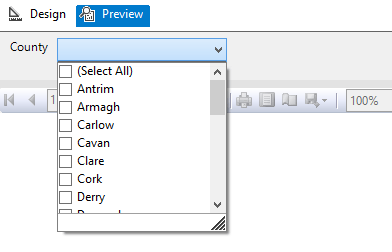
Image showing an SSRS report parameter options

But the issue is that the SSRS report will pass the multi-valued parameter as a string with the values separated by a comma.

So instead of receiving the required: ‘Antrim’, ‘Armagh’, ‘Carlow’, ‘Cavan’ etc. for use in the WHERE clause.

SQL Server is passed: ‘Antrim, Armagh, Carlow, Cavan’ etc. which cannot be used.

So the first additional logic and code to be added to the back end to deal with the multi-value parameter is a User Defined Function (UDF) which splits the parameter. The following function and quotations are taken from the 4guysfromrolla website.

Function Scope:

“There are generally two parameters to a split function: the list to split and the character(s) to split on, the delimiter. In the following function we begin by declaring our input variables – @List, the list to split, and @SplitOn, the delimiter(s) to split on. The return value of this UDF is a table with two fields: Id, an identity column, and Value, an nvarchar(100) column.”

Function Logic:

“The main body of the function simply loops through the string finding the first occurrence of the delimiter on each pass. Once the delimiter has been found, the string is broken into two pieces. The first piece is inserted into the result table while the second piece replaces the original list. The loop continues until no more occurrences of the delimiter are found. Lastly, the remainder of the list is added to the result table. Return the table and you have a split function.”

Run the query below to follow the working example.

USE [TEST_DB];
GO

CREATE FUNCTION [dbo].[Split] (
	@List NVARCHAR(2000)
	,@SplitOn NVARCHAR(5)
	)
RETURNS @RtnValue TABLE (
	Id INT identity(1, 1)
	,Value NVARCHAR(100)
	)
AS
BEGIN
	WHILE (Charindex(@SplitOn, @List) > 0)
	BEGIN
		INSERT INTO @RtnValue (value)
		SELECT Value = ltrim(rtrim(Substring(@List, 1, Charindex(@SplitOn, @List) - 1)))

		SET @List = Substring(@List, Charindex(@SplitOn, @List) + len(@SplitOn), len(@List))
	END

	INSERT INTO @RtnValue (Value)
	SELECT Value = ltrim(rtrim(@List))

	RETURN
END


(For a line by line break down of the function please see the webpage.)

Now that the split function exits within the database it is now possible to use a Stored Procedure to SELECT from the Ireland table pulling back specific counties by way of a WHERE clause.

Run the query below to follow the working example.

USE Test_DB;
GO

IF OBJECT_ID('[GetCounties]') IS NULL
	EXEC ('CREATE PROCEDURE dbo.[GetCounties] AS SELECT 1')
GO

ALTER PROCEDURE [dbo].[GetCounties] @County VARCHAR(MAX)
AS
	/*

NAME OF SP: GetCounties
Author:		Bloggins86
Date:		15/07/2015
Purpose:	Test multi-parameter select

*/
	------------------------------------------------------
	------------------------------------------------------
	--INSERT STORED PROCEDURE LOGIC HERE
	SELECT *
	FROM Ireland
	WHERE County IN (SELECT Value FROM dbo.Split(@County, ','))

	------------------------------------------------------
	------------------------------------------------------


Now that the populated table, split function and county select SP exists run the query below passing a string with multiple counties to return Dublin, Meath and Cork from the Ireland Table.

EXEC dbo.[GetCounties] 'Dublin, Meath, Cork'


You should now have returned the table with Dublin, Meath and Cork as separate row entries.

And that’s it, thanks for reading.

Combine and then split tsql insert statement files into batches of one thousand.

Recently I was given the task of executing hundreds of prepared sql files some containing multi-row insert statements numbering in the tens of thousands.

So I encountered two problems with this:

  • MSSQL Multi-row insert statements  actually have some limits i.e. a maximum of 1000 rows can be inserted.
  • I didn’t know which files had more or less than a thousand insert statements.

Luckily all the new rows were going into the same table and I knew that each file had the same flat/unformatted tsql structure.

This meant I could write a batch script to combine the files and then split the tsql insert statements into batches of 1000.

The batch script below is a little long winded so here are the main sections.

  • Combine Files
  • Remove unwanted lines of text  i.e. blank lines or insert statement sections.
  • Ensure every parentheses is followed by a comma
  • Inject the “insert into table” statement and GO every 1000 lines.
  • Remove double quotes

This was a somewhat specific case but hopefully you’ll be able to pick the batch script below apart for yourself and get some use out of it. But if there’s one little snippet of code I’d like to draw your attention to it is this little gem.

TYPE *.sql > CombinedScript.sql


Type that into a text file and save it as combine.bat, place the file in the folder with all your sql scripts and the OS will combine them all for you as CombinedScript.sql.

Here’s the rest of the script followed by some sample data showing the shape and structure of the original sql files.

(I’d like to thank the hilite.me website for creating this awesome online utility for creating HTML highlighted code that can just be dropped into a blog, as shown below. No more gist for me!)

@ECHO OFF

::VARIABLES
SET FileToUse="CombinedScript.sql"
SET FileToDelete="Query.sql"
SET FirstLine="Insert into [LoadProfiles] (Profile,Type,ProfileDate,ProfileValue,Active,Created,CreatedBy) Values"
SET BatchSplit="GO "
SET TextLineToAdd=%BatchSplit%%FirstLine%
::SET "TextLineToAdd=%TextLineToAdd:"=%"
::Combine SQL FILES

ECHO Combining Files . . . 
ECHO Please Wait
ECHO.
TYPE *.sql > %FileToUse%
ECHO Files Combined
ECHO.

ECHO Removing unwanted lines of text . . . 
ECHO Please Wait
ECHO.
::REF 1
::REMOVE THE LINES WITH INSERT AND VALUES FROM FILE
findstr /v "Insert Values" %FileToUse% > Temp.sql
::REF 2
::REMOVE BLANK ROWS FROM Temp.sql
findstr /v /r /c:"^$" /c:"^\ *$" Temp.sql >> CleanedFile.sql
::DELETE Temp.sql
IF EXIST Temp.sql del /F Temp.sql
ECHO Lines Removed
ECHO.


::REF 3
::REPLACE ) WITH ), TO ENSURE EVERY PARENTHESES IS FOLLOWED BY A COMMA
ECHO Adding Comma to each Parentheses missing a Comma . . .
ECHO Please Wait
ECHO.
    setlocal enableextensions disabledelayedexpansion

    set "search=)"
    set "replace=),"

    set "textFile=CleanedFile.sql"

    for /f "delims=" %%i in ('type "%textFile%" ^& break ^> "%textFile%" ') do (
        set "line=%%i"
        setlocal enabledelayedexpansion
        set "line=!line:%search%=%replace%!"
        >>PreparedFile.sql echo(!line!
        endlocal
    )
::DELETE CleanedFile.sql
IF EXIST CleanedFile.sql del /F CleanedFile.sql
::REF 3
::REPLACE ),, WITH ), TO ENSURE EVERY PARENTHESES IS FOLLOWED BY ONLY ONE COMMA
	    setlocal enableextensions disabledelayedexpansion

    set "search=),,"
    set "replace=),"

    set "textFile=PreparedFile.sql"

    for /f "delims=" %%i in ('type "%textFile%" ^& break ^> "%textFile%" ') do (
        set "line=%%i"
        setlocal enabledelayedexpansion
        set "line=!line:%search%=%replace%!"
        >>CleanedFile.sql echo(!line!
        endlocal
    )
ECHO Commas Added
ECHO.

ECHO Creating Query file . . .
ECHO Please Wait
ECHO.
::DELETE PreparedFile.sql
IF EXIST PreparedFile.sql del /F PreparedFile.sql
 
::Try to delete the file only if it exists
IF EXIST %FileToDelete% del /F %FileToDelete%
 
::REM If the file wasn't deleted for some reason, stop and error
IF EXIST %FileToDelete% exit 1

TYPE NUL > %FileToDelete% 

::REF 4
SETLOCAL
SET count=0
SET injectevery=1000
FOR /f "delims=" %%Z IN ('type CleanedFile.sql^|findstr /n "^"') DO (
SET /a count+=1
SET line=%%Z
SETLOCAL ENABLEDELAYEDEXPANSION
ECHO(!line:*:=! >> Query.sql
IF !count!==%injectevery% ECHO.%TextLineToAdd% >> Query.sql
ENDLOCAL
SET /a count=count %% %injectevery% 
) 

::REF 3
::REPLACE " WITH NOTHING 
ECHO Adding Comma to each Parentheses missing a Comma . . .
ECHO Please Wait
ECHO.
    setlocal enableextensions disabledelayedexpansion

    set "search=""
    set "replace= "

    set "textFile=Query.sql"

    for /f "delims=" %%i in ('type "%textFile%" ^& break ^> "%textFile%" ') do (
        set "line=%%i"
        setlocal enabledelayedexpansion
        set "line=!line:%search%=%replace%!"
        >>Script.sql echo(!line!
        endlocal
    )
::DELETE CleanedFile.sql
IF EXIST CleanedFile.sql del /F CleanedFile.sql

PAUSE

::REF 1: http://stackoverflow.com/questions/418916/delete-certain-lines-in-a-txt-file-via-a-batch-file
::CREDIT GOES TO: http://stackoverflow.com/users/14138/rick

::REF 2: http://www.computing.net/answers/programming/delete-blank-line-from-a-txt-file-using-batch/25575.html
::CREDIT GOES TO: http://www.computing.net/userinfo/150780

::REF 3: http://stackoverflow.com/questions/23075953/batch-script-to-find-and-replace-a-string-in-text-file-without-creating-an-extra
::CREDIT GOES TO: http://stackoverflow.com/users/2861476/mc-nd

::REF 4: FOR INSERT NEW TEXT LINE: http://stackoverflow.com/questions/15859128/looking-for-batch-file-to-insert-new-lines-into-text-file
::CREDIT GOES TO: http://stackoverflow.com/users/2128947/magoo

/*CHANGE DATABASE_NAME*/

USE [DATABASE_NAME]
GO

/****** Object:  Table [dbo].[LoadProfiles]    Script Date: 06/12/2015 15:34:43 ******/
SET ANSI_NULLS ON
GO

SET QUOTED_IDENTIFIER ON
GO

SET ANSI_PADDING ON
GO

CREATE TABLE [dbo].[LoadProfiles](
	[ProfileID] [int] IDENTITY(1,1) NOT NULL,
	[Profile] [int] NULL,
	[Type] [varchar](8) NULL,
	[ProfileDate] [date] NULL,
	[ProfileValue] [decimal](12, 10) NULL,
	[Active] [bit] NULL,
	[Created] [datetime] NULL,
	[CreatedBy] [int] NULL,
PRIMARY KEY CLUSTERED 
(
	[LoadProfileID] ASC
)WITH (PAD_INDEX  = OFF, STATISTICS_NORECOMPUTE  = OFF, IGNORE_DUP_KEY = OFF, ALLOW_ROW_LOCKS  = ON, ALLOW_PAGE_LOCKS  = ON) ON [PRIMARY]
) ON [PRIMARY]

GO

SET ANSI_PADDING OFF
GO

 
Insert into [dbo].[LoadProfiles] (Profile,Type,ProfileDate,ProfileValue,Active,Created,CreatedBy)
 Values
(1,'24H','2012/01/01',0.003348,1,getutcdate(),333),
(1,'24H','2012/01/02',0.003392,1,getutcdate(),333),
(1,'24H','2012/01/03',0.003278,1,getutcdate(),333),
(1,'24H','2012/01/04',0.003252,1,getutcdate(),333),
(1,'24H','2012/01/05',0.003203,1,getutcdate(),333)