All posts by Tidbytez 1

How to find Missing Indexes for all databases in a SQL Server instance

This script is for SQL Server 2005 and up. The script will return all the missing indexes for a SQL Server instance, rating their impact and provide the T-SQL to create the missing indexes.

SQL Server 2005 was the first version of SQL Server to add DMV (Database Management View) and DMO (Database Management Objects) which this script requires to function.
DMV & DMO provide useful information about SQL Server like expensive queries, wait types, missing indexes etc.

WARNING!
Before you create the missing indexes on the referenced tables you must consider the following essential points:
• Find and assess all the queries that are using the table referenced. If the table has a heavy amount of Data Manipulation Language (DML) operations against it (SELECT, INSERT, UPDATE, or DELETE) then you must analyse what impact adding the missing index will have before you create it on the table. INSERTs on tables are slowed down by nonclustered indexes for example.
• You need to make sure that by creating the missing indexes you are not going to end up with duplicate indexes on tables. The duplicate or unwanted indexes can kill your database performance. Search for the blog “over-indexing can hurt your SQL Server performance” for more information.
• If you find there is already an existing index that has most of the columns of the missing index highlighted you should consider adding the missing columns to the current index rather than creating another index on the table. FYI making an index wider does not mean adding all columns from a table into the current index.

/*Script to find Missing Indexes for all databases in SQL Server*/
/*
This script is for SQL Server 2005 and up. 
The script will return all the missing indexes for a SQL Server instance, rating their impact 
and provide the T-SQL to create the missing indexes.

SQL Server 2005 was the first version of SQL Server to add DMV (Database Management View) 
and DMO (Database Management Objects) which this script requires to function. 
DMV & DMO provide useful information about SQL Server like expensive queries, wait types, missing indexes etc.

WARNING!
Before you create the missing indexes on the referenced tables you must consider the following essential points:
• Find and assess all the queries that are using the table referenced. If the table has a heavy amount of Data Manipulation Language (DML) 
operations against it (SELECT, INSERT, UPDATE, or DELETE) then you must analyse what impact adding the missing index will have before you create it on the table. 
INSERTs on tables are slowed down by nonclustered indexes for example.
• You need to make sure that by creating the missing indexes you are not going to end up with duplicate indexes on tables. 
The duplicate or unwanted indexes can kill your database performance. Search for the blog “over-indexing can hurt your SQL Server performance” for more information.
• If you find there is already an existing index that has most of the columns of the missing index highlighted you should consider adding the missing columns to 
the current index rather than creating another index on the table. FYI making an index wider does not mean adding all columns from a table into the current index.
*/
SELECT [EstIndexUses]
	,[EstIndexImpact%]
	,[EstAvgQueryCost]
	,[DbName]
	,[SchemaName]
	,[TableName]
	,[CreateIndex]
	,[EqualityColumns]
	,[InequalityColumns]
	,[IncludedColumns]
	,[UniqueCompiles]
	,[LastUserSeek]
FROM (
	SELECT migs.user_seeks AS [EstIndexUses]
		,migs.avg_user_impact AS [EstIndexImpact%]
		,migs.avg_total_user_cost AS [EstAvgQueryCost]
		,db_name(mid.database_id) AS [DbName]
		,OBJECT_SCHEMA_NAME(mid.OBJECT_ID, mid.database_id) AS [SchemaName]
		,OBJECT_NAME(mid.OBJECT_ID, mid.database_id) AS [TableName]
		,'CREATE INDEX [IX_' + OBJECT_NAME(mid.OBJECT_ID, mid.database_id) + '_' + REPLACE(REPLACE(REPLACE(ISNULL(mid.equality_columns, ''), ', ', '_'), '[', ''), ']', '') + CASE 
			WHEN mid.equality_columns IS NOT NULL
				AND mid.inequality_columns IS NOT NULL
				THEN '_'
			ELSE ''
			END + REPLACE(REPLACE(REPLACE(ISNULL(mid.inequality_columns, ''), ', ', '_'), '[', ''), ']', '') + ']' + ' ON ' + mid.statement + ' (' + ISNULL(mid.equality_columns, '') + CASE 
			WHEN mid.equality_columns IS NOT NULL
				AND mid.inequality_columns IS NOT NULL
				THEN ','
			ELSE ''
			END + ISNULL(mid.inequality_columns, '') + ')' + ISNULL(' INCLUDE (' + mid.included_columns + ') WITH (MAXDOP =?, FILLFACTOR=?, ONLINE=?, SORT_IN_TEMPDB=?);', '') AS [CreateIndex]
		,mid.equality_columns AS EqualityColumns
		,mid.inequality_columns AS InequalityColumns
		,mid.included_columns AS IncludedColumns
		,migs.unique_compiles AS UniqueCompiles
		,migs.last_user_seek AS LastUserSeek
	FROM sys.dm_db_missing_index_group_stats AS migs WITH (NOLOCK)
	INNER JOIN sys.dm_db_missing_index_groups AS mig WITH (NOLOCK) ON migs.group_handle = mig.index_group_handle
	INNER JOIN sys.dm_db_missing_index_details AS mid WITH (NOLOCK) ON mig.index_handle = mid.index_handle
	) AS a
WHERE 1 = 1
--AND [EstIndexUses] > 1000
--AND [EstIndexImpact%] > 10
--AND [EstAvgQueryCost] > 1
--AND DbName IN ('DatabaseName')
ORDER BY [EstIndexUses] DESC
	,[EstAvgQueryCost] DESC
	,[EstIndexImpact%] DESC
OPTION (RECOMPILE);

 

How to perform incremental database file shrinking on SQL Server

First off you don’t ever shrink a database file unless you known it won’t need the space back again. (There’s some caveats to that statement but it mostly holds true) If that’s the space the file has consumed generally that’s the space the file needs. Shrinking just means the file will grow again and SQL Server will take a performance hit while it does that. You’re better off just adding the additional disk space.

If you need to perform a shrink and you’re worried about how long it will take and the performance impact it will have you can perform shrinks in small chunks. This is good practice particularly in a production transactional (OLTP) system as small increments  can make continuous, incremental progress, instead of trying to shrink by a large amount in one command. This makes it easier to shrink a database that must be shrunk by a large amount, and allows the shrink process to interrupted without losing all progress.

The script below can be used to shrink a database file in small increments until it reaches a target free space size based on the current free space percentage.

Simply provide as variables the database name, whether the file to be shrunk is the rows or log file, how much space to be left in terms of a percentage and how many shrinks you wish to perform. If you only want to truncate the file set the flag to 1 and you can ignore providing values for the number of shrinks or the percentage of space to keep.

(TruncateOnly means releasing all free space at the end of the file to the operating system without performing any page movement inside the file)

The script will determine given the number of shrinks and the target size what the shrink increment should be. It will then loop and execute the DBCC SHRINKFILE command to shrink the database file by the calculated increment until it reaches the target free space.

Progress updates are written to the global temp table ##DbStats so you can query this table during the shrink to see how far along the process is. The query to perform this check is commented out at the bottom of the script.

SET NOCOUNT ON;

DECLARE @DbName SYSNAME;
DECLARE @DbFileName SYSNAME;
DECLARE @RowsOrLog VARCHAR(4);
DECLARE @SpaceToLeavePercentage VARCHAR(2);
DECLARE @Sql VARCHAR(MAX);
DECLARE @ShrinkSql VARCHAR(MAX);
DECLARE @NumberOfShrinks INT;
DECLARE @FreeMbRounded INT;
DECLARE @TargetFreeMbRounded INT;
DECLARE @ShrinkIncrementInMb INT;
DECLARE @ShrinkToInMb INT;
DECLARE @TruncateOnly BIT;

/*SET USER INPUT VARIABLES*/
SET @DbName = '_DatabaseName_';
SET @RowsOrLog = 'Rows';
SET @SpaceToLeavePercentage = '10';
SET @NumberOfShrinks = 1;

--SET @TruncateOnly = 1;
IF OBJECT_ID('tempdb..##DbStats') IS NOT NULL
BEGIN
	DROP TABLE ##DbStats
END;

IF OBJECT_ID('tempdb..#Check') IS NOT NULL
BEGIN
	DROP TABLE #Check
END;

CREATE TABLE ##DbStats (
	Id_DbStats INT NOT NULL IDENTITY(1, 1) PRIMARY KEY
	,LogicalName SYSNAME
	,FreeMbRounded INT
	,TargetFreeMbRounded INT
	,DiffMb INT
	,ShrinkIncrementInMb INT
	,NumberOfShrinksLeft INT
	);

CREATE TABLE #Check (
	Id_DbStats INT NOT NULL IDENTITY(1, 1) PRIMARY KEY
	,LogicalName SYSNAME
	,FreeMbRounded INT
	,TargetFreeMbRounded INT
	,DiffMb INT
	,ShrinkIncrementInMb INT
	,NumberOfShrinksLeft INT
	);

IF @SpaceToLeavePercentage IS NULL
BEGIN
	SET @SpaceToLeavePercentage = '10'
END

SET @Sql = '
USE ' + QUOTENAME(@DbName) + ';
SELECT LogicalName
,FreeMbRounded
,TargetFreeMbRounded
,FLOOR(FreeMbRounded) - FLOOR(TargetFreeMbRounded) AS DiffMb
FROM (
SELECT NAME AS LogicalName
	,CAST(ROUND(CONVERT(DECIMAL(12, 1), (size - FILEPROPERTY(NAME, ''SpaceUsed'')) / 128.0), 0) AS INT) AS FreeMbRounded
	,CAST(ROUND(CONVERT(DECIMAL(12, 1),((((size - FILEPROPERTY(NAME, ''SpaceUsed'')) / 128.0) / 100.0) * ' + @SpaceToLeavePercentage + ')), 0) AS INT) AS TargetFreeMbRounded
FROM ' + QUOTENAME(@DbName) + '.sys.database_files 
WHERE type_desc = ''' + @RowsOrLog + '''
) AS a
';

INSERT INTO ##DbStats (
	LogicalName
	,FreeMbRounded
	,TargetFreeMbRounded
	,DiffMb
	)
EXEC (@Sql);

SET @TargetFreeMbRounded = (
		SELECT TargetFreeMbRounded
		FROM ##DbStats
		)
SET @DbFileName = (
		SELECT LogicalName
		FROM ##DbStats
		);

IF @TruncateOnly = 1
BEGIN
	SET @ShrinkSql = '
USE ' + QUOTENAME(@DbName) + ';

DBCC SHRINKFILE (
		N' + '''' + @DbFileName + '''' + '
		, 0
		, TRUNCATEONLY
		) WITH NO_INFOMSGS;
';

	EXEC (@ShrinkSql);
END
ELSE
BEGIN
	SET @ShrinkIncrementInMb = (
			(
				SELECT (FLOOR(MAX(FreeMbRounded)) - @TargetFreeMbRounded)
				FROM ##DbStats
				) / @NumberOfShrinks
			);

	UPDATE ##DbStats
	SET ShrinkIncrementInMb = @ShrinkIncrementInMb
		,NumberOfShrinksLeft = @NumberOfShrinks
	WHERE NumberOfShrinksLeft IS NULL;

	SELECT TOP 1 *
	FROM ##DbStats
	ORDER BY Id_DbStats DESC;

	IF @ShrinkIncrementInMb > 0
	BEGIN
		WHILE @NumberOfShrinks > 0
		BEGIN
			SET @FreeMbRounded = (
					SELECT FreeMbRounded
					FROM ##DbStats
					WHERE Id_DbStats = (
							SELECT MAX(Id_DbStats)
							FROM ##DbStats
							)
					);

			IF @TargetFreeMbRounded > (@FreeMbRounded - @ShrinkIncrementInMb)
			BEGIN
				SET @ShrinkToInMb = @TargetFreeMbRounded;
			END
			ELSE
			BEGIN
				SET @ShrinkToInMb = (@FreeMbRounded - @ShrinkIncrementInMb);
			END

			SET @ShrinkSql = '
USE ' + QUOTENAME(@DbName) + ';

DBCC SHRINKFILE (
		N' + '''' + @DbFileName + '''' + '
		,' + CONVERT(VARCHAR(12), @ShrinkToInMb) + '
		) WITH NO_INFOMSGS;
';

			EXEC (@ShrinkSql);

			SET @NumberOfShrinks = @NumberOfShrinks - 1;
			SET @Sql = '
USE ' + QUOTENAME(@DbName) + ';
SELECT LogicalName
,FreeMbRounded
,' + CONVERT(VARCHAR(255), @TargetFreeMbRounded) + '
,FLOOR(FreeMbRounded) - ' + CONVERT(VARCHAR(255), @TargetFreeMbRounded) + ' AS DiffMb
,' + CONVERT(VARCHAR(255), @ShrinkIncrementInMb) + '
,' + CONVERT(VARCHAR(255), @NumberOfShrinks) + '
FROM (
SELECT NAME AS LogicalName
	,CAST(ROUND(CONVERT(DECIMAL(12, 1), (size - FILEPROPERTY(NAME, ''SpaceUsed'')) / 128.0), 0) AS INT) AS FreeMbRounded
	,CAST(ROUND(CONVERT(DECIMAL(12, 1),((((size - FILEPROPERTY(NAME, ''SpaceUsed'')) / 128.0) / 100.0) * ' + @SpaceToLeavePercentage + ')), 0) AS INT) AS TargetFreeMbRounded
FROM ' + QUOTENAME(@DbName) + '.sys.database_files 
WHERE type_desc = ''' + @RowsOrLog + '''
) AS a
';

			INSERT INTO ##DbStats (
				LogicalName
				,FreeMbRounded
				,TargetFreeMbRounded
				,DiffMb
				,ShrinkIncrementInMb
				,NumberOfShrinksLeft
				)
			EXEC (@Sql);

			SELECT TOP 1 *
			FROM ##DbStats
			ORDER BY Id_DbStats DESC;
		END
	END
	ELSE
	BEGIN
		SELECT *
		FROM ##DbStats;
	END

	DROP TABLE ##DbStats
END;
		--DROP TABLE ##DbStats
		/*CHECK TO RUN IN ANOTHER SSMS WINDOW*/
		/*
SELECT TOP 1 Id_DbStats
	,LogicalName
	,FreeMbRounded
	,TargetFreeMbRounded
	,DiffMb
	,ShrinkIncrementInMb
	,NumberOfShrinksLeft
FROM ##DbStats WITH (NOLOCK)
ORDER BY Id_DbStats DESC;
/*
/*CHECK PROGRESS*/
/*
SELECT percent_complete AS PercentageComplete
	,start_time AS StartTime
	,STATUS AS CurrentStatus
	,command AS Command
	,estimated_completion_time AS EstimatedCompletionTime
	,cpu_time AS CpuTime
	,total_elapsed_time AS TotalElapsedTime
FROM sys.dm_exec_requests
WHERE Command = 'DbccFilesCompact'
*/
*/
/*
DROP TABLE ##DbStats
*/
*/


If you found this post helpful please like, comment and share.

How to grant a User SELECT permission on multiple tables in SQL Server using T-SQL and Excel Formulas

Maybe you get emails from time to time saying something like “Hey can you grant so-and-so SELECT permission on” and then they list a few dozen tables.

There’s a couple of issues with this.

Firstly you shouldn’t be getting that as a simple email, it should come in as a formal access request.

Secondly User access should be defined in roles (or group logins if you want to manage access at an Active Directory level) that tie back to departments and seniority. Different roles have different permissions on different objects. This makes the subject of access more manageable and easily auditable. The access request should be “can you add so-and-so to this role” and ideally people should only exist in one role.

Thirdly this would be really annoying and, depending on the length of the table list, take too long to do via the SSMS GUI.

So if you are getting emails like the above try move your organisation along with regards the first two points. But to help you action the email I’ve created the Excel file DbaScripts_GrantSelect which can be downloaded here.

Grant Select Excel Sheet Snippet

The DbaScripts_GrantSelect file allows you to enter the Login (user name), Database name and Schema name in the first three columns. You can then copy and paste the table names into the fourth column called Table. Drag the first three columns down for as many table name entries there are. Then drag the SQL Command formula column down for as many table name entries there are and this will create the commands to grant SELECTs on the tables for the user specified.

If you can’t download the file above you can recreate it.

In an empty Excel sheet write the following into the cells as directed.

A1: Login
B1: Database
C1: Schema
D1: Table
E1: SQL Command

In E2 paste the following formula:

=”GRANT SELECT ON [“&B2&”].[“&C2&”].[“&D2&”] TO [“&A2&”];”


Find and drop every table in a SQL Server Database that contains specific text in the table name

GDPR compliance has given people working in the DBA space the exciting opportunity to drop tables! Tables once considered gold mines are now being treated like live grenades management want rid of fast. This is a prudent stance because if a table contains personal data and it’s not being used for some vital business process why keep it around now? If somehow the wrong person gained access to the data it could have severe reputational and financial consequences. Of course a business should have never kept unneeded personal data but in truth most companies have gathered as much data as they could up until this point even if it wasn’t used as the assumption has been it might be needed later.

Before dropping tables though it is still good practice to rename the table first for a period of time to make sure nothing breaks. Once a sufficient amount of time has passed and you are confident the tables can be dropped without adverse effects the script below can help drop the newly unwanted tables.

If you’ve followed a standard naming convention for renaming unwanted tables, for example prefixing all the targeted tables with “_DropThis_” or something to that effect, this script will provide commands to:

  • Count the number of rows in each targeted table
  • Drop each targeted table
  • Confirm each targeted table has been dropped.

Simply find & replace the text “DatabaseName” with the name of the database that contains the tables to be dropped and “TextTarget” with the text each table name should contain and run the script.

Running the script will produce two tables. The first table will contain the commands to count the number of rows for each targeted table. The second table will contain the commands to drop each targeted table. Open new windows in SSMS, referencing the database to run the commands against, and copy and paste the scripts of each table into the windows. Run the count script first obviously before the drop script. Once the drop script has been run you can run the commented out query at the end of the script below to confirm the tables have been dropped.

You can take the screen shots and/or copy and paste the results of the commands (and the commands themselves) into an email or text document as a simple report to confirm the number of rows dropped and that the tables have been dropped.

/*
Find & Replace:
DatabaseName
TextTarget
*/
USE [DatabaseName];
GO

DECLARE @keyword AS VARCHAR(MAX);
DECLARE @MaxRow AS INT;

SET @keyword = 'TextTarget'

IF OBJECT_ID('tempdb.dbo.#TableStats', 'U') IS NOT NULL
	DROP TABLE #TableStats;

IF OBJECT_ID('tempdb.dbo.#CountCommand', 'U') IS NOT NULL
	DROP TABLE #CountCommand;

/*
Confirm Table Existance
*/
SELECT s.NAME AS SchemaName
	,t.*
INTO #TableStats
FROM sys.tables AS t
LEFT JOIN sys.schemas AS s ON t.schema_id = s.schema_id
WHERE t.NAME LIKE '%' + @keyword + '%'
ORDER BY s.NAME ASC
	,t.NAME ASC;

/*
Create Count SQL Commands
*/
SELECT ROW_NUMBER() OVER (
		ORDER BY [--SqlCommand]
		) AS Row#
	,[--SqlCommand]
INTO #CountCommand
FROM (
	SELECT 'SELECT ''' + s.NAME + '.' + t.NAME + ''' AS SchemaTableName, COUNT (*) AS [TableRowCount] FROM ' + QUOTENAME(s.NAME) + '.' + QUOTENAME(t.NAME) + ' WITH (NOLOCK) UNION ALL' AS [--SqlCommand]
	FROM sys.tables AS t
	LEFT JOIN sys.schemas AS s ON t.schema_id = s.schema_id
	WHERE t.NAME LIKE '%zzz%'
	) AS SqlCommand
ORDER BY [--SqlCommand];

SET @MaxRow = (
		SELECT MAX(Row#)
		FROM #CountCommand
		);

UPDATE #CountCommand
SET [--SqlCommand] = LEFT([--SqlCommand], LEN([--SqlCommand]) - 9)
WHERE Row# = @MaxRow;

UPDATE #CountCommand
SET [--SqlCommand] = [--SqlCommand] + ';'
WHERE Row# = @MaxRow;

SELECT *
FROM #CountCommand
ORDER BY [--SqlCommand];

/*
Create Drop Table SQL Commands
*/
SELECT 'DROP TABLE ' + QUOTENAME(s.NAME) + '.' + QUOTENAME(t.NAME) + ';' AS '--DropTableSqlCommand'
FROM sys.tables AS t
LEFT JOIN sys.schemas AS s ON t.schema_id = s.schema_id
WHERE t.NAME LIKE '%' + @keyword + '%'
ORDER BY s.NAME ASC
	,t.NAME ASC;
/*
Run seperately
Confirm Tables are dropped
*/
	/*
SELECT s.NAME AS SchemaName
	,t.NAME AS TableName
FROM sys.tables AS t
LEFT JOIN sys.schemas AS s ON t.schema_id = s.schema_id
INNER JOIN #TableStats AS ts ON s.NAME = ts.SchemaName
	AND t.NAME = ts.NAME
ORDER BY s.NAME ASC
	,t.NAME ASC;
*/


How to tell if Virtual Machine backups are running full database backups on a SQL Server instance

Some Virtual Machine backup solutions use the SQL Server VSS writer service to make SQL Server database backups as part of the VM backup.

You may not have had visibility on this process so to confirm if this is happening in your environment open up SQL Server Management Studio (SSMS) then in Object Explorer right click on the instance name, click on new query and run the script below. 

This query looks for entries in the physical_device_name field of msdb.dbo.backupmediafamily that are not directory paths.

SELECT @@SERVERNAME AS ServerName
	,bs.backup_set_id AS BackupSetId
	,bs.database_name AS DbName
	,bs.backup_start_date AS BackupStartDate
	,bs.backup_finish_date AS BackupFinishDate
	,CAST(CAST(bs.backup_size / 1000000 AS INT) AS VARCHAR(14)) + ' ' + 'MB' AS [Size]
	,bs.[type] AS BackupType
	,CASE bs.[type]
		WHEN 'D'
			THEN 'Full Backup'
		WHEN 'I'
			THEN 'Differential Backup'
		WHEN 'L'
			THEN 'TLog Backup'
		WHEN 'F'
			THEN 'File or filegroup'
		WHEN 'G'
			THEN 'Differential file'
		WHEN 'P'
			THEN 'Partial'
		WHEN 'Q'
			THEN 'Differential Partial'
		END AS BackupTypeDescription
	,bmf.physical_device_name AS BackupFilePath
	,CAST(bs.first_lsn AS VARCHAR(50)) AS FirstLogSeqNo
	,CAST(bs.last_lsn AS VARCHAR(50)) AS LastLogSeqNo
FROM msdb.dbo.backupset AS bs WITH (NOLOCK)
INNER JOIN msdb.dbo.backupmediafamily AS bmf WITH (NOLOCK) ON bs.media_set_id = bmf.media_set_id
WHERE bs.[type] = 'D'
	AND bmf.physical_device_name NOT LIKE '%\%'
ORDER BY bs.database_name ASC
	,bs.backup_set_id ASC;


For the field BackupFilePath if you see GUID looking entries like {AQ8F5957-2804-4X05-9EE5-109EB87EBCAB}5 the VM backup is probably running full database backups on the SQL Server.

It might be time to review your recovery strategy as the VM backups could be covering the same ground as the SQL Server backups creating a lot of expensive redundancy due to unnecessary replication of work.

How to schedule a job to restore the last backup made of a SQL Server database

This post provides you with a script that will generate a restore script for a database using the latest full backup file that exists in a directory. (No need to state the filename explicitly)

You need to provide the following at the start of the script:

  • The target database i.e. the database you will restore to
  • The directory where the backup file is saved

If you are using the excellent Ola Hallengren maintenance solution (see link) the directory path will look something like below. If you’re not using Ola’s solution, you should be.

\\ServerWhereBackupsAreSaved\DriveName\InstanceName\TargetDatabase\Full\

This restore script is designed to work with Ola’s solution as it segregates the backup directory structure such that each database has an allocated folder and each full backup file is named with the date and time of the file creation.

The restore script determines which backup file is the latest backup file based on the max name. So for the script to work it is assumed you have an appropriate backup strategy (i.e. using Ola’s solution) were backup types are segregated into different folders, backup names have a date reference and the backup location is dedicated to backups and nothing else, i.e. no trash files in the location.

Some use cases for this solution might be:

  • Restoring a nightly backup to another instance for reporting purposes
  • Restoring backups to a development environment
  • Restoring backups to another server to test the backups

You can use the logic in a stored procedure or as the T-SQL in a job step and schedule accordingly.

/*
You need to reference the following:
* The target database i.e. the database you will restore to.
* The directory where the backup file is saved.
If you are using the Ola Hallengren backup scripts the directory path will look 
something like below.
\\ServerWhereBackupsAreSaved\DriveName\InstanceName\TargetDatabase\Full\

Find & Replace the follow text for the target database and directory:

TARGET_DATABASE
DIR_PATH
*/
/*
Declare Variables
*/
DECLARE @DatabaseToRestore AS VARCHAR(MAX);
DECLARE @DirToSearch AS VARCHAR(MAX);
DECLARE @ShellCommand AS VARCHAR(MAX);
DECLARE @BackupFile AS VARCHAR(MAX);
DECLARE @Sql AS VARCHAR(MAX);

/*
Set User Variables
*/
SET @DatabaseToRestore = 'TARGET_DATABASE';
SET @DirToSearch = 'DIR_PATH';
SET @ShellCommand = 'dir ' + @DirToSearch;

/*
Create Temp Table To Hold xp_cmdshell Output
*/
IF OBJECT_ID('tempdb..#DirList') IS NOT NULL
	DROP TABLE #DirList;

CREATE TABLE #DirList (
	Id INT identity(1, 1)
	,line NVARCHAR(1000)
	);

/*
Enable Advanced Options To Enable xp_cmdshell Temporarily
*/
EXEC master.dbo.sp_configure 'show advanced options'
	,1;

RECONFIGURE
WITH OVERRIDE;

EXEC master.dbo.sp_configure 'xp_cmdshell'
	,1;

RECONFIGURE
WITH OVERRIDE;

/*
Run The Shell Command To Capture And Write Dir Info To Temp Table
*/
SET @Sql = '
INSERT INTO #DirList (line)
EXEC xp_cmdshell ' + '''' + @ShellCommand + '''' + ';';

EXEC (@Sql);

EXEC master.dbo.sp_configure 'xp_cmdshell'
	,0;

/*
Disable Advanced Options And xp_cmdshell Again
*/
RECONFIGURE
WITH OVERRIDE;

EXEC master.dbo.sp_configure 'show advanced options'
	,0;

RECONFIGURE
WITH OVERRIDE;

/*
Get The Last Backup File Name And Save To A Variable
*/
WITH CTE
AS (
	SELECT SUBSTRING(line, 37, 100) [FileName]
	FROM #DirList
	WHERE Id > (
			SELECT MIN(Id)
			FROM #DirList
			WHERE line LIKE '%<DIR>%..%'
			)
		AND Id < (
			SELECT MAX(Id) - 2
			FROM #DirList
			)
	)
SELECT @BackupFile = [FileName]
FROM CTE
WHERE [FileName] = (
		SELECT MAX(FileName)
		FROM CTE
		);

/*
Create The Restore Script
*/
SET @BackupFile = @DirToSearch + @BackupFile
SET @Sql = '
ALTER DATABASE ' + QUOTENAME(@DatabaseToRestore) + ' SET SINGLE_USER WITH ROLLBACK IMMEDIATE;
RESTORE DATABASE ' + QUOTENAME(@DatabaseToRestore) + ' FROM DISK = ' + '''' + @BackupFile + '''' + '
WITH NORECOVERY
,REPLACE;
RESTORE DATABASE ' + QUOTENAME(@DatabaseToRestore) + ' WITH RECOVERY;
'

/*
To Directly Execute The Script Uncomment The EXEC Statement And Delete The Select Statement
*/
/*
EXEC (@Sql)
*/
SELECT @Sql


How to demonstrate the space usage of a Null Varchar(Max) column

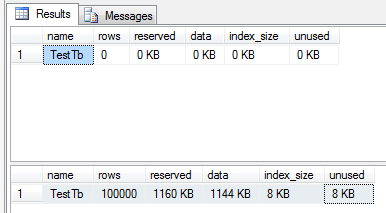
An empty Varchar(Max) column uses a negligible amount of disk space. The script below demonstrates this by creating the table TestTb which contains one column named NullColumn that has a Varchar(Max) data type. When the table is created the column NullColumn is populated with 100,000 rows of Null.

The two readings below show the table when it has just been created and the table with 100,000 rows entered.

Results

IF OBJECT_ID('dbo.TestTb', 'U') IS NOT NULL
	DROP TABLE dbo.TestTb;

CREATE TABLE TestTb (NullColumn VARCHAR(MAX));
GO

sp_spaceused 'TestTb';

DECLARE @i AS INT;

SET @i = 0;

WHILE @i < 100000
BEGIN
	INSERT INTO TestTb (NullColumn)
	VALUES (NULL)

	SET @i = @i + 1
END;
GO

sp_spaceused 'TestTb';

IF OBJECT_ID('dbo.TestTb', 'U') IS NOT NULL
	DROP TABLE dbo.TestTb;


How to convert pcm files to wav in Linux

Over the weekend I had to make a recording on my Android phone. I used the app Virtual Recorder  thinking I’d be able to just share the file afterwards but Virtual Recorder creates pcm files not typical mp3 files. I sent the file over to my Linux laptop, running Linux mint, to convert it.

Initially I had some trouble getting the conversion to work. Here are the steps I took.

Open a terminal window and navigate to the where the pcm file is. If you don’t know how to do this use the GUI file explorer to navigate to the directory where the pcm file is and then right click on white space and click on the option to open a terminal window. The terminal will open already set to run against the directory the pcm file is located in.

If you try to run any of the commands below and you don’t have ffmpeg installed you will be notified ffmpeg needs to be installed and it will give you the command to type in and run to install it.

If you want to convert a Virtual Recorder file specially you can use this terminal command below changing the file names to what you need.

ffmpeg -f s16le -ar 11250 -ac 2 -i YouInputFileName.pcm -ar 44100 -ac 2 YouOutputFileName.wav

Converting pcm files created by other applications may have varying results due to the sample rate of the source file. For example if you replace 11250 with 22500 as in the command below your output file pitch and speed will be increased. So you may need to play around with sample rates to get the output right.

ffmpeg -f s16le -ar 22500 -ac 2 -i YouInputFileName.pcm -ar 44100 -ac 2 YouOutputFileName.wav

How to determine why a T-SQL command is unreasonably slow

If you’ve ever found yourself in the situation were a command executing against a small table is nowhere near instant there can be numerous reasons for this but the most common causes are locks and waits.

The first step in identifying the problem is to execute the script below in a new query window while the troublesome command is running.

/* Queries Not Running */
SELECT ROW_NUMBER() OVER (
		ORDER BY r.total_elapsed_time DESC
		) AS Rn
	,st.TEXT AS SqlText
	,r.*
FROM sys.dm_exec_requests r
CROSS APPLY sys.dm_exec_sql_text(sql_handle) AS st
WHERE r.status <> 'running';

/* Queries Running */
SELECT ROW_NUMBER() OVER (
		ORDER BY r.total_elapsed_time DESC
		) AS Rn
	,st.TEXT AS SqlText
	,r.*
FROM sys.dm_exec_requests r
CROSS APPLY sys.dm_exec_sql_text(sql_handle) AS st
WHERE r.status = 'running';


This script will return two lists of the currently active sessions along with the stats associated with their execution. The first list will contain all the active sessions that are not running. The second list will contain all the active sessions that are running and will likely not contain the troublesome query you’re dealing with.

Identify your session based on the SqlText field. Be sure you’ve identified the session correctly as you may decide you want to kill the process later and killing the wrong one could cause you a lot of trouble.

  • status : If the status is not running look to the other fields in the returned result set to help identify the problem. If the session is in the running result set but you are unhappy with the performance it is likely the T-SQL needs to be optimized to make it run faster. This is a very broad topic and there are tons of articles and guides on the internet dealing with it.
  • blocking_session_id : If another session is blocking yours from executing, e.g. it has locked a table your command needs to write to, then this field will include the Id of the session causing the table to be locked. You can use EXEC sp_who2 to assess if the underlying command/query is experiencing a problem. If you are familiar with the blocking session you may know that you are able to kill the session without incurring any negative consequences. You can use the following code snippet to kill the blocking session.
    KILL blocking_session_id /*replace by the actual Id*/

    NOTE: Before you kill anything if it’s a command that has been running for a very long time it will likely take at least the same amount of time to roll back and unlock the table. You might be better off waiting for the session to finish on its own.

  • wait_type : If no blocking session is available, then the query is waiting for something, e.g. server resources etc. More details about wait types can be found HERE
  • wait_time : This stat value is measured in milliseconds. Short wait times are fine, specially in PAGEIOLATCH wait types (access to physical files) but longer wait times indicate a more serious problem.
  • last_wait_type : Indicates if the last wait type was different. This is quite helpful in analyzing if the query was blocked for the same reason before.


How to get the date & time a job or schedule was modified in SQL Server

The script below has one parameter, @SD or start date. The logic of the script will return two tables showing the modified jobs and schedules from the start date onward.

By default the start date will be set to one year ago to the day which will return a full years worth of data up to the time the script is run. To enter a date manually change the line SET @SD = NULL; –‘20180101 00:00:00’; removing NULL; — and changing the date time text. 

USE msdb;
GO

DECLARE @SD AS DATETIME;

SET @SD = NULL; --'20180101 00:00:00';

IF @SD IS NULL
BEGIN
SET @SD = DATEADD(YEAR, - 1, GETDATE());
END;

SELECT @SD AS StartDate;

-- Jobs that have been modified
SELECT [Name] AS JobName
	,[Enabled]
	,[Date_created]
	,[Date_modified]
FROM sysjobs
WHERE [date_modified] > @SD
--AND enabled = 0
ORDER BY [date_modified] DESC;

-- Schedules that have been modified
SELECT [Name] AS ScheduleName
	,[Enabled]
	,[Date_created]
	,[Date_modified]
FROM sysschedules
WHERE [date_modified] > @SD
--AND enabled = 0
ORDER BY [date_modified] DESC;
GO