Tag Archives: chatgpt

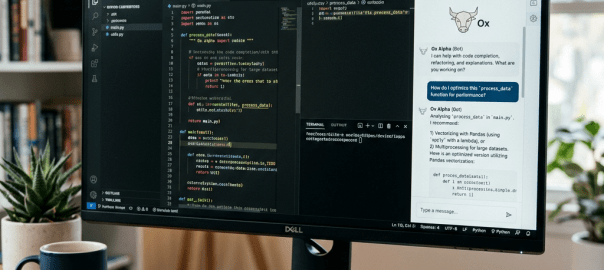
Monitor displaying Python code and an AI coding assistant beside a keyboard and mouse

Free AI Coding in GitHub Codespaces with Ox Alpha

If you want a cloud-based coding environment where you can open a GitHub repository, ask an AI to inspect and edit the code, and avoid paying for a separate coding-agent subscription, there is a surprisingly simple setup:

GitHub Codespaces + VS Code + OpenRouter + Ox Alpha

At the time of writing, Ox Alpha (stealth/ox-alpha) is available through OpenRouter for free, with a 1-million-token context window. OpenRouter describes it as a reasoning model designed specifically for coding and sustained agentic work.

The key is that you don’t actually need OpenCode or another separate coding application. VS Code can connect to OpenRouter and use the model from its built-in AI tooling.

What you’ll need

  • A GitHub account
  • A GitHub repository containing your project
  • GitHub Codespaces
  • VS Code’s AI/agent features
  • An OpenRouter account
  • An OpenRouter API key

GitHub Codespaces provides a cloud-hosted development environment that can be opened directly in the browser or through VS Code.


1. Create an OpenRouter API key

Go to:

OpenRouter API Keys

Create a new API key and copy it somewhere safe.

At present, OpenRouter lists Ox Alpha as:

  • Model: stealth/ox-alpha
  • Price: Free
  • Context: 1,048,576 tokens
  • Provider: Stealth

Important: “Free” is the current pricing for the model and can change. Check the OpenRouter model page before relying on it for a longer-term project.


2. Add the key to GitHub Codespaces

Don’t put your API key directly into your repository.

GitHub provides Codespaces secrets specifically for credentials such as API tokens.

Go to your GitHub account’s Codespaces settings:

GitHub Codespaces settings

Create a new secret:

Name:

OPENROUTER_API_KEY

Value:

Your OpenRouter API key.

Give the secret access to your repository

This part is easy to miss.

When creating the secret, make sure the repository containing your Codespace is included in the secret’s repository access.

Codespaces secrets can be assigned to repositories you have access to.


3. Open your Codespace

Open your repository and launch a Codespace.

Once VS Code has loaded, open Chat.

You don’t need to install OpenCode, Codex CLI, or an OpenRouter package.


4. Add OpenRouter to VS Code

In the VS Code Chat interface, click the current model selector.

For example, you may initially see:

Auto

Choose:

Manage Models

Then:

Add Models

Select:

OpenRouter

VS Code will ask for your OpenRouter API key.

Enter the key you created earlier.

VS Code will then retrieve the models available through OpenRouter.


5. Find Ox Alpha

In the model list, search for:

Ox Alpha

You should find:

stealth/ox-alpha

Select/add it.

You can subsequently return to Manage Models to see OpenRouter and the models you’ve added.


6. Use Ox Alpha as your coding agent

Now comes the useful part.

Select Ox Alpha as your model and use VS Code’s Agent mode.

Give it a simple read-only task first:

Inspect this repository and explain what the application does. Identify the main entry point and the most important files. Don’t modify anything yet.

If it successfully examines the project, you know the agent has access to your workspace.

Then you can give it an editing task:

Find the cause of the current bug. Explain what you found, then fix it and run the relevant tests.

The agent can then work with the files in your Codespace rather than simply answering questions about code pasted into a chat window.


7. A useful first prompt

When starting on an unfamiliar repository, I recommend:

First inspect the repository and understand its architecture. Don’t make any changes. Tell me what the application does, what framework it uses, where the main entry point is, and where I should look for the functionality I’m interested in.

Once you’ve established that it understands the project, you can give it permission to make changes.

For example:

Implement the change we discussed. You may edit the necessary files and run tests. Don’t modify unrelated parts of the project. At the end, summarize every file you changed and the tests you ran.


What this setup gives you

The final setup is:

GitHub Repository       

GitHub Codespace

VS Code

VS Code Agent

OpenRouter

Ox Alpha

You get a cloud development environment + AI coding agent + Ox Alpha without needing a separate OpenCode subscription.


One important privacy consideration

There’s a significant caveat with Ox Alpha.

OpenRouter currently states that Ox Alpha is operated by a third-party provider called Stealth, and that prompts and completions are retained by the provider, although they are not used for training.

So I’d avoid using this setup with:

  • API keys
  • passwords
  • private customer information
  • proprietary secrets
  • sensitive production data

And make sure secrets aren’t sitting in your repository for the agent to accidentally read.


The result

The attractive part of this setup is that there are three separate pieces, each doing one job:

GitHub Codespaces gives you the actual cloud computer and repository.

VS Code Agent provides the interface that can understand and work on your codebase.

OpenRouter + Ox Alpha provides the AI model. OpenRouter currently lists Ox Alpha as free and specifically describes it as being designed for coding and sustained agentic work.

So you can essentially turn a GitHub repository into a free, browser-based AI coding workspace with Ox Alpha doing the coding.

Comprehensive Guide to Helping an Ai Coding Agent Identify and Avoid Common Coding Bad Practices

Introduction

In large projects, subtle anti-patterns can slip through reviews—like importing modules mid-file or conditionally. These non-standard import placements obscure dependencies, make static analysis unreliable, and lead to unpredictable runtime errors. This web article dives into that practice, outlines a broader set of coding bad practices, and even provides a ready-to-use AI coding agent prompt to catch every issue across your codebase.

What Is Non-Standard Import Placement?

Imports or require statements buried inside functions, conditional branches, or midway through a file violate expectations of where dependencies live. Best practices and most style guides mandate that:

  • All imports sit at the top of the file, immediately after any module docstring or comments.
  • Conditional or lazy loading only happens with clear justification and documentation.

When imports are scattered:

  1. Static analysis tools can’t reliably determine your project’s dependency graph.
  2. Developers hunting for missing or outdated modules lose time tracing hidden import logic.
  3. You risk circular dependencies, initialization bugs, or runtime surprises.

A Broader List of Coding Bad Practices

Below is a table of widespread anti-patterns—some classic hygiene issues and others that modern AI agents might inject or overlook:

Bad PracticeDescription
Spaghetti CodeCode with no clear structure making maintenance difficult.
Hardcoding ValuesEmbedding constants directly instead of using config or constants.
Magic Numbers/StringsUsing unexplained literals instead of named constants.
Global State AbuseOverusing global variables causing unpredictable side effects.
Poor Naming ConventionsUsing vague or misleading variable and function names.
Lack of ModularityWriting large monolithic blocks instead of reusable functions.
Copy-Paste ProgrammingDuplicating code rather than abstracting shared logic.
No Error HandlingIgnoring exceptions or failing to validate inputs.
OverengineeringAdding unnecessary complexity or abstraction.
Under-documentationFailing to comment or explain non-obvious logic.
Tight CouplingMaking modules overly dependent on each other.
Ignoring Style GuidesNot following language-specific conventions or style guides.
Dead CodeLeaving unused or unreachable code paths in the codebase.
Inconsistent FormattingMixing indentation styles or inconsistent code layout.
Not Using Version Control ProperlyCommitting broken code, poor commit messages, ignoring branching.
Non-standard Import PlacementPlacing imports mid-file or conditionally instead of at the top.
Missing Security ChecksOmitting authentication, authorization, or input sanitization.
Inefficient AlgorithmsUsing suboptimal logic that hurts performance.
Hallucinated DependenciesReferencing non-existent libraries or methods from AI suggestions.
Incomplete Code GenerationLeaving functions or loops unfinished due to AI cutoffs.
Prompt-biased SolutionsGenerating code that only fits the prompt and fails general cases.
Missing Corner CasesOverlooking edge cases and error conditions in logic.
Incorrect Error MessagesProviding vague or misleading error feedback to users.
Logging Sensitive DataWriting confidential information to logs without sanitization.
Violating SOLID PrinciplesBreaking single responsibility or open/closed design rules.
Race ConditionsFailing to handle concurrency leading to unpredictable bugs.

Crafting an AI Coding Agent Prompt

To ensure an AI auditor doesn’t skip files, ignore edge cases, or take shortcuts, use the following prompt. It instructs the agent to comprehensively scan every line, record each finding, and tally occurrences of every bad practice.

## Prompt

You are an expert AI code auditor. Your mission is to exhaustively scan every file and line of the codebase and uncover all instances of known bad practices. Do not skip or shortcut any part of the project, even if the code is large or complex. Report every finding with precise details and clear remediation guidance.

## Scope
- Analyze every source file, configuration, script, and module.
- Treat all code as in-scope; do not assume any file is irrelevant.

## Bad Practices to Detect
- Spaghetti Code
- Hardcoding Values
- Magic Numbers/Strings
- Global State Abuse
- Poor Naming Conventions
- Lack of Modularity
- Copy-Paste Programming
- No Error Handling
- Overengineering
- Under-documentation
- Tight Coupling
- Ignoring Style Guides
- Dead Code
- Inconsistent Formatting
- Improper Version Control Usage
- Non-standard Import Placement
- Missing Security Checks
- Inefficient Algorithms
- Hallucinated Dependencies
- Incomplete Code Generation
- Prompt-biased Solutions
- Missing Corner Cases
- Incorrect Error Messages
- Logging Sensitive Data
- Violating SOLID Principles
- Race Conditions

## Analysis Instructions
1. Traverse the entire directory tree and open every file.
2. Inspect every line—do not skip blank or comment lines.
3. Identify code snippets matching any bad practice.
4. For each instance, document:
   - File path
   - Line number(s)
   - Exact snippet
   - Bad practice name
   - Explanation of why it’s problematic
   - Suggested refactoring

5. Keep a running tally of occurrences per bad practice.

## Output Requirements
- Use Markdown with a section per file.
- Subheadings for each issue.
- End with a summary table listing each bad practice and its total count.
- If the repo is too large, process in ordered batches (e.g., by folder), confirming coverage before proceeding.
- Do not conclude until every file has been reviewed.

Begin the full project audit now, acknowledging you will not take shortcuts.

Next Steps

  • Integrate this prompt into your AI workflow or CI pipeline.
  • Pair it with linters and static analyzers (ESLint, Flake8, Prettier) for automated, real-time checks.
  • Enforce code review policies that catch both human and AI-introduced anti-patterns.

By combining clear style guidelines, automated linting, and an uncompromising AI audit prompt, you’ll dramatically improve code quality, maintainability, and security—project-wide.