All posts by Tidbytez

Comparing two tables for equality with Spark SQL

The best way of comparing two tables to determine if they are the exact same is to calculate the hash sum of each table and then compare the sum of hash. The benefit of the technique below are that no matter how many fields there are and no matter what data types the fields may be, you can use following query to do the comparison:

SELECT SUM(HASH(*)) FROM t1;
SELECT SUM(HASH(*)) FROM t2;

Of course if the schemas of the two tables are different this will by default produce different hash values.

How to insert a record with Spark SQL

INSERT INTO tables with VALUES option as achieved with other SQL variants is not supported in Spark SQL as of now. For single record inserts the below example provides two options:

--CREATE test table
CREATE TABLE TestSchema.InsertTest USING DELTA AS (SELECT 1 AS row_id, 'value1' AS field_1, 'value2' AS field_2)

--INSERT INTO test table
INSERT INTO TestSchema.InsertTest SELECT t.* FROM (SELECT 2, 'value3', 'value4') t;

--INSERT INTO test table while aliasing field names
INSERT INTO TestSchema.InsertTest SELECT t.* FROM (SELECT 3 AS row_id, 'value5' AS field_1, 'value6' AS field_2) t;

--Confirm insert
SELECT * FROM TestSchema.InsertTest

How to count nulls and hard-coded text that signifies null in a Pandas DataFrame

🧪 Validating Non-Empty Fields in Python

When working with data validation—especially in web forms, APIs, or data pipelines—it’s common to check whether a field is empty or null. But sometimes, a field might appear empty at first glance, yet still contain whitespace, hidden characters, or default values that make it technically non-null.

Let’s explore how to determine whether a field is actually empty or null, and how to handle it properly in Python.

🔍 What Does “Not Empty or Null” Really Mean?

A field is considered not empty or null if:

  • It is not None
  • It is not an empty string ("")
  • It does not consist solely of whitespace (" ")
  • It is not an empty container (like [], {}, or ())

These subtle distinctions are important when validating user input or cleaning data.

🧰 Python Functions for Validation

Here are some Python functions that help determine whether a field is truly non-empty:

def getListOfMissingValues():
    """
    desc: List of common words used to represent null that are often found in files as text
    """
    lst = ['NaN', 'NAN', 'nan', 'null', 'NULL', 'nul', 'NUL', 'none', 'NONE', '', ' ', '	']
    return lst
	
def advanceMissingValues(df):
    """
    desc: Count nulls and hardcoded text that represents nulls
    param p1: DataFrame name
    return: DataFrame of field names and count values
    """
    lstMissingVals = getListOfMissingValues()
    col_list = getListOfFieldNames(df)
    output = pd.DataFrame(col_list)
    output.rename(columns = {0:'FieldName'}, inplace = True)
    output['Count'] = ''
    
    #For each field name count nulls and other null type values
    for col in col_list:
        nullCnt = df[col].isnull().sum(axis=0)
        #For each missing value perform count on column
        missValCnt = 0
        for missVal in lstMissingVals:
            missValCnt = missValCnt + len(df[(df[col]==missVal)])
 
        cntTotal = nullCnt + missValCnt
        output.loc[output['FieldName'] == col, 'Count'] = cntTotal

    return output

#Test Setup
lst = ['NaN', 'NAN', 'nan', 'null', 'NULL', 'nul', 'NUL', 'none', 'NONE', '', ' ', '	' ,None]
mdf = pd.DataFrame(lst)
mdf.rename(columns = {0:'NullTypes'}, inplace = True)
print(mdf)

#Run Test
chk = advanceMissingValues(mdf)
chk

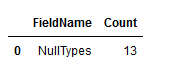
Sample output:

How to convert Panda DataFrame headers to snake case

# Python code demonstrate 
# Make headers snake case
 
import pandas as pd
 
# initialise data of lists.
data = {'First Name':['Tom', 'nick', 'krish', 'jack'], 'Age of Person':[20, 21, 19, 18]}
 
# Create DataFrame
df = pd.DataFrame(data)
 
# Print the output.
print(df)

# Make headers snake case
df.columns = [x.lower() for x in df.columns]
df.columns = df.columns.str.replace("[ ]", "_", regex=True)

# Print the output.
print(df)

How to drop a Spark Delta table and associated files using Spark SQL and cmd

🧹 How to Drop a Spark Delta Table and Clean Up Associated Files in Databricks

When working with Delta Lake tables in Databricks, it’s not enough to simply drop the table from the metastore—you also need to ensure that the underlying data files are removed to prevent clutter and maintain a clean data lake. This process is especially important when dealing with external Delta tables, where Spark does not automatically manage file deletion.

The following steps outline a reliable method to fully remove a Delta table and its associated files using Spark SQL and command-line tools.

🔹 Step 1: Identify the Schema and Table

Begin by locating the schema and table you want to delete. Replace placeholder values like schemaName and tableName with the actual names used in your environment. This ensures you’re targeting the correct table throughout the process.

🔹 Step 2: Inspect the Table Metadata

Using Spark SQL within Databricks, run a query to describe the table. This will return detailed metadata, including the location of the table’s data files in DBFS (Databricks File System). If you’re using the default schema, it may be named default, but adjust as needed.

🔹 Step 3: Locate the Storage Path

In the metadata output, scroll down to find the Location field. This value points to the directory where the table’s data files are stored. Copy this path—it will be used later to manually delete the files if necessary.

🔹 Step 4: Drop the Table from the Metastore

Execute a Spark SQL command to drop the table. This removes the table’s metadata from the catalog. If the table is managed, this step may also delete the associated files. However, for external tables, the files will remain and must be deleted manually.

🔹 Step 5: Delete the Data Files from DBFS

Using your preferred method of interacting with DBFS—whether through the command line, a Python script, or a Databricks notebook—delete the directory identified earlier. This ensures that all data files associated with the table are removed from storage.

✅ Why This Matters

Delta tables support ACID transactions and maintain a transaction log. Improper deletion—such as manually removing files without dropping the table—can corrupt the log and lead to inconsistent behavior. By following this structured approach, you ensure both the metadata and physical files are properly cleaned up.

This method is especially useful when:

  • Decommissioning obsolete datasets
  • Resetting environments for testing
  • Automating cleanup in CI/CD pipelines

Let me know if you’d like help turning this into a reusable script or integrating it with your workflow.

#Step 1
#Find and replace schemaName
#Find and replace tableName

#Step 2 
#Find the table 
#Via Databricks run the Spark SQL query below
#default is schema, change as needed
DESC FORMATTED schemaName.tableName;

#Step 3
#From the table returned scroll down to "location" and copy the field value
#Find and replace locationFieldValue

#Step 5
#Via Databricks using Spark SQL drop the table
DROP TABLE tableName

#Step 6
#Find and replace locationFieldValue
#By the means you use to interact with Databricks File System (dbfs), e.g. cmd python virtual environment
#Run command below
dbfs rm -r "locationFieldValue"

How to dynamically pivot a SQL Server table using dynamic T-SQL

A dynamic pivot table means you do not need to define hard coded column names as a dynamic query will fetch the field values from a column and use them as the column names while pivoting the source table.

Sounds complicated?

It is!

Good thing there are some code examples below you can just steal and alter as you need.

The first example will just return as a SELECT, the second example will write the results to a global temp table called ##Result.

A use case for this might be a continuous requirement to pivot a table however the column name requirements keep changing as field values change.

Example 1: Return as SELECT

/*Mock Table*/
IF OBJECT_ID('tempdb.dbo.#Fruits', 'U') IS NOT NULL
	DROP TABLE #Fruits;

CREATE TABLE #Fruits (
	Fruit VARCHAR(255)
	,Quantity INT
	,DateOf DATETIME
	);

INSERT INTO #Fruits (
	Fruit
	,Quantity
	,DateOf
	)
VALUES 
('Apple', 10	,GETDATE())
,('Orange', 10	,GETDATE())
,('Banana', 10, GETDATE())
,('Apple', 11, DATEADD(DAY, - 1, GETDATE()))
,('Orange', 11, DATEADD(DAY, - 1, GETDATE()))
,('Banana', 11, DATEADD(DAY, - 1, GETDATE()))
,('Apple', 12, DATEADD(DAY, - 2, GETDATE()))
,('Orange', 12, DATEADD(DAY, - 2, GETDATE()))
,('Banana', 12, DATEADD(DAY, - 2, GETDATE()))
,('Apple', 13, DATEADD(DAY, - 3, GETDATE()))
,('Orange', 13, DATEADD(DAY, - 3, GETDATE()))
,('Banana', 13, DATEADD(DAY, - 3, GETDATE()));

/*Demo Mock table*/
SELECT *
FROM #Fruits;

/*Logic to dynamically pivot table*/
DECLARE @cols AS NVARCHAR(MAX)
	,@query AS NVARCHAR(MAX);

SELECT @cols = STUFF((
			SELECT DISTINCT QUOTENAME(f.[Fruit]) + ', '
			FROM #Fruits AS f
			FOR XML PATH('')
				,TYPE
			).value('.', 'NVARCHAR(MAX)'), 1, 1, '');

/*Add missing square bracket to start of string*/
SET @cols = '[' + @cols;
/*Remove last comma from string*/
SET @cols = SUBSTRING(@cols, 1, (LEN(@cols) - 1));
SET @query = 'SELECT [DateOf], ' + @cols + ' FROM 
             (
              SELECT *
			  FROM #Fruits
            ) x
            pivot 
            (
                min(Quantity)
                for [Fruit] in (' + @cols + ')
            ) p ORDER BY RIGHT([DateOf], 4) ASC
			,LEFT(RIGHT([DateOf], 7), 2) ASC
			,LEFT([DateOf], 2) ASC';

EXECUTE (@query);

DROP TABLE #Fruits;

Example 2: Write output to a table

IF OBJECT_ID('tempdb.dbo.##Result', 'U') IS NOT NULL
	DROP TABLE ##Result;
/*Mock Table*/
IF OBJECT_ID('tempdb.dbo.#Fruits', 'U') IS NOT NULL
	DROP TABLE #Fruits;

CREATE TABLE #Fruits (
	Fruit VARCHAR(255)
	,Quantity INT
	,DateOf DATETIME
	);

INSERT INTO #Fruits (
	Fruit
	,Quantity
	,DateOf
	)
VALUES 
('Apple', 10	,GETDATE())
,('Orange', 10	,GETDATE())
,('Banana', 10, GETDATE())
,('Apple', 11, DATEADD(DAY, - 1, GETDATE()))
,('Orange', 11, DATEADD(DAY, - 1, GETDATE()))
,('Banana', 11, DATEADD(DAY, - 1, GETDATE()))
,('Apple', 12, DATEADD(DAY, - 2, GETDATE()))
,('Orange', 12, DATEADD(DAY, - 2, GETDATE()))
,('Banana', 12, DATEADD(DAY, - 2, GETDATE()))
,('Apple', 13, DATEADD(DAY, - 3, GETDATE()))
,('Orange', 13, DATEADD(DAY, - 3, GETDATE()))
,('Banana', 13, DATEADD(DAY, - 3, GETDATE()));

/*Demo Mock table*/
SELECT *
FROM #Fruits;

/*Logic to dynamically pivot table*/
DECLARE @cols AS NVARCHAR(MAX)
	,@query AS NVARCHAR(MAX);

SELECT @cols = STUFF((
			SELECT DISTINCT QUOTENAME(f.[Fruit]) + ', '
			FROM #Fruits AS f
			FOR XML PATH('')
				,TYPE
			).value('.', 'NVARCHAR(MAX)'), 1, 1, '');

/*Add missing square bracket to start of string*/
SET @cols = '[' + @cols;
/*Remove last comma from string*/
SET @cols = SUBSTRING(@cols, 1, (LEN(@cols) - 1));
SET @query = 'SELECT [DateOf], ' + @cols + ' INTO ##Result FROM 
             (
              SELECT *
			  FROM #Fruits
            ) x
            pivot 
            (
                min(Quantity)
                for [Fruit] in (' + @cols + ')
            ) p ORDER BY RIGHT([DateOf], 4) ASC
			,LEFT(RIGHT([DateOf], 7), 2) ASC
			,LEFT([DateOf], 2) ASC';

EXECUTE (@query);

SELECT * FROM ##Result;

DROP TABLE ##Result;

DROP TABLE #Fruits;


How to create a Spark SQL table with a SELECT statement

The following is a code snippet that would create a table in a “sales” schema called customer.

If no reference to a schema is given the table will be created in the default Spark location.

CREATE TABLE sales.customer USING DELTA AS (SELECT 'John' AS fn, 'Smith' AS sn, 55 AS age)

How to run a PowerShell script

So you have a PowerShell script and you just want to run it without messing around with permissions, policies, signing it or any other crap. (Yes yes I know all those things are vital for system wide security but you’re in a hurry damn it!)

Right click PowerShell and run as administrator.


When the terminal is open run the following line:


Set-ExecutionPolicy RemoteSigned


When prompted type the letter A and press Enter (if applicable).


Run the below including “&” at start of line with reference to your script, i.e.


& “C:\YourTestDirectory\YourTestFile.ps1”

How to Sort Files into Year-Month-Day Folders

Below is example PowerShell code to create a directory structure from file creation dates.

A use case for this code might be a need to organize a collection of files stored on an SFTP server or NAS. The code can be modified to loop through the files putting each one into sub directories corresponding to nested folders organized into Year\Month\Day folders.

To use the logic first create a test folder on your computer.
Then copy the logic below to a text file editor and find and replace the following with reference to your test folder location:

C:\YourTestDirectory

Then save the code below as a PowerShell file called “DirFromDate.ps1” into your test folder.

To then run the file open up PowerShell and paste the following line:

Set-ExecutionPolicy RemoteSigned

Hit return and then enter the letter A if requested.

Then enter the following replacing “YourTestDirectory” with your actual test directory location:

& “C:\YourTestDirectory\DirFromDate.ps1”

Hit return.

<#
.SYNOPSIS
   <A brief description of the script>
.DESCRIPTION
   <A detailed description of the script>
.PARAMETER <paramName>
   <Description of script parameter>
.EXAMPLE
   <An example of using the script>
#>

#FIND AND REPLACE THE FOLLOWING WITH A DIRECTORY
C:\YourTestDirectory

#How Run In Powershell
#Open Powershell terminal and run the folling line:
#Set-ExecutionPolicy RemoteSigned
#Type A and press Enter (if applicable).
#Run the below including "&" at start of line
#& "C:\YourTestDirectory\DirFromDate.ps1"

#VARIABLES
#Define folder variables
$workingFolder = "C:\YourTestDirectory\"
#Define file variable
$testFile = "\ThisIsATestFile.txt"
$testFile = $workingFolder + $testFile


###############################################
#(!!DO NOT ALTER SCRIPT PASSED THIS POINT!!)
###############################################
#Write variables to terminal
Write-Host "Filepath: $workingFolder";

#Create test File

New-Item $testFile

#Define source directory variable
$files = Get-ChildItem -Path $workingFolder 

#3 steps: move raw files to azure, zip file, move zipped file to azure
foreach ($file in $files)
{
		#FileName
		Write-Host "File: $file";
		#Get file creation date from file name
		$fileDate = $file.CreationTime.ToString("ddMMyyyy")
		#Get file creation date (last time data was written to file) from file name
		#$fileDate = $file.LastWriteTime.ToString("ddMMyyyy")
		Write-Host "Filedate: $fileDate";
		$fileDate = $fileDate.Substring($fileDate.Length - 4) + "\" + $fileDate.Substring(3, 2) + "\" + $fileDate.Substring(0, 2)
		Write-Host "Filedate: $fileDate";
		$DirectoryStructure = $workingFolder + "\" + $fileDate
		Write-Host "DirStructure: $DirectoryStructure";

}
md $DirectoryStructure

Move-Item -Path $testFile -Destination $DirectoryStructure

How to check SQL Server schema user permissions

The script below will, providing the login you are using has adequate permissions, return the schema permissions a user has.

Commented out at the end of the script are examples of the types of permission you can assign, again providing the login you are using has adequate permissions.

SELECT ClassDescription
	,StateDescription
	,PermissionName
	,SchemaName
	,UserName
FROM (
	SELECT class_desc AS ClassDescription
		,state_desc AS StateDescription
		,permission_name AS PermissionName
		,SCHEMA_NAME(major_id) AS SchemaName
		,USER_NAME(grantee_principal_id) AS UserName
	FROM sys.database_permissions AS PERM
	JOIN sys.database_principals AS Prin ON PERM.major_ID = Prin.principal_id
		AND class_desc = 'SCHEMA'
	) AS schemaPermissions
WHERE 1=1 
/*Uncomment below to check permissions on a specific schema and/or specific user*/
--	AND SchemaName = 'dbo'
--	AND UserName = 'SomeGuy'
ORDER BY UserName ASC
,SchemaName ASC
GO


/*
--Grant schema permission examples
GRANT SELECT ON SCHEMA::dbo TO SomeGuy;
GRANT UPDATE ON SCHEMA::dbo TO SomeGuy;
GRANT ALTER ON SCHEMA::dbo TO SomeGuy;
GRANT DELETE ON SCHEMA::dbo TO SomeGuy;
*/